



3task Toolbar, Tables & Tabs for Classic Editor
3task Toolbar turns off the block editor and gives you back the classic editor of WordPress: one writing area with a toolbar, like in a word processor. It does everything the Classic Editor plugin does and takes over its settings when you switch.
On top of that it brings the tools the classic editor never had: a toolbar you arrange yourself, tables that look good on every screen, and content elements you insert from one clear dialog. Everything runs on your own server; the plugin loads no fonts, scripts or images from outside, and a video only connects to YouTube or Vimeo after a visitor clicks it.
Instead of the block editor
- The classic editor for everyone, or the block editor where you still want it: as the default for the whole site, and optionally a choice for every user in the profile.
- Each post opens in the editor it was last edited in, and the post list offers “Edit (classic editor)” and “Edit (block editor)” while users may choose.
- Switching from the Classic Editor plugin takes one step: its settings are taken over once when you activate this plugin, then you deactivate the old one.
- For everyone who prefers writing in one document: nothing changes in your existing posts.
Toolbar you put together
- A preview of the real toolbar with the same icons as in the editor. Click a button to move it left or right, to another row or to remove it, drag it with the mouse, or do all of it with the keyboard.
- A palette with every button in four groups: text, paragraph, insert and tools.
- Extra buttons from TinyMCE 4.9.11, the version WordPress ships: table, list styles, find and replace, anchor, source code, show blocks, invisible characters, non-breaking space, date and time.
- Coming from Advanced Editor Tools? While it is active, this plugin leaves the toolbar to it.
Tables
- Eight table templates (clean, striped, grid, minimal, colored header, price list, comparison, compact) with switches for header row, first column, stripes, hover and number alignment.
- Paste cells from Excel, Google Sheets or a CSV file and get a table.
- Visitors can sort the columns if you allow it.
- On phones a table scrolls sideways or shows each row as a card.
Content elements
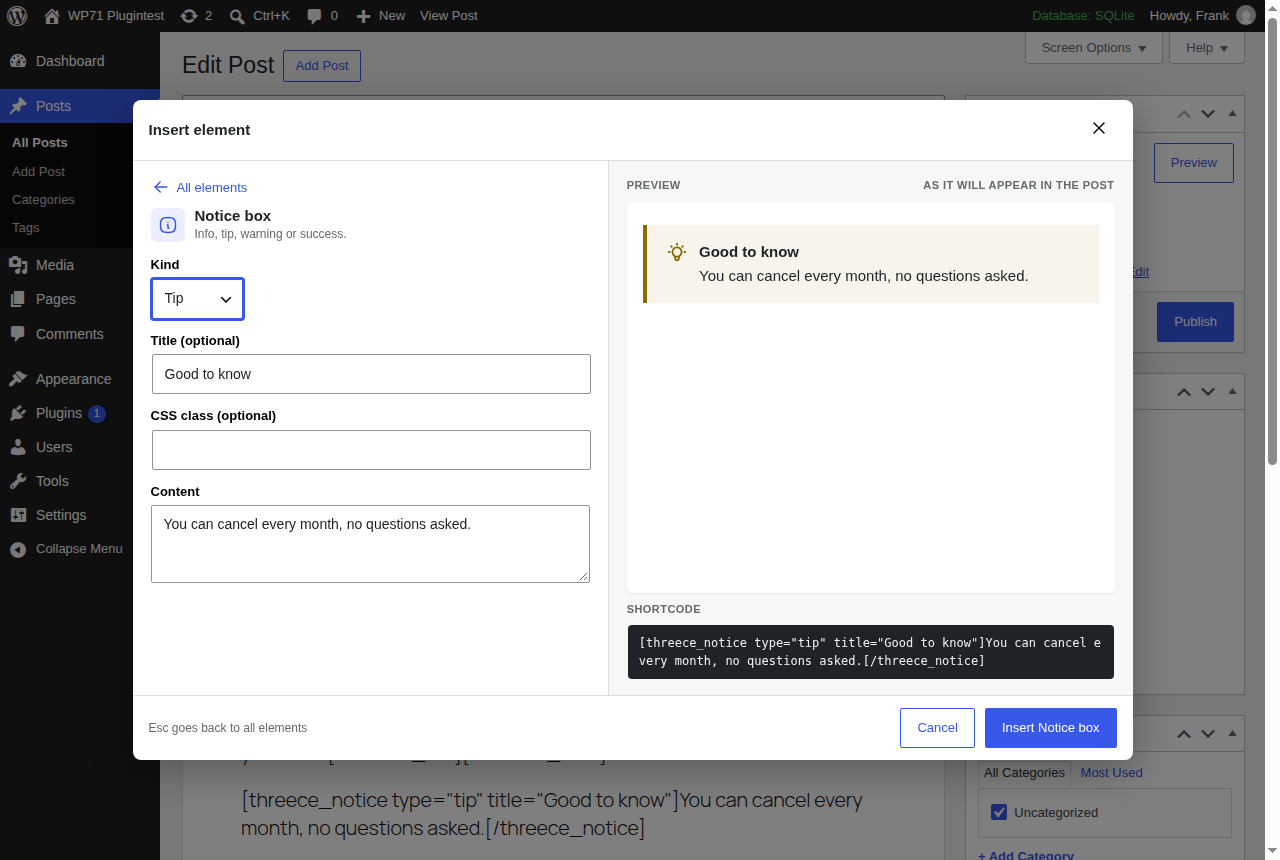
Twelve elements, inserted from a dialog with search, groups, a live preview in the style of your site and the shortcode shown before you insert it:
- Structure: Tabs, Accordion, Spoiler, Columns.
- Highlight: Notice box, Button, Tooltip, Footnote.
- Embed: Table of contents, Video (YouTube, Vimeo) with two clicks, Countdown, QR code made on your server.
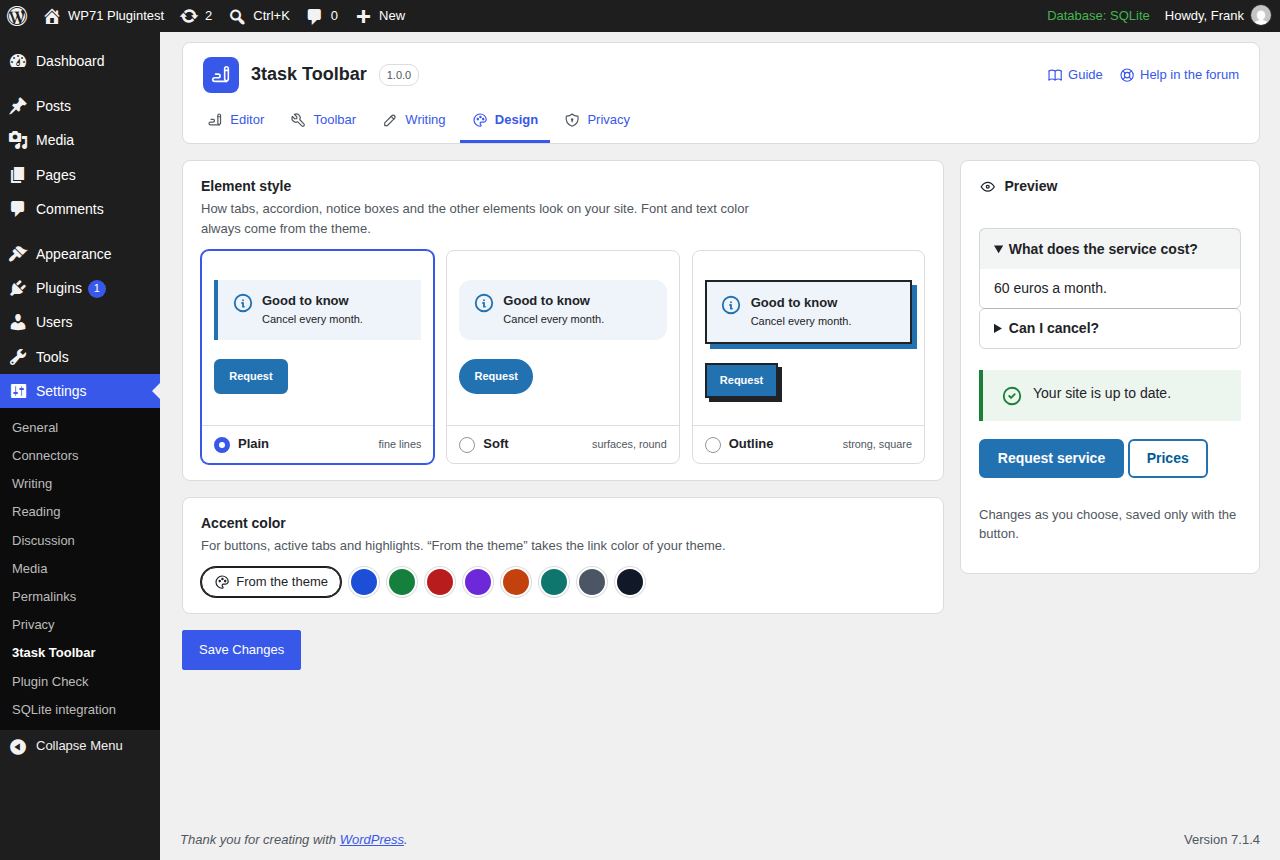
Each element comes in three styles (Plain, Soft, Outline) and takes its accent color from your theme or from eight colors you can choose. Font and text color always come from the theme.
Writing
- The editor shows posts with the fonts, colors and text width of block themes.
- Clean paste removes fonts, colors and empty paragraphs when you paste from Word, Google Docs or web pages.
- Script, style and SVG code in a post survive switching between the visual and the text tab.
- An outline of the headings next to the editor with checks for skipped heading levels, missing alternative text and vague link text.
- An emoji picker with search in 28 languages, and buttons “Element”, “Emoji” and “Table” in the text tab.
Coming from Shortcodes Ultimate?
When Shortcodes Ultimate is deactivated, the most common of its shortcodes (tabs, spoilers, accordions, notes, boxes, buttons, columns, videos, tooltips, QR codes and a few more) are shown with the elements of this plugin. Nothing in your posts is rewritten.
Privacy
A switch, on by default, turns off the emoji script of WordPress, so your pages, feeds and emails load no emoji images from WordPress.org.
Pro add-on
Everything above is free and complete. For editorial teams, agencies and shops there is a separate add-on, 3task Toolbar Pro: a toolbar per user role, text blocks you write once and insert anywhere, pricing tables, testimonials, timelines and FAQ schema on the accordion. When its license term ends, its features keep working; only updates and support stop.
External services
The Video element embeds videos from YouTube or Vimeo. Nothing is loaded from there when the page opens: visitors first see a preview image from your own media library or a plain surface, together with a note that playing loads the video from the provider.
Only when a visitor clicks play, the browser of the visitor loads the player:
- YouTube from
www.youtube-nocookie.com(a service of Google). The browser sends the IP address, the video ID and the usual browser data. Terms: https://www.youtube.com/t/terms. Privacy: https://policies.google.com/privacy. - Vimeo from
player.vimeo.com, with “do not track” switched on. The browser sends the IP address, the video ID and the usual browser data. Terms: https://vimeo.com/terms. Privacy: https://vimeo.com/privacy.
The plugin itself sends no data anywhere. There is no tracking, and the settings page links to WordPress.org only for the guide, the support forum and reviews.
Credits
Icons in the notice box: Tabler Icons, MIT License (see credits.txt).
Emoji names and search words: emojibase-data, MIT License (see assets/emoji/LICENSE-emojibase.txt).
Editor extensions (table, list styles, find and replace, anchor, source code, show blocks, invisible characters, non-breaking space, date and time): TinyMCE 4.9.11, the version WordPress ships, unchanged, LGPL 2.1 (see assets/tinymce/).
Security
Please report security issues privately to support@3task.de, not in the public support forum. We confirm receipt and keep you informed until a fix is released. Security fixes are made for the current version.
Details





Related plugins
Plugins that also contain the tag accordion
Easy Accordion – Responsive Accordion FAQ Builder and Product FAQ
Accordion FAQ – Compatible With All Page Builder (Elementor, Gutenberg)
Tabby Responsive Tabs

Bellows Accordion Menu

Lightweight Accordion
Accordion Blocks


About
Plugin for that tries to help you find the WordPress plugin you are looking for.
| Please enjoy an image of Crush (this awesome turtle) and have a lovely day! |  |
We do not own any plugin listed on this site and do not work for or work with WordPress.com or it's associated companies. We simply provide a searchable list of the available WordPress plugins.