


Adinav Accessibility Audit for EAA
The European Accessibility Act (Directive (EU) 2019/882) has applied since 28 June 2025. It covers e-commerce, banking, transport, telecoms and consumer digital services. The standard it requires is EN 301 549, which applies WCAG 2.1 Level AA.
Enforcement is no longer theoretical. The first EAA lawsuits in Europe were filed in France in November 2025, and national market-surveillance authorities are now actively supervising.
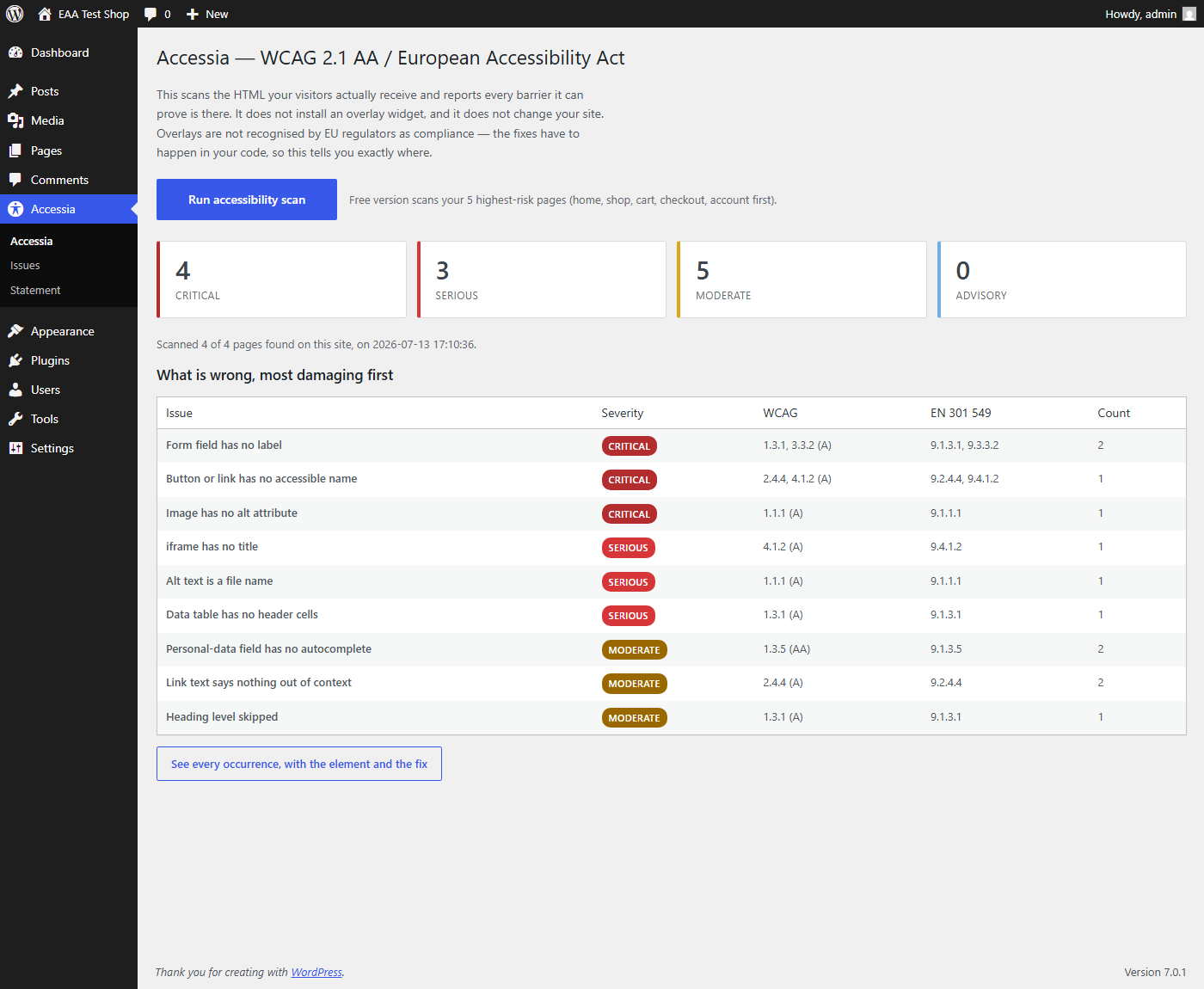
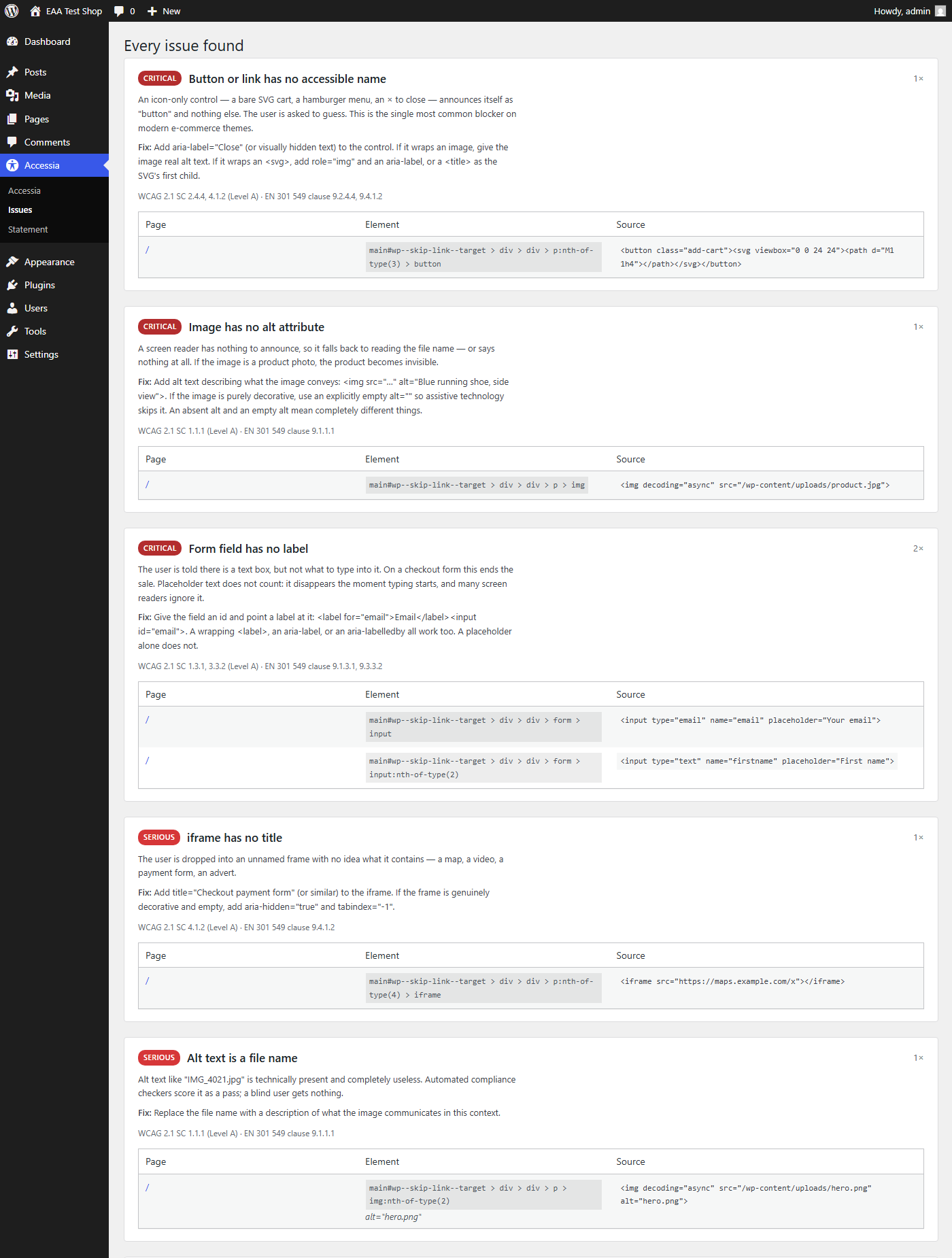
Adinav Accessibility Audit for EAA scans the HTML your visitors actually receive and reports every barrier it can prove is there — with the exact element, the WCAG success criterion it breaks, the EN 301 549 clause a regulator would cite, and how to fix it in code.
This is not an overlay
Overlay widgets that promise instant compliance from one line of JavaScript do not deliver compliance. The EU has never endorsed them, European disability organisations have rejected them, and their presence on a site is increasingly read by regulators as evidence that the site was never made accessible in the first place.
This plugin changes nothing on your front end. It adds no script, no widget, no banner. It tells you the truth about your site and gets out of the way.
What it checks
Every check runs against WCAG 2.1 A and AA, mapped to the EN 301 549 clause:
- Images with no alt attribute, and alt text that is just a file name
- Form fields with no label — the single most common checkout blocker
- Buttons and links with no accessible name (icon-only carts, hamburger menus, close buttons)
- Link text that says nothing out of context (“Read more”, “Cliquez ici”)
- Missing page language, missing page title
- Skipped heading levels, empty headings, missing h1
- iframes with no title
- Data tables with no header cells
- Duplicate ids that silently break label associations
- Positive tabindex that wrecks keyboard order
aria-hiddencontainers that still trap keyboard focus- Pinch-to-zoom disabled on mobile (
user-scalable=no) - Timed page refreshes
- Video without captions; audio or video that autoplays with sound
- Missing
autocompleteon personal-data fields (WCAG 1.3.5 AA — inside the EAA’s required level, and almost universally missed) - Missing
mainlandmark - Colour contrast below 4.5:1, where it can be verified with certainty
It tells you what it cannot know
Automated testing cannot prove compliance, and this plugin will never tell you it has. Colour contrast defined in stylesheets, keyboard focus order, and the behaviour of dynamic content can only be confirmed by a manual test with assistive technology. The report says so, plainly, instead of handing you a green tick you cannot rely on in front of a regulator.
A false positive is worse than a missed issue. Every rule here fires only on evidence present in the page source.
Accessibility statement generator
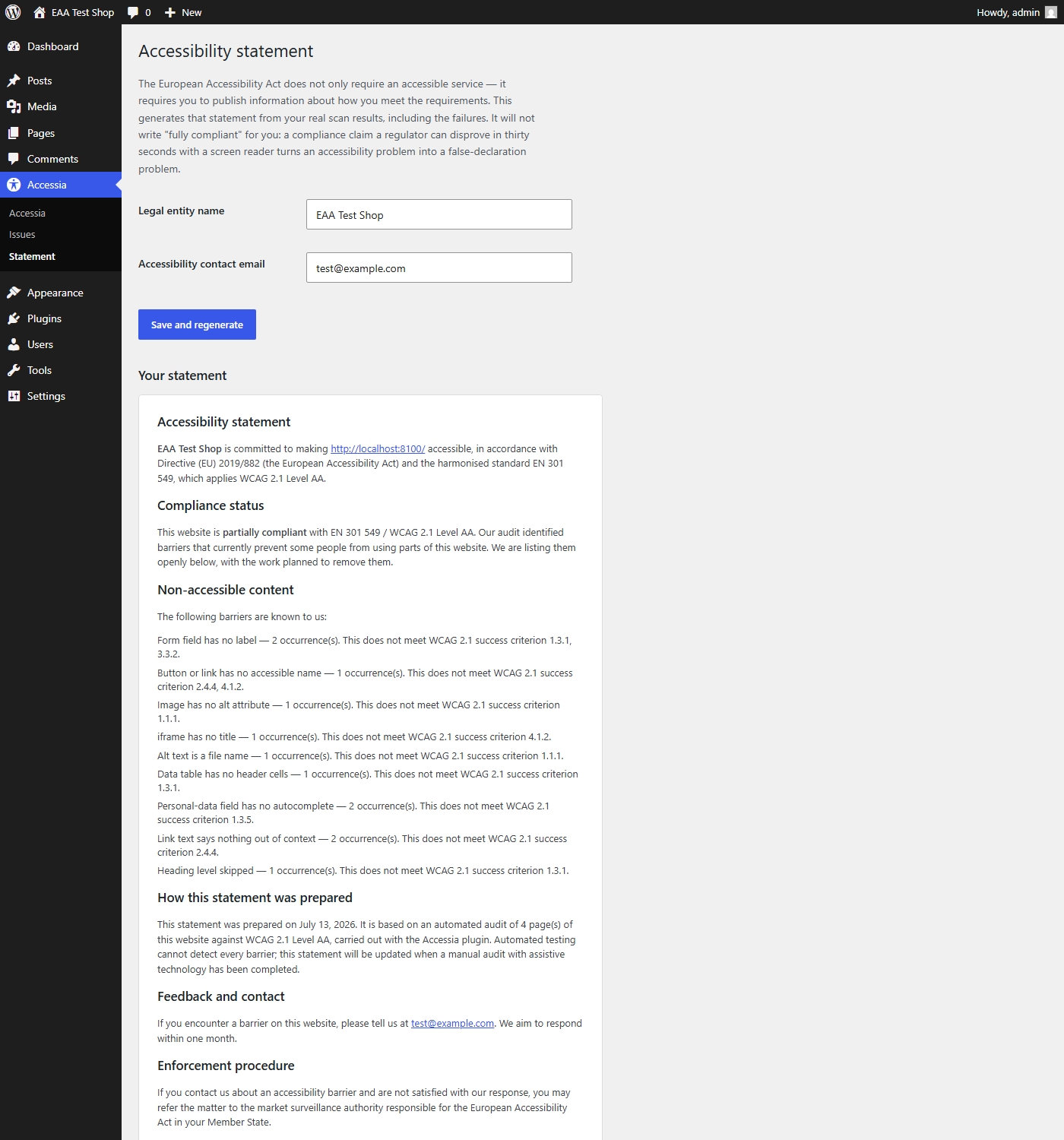
The EAA does not only require an accessible service — it requires you to publish information about how you meet the requirements. This plugin generates that statement from your real scan results, including the failures it found. It will not write “fully compliant” for you: a compliance claim that a regulator can disprove in thirty seconds with a screen reader turns an accessibility problem into a false-declaration problem.
Privacy
This plugin sends no data anywhere. It makes HTTP requests only to your own site’s public pages, exactly as a visitor’s browser would, and stores the results in your own database. There is no telemetry, no external API, no account, and no tracking. Uninstalling it removes its table and its options completely.
Details
Related plugins
Plugins that also contain the tag a11y
Ally – Web Accessibility & Usability
AccessibleWP – Accessibility Toolbar
WP Accessibility Helper (WAH)

Contact Form 7: Accessible Defaults

Accesibilidad Web con el Widget de AccedeMe
Accessibility New Window Warnings


About
Plugin for that tries to help you find the WordPress plugin you are looking for.
| Please enjoy an image of Crush (this awesome turtle) and have a lovely day! |  |
We do not own any plugin listed on this site and do not work for or work with WordPress.com or it's associated companies. We simply provide a searchable list of the available WordPress plugins.