



WebCalendar
WebCalendar gives your WordPress site a clean, responsive calendar with the features you actually need — recurring events, iCal import, remote sync, email reminders, and fine-grained permissions — without the complexity.
Calendar Views & Display
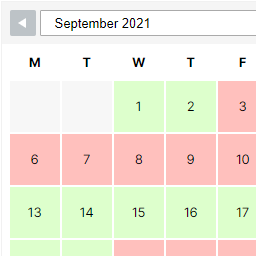
- Month, week, and day views with smooth AJAX navigation — no page reloads
- Responsive design that adapts to any theme and screen size
- Color-coded categories for visual organization
- Gutenberg blocks (Calendar + Upcoming Events) and
[webcalendar]shortcode
Event Management
- Recurring events — daily, weekly, monthly, and yearly patterns with RRULE support
- Edit a single instance or the entire series
- File attachments via the WordPress Media Library
- Conflict detection warns you about overlapping events
- Public, Private, and Confidential visibility levels
Import, Export & Sync
- Import
.icsfiles from Google Calendar, Outlook, Apple Calendar, or any iCal source - Export your calendar in iCalendar format
- Subscribe to remote iCal feeds with automatic hourly sync
- Import public holidays for any country
Collaboration & Permissions
- Invite WordPress users to events with email notifications
- Event reminders via WP-Cron
- 36 granular capabilities mapped to WordPress roles — control who can view, create, edit, and manage events
SEO & Sharing
- Single event pages with SEO-friendly permalinks
- Schema.org Event JSON-LD, Open Graph, and Twitter Card meta tags
- Social share buttons and “Add to Google/Outlook/Yahoo” one-click buttons
For Developers
- Full REST API for events, categories, holidays, and remote calendars
- Built on Clean Architecture with
webcalendar-corebusiness logic library - PSR-4 autoloading, PHPStan Level 9, 1100+ automated tests
- All calendar data in dedicated
webcal_*tables — no Custom Post Types
Want Even More?
WebCalendar Pro is a separate premium plugin that adds:
- Appointment Booking — public scheduling with availability management
- Google & Outlook Sync — two-way OAuth synchronization
- Multisite Network Support — shared calendars across a WordPress network
- White-Labeling — remove all WebCalendar branding
- Priority Support — 24-hour response time SLA
The free version you’re using right now is fully functional with zero locked features. Pro adds capabilities that aren’t included here.
Technical Note: Database Architecture
This plugin integrates webcalendar-core, a framework-agnostic Composer library that provides all calendar business logic (events, recurrence, iCal, permissions) through 17 repository classes. These repositories require PDO and use exclusively parameterized prepared statements — no raw SQL concatenation. WordPress-specific data (users, options, capabilities) is accessed via $wpdb through the plugin’s Bridge layer (WpUserRepository, WpConfigRepository, etc.). See src/Bridge/PdoFactory.php for the connection factory.
External Services
This plugin connects to the following third-party services:
Nager.Date API
Used for importing public holidays via WebCalendar > Holidays.
* Endpoint: https://date.nager.at/api/v3/
* Terms of Use
* Privacy Policy
Google Calendar Public Feeds
Alternative holiday source. Fetches public .ics files from Google.
* Endpoint: https://calendar.google.com/calendar/ical/
* Google Privacy Policy
* Google Terms of Service
Thunderbird Holiday Calendars
Alternative holiday source via community-maintained .ics files.
* Endpoint: https://www.thunderbird.net/media/caldata/
* Mozilla Terms of Use
* Mozilla Privacy Policy
Remote Calendar Sync (User-Configured)
When remote iCal subscriptions are configured, the plugin fetches .ics data from
those URLs via HTTP GET. No user data is transmitted to these services.
OpenStreetMap / Nominatim
When a single event page has a location and the map provider is set to OpenStreetMap
(the default), the plugin geocodes the address via the Nominatim API and displays a
map using OpenStreetMap tile servers. The event location string is sent as a search
query. No user personal data is transmitted.
* Geocoding endpoint: https://nominatim.openstreetmap.org/search
* Tile server: https://tile.openstreetmap.org/
* OpenStreetMap Terms of Use
* Nominatim Usage Policy
* OpenStreetMap Privacy Policy
Google Maps Embed API
When the map provider is set to Google Maps in settings, single event pages display
an embedded Google Map for the event location. The event location string and your
Google Maps API key are sent to Google. No other user data is transmitted.
* Endpoint: https://www.google.com/maps/embed/v1/place
* Google Maps Platform Terms of Service
* Google Privacy Policy
Add to Calendar Links
Single event pages include “Add to Calendar” buttons that generate links to Google
Calendar, Outlook.com, and Yahoo Calendar. When a visitor clicks a button, the event
title, date, time, location, and description are passed as URL parameters to the
chosen service. No data is sent until the visitor clicks.
* Google Calendar: https://www.google.com/calendar/render — Terms | Privacy
* Outlook.com: https://outlook.live.com/calendar/0/action/compose — Terms | Privacy
* Yahoo Calendar: https://calendar.yahoo.com/ — Terms | Privacy
Social Sharing Links
Single event pages include social sharing buttons for Facebook, X (Twitter), and
LinkedIn. When a visitor clicks a button, the event page URL and title are passed as
URL parameters to the chosen service. No data is sent until the visitor clicks.
* Facebook: https://www.facebook.com/sharer/sharer.php — Terms | Privacy
* X (Twitter): https://x.com/intent/tweet — Terms | Privacy
* LinkedIn: https://www.linkedin.com/sharing/share-offsite/ — Terms | Privacy
Development & Source Code
Full unminified source for this plugin is included in this distribution under GPL-2.0-or-later — you do not need to download anything external to rebuild the compiled assets.
What ships in this zip:
src/— unminified React/JSX source for all admin components, frontend calendar, and the mini-calendar widgetbuild/— the pre-compiled minified bundles (what the plugin actually loads at runtime)package.json+package-lock.json— Node build manifest and lockfile for reproduciblenpm installcomposer.json— PHP dependency manifest
Rebuilding the compiled assets from source:
Prerequisites: PHP 8.2 or higher with Composer 2, Node.js 20 or higher with npm 10.
composer install— install PHP dependenciesnpm install— install JavaScript build dependencies (@wordpress/scripts, React, Toast UI Calendar, Leaflet, Tiptap)npm run build— compilesrc/index.jsandsrc/frontend.jsinto the minified bundles underbuild/
The compiled output in build/ is byte-reproducible from the matching src/ at the same version using this toolchain.
Details


Related plugins
Plugins that also contain the tag calendar
The Events Calendar

LatePoint – Calendar Booking Plugin for Appointments and Events

Woo Store Vacation

SimplyBook.me – Booking and reservations calendar

The Events Calendar Shortcode & Block

WP Simple Booking Calendar

About
Plugin for that tries to help you find the WordPress plugin you are looking for.
| Please enjoy an image of Crush (this awesome turtle) and have a lovely day! |  |
We do not own any plugin listed on this site and do not work for or work with WordPress.com or it's associated companies. We simply provide a searchable list of the available WordPress plugins.