


Allow Username Edit
The Allow Username Edit plugin provides a secure and user-friendly way for WordPress administrators to edit user usernames. By default, WordPress prevents username changes to maintain data integrity. This plugin overrides that limitation but adds a crucial safety feature: an activation checkbox.
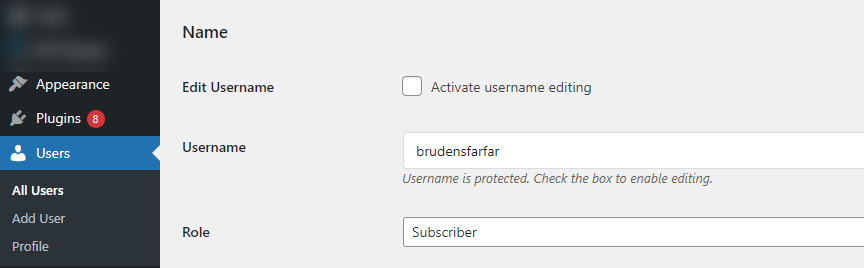
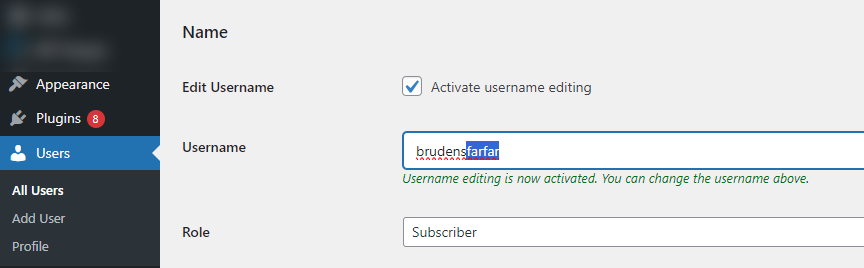
The username field is read-only by default, protecting it from accidental edits. To make a change, an administrator must explicitly check the “Activate username editing” box. This two-step process ensures that every username change is intentional.
Key Features:
* Safe Username Editing: Prevents accidental edits by requiring an activation checkbox to be checked.
* User-Friendly Interface: Integrates seamlessly into the WordPress user profile and user edit screens.
* Dynamic Help Text: The description below the username field updates dynamically to inform the admin whether editing is enabled or protected.
* Settings Page: Includes a dedicated settings page under “Settings > Username Edit” with plugin information, usage instructions, and a link to support future development.
* Secure and Compliant: Follows WordPress best practices, including the use of nonces, proper permission checks, and a consistent text domain for internationalization.
This plugin is ideal for site managers who need the flexibility to correct username typos or update usernames upon user request, without compromising on safety.
Details
Related plugins
Plugins that also contain the tag admin
Redux Framework

Loginizer

LightStart – Maintenance Mode, Coming Soon and Landing Page Builder

Admin Menu Editor

White Label CMS

InfiniteWP Client


About
Plugin for that tries to help you find the WordPress plugin you are looking for.
| Please enjoy an image of Crush (this awesome turtle) and have a lovely day! |  |
We do not own any plugin listed on this site and do not work for or work with WordPress.com or it's associated companies. We simply provide a searchable list of the available WordPress plugins.