



AlmaSEO SEO Playground
Every SEO plugin keeps a different set of features free. AlmaSEO gives you the best of all three in one.
Yoast SEO, Rank Math and All in One SEO each give some features away and charge for others, so with any one of them you’re doing without something. AlmaSEO brings the best free features of all three together in a single plugin, so you don’t have to choose. Everything below is free, works out of the box, and needs no account.
Already using one of them? The built-in importer brings your titles, descriptions, settings and redirects across in a few clicks.
On-page SEO
- SEO Health Score for every post and page
- Meta title, description and focus keyword editor with a live SERP preview
- Open Graph and Twitter Card meta, canonical URLs and robots controls
- Keyword suggestions from Google’s public suggest service
Content analysis
- Headline Analyzer and readability analysis
- Cornerstone content and an evergreen content tracker
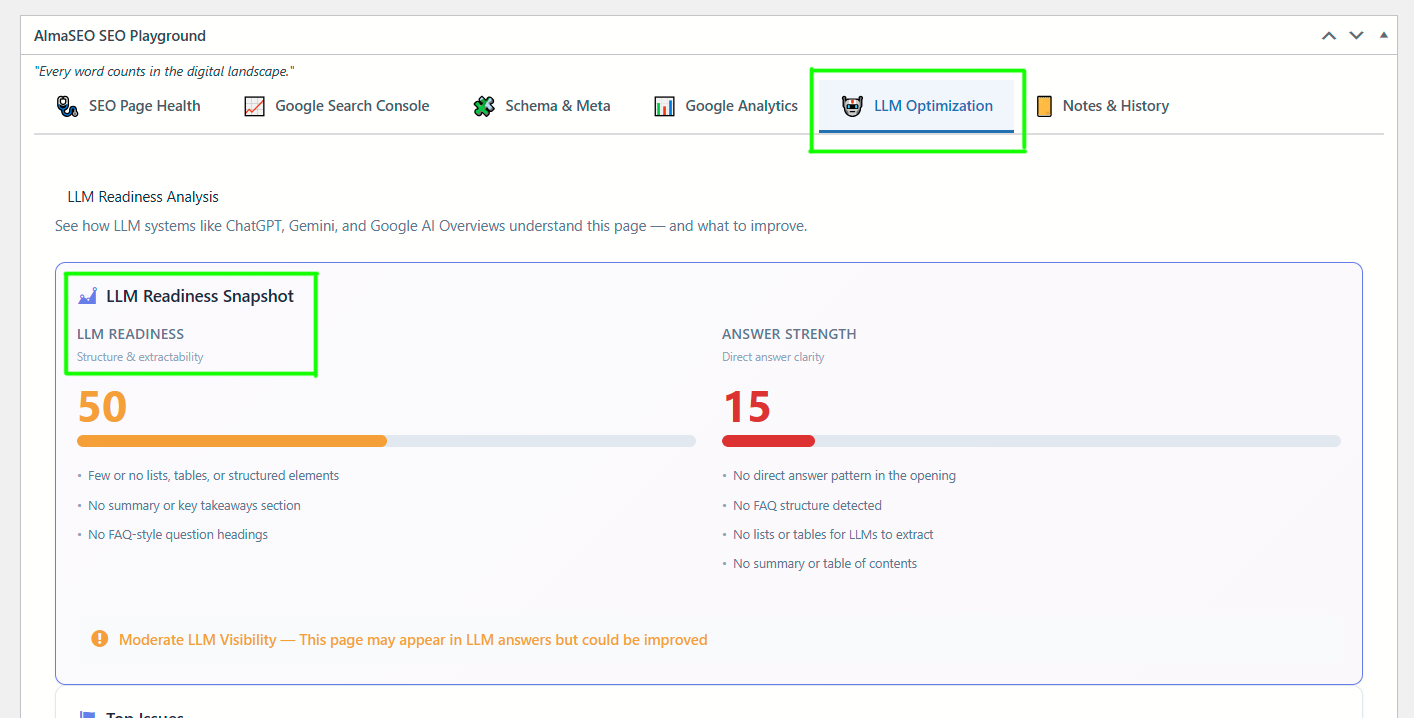
- LLM readiness checks for AI answers
Structured data
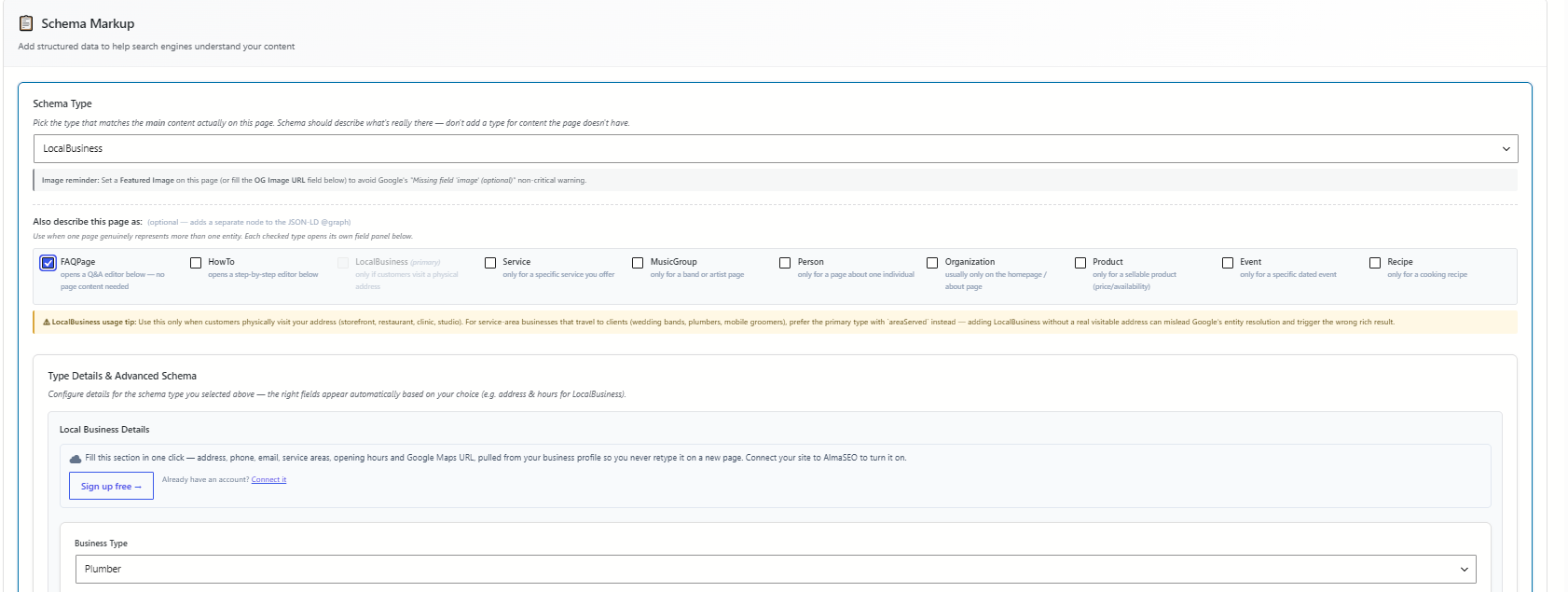
- JSON-LD schema: Article, FAQ, How-To, LocalBusiness (154 sub-types), Product, Event, Recipe, Person, Organization and more
- FAQ, How-To, Table of Contents and Breadcrumbs blocks
- Link attributes (nofollow / sponsored / ugc)
Technical SEO
- XML, News, Video, Image and HTML sitemaps, with IndexNow
- robots.txt editor and crawl optimization
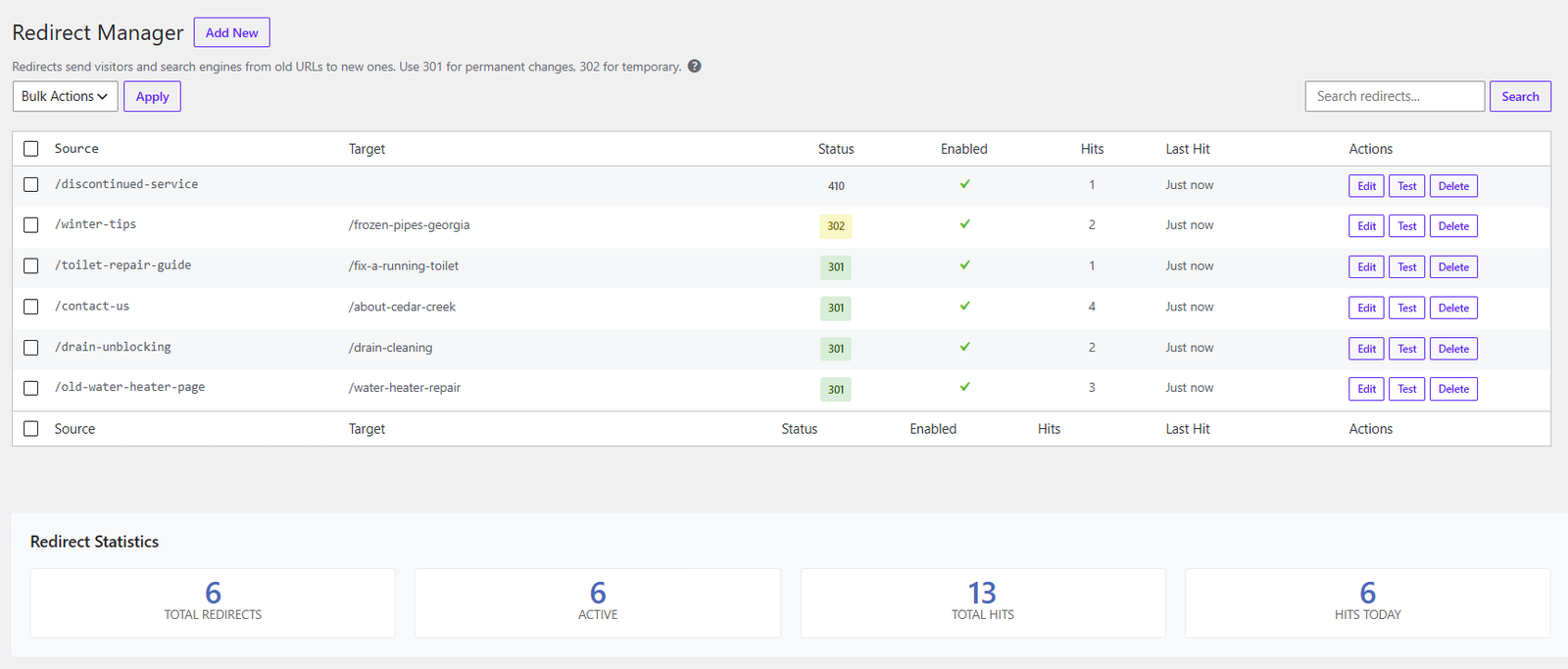
- Redirect manager and 404 tracking
- Image SEO alt and title templates
Site-wide settings
- Search Appearance templates with smart tags
- Webmaster verification codes, RSS controls and LLMs.txt
- Role-based access, GA4 integration and a setup wizard
Bulk editing and content maintenance
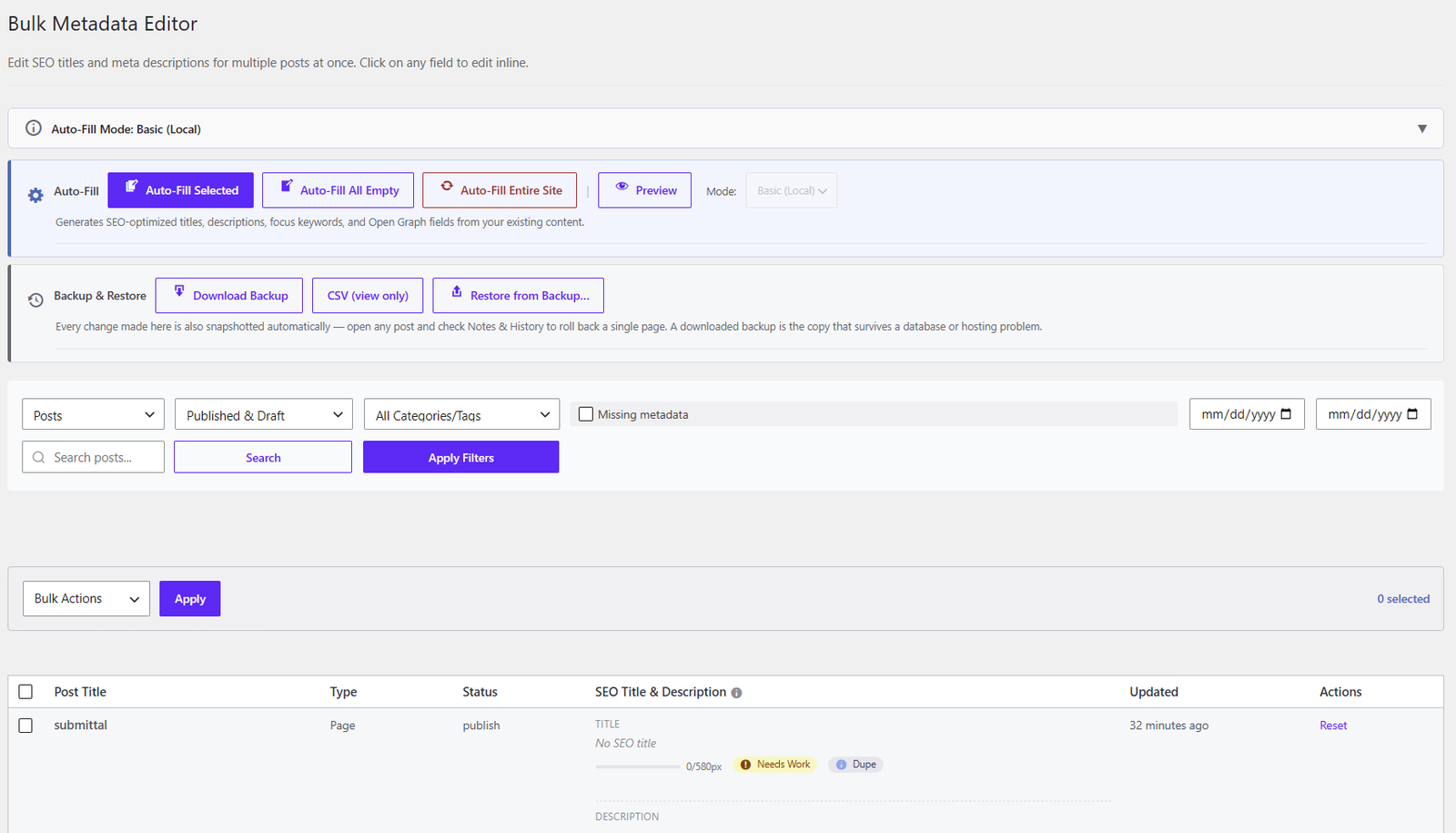
- Bulk Metadata Editor with find-and-replace and one-click undo
- Downloadable backups you can restore later
- Internal Links auto-linker with guardrails
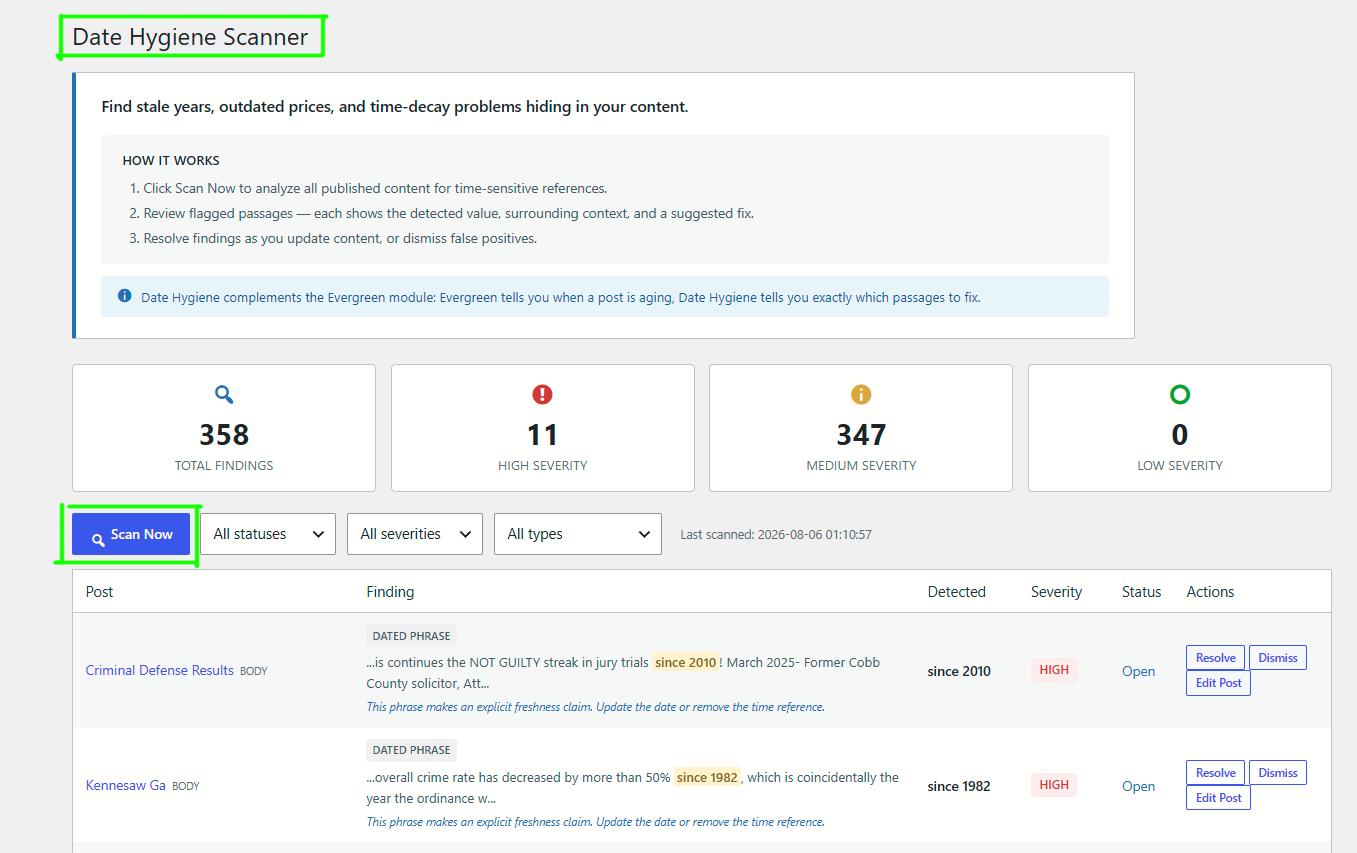
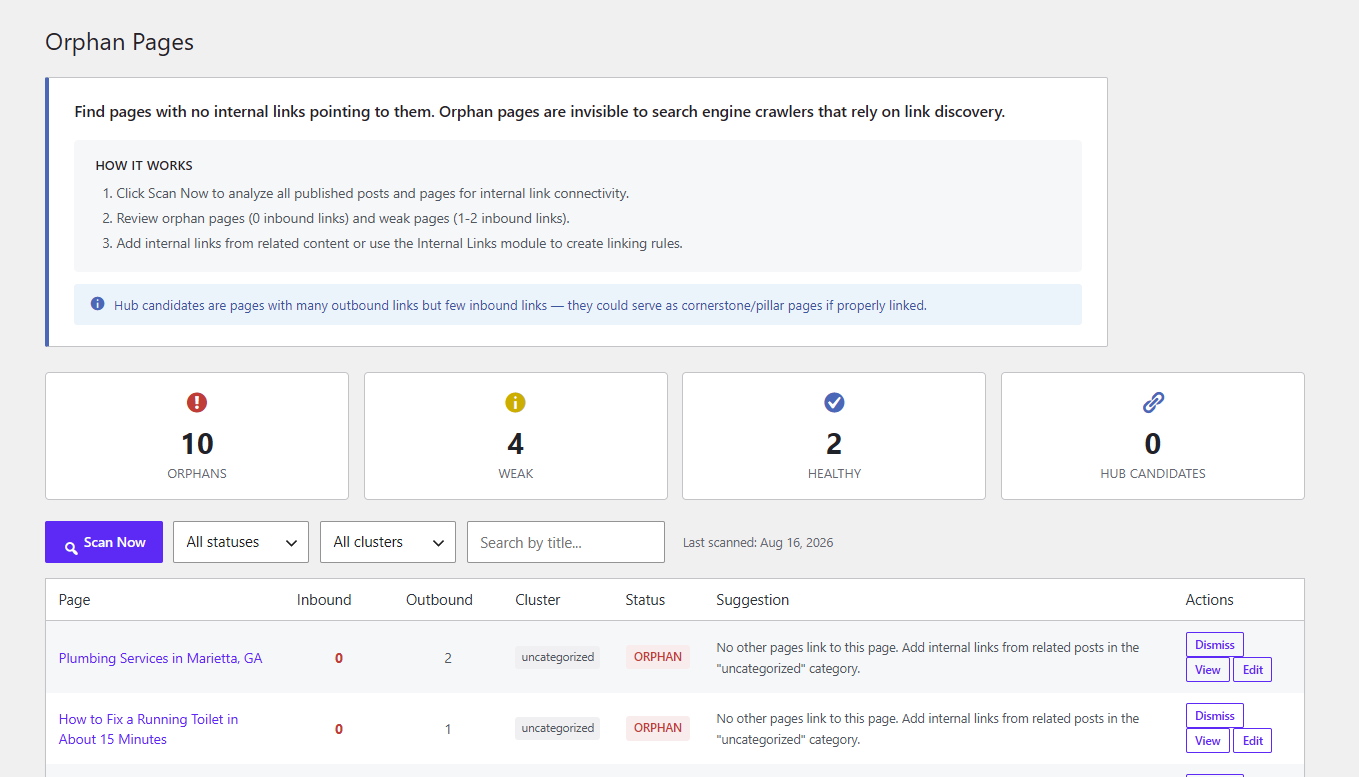
- Orphan pages, Content Refresh Drafts, Refresh Queue and Date Hygiene Scanner
Quality and monitoring
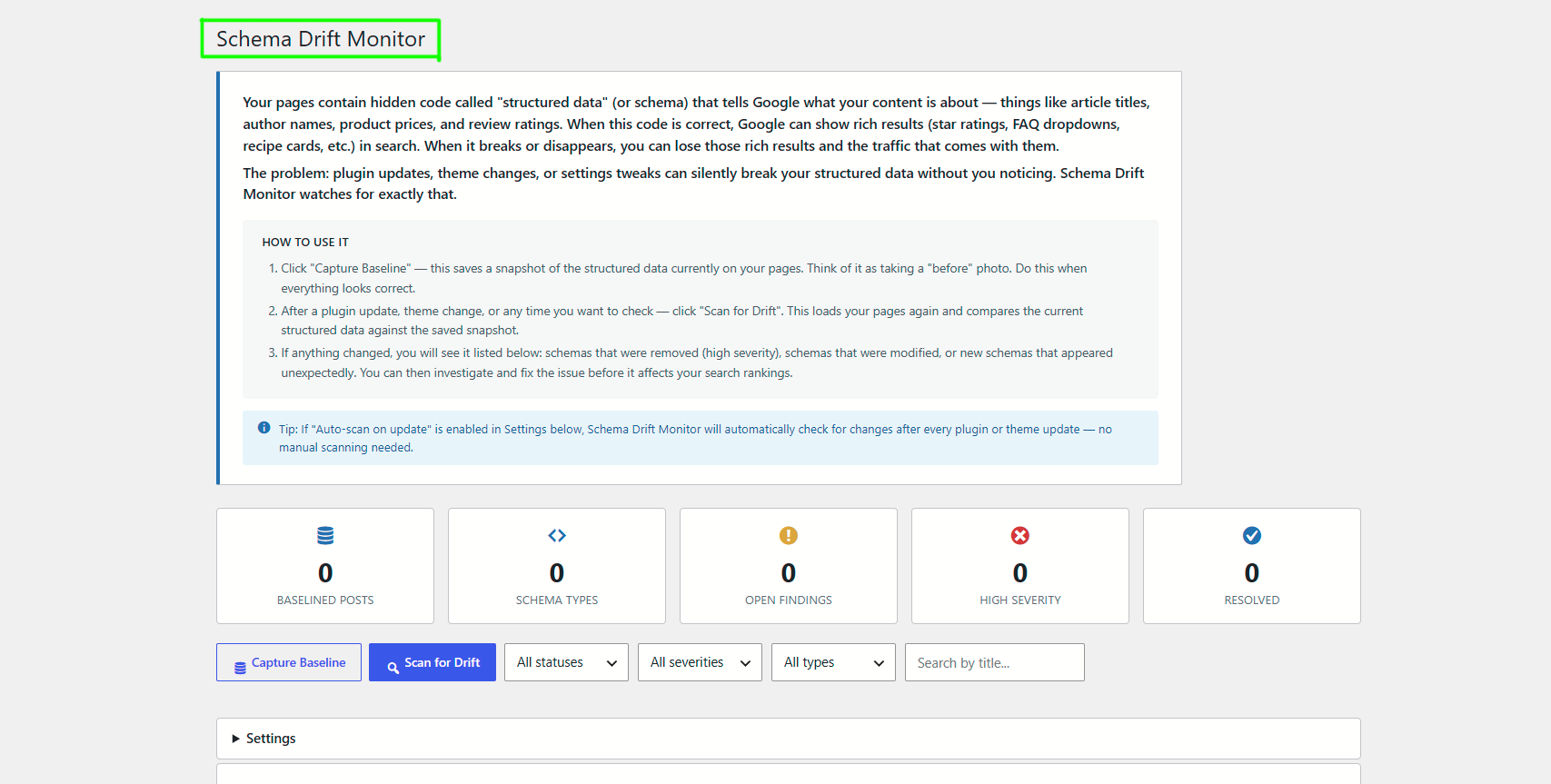
- E-E-A-T checks, Schema Drift Monitor and Canonical Health
WooCommerce
- Product schema, product sitemaps and per-product indexing control
Migrate from another SEO plugin
- Import from Yoast, Rank Math and AIOSEO: post meta, terms, settings and redirects, with a verification report
- Conflict detection for major SEO plugins
AlmaSEO is not affiliated with Yoast, Rank Math or All in One SEO.
External services
Most of AlmaSEO runs on your own server and sends nothing anywhere. The features below are the ones that contact another service. For each one: what the service is for, what starts the request, what is sent, and where that provider’s terms and privacy policy are.
Every request listed here is made by your server, with two exceptions that happen in a browser instead and are marked as such: the Google Analytics tag runs in your visitors’ browsers, and Gravatar images load in the browser of whoever is editing a post.
AlmaSEO (app.almaseo.com)
What it is: AlmaSEO’s own optional service. Connecting an AlmaSEO account adds work that does not run inside WordPress: readings of a page’s headline, readability, dated content, author signals, structured data and orphan status; keyword ideas and page figures drawn from your Google Search Console and Google Analytics; cornerstone ranking; alt text written from the image itself; bulk title and description generation; and LLM optimisation summaries. Nothing else in the plugin needs an account.
Before you connect: the plugin does not contact AlmaSEO on installation or on any schedule. One lookup can happen without an account, on activation: a site that still holds the remains of an earlier connection (a stored credential, a recorded dashboard ID, or a credential your host placed in wp-config.php) asks whether it is already on an AlmaSEO dashboard, sending your site’s address, domain and plugin version, so it can be re-linked; a site that never connected holds none of these and makes no request.
Connecting: happens only when an administrator presses Create Connection Token on the Connection screen. Opening the screen does nothing on its own. Before creating anything, the plugin checks that the site can work over a token alone and refuses if it cannot (for example, when another SEO plugin is active whose metadata the plugin cannot write). The plugin then creates a connection token for that administrator: a signed token, valid for 365 days, naming the administrator’s WordPress username. The plugin does not create a WordPress Application Password. The administrator copies the token into the AlmaSEO dashboard; the token and the username are the credential every later request carries, in both directions. The token is accepted only on the plugin’s own REST routes (almaseo/v1), never as a login to WordPress’s core REST API (wp/v2), so the dashboard can use only the operations those routes provide, such as reading and writing SEO metadata and publishing and managing content (creating and updating posts, uploading media and adding categories) through the plugin’s named operations. To link the site, the plugin asks AlmaSEO whether the site is on your dashboard (sending the site’s address), then sends the site’s address, the plugin version and the credential so the dashboard can confirm it holds this token. This happens when the token is created, when an administrator presses Check Dashboard Link, and, while a new token has not yet been linked, with the twice-daily check for up to 30 days.
While connected, automatically: twice a day the plugin checks that the site is still linked to your dashboard. That check sends the site’s address and the plugin version, nothing else, and stops when you disconnect. Your business profile (name, address, hours and phone number, used for LocalBusiness structured data and bulk metadata) is downloaded from AlmaSEO and cached at three moments: when the site is linked, once a day while the site stays connected, and when a feature needs it and the cached copy is over a day old. Each request sends the site’s address and the credential; the profile comes down to your site, nothing goes up.
In the post editor, without a click: once connected, four panels request data on their own, for any user who can edit that post. Each request carries the site’s address and the credential, plus:
- Keyword suggestions: when the panel loads, after a pause in typing the focus keyword, on its refresh button, and when a suggestion is clicked. Sends the keyword being typed (or the saved keyword, or failing that the post’s title) and the post’s title. Google Suggest is asked on the same triggers whether or not the site is connected; see its entry below.
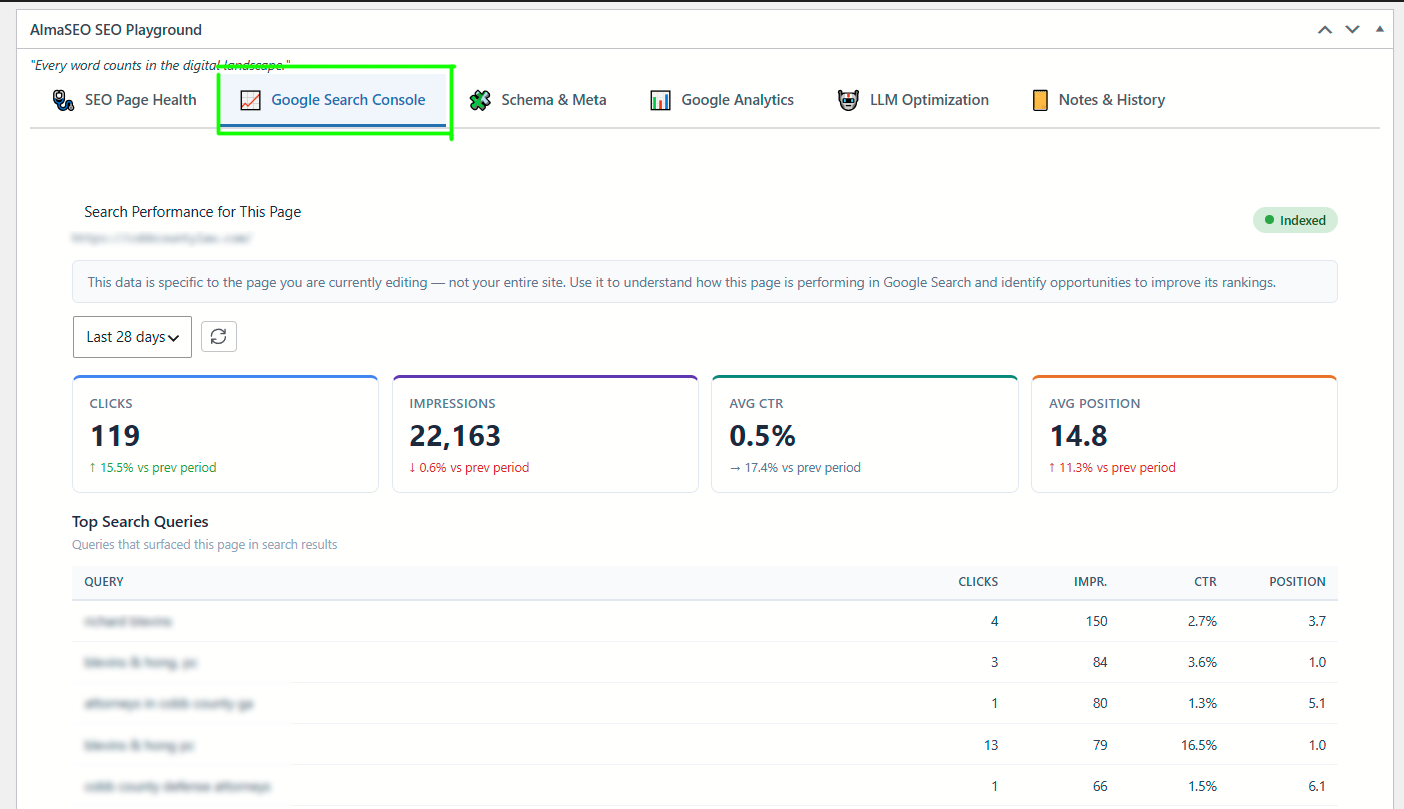
- Search Console panel: when its tab is opened, or on editor load if it was the tab left open last time. Sends the page’s URL and the number of days requested; answers are kept for five minutes. The figures are your Search Console data relayed by AlmaSEO; the plugin does not contact Google.
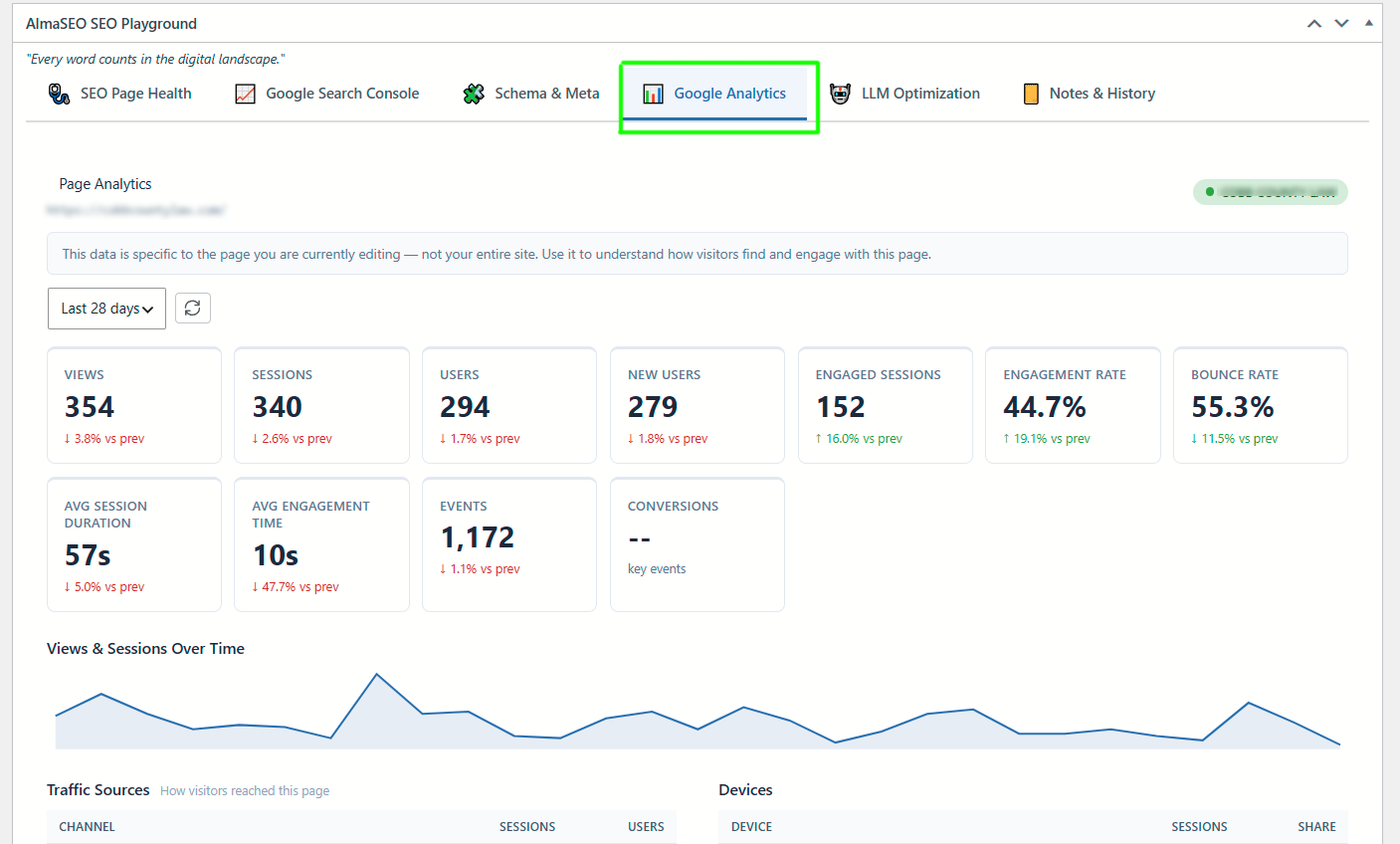
- Analytics panel: the same triggers and values, kept for five minutes, relaying your Google Analytics data.
- LLM optimisation: the same two triggers. Sends the title, up to 8,000 characters of content, meta description, schema type, focus keyword and URL.
Only when you run a feature: each of these is a button in the admin, available to a user who can edit the page in question. Every request carries the site’s address and the credential, plus:
- Headline suggestions: the headline, page title, the first 4,000 characters of the content, meta description, focus keyword and URL.
- Readability, Date Hygiene, E-E-A-T, Orphan Pages and Schema Drift readings: the page title, URL and up to 9,000 characters of its content (6,000 for Orphan Pages), with that check’s own findings. E-E-A-T also sends the author’s display name and bio. Orphan Pages also sends the titles and URLs of other pages that could link to it. Schema Drift sends the structured data recorded for the page.
- 404 ranking: the missing paths from your 404 log.
- Cornerstone suggestions: for every published page, its URL, title, word count and number of internal links pointing to it.
- Alt text for an image: the image itself at medium size, its file name and type, its caption and title, the title of the post it belongs to, and the site name.
- Bulk metadata generation: for each selected post, its title, the first 2,000 characters, excerpt, focus keyword, current title and description, headings, and category and tag names.
- Connection test: the site’s address and plugin version.
Disconnecting sends nothing to AlmaSEO. It deletes the connection details stored on your site and the signing secret behind the connection token, so every token the site issued stops working at once, and cancels the twice-daily link check; your dashboard is not told. Reconnecting creates a new secret and a new token. Disconnecting also removes any AlmaSEO Application Password left behind by a version before 1.23.0. Your dashboard can also unlink the site from its side, which clears only the recorded dashboard link and leaves the token in place.
Terms: https://almaseo.com/terms/ — Privacy: https://almaseo.com/privacy/
Google Suggest (suggestqueries.google.com)
What it is: Google’s public autocomplete service. It fills the keyword suggestion panel in the post editor. No account is needed, and it works whether or not AlmaSEO is connected.
Trigger: automatic. The request is made when the SEO panel in the post editor loads for any user who can edit that post, and again, after a short pause, as the focus keyword is typed, when the panel’s refresh button is pressed, or when a suggestion is clicked. Your server caches each answer for an hour, so the same phrase is not asked twice in that time.
Data sent: the focus keyword being typed; if the field is empty, the saved focus keyword; if there is none, the post’s title. The request goes from your server to Google, so Google sees your server’s address rather than the editor’s browser.
Terms: https://policies.google.com/terms — Privacy: https://policies.google.com/privacy
Google Analytics (www.googletagmanager.com)
What it is: the optional GA4 integration.
Trigger: only after an administrator saves a GA4 Measurement ID under AlmaSEO Analytics. There is no ID by default, and with no ID nothing is loaded. Once an ID is saved, every public page load makes the visitor’s browser fetch Google’s gtag.js and report the visit to Google directly. Logged-in administrators are left out by default (a setting). Two further settings, both off by default, add outbound-link click events and pass Google’s “anonymize IP” flag; what Google does with that flag is Google’s decision.
Data sent: browser-side, to Google, whatever Google Analytics normally collects: page addresses, referrers, browser and device details, IP-derived location and its own cookies. AlmaSEO receives none of it. If you enable this, your site’s privacy policy should say so.
Analytics terms: https://marketingplatform.google.com/about/analytics/terms/us/ — Terms: https://policies.google.com/terms — Privacy: https://policies.google.com/privacy
IndexNow (api.indexnow.org or yandex.com/indexnow)
What it is: tells search engines that a URL has changed. api.indexnow.org is run by Microsoft Bing and shares submissions with the other participating engines; you can point the plugin at Yandex’s endpoint instead.
Trigger: off by default. Nothing is sent until an administrator switches IndexNow on under AlmaSEO Sitemaps and generates a key. With it on, two things submit: the Submit button on the Sitemaps screen, which sends your sitemap’s address or the URLs the plugin has queued from recent edits; and, if the Delta sitemap is also on, a scheduled task that runs after posts or terms change and sends the changed URLs (up to 100) together with your sitemap addresses in one submission, no more often than every fifteen minutes.
Data sent: your site’s host name, your IndexNow key, the address of the key file on your site, and the list of URLs.
IndexNow: https://www.indexnow.org/ — Microsoft terms: https://www.microsoft.com/en-us/servicesagreement — Microsoft privacy: https://privacy.microsoft.com/privacystatement — Yandex terms: https://yandex.com/legal/rules/ — Yandex privacy: https://yandex.com/legal/confidential/
Google and Bing sitemap ping (www.google.com, www.bing.com)
What it is: asks the two engines to re-read your sitemap.
Trigger: the WP-CLI command wp almaseo sitemaps submit only. Nothing in the admin screens and no scheduled task pings either engine. Google retired this endpoint in 2023, so the request to Google now only comes back with an error; it is listed because the command still makes it, and it will be removed in a coming release.
Data sent: the address of your sitemap.
Google terms: https://policies.google.com/terms — Google privacy: https://policies.google.com/privacy — Microsoft terms: https://www.microsoft.com/en-us/servicesagreement — Microsoft privacy: https://privacy.microsoft.com/privacystatement
Vimeo (vimeo.com)
What it is: fills in titles, descriptions, durations and thumbnails for the video sitemap.
Trigger: whenever the video sitemap is built, for posts that embed a Vimeo video: with the default static storage, the daily scheduled rebuild, a rebuild started from the Sitemaps screen, or a request for a sitemap whose file is missing; with dynamic storage, every request for the video sitemap. Video sitemaps and this lookup are both on by default, so it can happen without you switching anything on, but only if your posts contain Vimeo embeds, and no account is involved. Turn off video sitemaps, or the oEmbed option, under AlmaSEO Sitemaps Media to stop it.
Data sent: the address of the Vimeo video found in your content, sent by your server with WordPress’s standard User-Agent, which names the WordPress version and your site’s address. Nothing about your visitors.
Terms: https://vimeo.com/terms — Privacy: https://vimeo.com/privacy
YouTube (www.youtube.com, img.youtube.com)
What it is: the same job as the Vimeo entry, for YouTube embeds.
Trigger: the same moments as the Vimeo lookup, for posts that embed a YouTube video. Two requests: WordPress’s standard oEmbed lookup of the video at youtube.com, and a check that the video’s thumbnail exists at img.youtube.com, remembered for a day (a week once found). The same Sitemaps Media settings turn this off.
Data sent: the address of the YouTube video found in your content, and its ID for the thumbnail check, both sent by your server with WordPress’s standard User-Agent (WordPress version and your site’s address). Nothing about your visitors.
Terms: https://www.youtube.com/t/terms — Privacy: https://policies.google.com/privacy
Gravatar (gravatar.com)
What it is: WordPress’s avatar service, run by Automattic. The Notes & History panel in the post editor shows the avatar of each person who left a note, through WordPress’s standard avatar function.
Trigger: browser-side, when someone opens that panel. It follows WordPress’s own Settings Discussion Show Avatars setting; switch that off and no avatar is requested. Separately, when a post’s author has no other photo, the author’s Gravatar address is published as the author image in structured data and in the user sitemap; your server fetches nothing for that.
Data sent: a hash of the note author’s email address, which is what a Gravatar address is made of. The email address itself is not sent.
Terms: https://wordpress.com/tos/ — Privacy: https://automattic.com/privacy/
Details



Related plugins
Plugins that also contain the tag meta-description
All in One SEO – Powerful SEO Plugin to Boost SEO Rankings & Increase Traffic

SiteSEO – SEO Simplified

WP Meta SEO

VS Meta Description

SEO Meta Description AI

Meta Tags Generator


About
Plugin for that tries to help you find the WordPress plugin you are looking for.
| Please enjoy an image of Crush (this awesome turtle) and have a lovely day! |  |
We do not own any plugin listed on this site and do not work for or work with WordPress.com or it's associated companies. We simply provide a searchable list of the available WordPress plugins.