


Annovisio
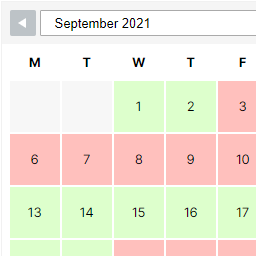
Annovisio connects a WordPress site with Calendly and displays imported event types in a clear yearly calendar.
Features:
- Display Calendly event types in a yearly calendar via shortcode
- Support multi-day events
- Sync Calendly event types manually
- Optional automatic synchronization via WP-Cron
- Settings page in the WordPress admin area
This plugin is designed for site owners who want to present bookable event formats in a compact annual calendar view.
External services
This plugin uses Calendly as an external service. Calendly is required to synchronize Calendly event types into WordPress, to check availability before opening a booking dialog, and to display Calendly’s booking popup on frontend pages that use the [annovisio] shortcode.
External services used:
- Calendly service: https://calendly.com
- Calendly API endpoint used by the plugin: https://api.calendly.com
- Calendly frontend widget assets loaded by the shortcode: https://calendly.com/assets/external/widget.js and https://calendly.com/assets/external/widget.css
What is sent to Calendly and when:
- During manual synchronization and WP-Cron automatic synchronization, the plugin sends authenticated server-side GET requests to
https://api.calendly.comusing the Calendly Personal Access Token configured by the site administrator in the WordPress admin area. - During synchronization, the plugin requests Calendly data from
/users/meand/event_types. For availability checks, the plugin requests/event_type_available_times. Request parameters can include Calendly user URI, event type URI,active,count, start/end time values, and Calendly pagination URLs returned by previous API responses. - When a site visitor clicks an event rendered by the
[annovisio]shortcode, the visitor’s browser first calls this plugin’s WordPress REST endpoint on the same WordPress site with the Calendly event type URI and either a selected date or a UTC slot start. The plugin then sends a server-side authenticated request to Calendly’s/event_type_available_timesendpoint with the event type URI and the calculated start/end time window. - On frontend pages where the
[annovisio]shortcode renders the calendar, the visitor’s browser loads Calendly’s widget JavaScript and CSS fromcalendly.comso Calendly’s booking popup can be displayed. Interactions inside the Calendly booking popup are handled by Calendly.
Calendly legal links:
- Terms: https://calendly.com/legal/customer-terms-conditions
- Privacy: https://calendly.com/legal/privacy-notice
Details


Related plugins
Plugins that also contain the tag calendar
The Events Calendar

LatePoint – Calendar Booking Plugin for Appointments and Events

Woo Store Vacation

SimplyBook.me – Booking and reservations calendar

The Events Calendar Shortcode & Block

WP Simple Booking Calendar

About
Plugin for that tries to help you find the WordPress plugin you are looking for.
| Please enjoy an image of Crush (this awesome turtle) and have a lovely day! |  |
We do not own any plugin listed on this site and do not work for or work with WordPress.com or it's associated companies. We simply provide a searchable list of the available WordPress plugins.