


This plugin is outdated and might not be supported anymore
Back

Ashtabula
Details
View on WordPress
Back
This plugin allows you to use of the popular Swiper.js library in WordPress.
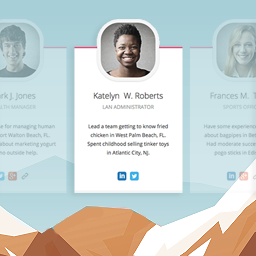
This is a minimalist plugin that is for displaying responsive cards in a slide.
- On a large screen device, the slide will show a horizontal card (image on the left and text on the right).
- On a small device, the slide becomes a stacked card with the image on the top and text on the bottom.
See the screengrabs below to get a visual or visit the live demo.
Note: You should be comfortable with HTML and CSS to use this plugin.
Usage
- Use the demo HTML file as a starter template. Add this HTML to a HTML or code block/element to your page or post.
- To add the images, use the example CSS below as a template. Add the CSS to your Appearance > Customize > Additional CSS or your child theme’s
style.cssfile.
CSS example to specify the background image for the responsive card in a slide.
/**
 * Swiper Slider Plugin Custom Styles
 */

#my-swiper-slide-1 {
 background-image: url(mybgimg-1.png);
}
#my-swiper-slide-2 {
 background-image: url(mybgimg-2.png);
}
#my-swiper-slide-3 {
 background-image: url(mybgimg-3.png);
}
Credits
Powered by Swiper.js.
Details
Plugin code:
ashtabula
Plugin version:
1.0.0
Author:
Outdated:
Yes
WP version:
5.3.2 or higher
PHP version:
7.2 or higher
Test up to WP version:
6.1.7
Total installations:
0
Last updated:
2022-12-18
Rating:
Times rated:
0
responsive
slider
swiper


Related plugins
Plugins that also contain the tag responsive
WP Mobile Menu – The Mobile-Friendly Responsive Menu

Responsive Menu – Create Mobile-Friendly Menu

WPtouch – Make your WordPress Website Mobile-Friendly

WP Responsive Menu

Team Members
Tabby Responsive Tabs


About
Plugin for that tries to help you find the WordPress plugin you are looking for.
| Please enjoy an image of Crush (this awesome turtle) and have a lovely day! |  |
We do not own any plugin listed on this site and do not work for or work with WordPress.com or it's associated companies. We simply provide a searchable list of the available WordPress plugins.