


Avoonta
Avoonta calls a new lead seconds after they fill in your form, with an AI voice agent that qualifies them and books an appointment. This plugin connects your WordPress forms to your Avoonta account.
Works with
- Contact Form 7
- WPForms (Lite and Pro)
- Gravity Forms
- Elementor Pro Forms
- Ninja Forms
- Fluent Forms
- Formidable Forms
How it works
- Connect with an API key (recommended) or an agent’s trigger link on the plugin’s settings page (Settings > Avoonta).
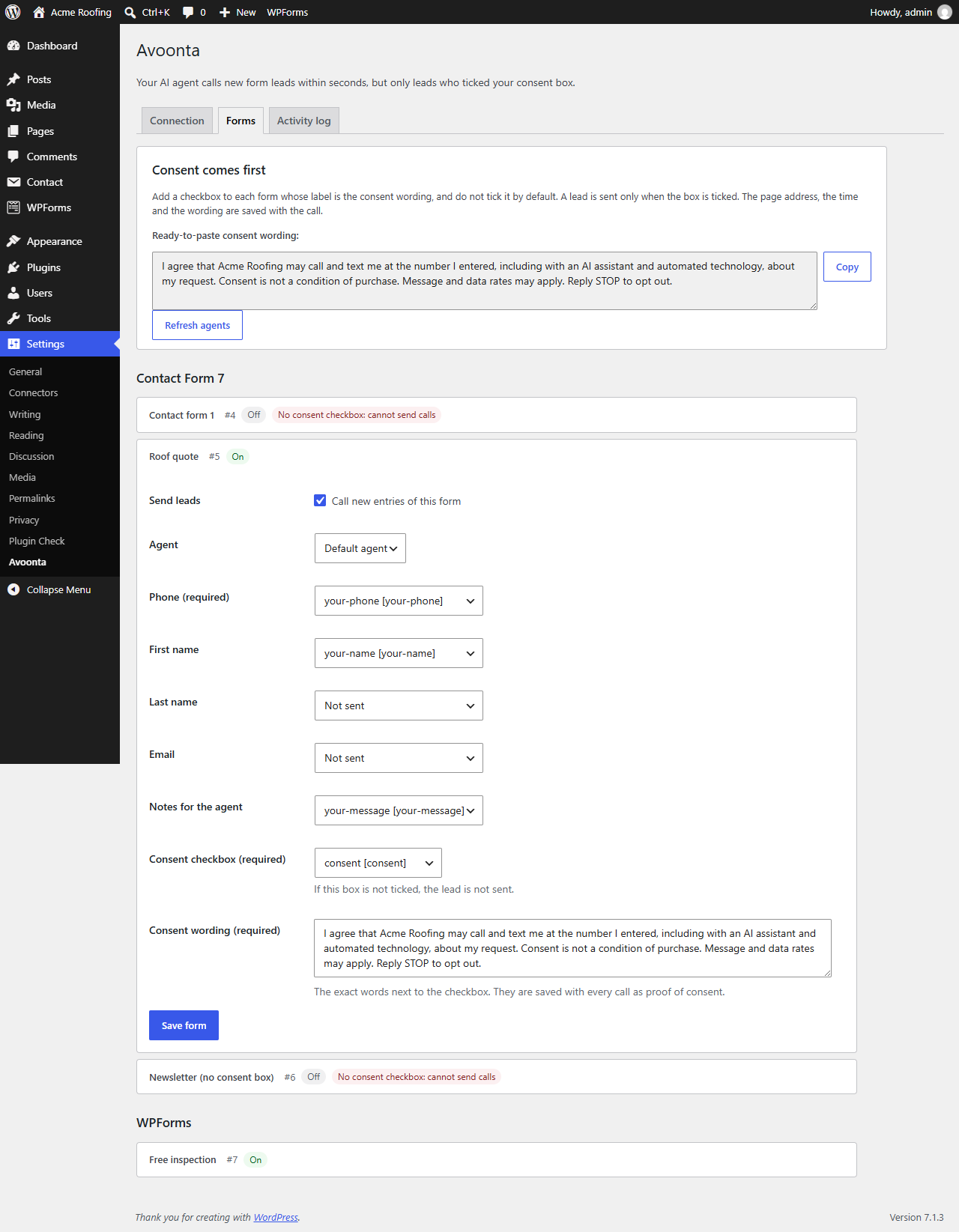
- On the Forms tab, switch a form on, choose the agent, and map the phone field (required) and, if you like, first name, last name, email and notes.
- Map the form’s consent checkbox (required) and paste the exact wording shown next to it.
- When someone submits the form and ticked the box, the plugin sends the lead to Avoonta in the background, and your agent calls.
Consent comes first
A lead is sent only when its consent checkbox is ticked. A form without a mapped consent checkbox and its wording cannot be switched on and never sends a call; the Forms tab marks it in red. With an API key, every call carries the lead’s consent record: the page address, the form, the exact wording and the submission time. Every call opens by saying the caller is an AI assistant.
Never slows your forms
Leads are sent in the background with WP-Cron, or with Action Scheduler when another plugin provides it. A slow or unreachable API never delays or breaks a form submission. A failed send is tried up to 5 times over about 80 minutes, and every retry uses the same idempotency key, so a lead is never called twice for one entry.
Calling hours are handled for you
Avoonta only calls between 8am and 8pm in the lead’s time zone, skips holidays you set, and never calls numbers on your do-not-contact list. A lead that arrives at night is called the next morning. There is nothing to set up in WordPress for this.
For agencies
White-label agencies can paste the trigger link from their own domain and give the settings page their own name (Advanced), so clients never see another brand.
Activity log
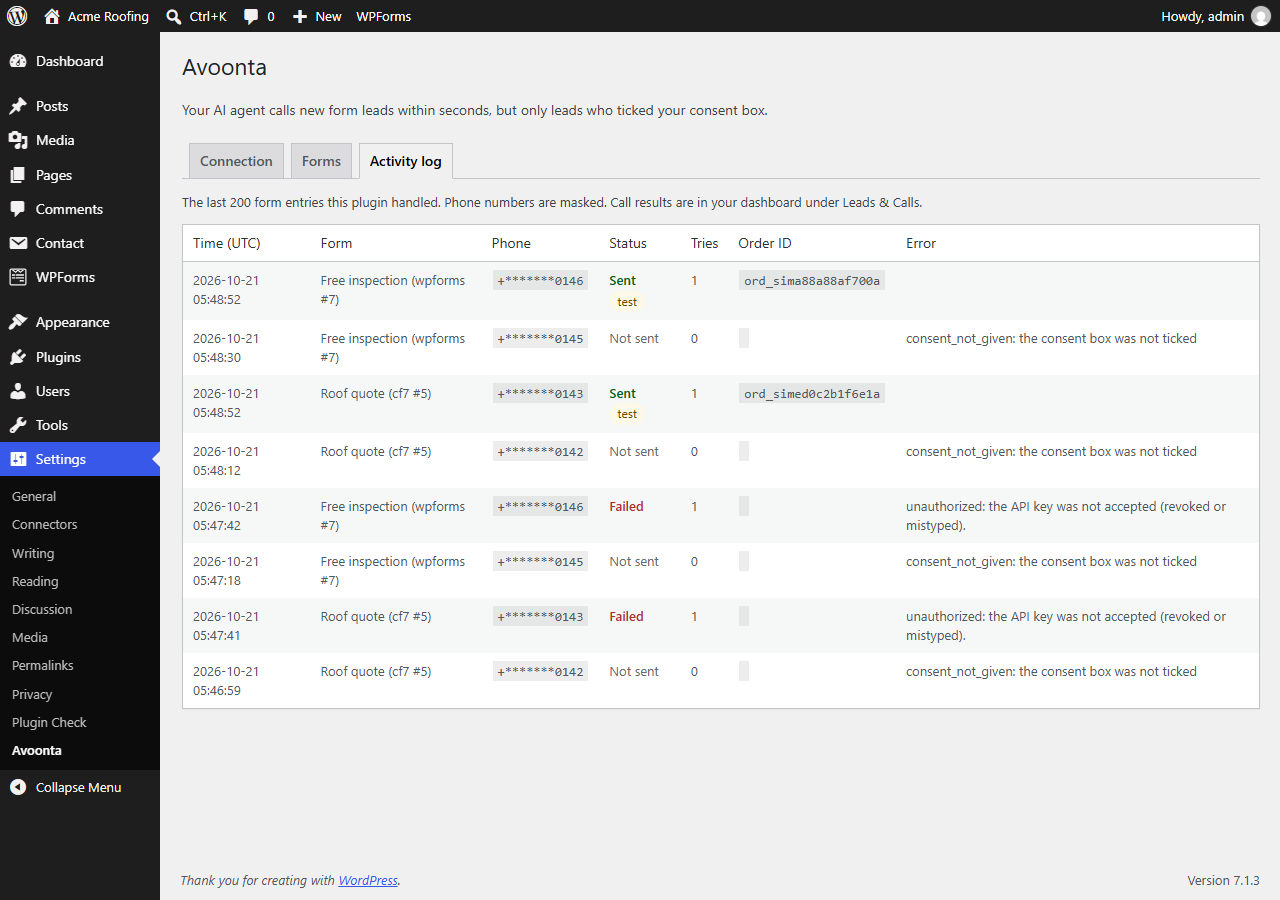
The Activity log tab shows the last 200 entries with their status, order ID and any error. Phone numbers are masked.
Test mode
Connect with an av_test_ API key to place simulated calls: nobody is dialed and nothing is charged.
You need an Avoonta account with a published agent. Calls are to US numbers only.
External services
This plugin connects to the Avoonta API to start AI phone calls to your form leads. It is required: without it the plugin does nothing.
- Service: the Avoonta API, at https://api.avoonta.com, or the API address your provider gave you (Advanced settings). With a trigger link, the plugin sends leads to the address of that link, which is the Avoonta API or your agency’s own domain. The plugin sends data to no other address.
- When: each time a mapped form is submitted with its consent box ticked (in the background, within seconds); when you press “Test connection” (GET /v1/me); and when the settings page loads or you press “Refresh agents” (GET /v1/agents, cached for 10 minutes).
- What is sent with a lead: the phone number; the first name, last name, email and notes if you mapped them; the submission time; and, with an API key, the agent ID, the consent record (page address, form name and consent wording) and a reference made of the form plugin, form ID and entry ID. Your API key is sent in the Authorization header. With a trigger link, the link itself identifies your agent.
- Not sent: other form fields, visitor IP addresses, cookies or WordPress user data.
- Avoonta Terms of Service: https://avoonta.com/terms
- Avoonta Privacy Policy: https://avoonta.com/privacy
Details


Related plugins
Plugins that also contain the tag ai
SEOPress – On-site SEO & Analytics

AI Engine – The Chatbot, AI Framework & MCP for WordPress

GetGenie – AI Content Writer with Keyword Research & SEO Tracking Tools

SEO Plugin by Squirrly SEO

Website LLMs.txt

Smartsupp – live chat, AI shopping assistant and chatbots


About
Plugin for that tries to help you find the WordPress plugin you are looking for.
| Please enjoy an image of Crush (this awesome turtle) and have a lovely day! |  |
We do not own any plugin listed on this site and do not work for or work with WordPress.com or it's associated companies. We simply provide a searchable list of the available WordPress plugins.