

Back to Normal Widgets
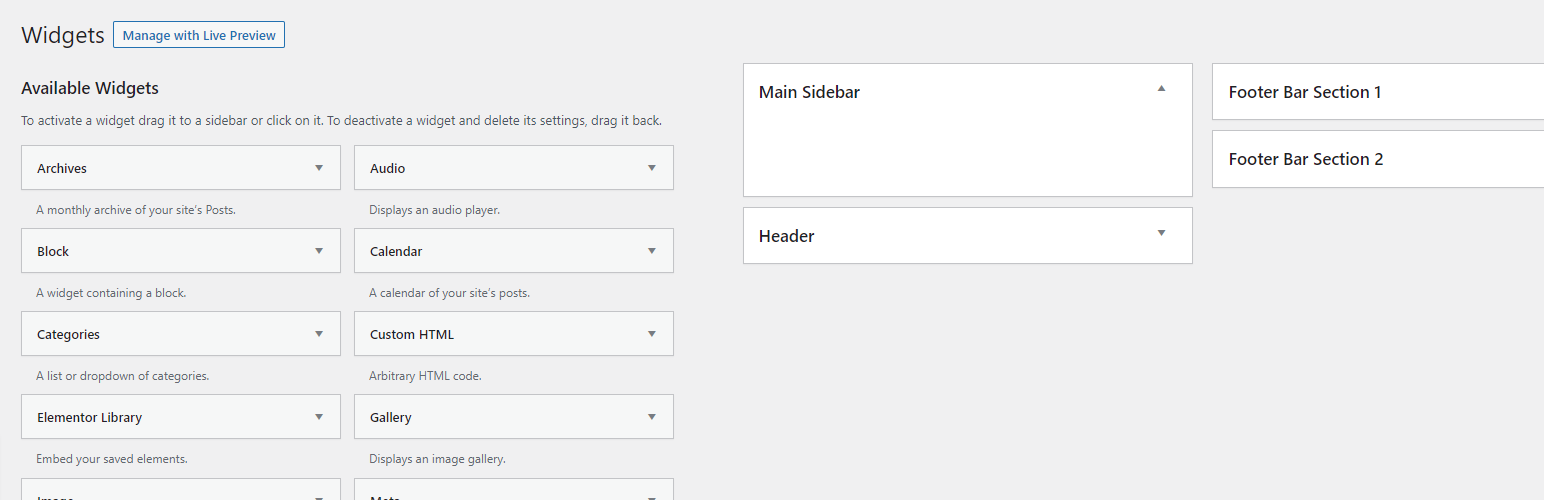
Back to Normal Widgets” is a simple plugin that restores the classic widgets settings screens and disables the block editor from managing widgets.
With this plugin activated, you can continue to use the traditional widgets settings screens to add and customize widgets on your WordPress site.
The block editor will no longer be able to manage widgets, and the “Customize” menu item and button will be removed from the WordPress dashboard.
There is no configuration required – simply install and activate the plugin to restore the classic widgets settings screens and disable the block editor for widgets.
Installation Guide
- Download the “Back to Normal Widgets” plugin from the WordPress plugin repository
- In your WordPress dashboard, go to Plugins > Add New.
- Click the “Upload Plugin” button.
- Select the plugin back-to-normal-widgets.zip file you downloaded in step 1 and click “Install Now”.
- Click the “Activate” button to activate the plugin.
The classic widgets settings screens will now be restored and the block editor will be disabled for managing widgets.
There is no further configuration required.
Details


About
Plugin for that tries to help you find the WordPress plugin you are looking for.
| Please enjoy an image of Crush (this awesome turtle) and have a lovely day! |  |
We do not own any plugin listed on this site and do not work for or work with WordPress.com or it's associated companies. We simply provide a searchable list of the available WordPress plugins.