


BirdyChat
Insert BirdyChat JavaScript Code Into WordPress Footer
This plugin is designed for users of BirdyChat, allowing them to install the BirdyChat Telegram widget on any WordPress website.
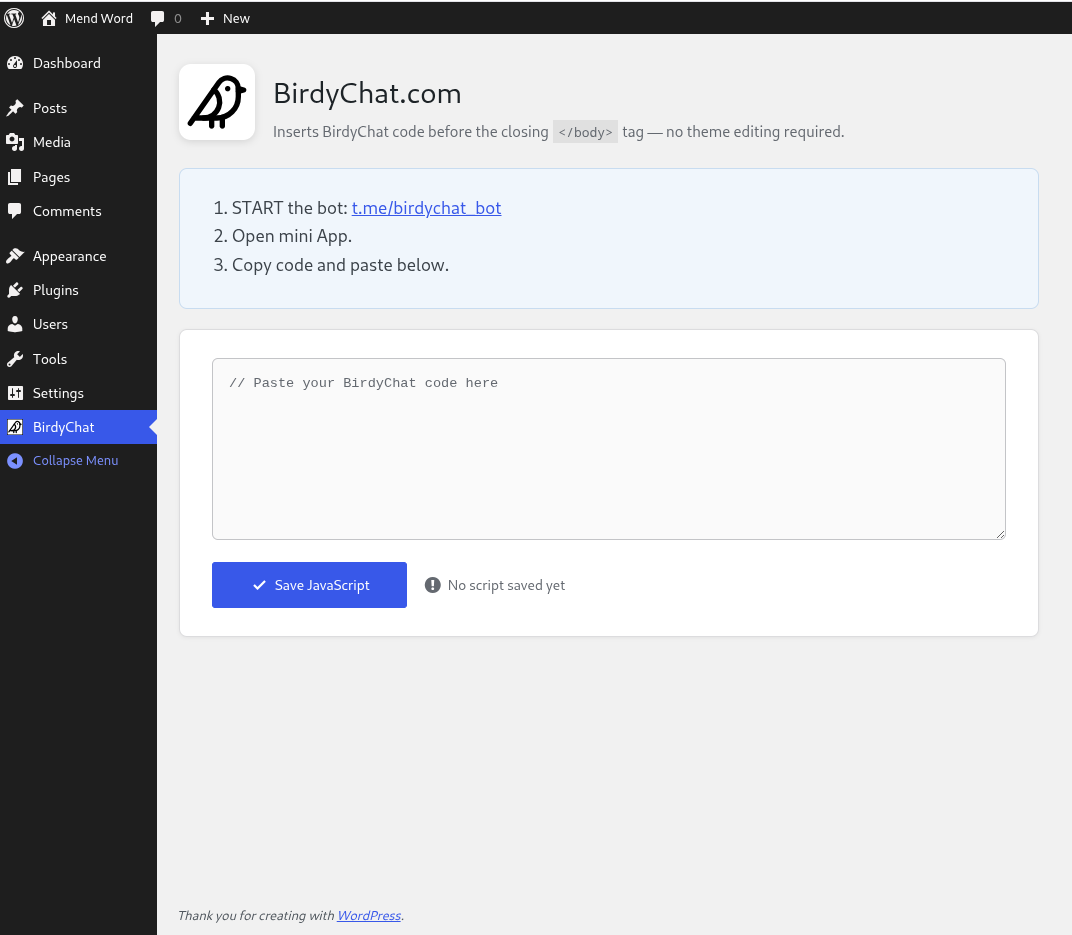
Steps to get started:
- Start the bot: t.me/birdychat_bot
- Open the mini app.
- Copy the code and paste it into the textarea below.
It simplifies the process of adding BirdyChat JavaScript code without the need to edit the theme’s functions.php file.
How the plugin works
User copies the widget code from the telegram bot (https://t.me/birdychat_bot) and pastes it into the textarea. The widget embed code consist of two parts:
1. External resource loader: <script src="https://birdychat.com/js/chat-widget.js"></script>
2. Initialization snippet: <script>document.addEventListener('DOMContentLoaded', function() {AdminChatWidget.init({ widgetId: '...' });});</script>.
The plugin extracts widgetId parameter and validates it.
If successful, the both scripts are enqueued in the footer section of every WordPress page.
External services
This plugin relies on an external service provided by https://birdychat.com (terms of use: https://birdychat.com/terms-and-conditions, privacy policy: https://birdychat.com/privacy-policy).
The plugin first checks that the widgetId is in UUID format (e.g. 123e4567-e89b-12d3-a456-426655440000), then calls the API at https://router.birdychat.com/getserverurl/ to confirm the ID exists in the BirdyChat database.
This call is made once, when the user saves the widget embed code.
Details

About
Plugin for that tries to help you find the WordPress plugin you are looking for.
| Please enjoy an image of Crush (this awesome turtle) and have a lovely day! |  |
We do not own any plugin listed on this site and do not work for or work with WordPress.com or it's associated companies. We simply provide a searchable list of the available WordPress plugins.