


Bloatwright – Performance Profiler & Site Speed Audit
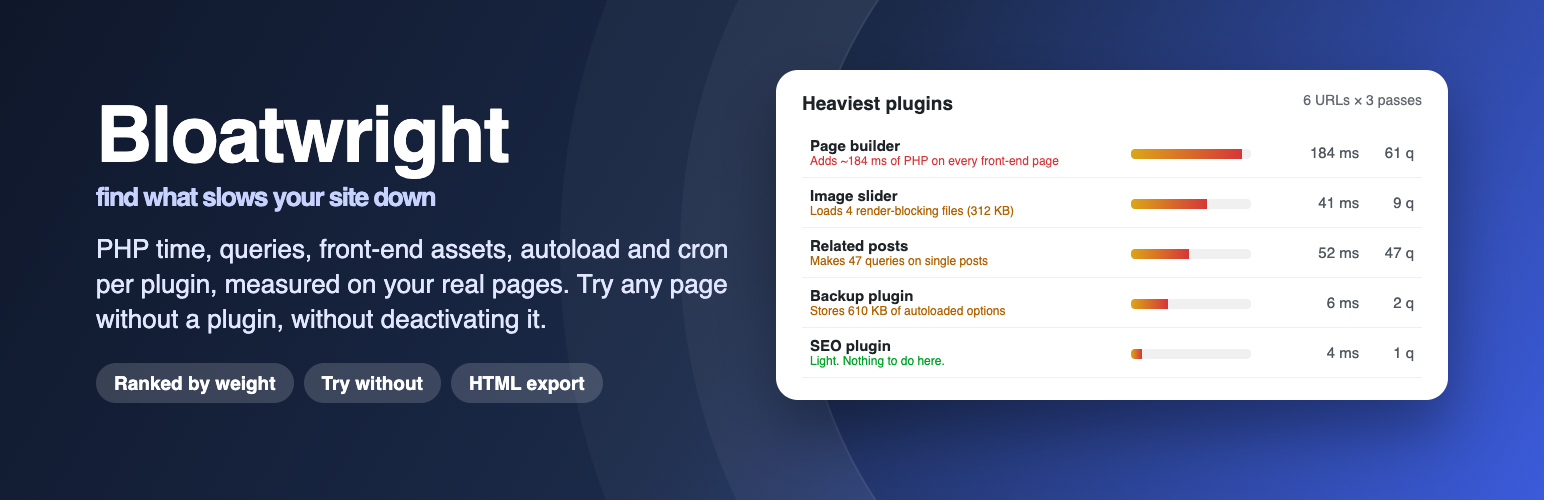
Bloatwright answers one question: which plugins make this site slow, and by how much? It measures each one on real pages of your own site.
Click Run profile. The plugin requests a handful of typical pages (home, the latest post, a page, the WooCommerce shop and a product when WooCommerce is active, the dashboard and the posts list) from your own server, several times each, with a profiler attached to those requests only. Visitors are never affected, nothing is deactivated, and no measurement data leaves your site (see External services below for the one optional, off-by-default kind of outbound request).
For every plugin, theme and must-use plugin you get:
- PHP time (self time, with nested hooks charged to the plugin that actually did the work), averaged per page; its tooltip shows the lowest and highest figure of any single request (any page, any pass). It is the time spent in those of its hook callbacks that the profiler times (see “Which hook callbacks are timed?” below; callbacks in the active theme’s folder count for the theme, those in a parent theme’s folder for the parent theme) plus, for regular and must-use plugins, the time their main file takes to load, measured until
plugins_loaded. That load time includes any hook callbacks that run while the file loads, so it overlaps with the time charged to those callbacks’ owners. Not measured separately: the theme’sfunctions.phpload time and, on multisite, the load time of network-activated plugins (their hook callbacks are still timed). - Database queries it triggered, with the slowest ones and the caller.
- Front-end assets served from its folder on the front-end pages of the run (a remote file counts for the plugin whose local script or style depends on it), their size (file size on disk plus inline code, on its heaviest front-end page), whether they block rendering, and libraries loaded twice by different plugins (jQuery UI, Swiper, Font Awesome …). A local URL that does not map to a file counts as 0 KB. What a plugin loads on admin pages does not count toward front-end KB, render-blocking KB or the weight; it is shown separately in the tooltip of the Front-end KB column. A remote file whose size was not measured (see External services) is shown as “size unknown” and left out of the KB figures; a measured one counts with the size from its Content-Length header, which is often the compressed size.
- Autoloaded options matched to it by name (your own prefix overrides, a bundled list of option prefixes, or its folder name; must-use plugins only through overrides), with their size in the database. They load on every request.
- Cron events it schedules and how often they run.
Everything rolls up into a relative weight score (PHP time 40 %, query time 20 %, render-blocking KB 20 %, autoload KB 10 %, cron runs/day 10 %; render-blocking KB counts only the scripts and styles that block rendering on front-end pages) and, where a rule applies, a plain-language verdict, such as “Adds about 180 ms of PHP on every front-end page, including pages that may not use it” or “Expensive only on checkout (240 ms); cheap elsewhere.”
Try without
Pick a plugin and re-run the same URLs with that plugin filtered out of the profiling requests only. You see the before/after of every page, compared with the session you started it from, without deactivating anything for visitors.
Browse-and-profile
If your host blocks loopback requests, start a recording instead (it lasts two minutes by default; change it under Settings): the pages you open in your own browser are measured, front-end and admin alike. The recording cookie is host-only, so on a site whose front end and admin use different hosts, only pages on the host of the Site Address (Settings General) are recorded. REST API, admin-ajax, cron, XML-RPC, login and media-upload requests and the Bloatwright screen itself are not measured, and each URL is recorded once. When the time is up the cookie expires and the recording ends; what it recorded is saved as a session the next time Bloatwright checks (the Bloatwright screen, or your next page view with the toolbar). A recording and an automatic run (including “Try without” and WP-CLI runs) never overlap: neither can start while the other is in progress.
History, compare and export
The newest twenty sessions are kept by default (Settings “Sessions to keep”); older ones are deleted when a new run or recording starts. On the results screen a session can be compared with the previous regular session to see what changed after an update or a plugin swap; to compare any two sessions use wp bloatwright profile compare <a> <b> or the REST API (/wp-json/bloatwright/v1/sessions/<b>/compare/<a>). The History tab lists past sessions and, once there are two finished regular sessions, a PHP-time trend for the heaviest plugins; every session can be exported as a self-contained HTML report you can send to a client or a developer.
Autoload and cron pages
Two extra tabs break down the autoloaded options and the cron queue by owner, including cron hooks that have no callback attached (usually left behind by a removed plugin).
WP-CLI
wp bloatwright profile run [--urls=<a,b>] [--passes=<n>] [--without=<plugin/file.php>] [--format=table|json] [--user=<id|login>]wp bloatwright profile listwp bloatwright profile compare <a> <b>wp bloatwright autoload-
wp bloatwright cron–user is WP-CLI’s global parameter: admin URLs are requested as that user and skipped (with a warning) when no user is given. Like the admin screen,
profile runwrites the must-use loader first when it is missing or out of date.
How it works
When a profiling run, a “Try without” run, a WP-CLI run or a browse-and-profile recording starts and the loader is missing or out of date, the plugin writes one small must-use plugin, 0-bloatwright-loader.php, into the must-use plugins folder (normally wp-content/mu-plugins). That file does nothing unless a request carries a signed, short-lived token; only then it starts the profiler, which sends no-cache headers, wraps hook callbacks with timers, records SAVEQUERIES output, reads the enqueued scripts and styles, and stores the result. You can remove the loader at any time from Settings Advanced (it is written again on the next run), and it is removed when Bloatwright is deactivated. On multisite it is kept while Bloatwright is still active on another site of the network, and removed on network deactivation or when the last site deactivates it.
Hooks for developers
bloatwright_urls_default, `bloatwright_owner_for_file`, `bloatwright_option_prefixes`, `bloatwright_verdicts`, `bloatwright_expected_slugs`, `bloatwright_session_complete`, `bloatwright_capability`, `bloatwright_loopback_sslverify`, `bloatwright_remote_head`, `bloatwright_remote_asset_owner`, `bloatwright_record_wait`, and the action `bloatwright_record`, which runs at shutdown at the end of every profiled request (warm-up passes included, though they are not stored) with the request's measurement record and its context (session id, URL, pass, excluded plugin).
More plugins by Emtiaz Zahid
- Launchmender: 44 pre-launch checks with one-click fixes, a manual checklist and a client handoff report
- Faultwright: PHP errors, JavaScript errors, failed cron jobs, emails and updates on one timeline
- Stalemender: content audit that gives every post a Freshness Score (0–100) and tells you why
- Waymender: finds broken links without hammering your server, logs 404s and fixes both in one click
- Anchormender: internal link suggestions while you write, an orphan post report and bulk internal linking
- Repeatwright: RFM customer segments, repeat rate, LTV and cohort retention from your own WooCommerce orders
- Hoverbuy: sticky add to cart bar with image, price and quantity once the real button scrolls away, variable products included
- Dynafield: ACF, Pods, Meta Box and post meta as dynamic tags in free Elementor: text, link, image, number, colour and date
- Shipeach: shipping cost per product and per variation, by country, state or postcode, as its own method or added to other rates
External services
Bloatwright profiles your site from your own server: every measurement request goes to your own site’s URLs. It has no server of its own and uses no third-party service or API. Nothing is sent anywhere by default; the one optional kind of outbound request is described below.
Remote asset sizes (optional, off by default)
To show the file size of the remote scripts and styles your pages already load (for example a CDN copy of a library or a font stylesheet), Bloatwright can ask the host that serves each file for its size. There is no fixed provider: the hosts contacted are the ones your own pages already load files from, so their terms and privacy policies are those of the services you chose to use.
- What is sent: an HTTP HEAD request (file headers only) to that asset’s own URL, with the User-Agent
Mozilla/5.0 (compatible; Bloatwright/1.0.0)(the version follows the plugin version) and no cookies. Redirects are not followed, so a redirected asset’s size (like one sent without a Content-Length header) is shown as unknown. - When: at the end of a profiled request (an automatic run or a browse-and-profile recording), for each remote script or style on that page whose size is not cached yet. The result of each request is cached for a day; while the setting is off nothing is requested or cached.
- How to turn it on: Tools Bloatwright Settings “Measure remote asset sizes with HEAD requests (off by default)”. The setting is off when the plugin is installed, so no third-party host is contacted until you switch it on.
Privacy
Everything Bloatwright stores stays in your own database:
- One row per profiling session and one row per measured request. A request row holds the page URL, per-plugin timings, the names of the hooks involved, each plugin’s main file name relative to the plugins folder (for example
akismet/akismet.php), the slowest database queries with their literal values (quoted strings, numbers, hex values) replaced by?and, for each of them, the caller: the last three entries of WordPress’s own query caller summary, which are function and method names and, forinclude/requireentries and closures (named after their file since PHP 8.4), file paths relative to the WordPress orwp-contentfolder; a file outside both is reduced to its file name. It also holds the URLs and sizes of enqueued scripts and styles. - A per-user flag (user meta) remembering that an administrator dismissed the welcome notice.
- While browse-and-profile is active, a short-lived cookie named
bloatwright_profilein the administrator’s own browser. It expires after the configured lifetime (two minutes by default) and is cleared when the recording stops. - While a run requests admin URLs, one extra login session for the administrator running it (stored by WordPress in that user’s
session_tokensuser meta). It is ended when the step or WP-CLI run finishes, or when the PHP request running it ends; at worst it expires after ten minutes.
No visitor requests are measured and no visitor data is recorded. Nothing is sent off-site by default; the only exception is the optional HEAD requests described under External services, which go only to asset URLs your pages already load and carry the User-Agent Mozilla/5.0 (compatible; Bloatwright/1.0.0).
Uninstalling always removes the must-use loader, the signing key and other run-state options, the cached remote asset sizes and every user’s dismissed-notice flag. It also drops the two tables (sessions and request rows) and deletes the settings, the attribution overrides and the schema version option, unless “Keep sessions when the plugin is uninstalled” is on in Settings; then those stay so a reinstall picks up the history. On multisite every site is cleaned up.
Details


Related plugins
Plugins that also contain the tag debug
WP Crontrol

Query Monitor – The developer tools panel for WordPress

Debug Bar

Debug Log Manager – Conveniently Monitor and Inspect Errors

WP Debugging

Code Profiler – WordPress Performance Profiling and Debugging Made Easy

About
Plugin for that tries to help you find the WordPress plugin you are looking for.
| Please enjoy an image of Crush (this awesome turtle) and have a lovely day! |  |
We do not own any plugin listed on this site and do not work for or work with WordPress.com or it's associated companies. We simply provide a searchable list of the available WordPress plugins.