



Caching Out
Caching Out keeps a ready-made copy of each page and serves it before
WordPress loads, writes browser caching and compression rules into your server
configuration, loads images, iframes and video as they are needed rather than
all at once, and can minify your CSS and JavaScript. It rebuilds the copies
when your content changes. It is designed to improve LCP, INP and CLS.
Performance results vary depending on hosting, theme, plugins and traffic.
We check before we touch anything
Page caching needs one file, wp-content/advanced-cache.php, and browser caching
needs a block of rules in your server configuration. Either of them may already
belong to another plugin.
Caching Out records a fingerprint of the drop-in file it writes and compares it
before every write, overwrite or delete. If the file on disk is not the one it
wrote, it leaves that file alone, does not switch page caching on, and shows a
notice naming the plugin the file belongs to. The rest of the plugin keeps
working.
The same rule covers your .htaccess. A marker block belonging to another plugin
is never written into and never removed. Before Caching Out writes its own
block it checks the result, then replaces the file in one step; if the file
cannot be written, nothing is written at all, so a half-written server
configuration is never left behind, and no copy of your .htaccess or
wp-config.php is ever left on disk. Deactivation never edits .htaccess or
wp-config.php.
Caching Out never reads, writes or removes object-cache.php.
What is on the moment you activate
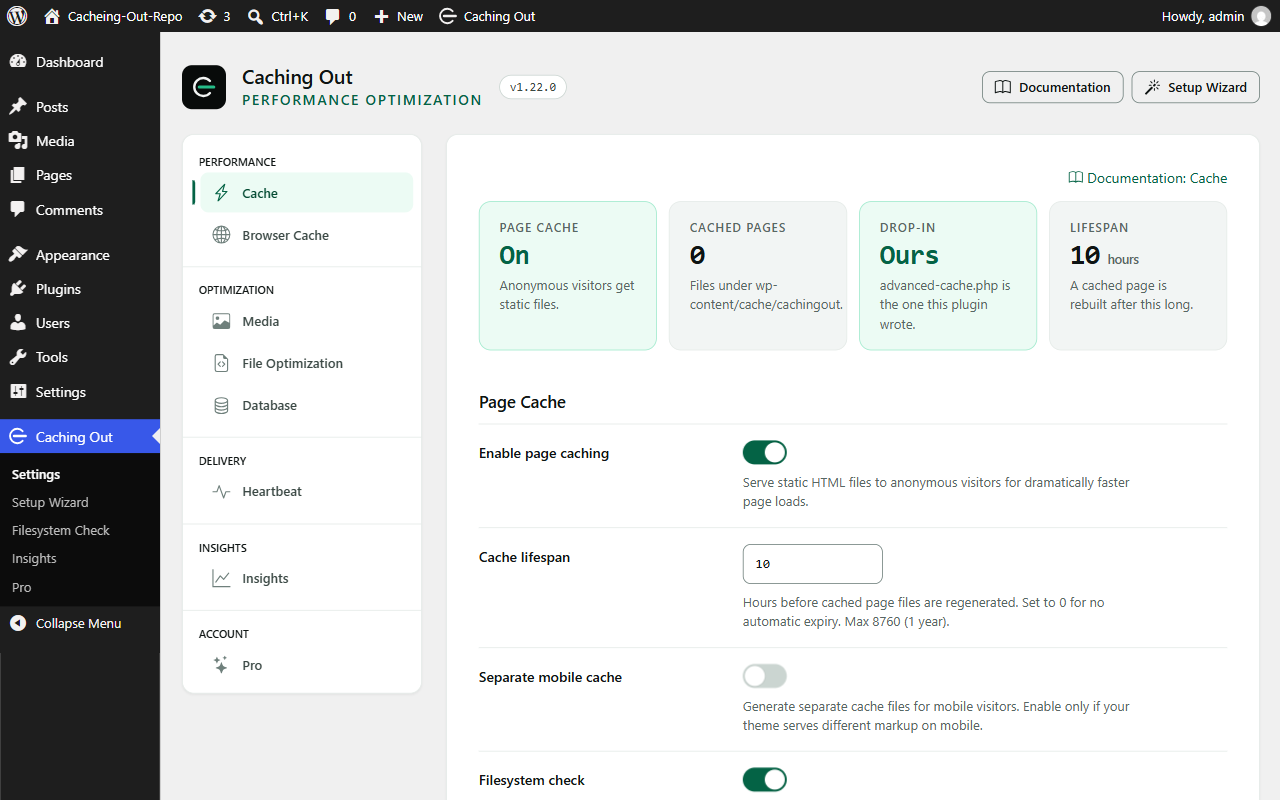
- Page caching, with the drop-in installed and WP_CACHE set
- Purging when your content changes
- Browser caching: Expires headers, GZIP and Brotli, written through the
checked writer described above - Lazy loading for images, iframes and video, and missing width and height
attributes added - Hero-image priority for the image most likely to be the largest one on
screen - The Filesystem Check notice and the Page Audit of your key pages
- Your own exclusions: URLs, cookies and user agents that must never be
cached, on the Cache tab
What stays off until you choose it
Anything that can change how a page looks is off until you switch it on:
- Minify CSS
- Minify JavaScript
- Defer JavaScript
- Lazy loading of CSS background images
- Database cleanup, which is manual and shows you the row counts first
The safety layer
These rules are fixed. They have no settings, they cannot be switched off, and
they are the same in the free plugin and in Caching Out Pro:
- A logged-in visitor is never served a cached page
- A request carrying a session, authentication or cart cookie – including
PHPSESSID – is never served from the cache and is never cached - A response that sets a session or authentication cookie is never stored
- Cart, checkout and account pages, in WooCommerce and Easy Digital Downloads,
are excluded with no configuration - wp-admin and wp-login.php are never cached
- Only ordinary page views (GET requests) that returned 200 are cached
- Cache files are written to a temporary file and renamed into place, so a
visitor never receives a half-written page - The drop-in ownership guard described above
- define( ‘CACHINGOUT_DISABLE_CACHE’, true ); in wp-config.php disables all
cache reading and writing, in every version - Deleting the plugin removes its options, its scheduled tasks, its cache
directory, the drop-in, WP_CACHE and its .htaccess block
What the free plugin does
- Page caching served from the drop-in, before WordPress and its plugins
load. Cache lifespan in hours, optional separate cache files for mobile. - Purging when a post or page is saved, trashed or restored, when a term,
menu, theme, widget or customizer setting changes, when a comment is
approved, and from the Purge button in the admin bar. Archives and the pages
that list a changed post are purged with it. - Browser caching: Expires headers, GZIP and Brotli for Apache through the
.htaccess writer. On NGINX the documentation carries the equivalent snippet
to paste into your server configuration. - Lazy loading for images, iframes and self-hosted video, with an
exclusion list, an above-the-fold allowance, missing width and height
attributes added to reduce layout shift, and optional lazy loading of CSS
background images. - Hero-image priority: the image most likely to be the largest one on
screen is marked high priority and preloaded, with an exclusion list. - Minify CSS and JavaScript, and defer JavaScript, each off until you
switch it on, each with its own per-file inclusion and exclusion controls.
Minified copies are written to disk; the original tag keeps its attributes
and only the URL changes. Already-minified files are left alone. - Database cleanup by hand: revisions, auto-drafts, trashed posts, spam and
trashed comments, and transients, with the number of rows shown before
anything is deleted. Nothing is scheduled and nothing runs unattended. - Heartbeat control and DNS prefetch for the domains you list.
- Compatibility handling for WooCommerce, Easy Digital Downloads, WPML,
Polylang and page builders, which register their exclusions into the one
place that decides whether a page may be cached.
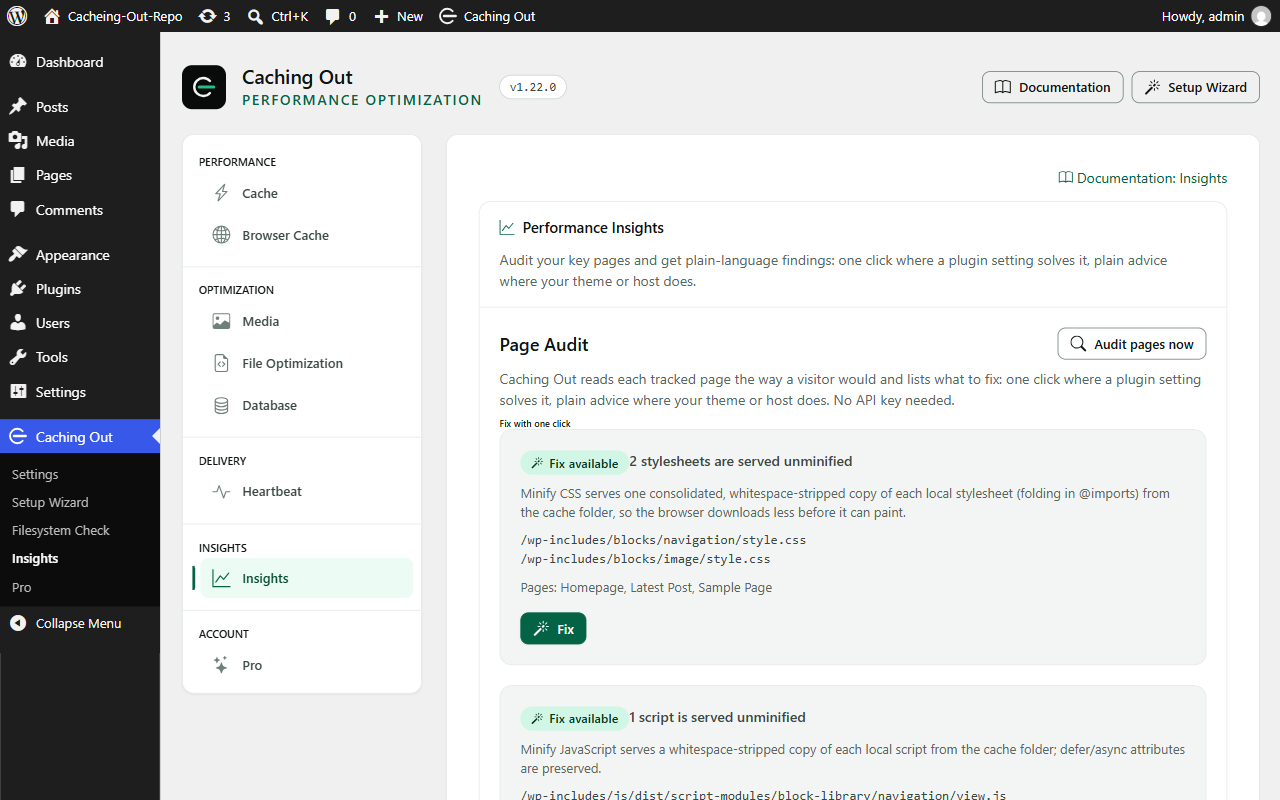
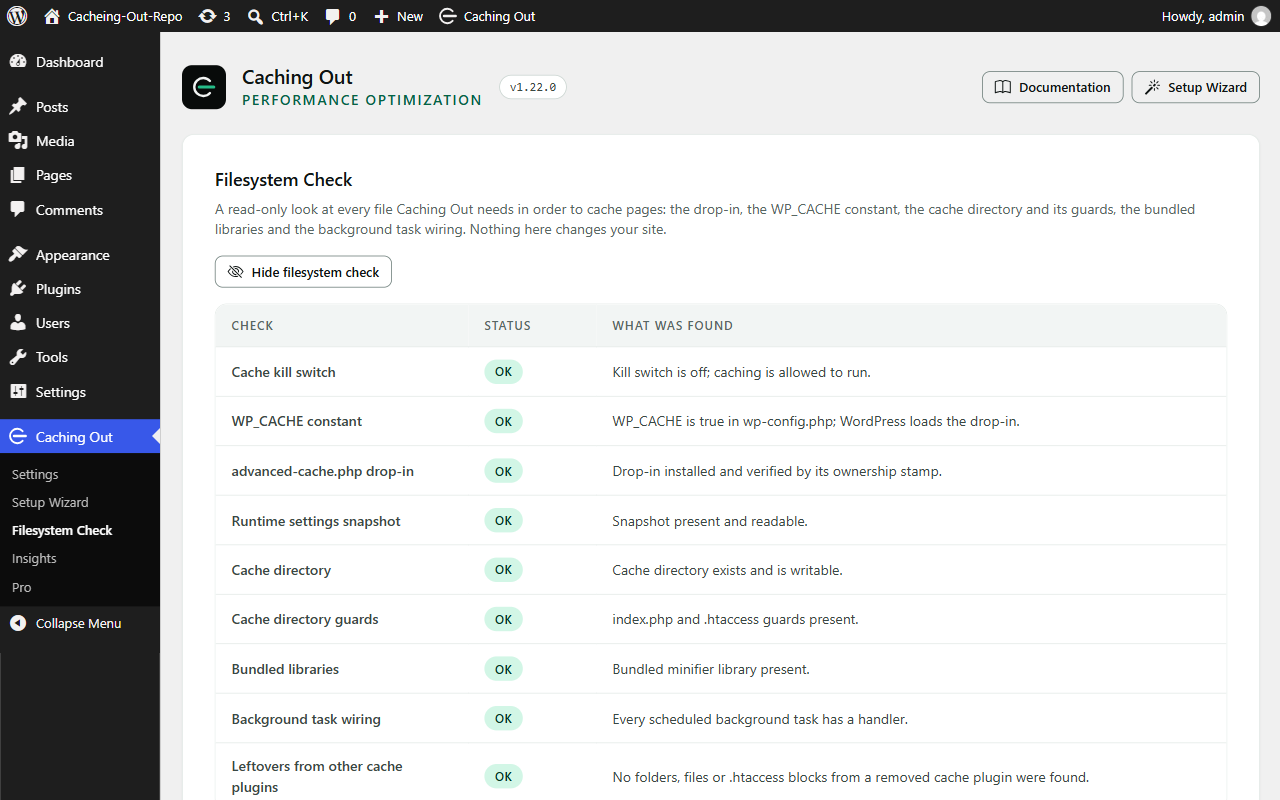
Page Audit and Filesystem Check
Both are included in full, and neither needs an API key.
The Page Audit reads your tracked pages the way a visitor would – over a
loopback request to your own site – and lists what it found. Where a plugin
setting answers the finding, there is a button that changes that setting. Where
your theme or your host has to change something, it says so in plain words.
The Filesystem Check verifies every file the plugin needs: the drop-in, the
WP_CACHE constant, the cache directory, the settings snapshot the drop-in reads
and the scheduled tasks. Each row says what state it is in and what to do about
it.
Caching Out Pro
The free plugin above is complete on its own and stays free. Caching Out Pro is
a separate add-on, installed alongside it, that adds:
- Optimize CSS delivery, combine CSS and JS, delay JS, Google Fonts (combine
and self-host), WebP serving where WebP copies already exist, and YouTube
click-to-load - Unused CSS/JS: stops named plugin files loading on pages that do not need
them, with a scan, a preview, a dependency check, a never-unload list,
suggested rules from a built-in catalogue and an optional weekly scan - Activity: a record of every change the plugin makes, with one-click revert
- Performance Insights: a PageSpeed dial, a baseline, re-tests and history
- Cache preloading, a step you switch on
- Database: scheduled cleanup, orphaned metadata and table optimisation
- CDN rewriting, and purge add-ons for Cloudflare, Varnish and Sucuri
- WP-CLI commands, settings export and import, and Multisite Network Admin
- Email support from the team who built it – plus an assistant that already
knows your setup. It knows which plugins you run, which settings you have on
and what the Page Audit found, so you never have to explain your site before
asking a question. Every answer points at the documentation or the rule it
came from.
The assistant is scoped to Caching Out and your site’s configuration: 50
questions a day and 300 a month per licence. It is not a general-purpose
chatbot; answers are AI-generated and can be wrong, so check anything
consequential against the linked source.
Every feature in every paid plan; the paid plans differ in the number of sites
and the length of support, never in what the plugin does. In both editions,
anything that can change how a page looks stays off until you switch it on.
Details: https://cachingout.com/pricing/
Privacy
The free plugin does not need a licence, never contacts our servers, and makes
no outbound request of its own.
The one exception is the Page Audit and the Filesystem Check, which fetch pages
from your own site over a loopback request when you run them or when the
tracked-page schedule runs. Nothing is sent anywhere else and nothing leaves
your server.
The free plugin sends no usage data. Telemetry belongs to Caching Out Pro,
where it is opt-in with the box unticked, sends aggregate figures only – never
page content and never personal data – and is disabled outright by
define( ‘CACHINGOUT_DISABLE_TELEMETRY’, true );.
The free plugin sets no cookies of its own. It reads cookie names on the
request, because it must – a visitor carrying a session, authentication or cart
cookie is never served a cached page – but no cookie value is stored, logged or
sent anywhere.
Third-party libraries
The admin screens use Bootstrap 5.3.8 (https://github.com/twbs/bootstrap) and
Bootstrap Icons 1.13.2 (https://github.com/twbs/icons), both under the MIT
licence, shipped as the unmodified minified files from their upstream
releases. The human-readable source is in those repositories at the matching
version tag. Minify CSS and Minify JavaScript use matthiasmullie/minify
(https://github.com/matthiasmullie/minify, MIT), shipped unminified in
vendor/. assets/THIRD-PARTY-LICENSES.txt in the plugin folder names each
bundled file, its version and its licence.
The plugin’s own three front-end scripts (the lazy loading helpers) are printed
inline from assets/js/*.min.js; their readable source is in assets/js/src/.
Details

Related plugins
Plugins that also contain the tag cache
WP Super Cache
WP-Optimize – Cache, Compress images, Minify & Clean database to boost page speed & performance
SpeedyCache – Cache, Optimization, Performance

Breeze Cache

OMGF | GDPR/DSGVO Compliant, Faster Google Fonts. Easy.

Jetpack Boost – Website Speed, Performance and Critical CSS


About
Plugin for that tries to help you find the WordPress plugin you are looking for.
| Please enjoy an image of Crush (this awesome turtle) and have a lovely day! |  |
We do not own any plugin listed on this site and do not work for or work with WordPress.com or it's associated companies. We simply provide a searchable list of the available WordPress plugins.