



Calendarista Tables Lite
Calendarista Tables Lite takes reservations for a restaurant, on the restaurant’s own website. There is no menu builder, no online ordering and no point of sale: just a booking widget guests trust, an availability engine that understands how a dining room works, and a diary a host can run a service from.
There is no limit on bookings or guests, nothing is charged per cover, and every booking and guest stays in your own WordPress database.
Need reminders, deposits or a waitlist? Get Calendarista Tables.
Live in five decisions. Setup asks for your restaurant, your services and hours, how many guests you can seat, how you confirm bookings and where notifications go, then publishes a “Reserve a table” page with the widget already on it. Everything else has a default that suits most restaurants.
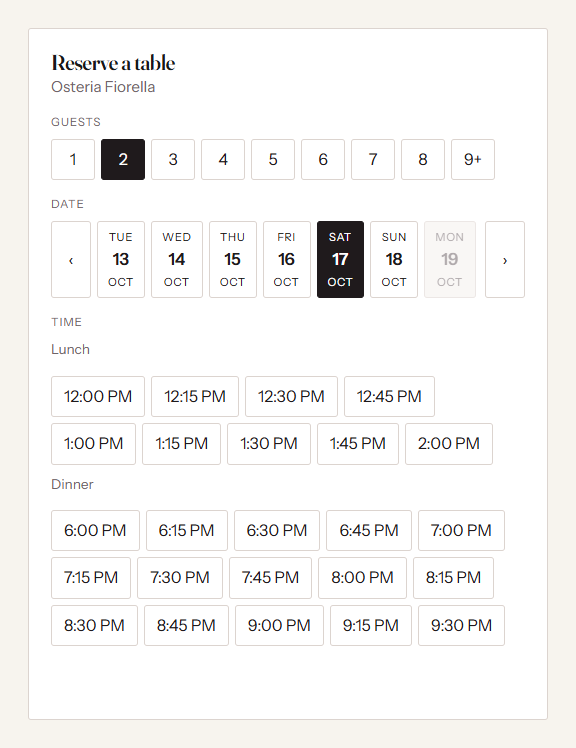
A widget that is faster than calling. Party size first, then a date strip, then only the times genuinely available for that party, with unavailable ones struck through so nobody wonders whether the list is real. Choosing a time holds it for ten minutes while the guest fills in one short form. The widget inherits your theme’s font and takes a single accent colour, so it looks like part of your site. Place it inline, or as a floating “Reserve” button.
An availability engine that understands a restaurant.
- Separate services (Lunch, Dinner, Sunday brunch) with their own hours and booking grid.
- Turn times that grow with party size, and a last seating so you never seat at closing time.
- Covers mode for most restaurants: a cap on guests seated at once, per service.
- Table mode when you want it: your real tables, best-fit seating, and joins for bigger parties. A physical table can never be booked twice.
- Pacing caps, so a rush of arrivals in one quarter-hour cannot swamp the kitchen.
- Closures for holidays and private events, phone-only days, and days with special hours.
- Services that run past midnight, for late bars.
- Two guests can never win the same last table: bookings are settled inside a database transaction.
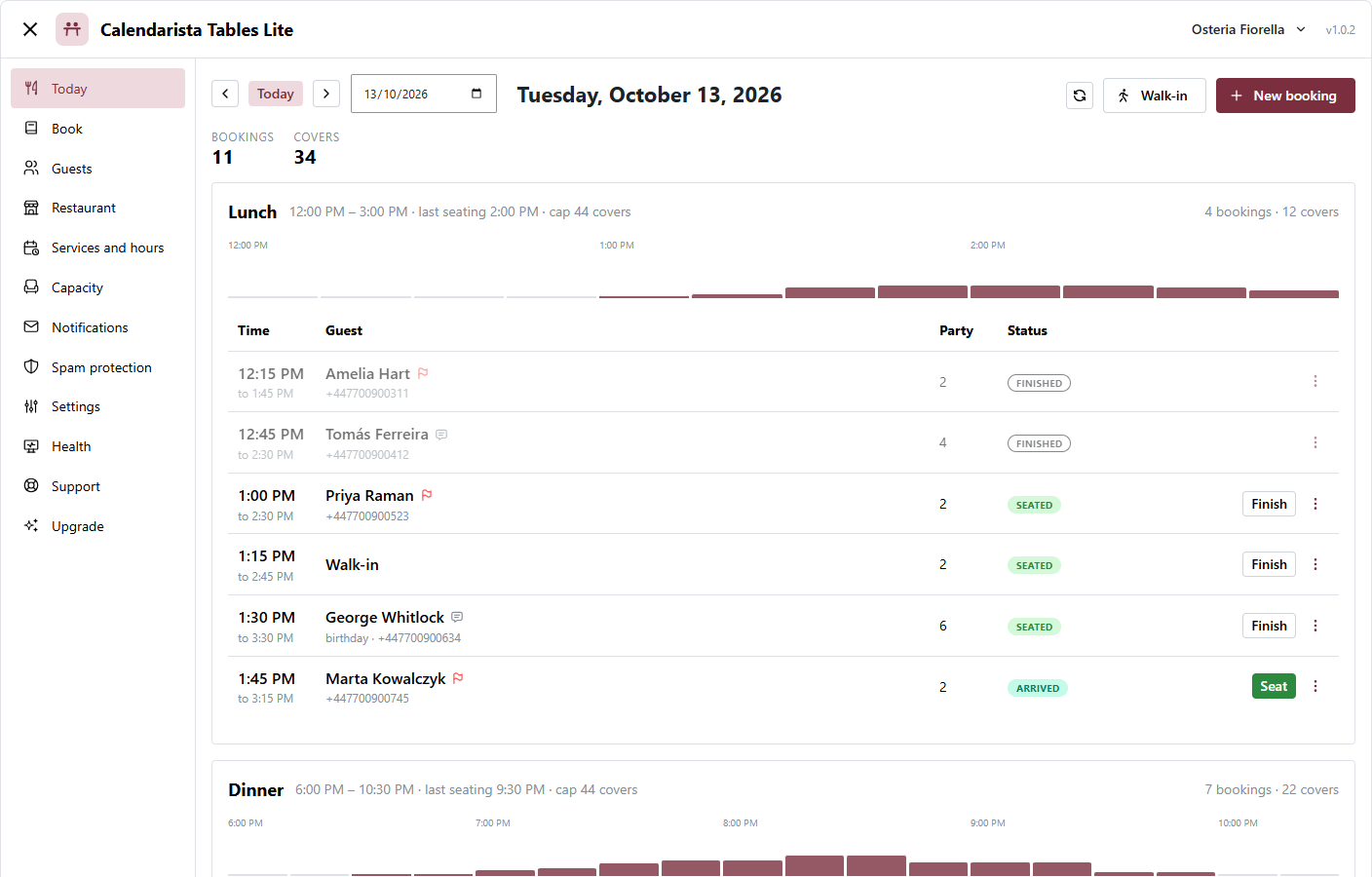
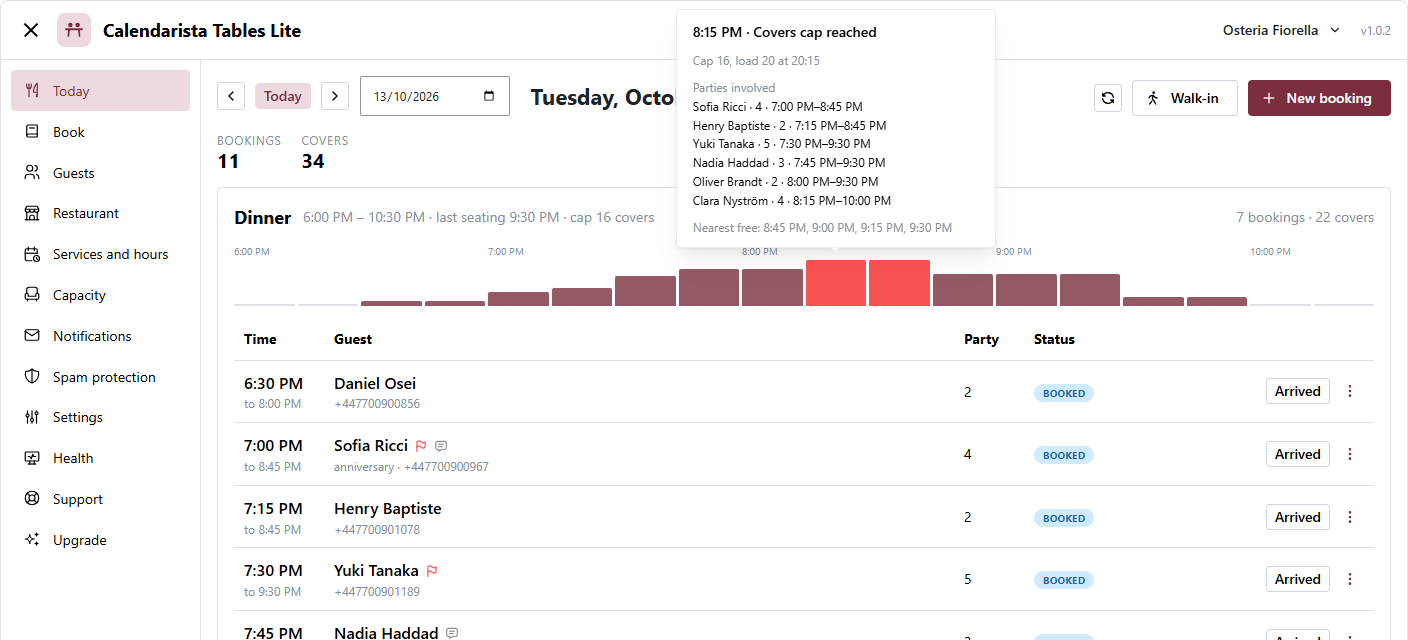
Today, the screen you run service from. The day’s bookings on a timeline with a live “now” line, one-tap Arrived, Seat, Finish and No-show, walk-ins and phone bookings in one button, and an explainer that answers “why is 20:00 full?” by naming the rule and the parties involved.
A guest loop without accounts. Guests get a confirmation email with a calendar file, and a private link where they can change or cancel inside your cancellation window, with no account, no password and no phone call.
Confirm instantly, or approve each request. Online bookings can confirm at once, or arrive as requests you accept or decline from Today. The guest is emailed either way.
A guest book that maintains itself. Every booking adds to it: visits, no-shows, cancellations and last visit. Search by name, email or phone, and export it as CSV whenever you like.
Emails you can edit. Every email has editable wording with placeholders, a live preview as you type and a send-test button. Failed emails are retried automatically and listed on the Health screen.
Spam protection that never closes the door on real guests. A rate limit, a hidden honeypot field, a form timer and a disposable-email list are on by default. Cloudflare Turnstile is there for when you need it.
More than one restaurant. Run every restaurant you own from one install, each with its own services, booking page and diary. Switch between them from the top of the screen.
Built to be supported. A Health screen checks the things that actually break (scheduled tasks, email delivery, the booking page, the database engine) and tells you the fix in a sentence.
Calendarista Tables
Lite is complete for taking bookings. Calendarista Tables adds what a busier room needs:
- Reminders with a one-tap “Yes, I’m coming”, and a daily digest of tomorrow’s list.
- Deposits, or a saved card with a no-show fee, through Stripe’s hosted payment page.
- A waitlist that offers freed-up tables to waiting guests automatically.
- Enquiries for parties above your online maximum.
- Guest tags, standing notes and duplicate merging.
- The Calendarista companion app for iOS and Android.
- Direct email support.
Moving up keeps everything: both plugins read the same tables, and Lite steps aside when Calendarista Tables is activated.
External services
This plugin connects to one external service, and only if you switch it on.
Cloudflare Turnstile (off by default). When you enable Turnstile under Spam protection and enter your own Cloudflare keys, the booking widget loads Cloudflare’s challenge script in the guest’s browser, and when a guest submits a booking the plugin sends the challenge token and the guest’s IP address to Cloudflare to check it. Nothing is sent while Turnstile is off. Cloudflare’s terms of service and privacy policy apply.
The confirmation screen and emails offer guests an “Add to Google Calendar” link. It is an ordinary link: nothing is sent to Google unless the guest clicks it.
Details


Related plugins
Plugins that also contain the tag booking
LatePoint – Calendar Booking Plugin for Appointments and Events

Booking for Appointments and Events Calendar – Amelia

Online Scheduling and Appointment Booking System – Bookly

Appointment Booking Calendar — Simply Schedule Appointments Booking Plugin

Fluent Booking – The Ultimate Appointments Scheduling, Events Booking, Events Calendar Solution

SimplyBook.me – Booking and reservations calendar


About
Plugin for that tries to help you find the WordPress plugin you are looking for.
| Please enjoy an image of Crush (this awesome turtle) and have a lovely day! |  |
We do not own any plugin listed on this site and do not work for or work with WordPress.com or it's associated companies. We simply provide a searchable list of the available WordPress plugins.