


Cartnorm B2B – EU VAT Number Validation (VIES) & Wholesale Prices for WooCommerce
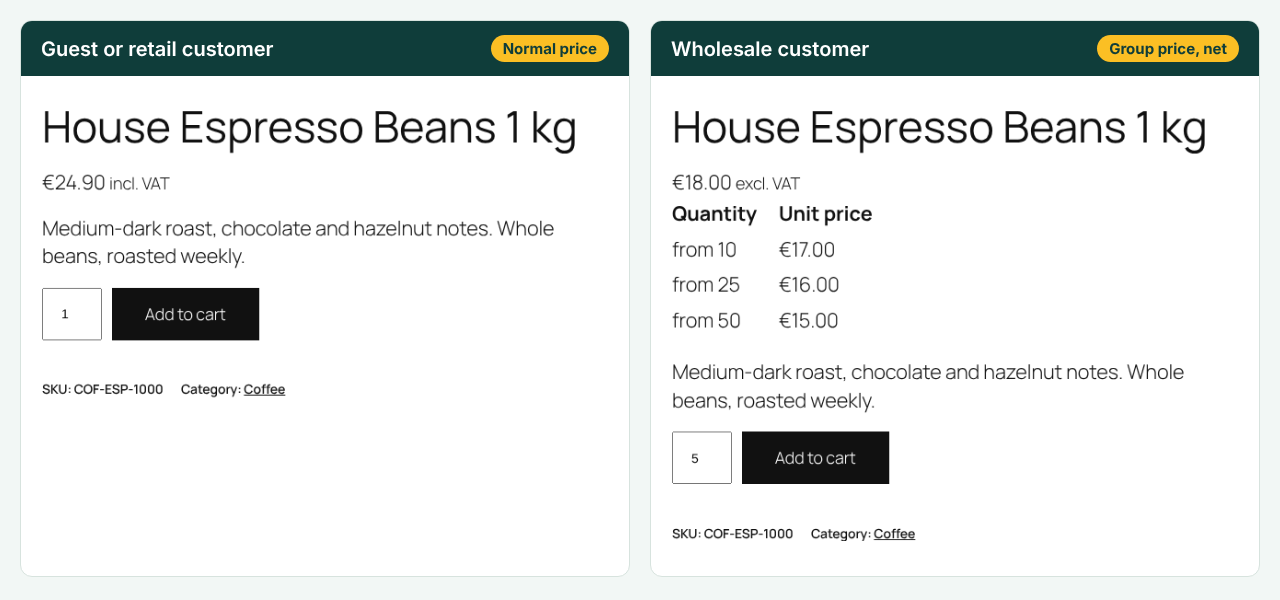
Cartnorm B2B lets one WooCommerce shop sell to consumers and to businesses. Consumers keep seeing your normal prices. Business customers in a group see their own prices, net or gross, can be held to minimum order values and pack sizes, can request quotes, and can apply for a wholesale account themselves. EU businesses from other member states with a valid VAT ID buy without VAT, with the right legal note on the order.
Customer groups
- Retail is built in: guests and every customer who is not in a group see exactly your normal WooCommerce prices.
- Create as many B2B groups as you need (for example “Wholesale”, “Dealer” and “Distributor”), each with a name, prices shown including or excluding VAT, and an optional discount on all products.
- Only shop staff can put a customer into a group (Users › Edit user). Customers can never choose their own group, not at registration, not at checkout, not in My Account.
Wholesale prices with a clear order of precedence
For each group, the price of a product is found in this order:
- A fixed price for the group on the product (simple products and every single variation).
- A category discount of the group (subcategories included; the largest discount wins if a product is in several categories; 0% excludes a category).
- The group’s discount on all products.
- The normal price.
A group price is never higher than the current normal or sale price.
Quantity prices
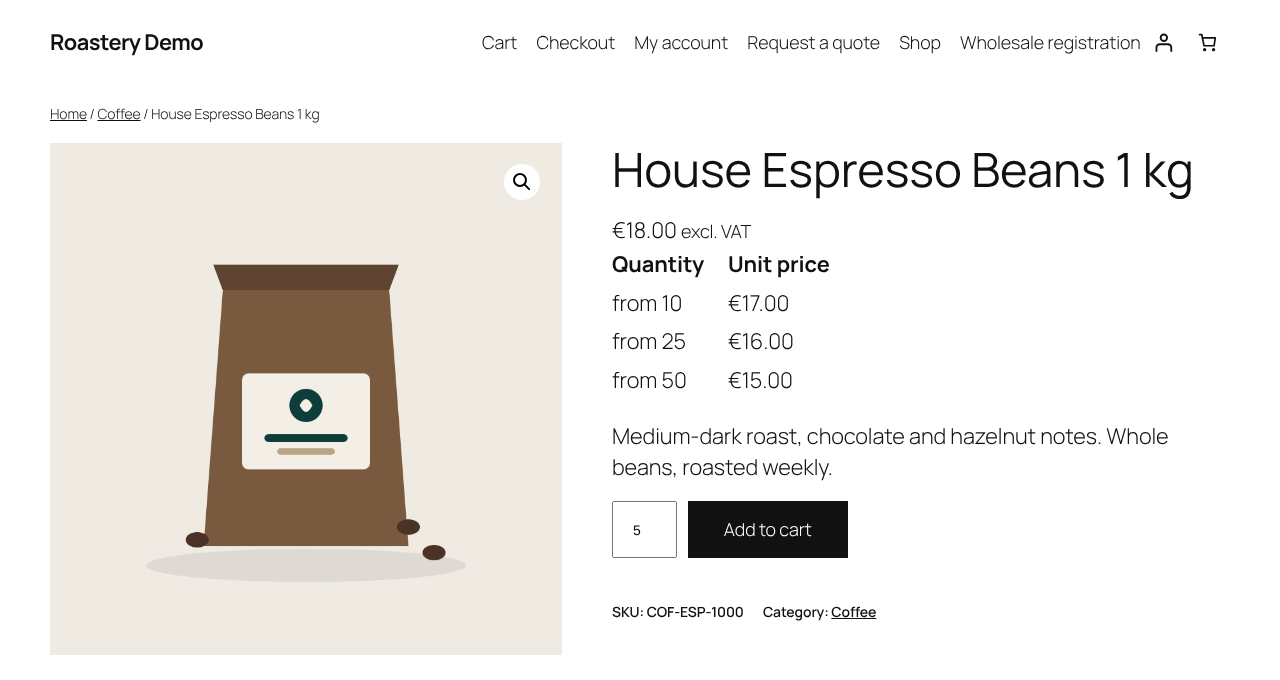
Add quantity prices per product and group, for example from 10 pieces €7, from 50 pieces €6. They are applied in the cart and shown as a small table on the product page.
Works with simple and variable products, in the shop, on the product page, in the mini cart, in the classic cart and checkout and in the cart and checkout blocks. Your stored product prices are never changed.
Order rules: minimum order value, minimum quantity, pack sizes
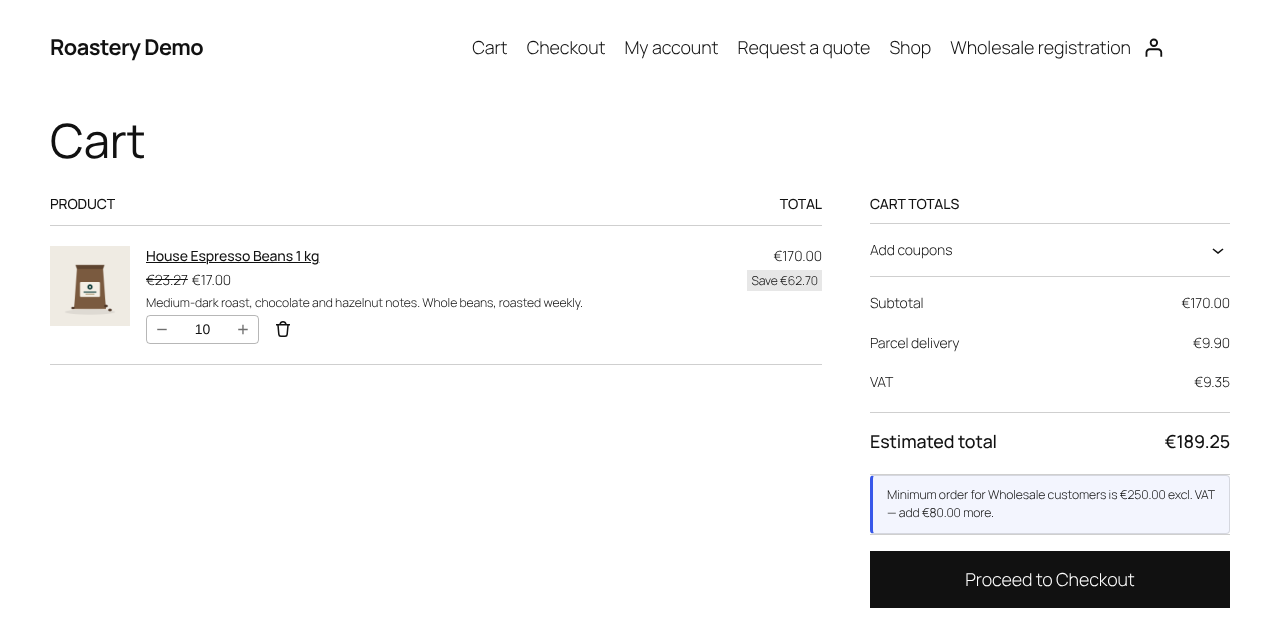
- Minimum order value per group, for example “Wholesale customers order at least €100”. It is compared with the cart subtotal before coupons, excluding or including VAT the way the group sees prices.
- Minimum number of items per group.
- Per product and variation: minimum and maximum quantity and pack size (“sold in cases of 24”), separately for each group. Variations use the product’s rules unless they have their own.
- Quantity fields on the product page and in the cart only offer valid quantities, in the classic cart and in the cart block (via WooCommerce’s Store API quantity limits). Shop buttons add a full pack.
- Friendly, translatable messages such as “Minimum order for Wholesale customers is €100.00 excl. VAT — add €23.50 more” or ““Mug” is sold in packs of 24” in the classic cart, the mini cart and the cart block. Checkout is blocked on the server until the rules are met, in the classic checkout and in the checkout block.
- Retail customers and guests are not affected unless you set rules for Retail.
Request a quote
- Per group, and for Retail customers and guests: an “Add to quote” button next to “Add to cart”, or instead of it.
- Optionally hide prices from a group or from guests (“Log in to see prices”, “Price on request”). Hidden prices are also removed from the Store API product data used by product blocks (
/wc/store/v1/products, including the price filter range) and from the product’s structured data (JSON-LD), so they cannot be read from the page source. Customers who cannot see prices cannot buy, also not through the Store API. - A quote request page (created automatically, works in block themes; shortcode
[cartnorm_b2b_quote]) where customers change quantities and send their details: name, company, email, country, VAT ID (prefilled) and a message. Spam protection with a honeypot field and a rate limit. - Quotes are listed in WooCommerce › Quotes with the statuses New, Answered, Accepted, Expired and Converted. You enter a price per line (the customer’s current shop price is shown as reference), a validity date and a note, and send the answer with one click.
- The customer accepts from a signed link that expires with the quote. The plugin then creates a WooCommerce order with your prices, “pending payment”, with the same VIES and 0% VAT rules as the checkout, and sends the customer to the “pay for order” page.
- Emails (WooCommerce › Settings › Emails, translatable, using your WooCommerce email template): new quote request (to you), quote answered and quote expired (to the customer). Answered quotes expire automatically after the validity date.
Wholesale registration
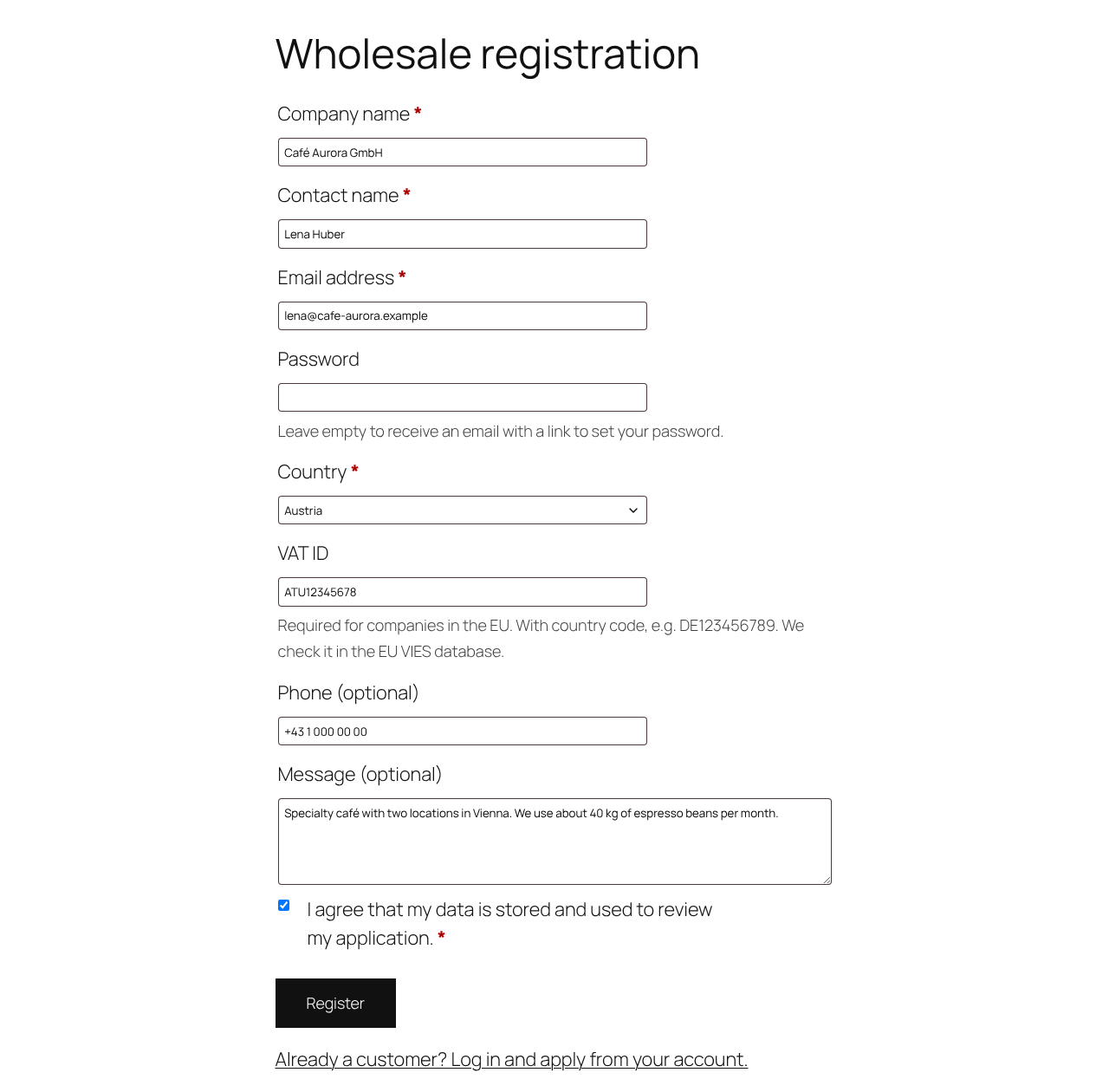
- A registration page (created automatically; shortcode
[cartnorm_b2b_registration]) with company name, contact name, email, password (or a “set your password” email link), country, VAT ID, phone and message, plus a privacy consent checkbox. - The VAT ID is checked in VIES. If VIES is unavailable, the application waits for your review.
- Manual approval (default) or automatic approval when VIES confirms the VAT ID. Applicants stay Retail customers until they are approved; a group is never taken from the form.
- Users › Pending wholesale lists the applications, with approve and reject links. You and the customer are informed by email.
- Existing customers can apply from My Account.
- Spam protection: nonce, honeypot field and a rate limit per IP address.
Store modes: Hybrid or B2B only
- Hybrid (default): consumers and guests see your normal WooCommerce prices; B2B groups see their own prices, net if the group is set to “excluding VAT”.
- B2B only: the shop sells only to approved business customers (customers in a B2B group). Guests and customers without a group see no prices (also not in product blocks, the Store API and the structured data), cannot buy and see a notice with links to log in or apply for a business account.
- Optionally the whole catalog is restricted to approved customers: other visitors are sent to the login page or the wholesale registration page.
Showing only net prices is allowed only if consumers are effectively excluded, for example because every account is checked (VAT ID, company details) before it is approved. A checkbox “I am a business customer” is not enough. The settings screen explains this.
Safe with page caches
A consumer must never see a cached page with net prices that was made for a wholesale customer. Pages for logged-in B2B customers (and every page in “B2B only” mode) are sent with Cache-Control: private, no-store and DONOTCACHEPAGE. Group members get a signed cookie (cartnorm_b2b_group) so caches that cache logged-in users can keep the groups apart; prices are never taken from that cookie.
Built-in support for WP Rocket, LiteSpeed Cache, W3 Total Cache, WP Super Cache and FlyingPress. The settings show which cache plugin was found and what Cartnorm B2B did, and a self-test loads your shop like an anonymous visitor and checks that no B2B prices leak.
Unit prices
- With Germanized, the unit price (price per kg, l …) of group members is recalculated from their group price, and Germanized’s “incl. / excl. VAT” notice follows the group’s net or gross display.
- Without Germanized or German Market you can turn on a simple unit price: add unit, reference amount and content to a product, and a line such as “€7.00 / 1 kg” is shown under the price, calculated from the price each customer sees.
Orders created in wp-admin
When you create or edit an order in WooCommerce › Orders for a customer in a group, added items get the customer’s group price (with quantity prices). “Recalculate” re-prices lines that still have the normal price, for example when you added the items before choosing the customer. Prices you changed by hand are kept.
Net or gross prices per group
Groups set to “excluding VAT” see shop and cart prices without VAT and with a clear “excl. VAT” suffix. Only the display changes; VAT is calculated as usual. Retail always uses your store settings.
EU VAT ID check with correct 0% VAT
- VAT ID field in the classic checkout, the block checkout, My Account › Account details and the user profile.
- Format check for all 27 EU member states and Northern Ireland (XI), then a live check in VIES, the official EU database.
- Your own VAT ID is sent as the requester, so VIES returns a consultation number – your proof that you checked.
- 0% VAT only when it is correct: the VAT ID is valid in VIES and the customer is in an EU country other than your shop’s country. Customers from your own country always pay VAT.
- VIES down? Checkout keeps working. VAT is charged, the order is accepted and marked “pending verification”, and the number is checked again automatically in the background.
- Invalid numbers get a clear message (or, if you prefer, the order is accepted with VAT).
- Results are cached (7 days for valid numbers) so checkout stays fast.
The right legal wording on every order
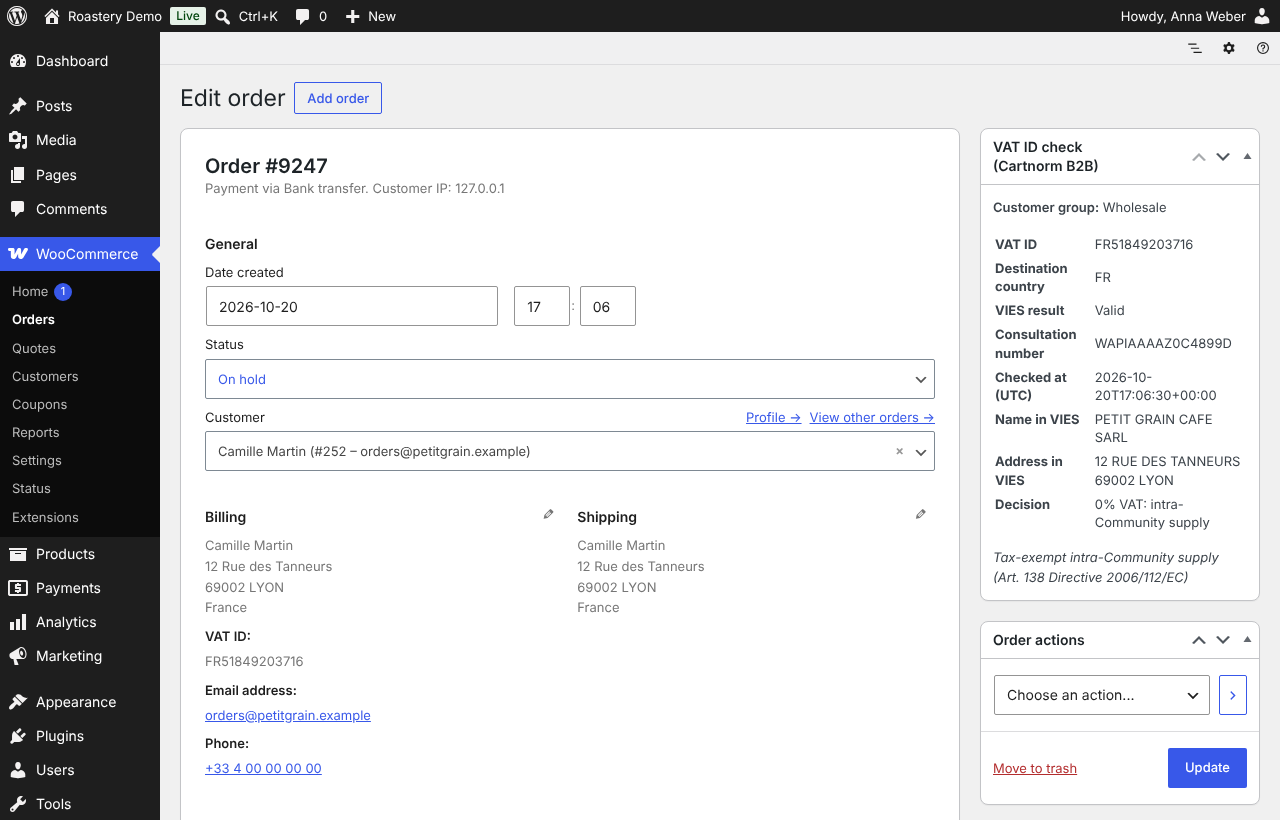
- Goods: “Tax-exempt intra-Community supply (Art. 138 Directive 2006/112/EC)”
- Services and virtual products: “Reverse charge: VAT to be paid by the recipient (Art. 196 Directive 2006/112/EC)”
- Mixed carts show both.
The wording is stored on the order in the language of the order and shown on the thank-you page, in My Account, in the order emails and in the admin order screen. Both phrases are built in for all 24 official EU languages (for example “Steuerfreie innergemeinschaftliche Lieferung (Art. 138 MwStSystRL)” and “Steuerschuldnerschaft des Leistungsempfängers (Reverse Charge, Art. 196 MwStSystRL)” in German, “Autoliquidation” in French, “Odwrotne obciążenie” in Polish), so they do not depend on installed translations. The language comes from WPML or Polylang, or from the language of the shop at checkout. The phrases and the language can be changed with filters.
Works with
- WooCommerce cart and checkout blocks, High-Performance Order Storage
- Cartnorm Omnibus Lowest Price: B2B group members do not see the consumer “lowest price in the last 30 days” notice, and Omnibus’ strikethrough logic does not touch group prices. Retail customers are not affected.
- Germanized: unit prices and VAT notices follow the group price and display
- German Market: best effort, not yet tested (see FAQ)
- WPML and WooCommerce Multilingual: group prices, quantity prices, quantity rules and unit price fields are copied to translations (wpml-config.xml); labels and group names can be translated; fixed group prices and quantity prices follow WCML’s exchange rates in other currencies
- WP Rocket, LiteSpeed Cache, W3 Total Cache, WP Super Cache, FlyingPress
Translations
Translations come from translate.wordpress.org as language packs. So that shops do not have to wait for a language pack, the texts your customers see (price suffix, VAT ID field and its messages, order rule messages, quote and registration pages, customer emails) have built-in wording for German (Germany and Austria, formal “Sie”), Polish, French (France and Belgium), Italian, Spanish and Dutch (Netherlands and Belgium). The built-in wording is used only for strings that no installed language pack translates. The settings screens are in English until a language pack is available.
Evidence for your tax office
Every order with a VAT ID stores the VAT ID, its country, the VIES result, the consultation number, the time of the check and the decision. You see it in a box on the order screen, and invoice plugins can read it from the order meta (see “For developers”).
Fast
No database queries per cart line, also for the order rules. In our test a cart with 300 lines in a B2B group is calculated in about 40 ms.
Not tax advice
Cartnorm B2B applies the general EU rules for business-to-business sales (Articles 138 and 196 of Directive 2006/112/EC). It is not tax advice. Special cases – for example triangular trade, goods that are not dispatched to another member state, special schemes, or national rules – are not covered. Please confirm with your tax adviser how these rules apply to your business.
External services
This plugin connects to VIES (VAT Information Exchange System), a service of the European Commission, to check whether a VAT identification number is valid.
- When: when a customer enters a VAT ID at checkout (classic or block checkout) and the cart is calculated, when someone applies for a wholesale account with a VAT ID, when a customer accepts a quote (the order is checked like a checkout), and when an order whose VAT ID could not be checked is checked again in the background. Results are cached, so the same number is not sent again for up to 7 days.
- What is sent: the country code and number of the VAT ID the customer entered and, if you entered it in the settings, your shop’s own VAT ID (as “requester”, to receive a consultation number). No other customer data is sent.
- Where:
https://ec.europa.eu/taxation_customs/vies/rest-api/check-vat-number - Service: https://ec.europa.eu/taxation_customs/vies/
- Privacy statement: https://commission.europa.eu/privacy-policy-websites-managed-european-commission_en
No data is sent anywhere else. The plugin does not contact cartnorm.com.
For developers
Order meta (read with $order->get_meta()):
_cartnorm_b2b_vat_id– VAT ID with country prefix, e.g. DE123456789_cartnorm_b2b_vat_country– country of the VAT ID_cartnorm_b2b_vat_destination– country that decided about VAT_cartnorm_b2b_vies_status– valid, invalid, unavailable or format_invalid_cartnorm_b2b_vies_consultation– VIES consultation number_cartnorm_b2b_vies_checked_at– time of the VIES check (UTC, ISO 8601)_cartnorm_b2b_vies_name,_cartnorm_b2b_vies_address– trader data returned by VIES_cartnorm_b2b_vat_treatment– standard, intra_community_supply, reverse_charge, mixed or pending_verification_cartnorm_b2b_vat_reason– cross_border, same_country, outside_eu, country_mismatch, invalid, unavailable, verified_after_order …_cartnorm_b2b_vat_notes– array of legal notes to print on the invoice_cartnorm_b2b_customer_group– customer group at the time of the order_cartnorm_b2b_locale– language of the legal notes_cartnorm_b2b_quote_id– quote the order was created from
Filters (selection): cartnorm_b2b_group_price, cartnorm_b2b_never_above_retail, cartnorm_b2b_tier_quantity, cartnorm_b2b_user_group, cartnorm_b2b_can_assign_group, cartnorm_b2b_vat_decision, cartnorm_b2b_require_matching_country, cartnorm_b2b_is_service, cartnorm_b2b_legal_note_goods, cartnorm_b2b_legal_note_services, cartnorm_b2b_legal_notes, cartnorm_b2b_vies_timeout, cartnorm_b2b_vies_cache_ttl, cartnorm_b2b_keep_data_on_uninstall, cartnorm_b2b_group_order_rules, cartnorm_b2b_product_quantity_rule, cartnorm_b2b_min_order_cart_amount, cartnorm_b2b_cart_rule_messages, cartnorm_b2b_quote_mode, cartnorm_b2b_hide_prices, cartnorm_b2b_add_to_quote_label, cartnorm_b2b_registration_errors, cartnorm_b2b_auto_approve, cartnorm_b2b_rate_limit, cartnorm_b2b_store_locked, cartnorm_b2b_store_notice, cartnorm_b2b_is_catalog_request, cartnorm_b2b_private_page, cartnorm_b2b_cache_plugins, cartnorm_b2b_legal_phrases, cartnorm_b2b_order_language, cartnorm_b2b_convert_price, cartnorm_b2b_show_excl_suffix, cartnorm_b2b_units.
Order item meta _cartnorm_b2b_group_price marks lines that were priced for a group in the order editor.
Actions (selection): cartnorm_b2b_quote_created, cartnorm_b2b_quote_after_answer, cartnorm_b2b_quote_converted, cartnorm_b2b_quote_status_changed, cartnorm_b2b_application_submitted, cartnorm_b2b_application_approved, cartnorm_b2b_application_rejected.
Quote statuses are post statuses of the private post type cartnorm_b2b_quote: cnb2b-new, cnb2b-answered, cnb2b-accepted, cnb2b-expired, cnb2b-converted.
Assign a group from your own code: \Cartnorm\B2B\Groups::assign( $user_id, 'wholesale' );
Details



Related plugins
Plugins that also contain the tag b2b
B2BKing — Ultimate WooCommerce B2B and Wholesale Solution — Dynamic Pricing, Wholesale Order Form & More

Lead Forensics

CatalogX – Catalog Mode, Enquiry & Quotes for WooCommerce

WholesaleX – B2B & Wholesale Plugin for WooCommerce with Wholesale Prices

WC Call For Price

Wholesale & Tiered Pricing for WooCommerce


About
Plugin for that tries to help you find the WordPress plugin you are looking for.
| Please enjoy an image of Crush (this awesome turtle) and have a lovely day! |  |
We do not own any plugin listed on this site and do not work for or work with WordPress.com or it's associated companies. We simply provide a searchable list of the available WordPress plugins.