



Clickflame Rank Any Site
Clickflame Rank Any Site finds the directories a local business belongs on, tracks every listing from your WordPress admin, and reads listing pages, where the directory allows it, to check your name, phone and place. It also reads your own published pages the way Google and AI answer engines do and lists what to fix.
It is built to run beside the SEO plugin you already use. For a plain account of what is different, what overlaps and how it was checked, see docs/WHY-THIS-PLUGIN.md in the plugin folder.
Free, no account:
- Citation Finder. A list of 900+ directories, filtered to your trade, strongest first, with cost and the page where you add or claim a listing. Find By Name and Find By Phone open a search for that directory in your own browser.
- Citation Tracker. One row per directory with a status (Not Checked, Not Listed, Submitted, Live, Needs Fix, Skip), the listing address and your notes. Add any directory of your own and download it all as CSV.
- Listing check. One click reads a listing page and compares it with Your Facts: name, phone and place, including the phone number the page shows when it is different. Many large directories block automated reads. Those rows are marked so you can open them by hand and set the status yourself. An optional weekly check flags listings that change.
- What the live page serves. One click on any post or page and your site reads its own published page the way Google and AI crawlers do. You get plain findings: “Google sees 2 page descriptions, your theme prints an extra one”, “your server sends a noindex header”, “the canonical points somewhere else”, “robots.txt blocks ChatGPT”.
- Can AI answer from this page? Checks the things ChatGPT, Perplexity and Google AI need to quote you: a short answer-first opening, questions answered on the page, sources linked, schema, the page listed in llms.txt, and AI crawlers allowed in robots.txt.
- Your facts, with proof. Licenses with their lookup links, insurance, year founded, reviews, phone, address, Google Business Profile and service areas. They go into LocalBusiness schema (with your licenses as credentials), a llms.txt file and a How To Check Us page, made in one click. Empty fields print nothing; the plugin never makes up a fact.
- Fix it in one click. Most findings come with a Fix button, and “Fix All” makes every fix for a page at once, after you confirm. Site-wide fixes: keep one title, description, canonical and robots tag when a theme or plugin prints extras; remove a noindex header added by code; turn off “Discourage search engines”; add share previews (Open Graph and Twitter); add Article or WebPage schema and FAQ schema built word for word from questions on the page; fill missing alt text from the Media Library; allow AI crawlers in robots.txt; serve llms.txt; show your phone and city in the footer. Page fixes: point the canonical at the page, write the description from the page’s own opening, shorten a long title at a whole word, use the first image as the share image. The dashboard has “Fix Everything” for the recommended site fixes, every fix can be turned off again, and the Posts list has a “check and fix” bulk action.
- House rules for titles and descriptions. Titles as service, city and phone (“Car Lockout in Tulsa OK. Call (918) 555-0142”), about 60 characters, with periods or commas instead of pipes, colons and dashes. Descriptions of 140 to 160 characters with your phone on service pages. The box, the live check and one-click fixes all follow them, using the phone in Your Facts.
- Meta keywords (optional). A per-page keywords field in the box, Quick Edit and the Bulk SEO Editor, printed only when filled in, with a warning when a list runs past 8 phrases or repeats a word. Google ignores this tag; Bing may read it.
- Connections. Google Analytics 4 (loaded after the page is ready, never for logged-in editors), Google and Bing verification (meta tags, the Google HTML file and BingSiteAuth.xml), your own llms.txt, and IndexNow pings on publish, update and delete (opt-in).
- Sitemaps and archives. Last-modified dates in the WordPress sitemap, /sitemap.xml sent to it, a Sitemap line in robots.txt (a real robots.txt file is edited once, with a backup), noindexed pages kept out, and thin pages (date archives, search results, author pages on one-author sites) kept out of search, with attachment pages sent to their post.
- Clean head. One title with your business name once, one description (a description a page builder puts inside the page body moves to the head), one canonical, schema printed once, and no Article markup on plain pages.
- Speed fixes. The main image loads first and is preloaded, other images decode in the background and get their width and height, Google Analytics and Tag Manager tags from your theme load after the page, emoji and embed scripts and extra head links are removed, Google Fonts show text right away, new uploads are saved as WebP, and blocking scripts can be deferred (advanced). The live check measures how fast your server builds each page, whether it is compressed, how heavy it is, and what blocks it.
- Page caching. One click saves each page as HTML and serves it to visitors who are not logged in, through the standard advanced-cache.php drop-in. It clears itself on every edit, comment, menu or SEO change, skips logged-in users, carts, checkouts, searches and forms, times the home page before and after so you see the gain, and stays off when another cache plugin or a managed host cache is found. Optional browser caching and compression for Apache and LiteSpeed.
- Local checks. Each live check compares the phone and city on the page with your facts.
- What changed this week. Every title, description, robots, canonical and fact change is logged with its before and after, and the dashboard shows the change in live-page issues it caused.
- Your search listing. SEO title and description with a Google preview and plain length hints, an optional search phrase, title variables (%title%, %sitename%, %sep%, %year%, %excerpt%), per page noindex, nofollow and canonical. Noindexed pages leave the sitemap and llms.txt.
- Many pages at once. The Posts and Pages lists show each page’s live-check result, Quick Edit has the SEO fields, and the Bulk SEO Editor writes titles and descriptions for many pages on one screen.
- Turn any part on or off. Rank Any Site, Settings has a panel for each area (SEO box, live page check, meta keywords, site fixes, facts and schema, sitemap cleanup, connections, speed and caching, change log, citations) with a switch. Turning one off stops everything it prints and keeps its settings for later.
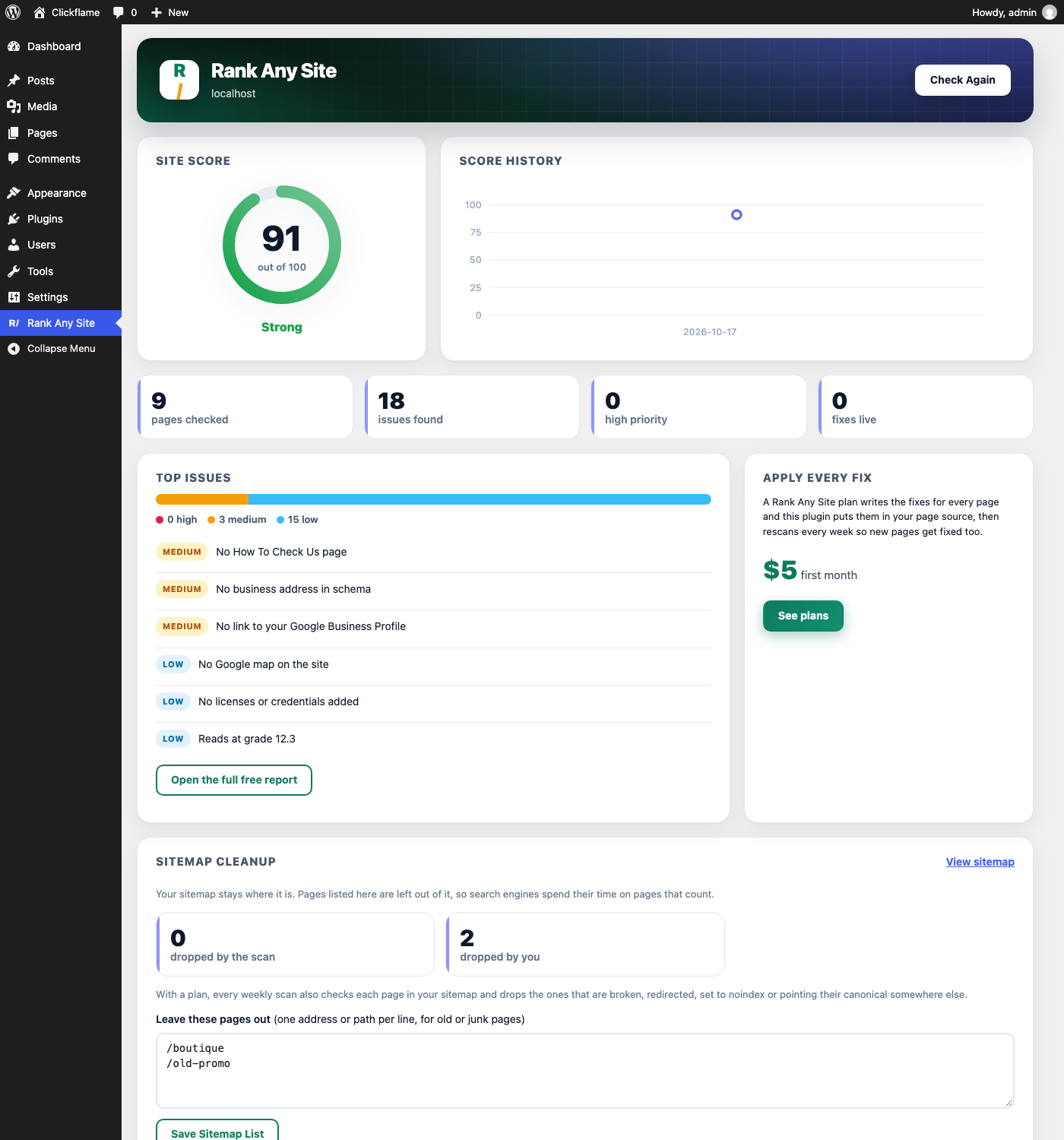
- A site dashboard with your score, score history, issues by priority, and sitemap cleanup that works with the WordPress sitemap, Yoast SEO, Rank Math and All in One SEO.
- Works beside Yoast SEO, Rank Math and All in One SEO: your values and facts go into their tags and schema, so nothing prints twice.
With a Rank Any Site plan (paid service, first month $5), the plugin applies the fixes in your page source and keeps them current:
- Titles and meta descriptions written from what is really on each page.
- Schema: Organization or LocalBusiness with the licenses and facts you enter, WebPage, Breadcrumbs, Articles and FAQs that are visible on the page.
- Open Graph and Twitter tags so shared links look right.
- Image alt text.
- Redirects from old URLs that now 404 to the page that replaced them.
- llms.txt and llms-full.txt so AI tools describe your business correctly.
- Every page in your sitemap checked each week; pages that are broken, redirected, set to noindex or pointing their canonical elsewhere are left out of the sitemap automatically.
- A fresh scan every week, so new and changed pages get fixed too, with score history on the dashboard.
- Automatic citation search: instead of searching directory by directory, the service looks for your business on the directories for your trade and fills in your Citation Tracker.
The plugin never invents facts about your business. Licenses, insurance, address and hours only come from what you enter in your account. It only adds a description where a page has none and never repeats a schema type a page already has, so it works next to other SEO plugins.
External services
This plugin connects to Rank Any Site (https://rankanysite.com), a service run by Supercanic LLC. Nothing is sent until an administrator clicks a button on the Rank Any Site dashboard.
- Free score. When you click “Check My Site Free”, the plugin sends your site’s home URL to https://rankanysite.com/api/free/score. The service reads your public pages and returns a score, top issues and a link to the full report.
- Plan sync. When you save a license key, and then once a day, the plugin sends the license key, your site’s home URL and the plugin version to https://rankanysite.com/api/lic/sync. The service returns the fixes for your pages, which the plugin stores in your options table. When the service has search and traffic numbers for your site (Google Search Console clicks, Google Analytics visitors, call and form lead counts), it returns them too for the Big wins and Traffic cards, along with the Google PageSpeed results the service gathers for the site once a day (the plugin itself never calls Google). Before sending them it reads https://your-site/wp-json/rank-any-site/v1/owner, which answers a one-way hash of your key (never the key itself), to confirm the key belongs to this site.
-
Rescan. “Rescan My Site Now” sends the same data with a rescan request.
-
Automatic citation search (plan sites, only when you click Search All Directories For Me). The plugin sends your license key, home URL, business name, business type, phone, address and Google Business Profile link to https://rankanysite.com/api/lic/citations. The service searches public directories for the business through a search data provider and returns the listings it found.
- Google Analytics (only when you enter a Measurement ID on the Connections screen). Visitors’ browsers load Google’s tag from https://www.googletagmanager.com after the page is ready, and Google Analytics receives the usual page view data. Google terms: https://marketingplatform.google.com/about/analytics/terms/us/ and privacy policy: https://policies.google.com/privacy
-
IndexNow (only when you turn it on on the Connections screen). When a page is published, updated or deleted, its address, your site’s host name and the IndexNow key are sent to https://api.indexnow.org/indexnow, which shares them with participating search engines. Terms: https://www.indexnow.org/terms
-
Citation Tracker listing check (only when you click Check or Save And Check All, or turn on the weekly check). Your site requests the listing addresses you saved, directly from that directory, and reads the page on your server. Nothing goes to rankanysite.com. The request names the plugin in its user agent. Each directory’s own terms and privacy policy apply.
- Citation Finder search links. Find By Name and Find By Phone are ordinary links to https://www.google.com/search. They open in your browser only when you click them, and the plugin sends nothing. Google terms: https://policies.google.com/terms and privacy policy: https://policies.google.com/privacy
The plugin itself sends no visitor data to rankanysite.com. Rank Any Site’s crawler identifies itself as RankAnySiteBot and only reads public pages.
- Terms of service: https://rankanysite.com/terms
- Privacy policy: https://rankanysite.com/privacy
- About the crawler: https://rankanysite.com/bot
Rebuild In WordPress. When an administrator presses Start on the Rebuild screen, the rebuild key and the address of the site to rebuild are sent to rankanysite.com, which reads that site’s public pages and returns them. Pictures are then copied from that site into your media library.
Details

Related plugins
Plugins that also contain the tag ai-search
WP Search with Algolia

Init Live Search – AI-Powered, Related Posts, Slash Commands

Chatbot with ChatGPT WordPress

SEOJuice

IASM – AI Search Visibility Monitor

AI Analytics – Track AI Bots & Referrals


About
Plugin for that tries to help you find the WordPress plugin you are looking for.
| Please enjoy an image of Crush (this awesome turtle) and have a lovely day! |  |
We do not own any plugin listed on this site and do not work for or work with WordPress.com or it's associated companies. We simply provide a searchable list of the available WordPress plugins.