



Code and core – Smart Image Ratio
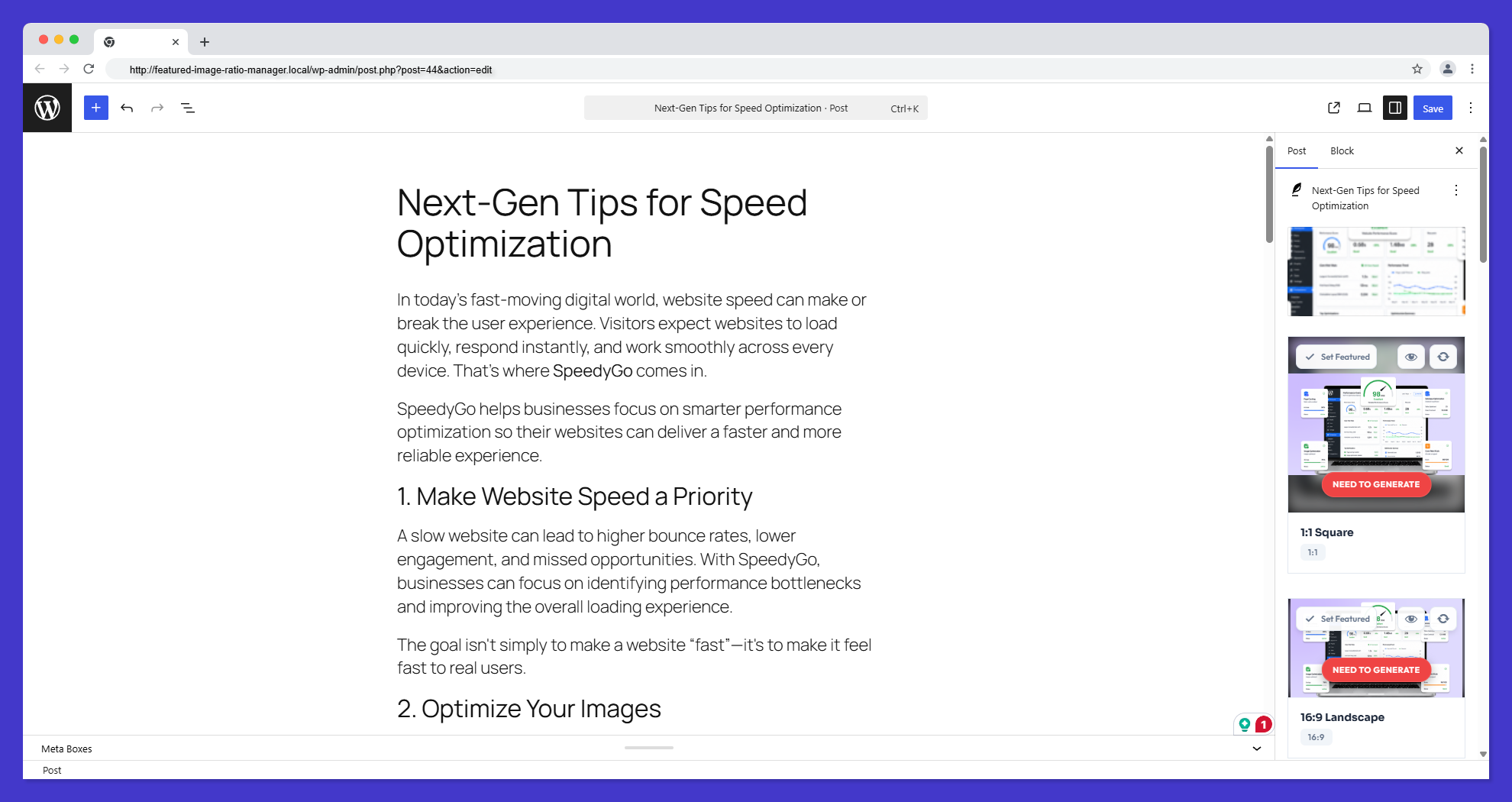
Codeandcore Smart Image Ratio is a premium WordPress plugin designed for high-fidelity aspect ratio management. It empowers developers and site owners to create perfectly sized image variations with interactive cropping, modern smart-fill technology, and an efficient background processing engine.
The Ultimate Control Over Your Library
In our latest major release, we’ve transformed the plugin into a highly efficient, server-friendly powerhouse:
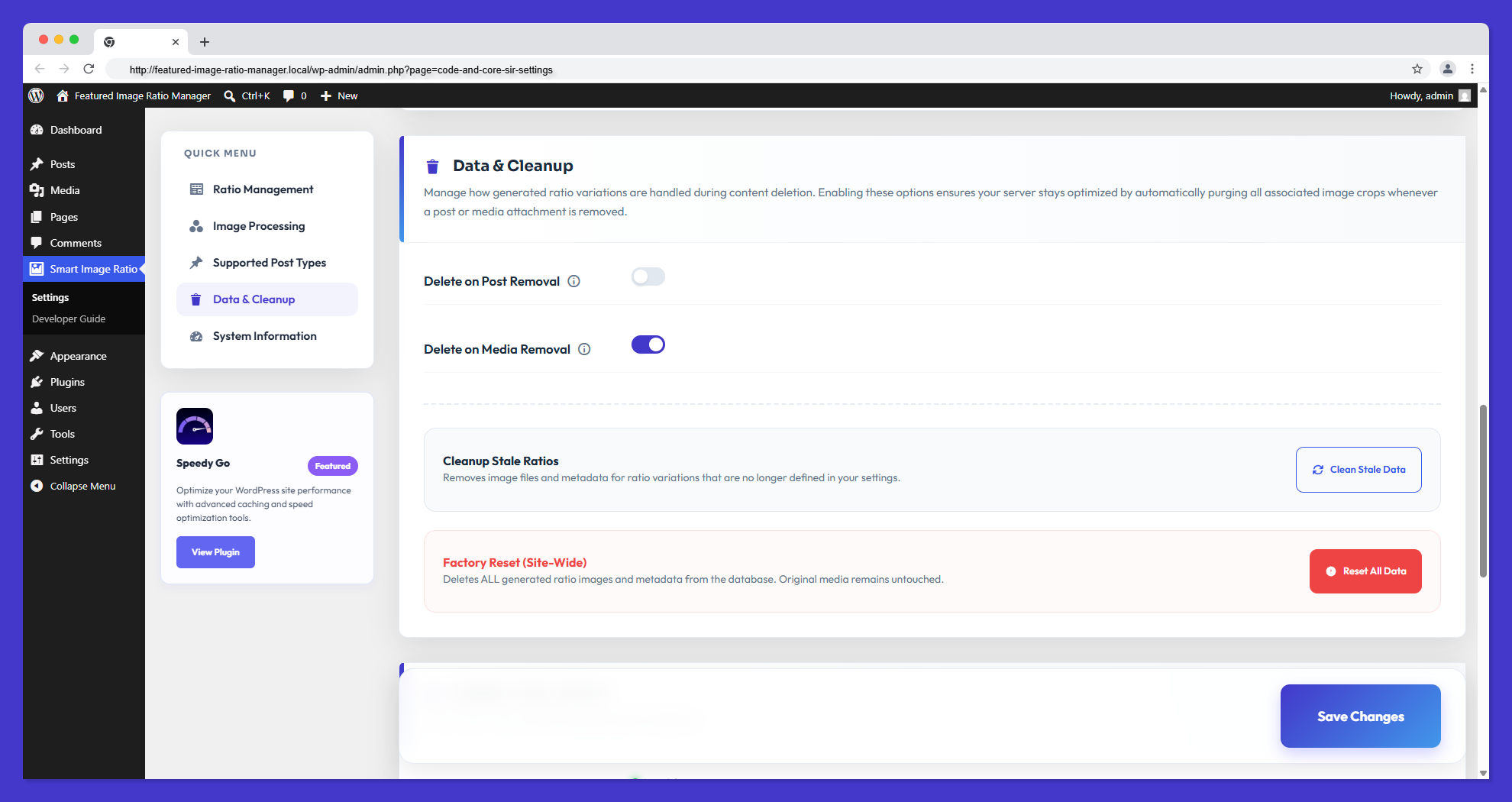
- Automatic Data Cleanup: Keep your database and literal
<upload>folders 100% bloat-free. When a post or media attachment is deleted, the plugin intelligently hunts down and permanently deletes all generated ratio variations and tracking metadata. - Conversion Coverage Dashboard: Need to know how many images are actually structured correctly? Our new real-time statistical dashboard displays your conversion progress percentages across all registered post types beautifully.
- Atomic Metadata Infrastructure: Built-in race condition prevention. All metadata updates use optimistic locking to ensure data integrity during concurrent AJAX operations.
- Harden Security & Privacy: All AJAX endpoints strictly enforce capability checks. Custom upload directories are automatically protected with index.php files to prevent directory listing.
- 100% Privacy Compliance (Native Hosting): We’ve completely detached from third-party CDNs. Every single asset (from SweetAlert2 modules to SaaS-inspired Google Fonts) is hosted natively within the plugin folder. 0 tracking, 0 offloaded scripts.
Boost Your SEO & User Experience
Image optimization is a core pillar of technical SEO. By serving perfectly sized aspect ratios, you reduce Layout Shift (CLS), which is a critical Core Web Vital metric. Faster loading, correctly dimensioned images signal search engines that your site provides a high-quality user experience. Additionally, our “Smart-Fill” technology ensures that your featured images always look intentional and professional, reducing bounce rates and increasing user engagement.
Features
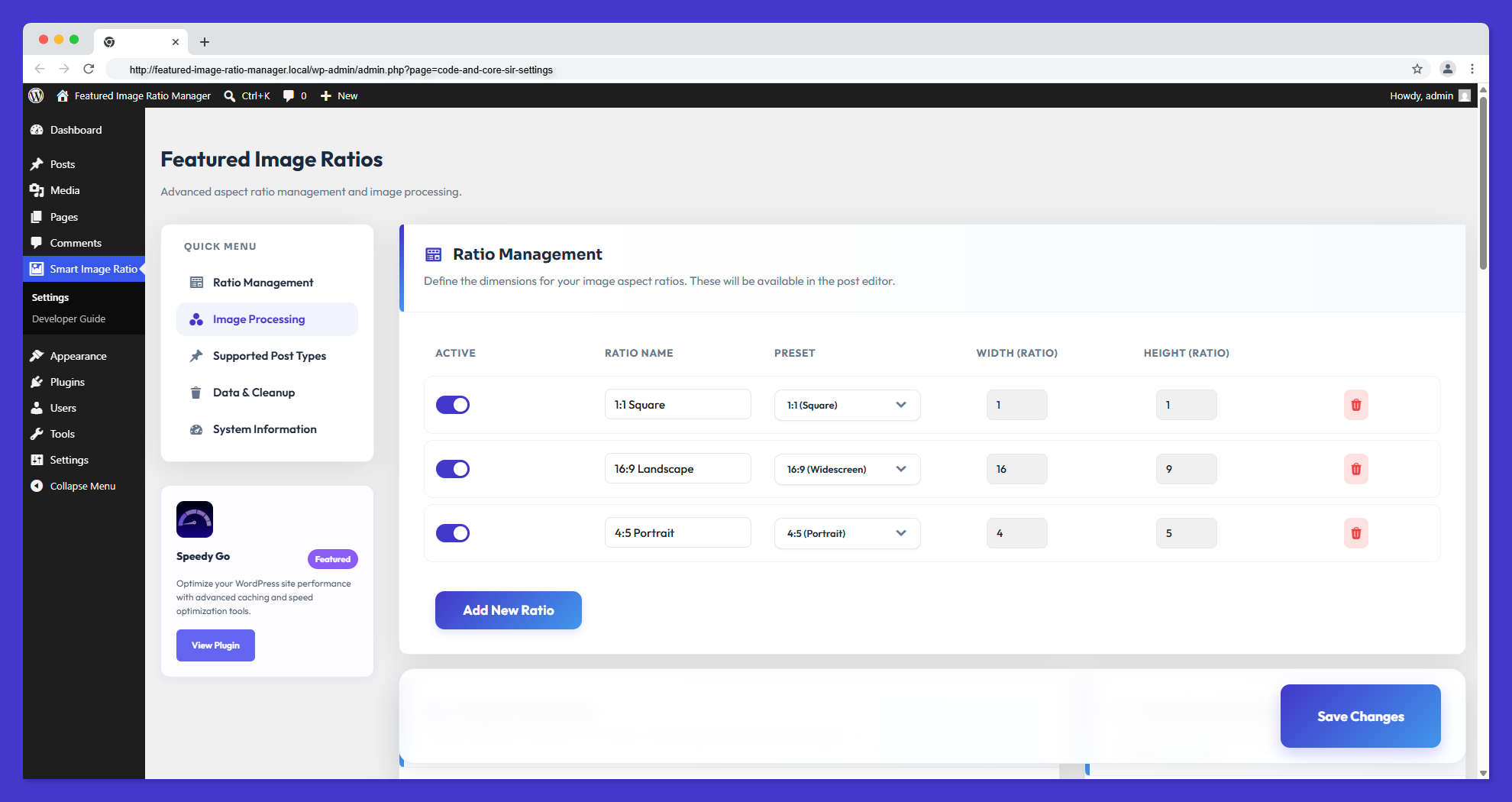
- Custom Aspect Ratios: Define unlimited aspect ratios (e.g., 16:9, 4:3, 1:1) through a sleek, SaaS-inspired admin interface.
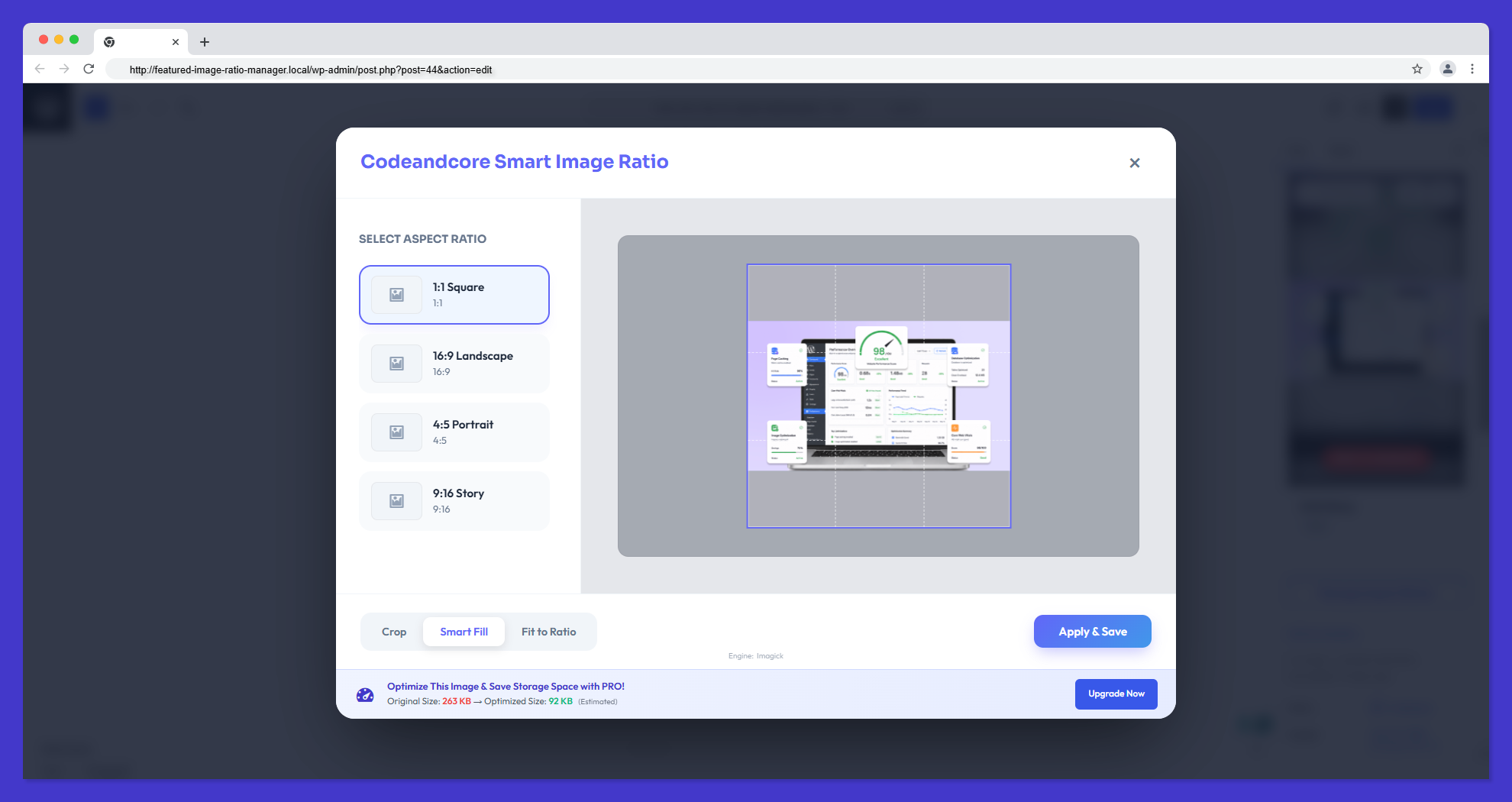
- Interactive Cropping: Powered by Cropper.js, providing a pixel-perfect interface within the WordPress Media Library to adjust every variation manually.
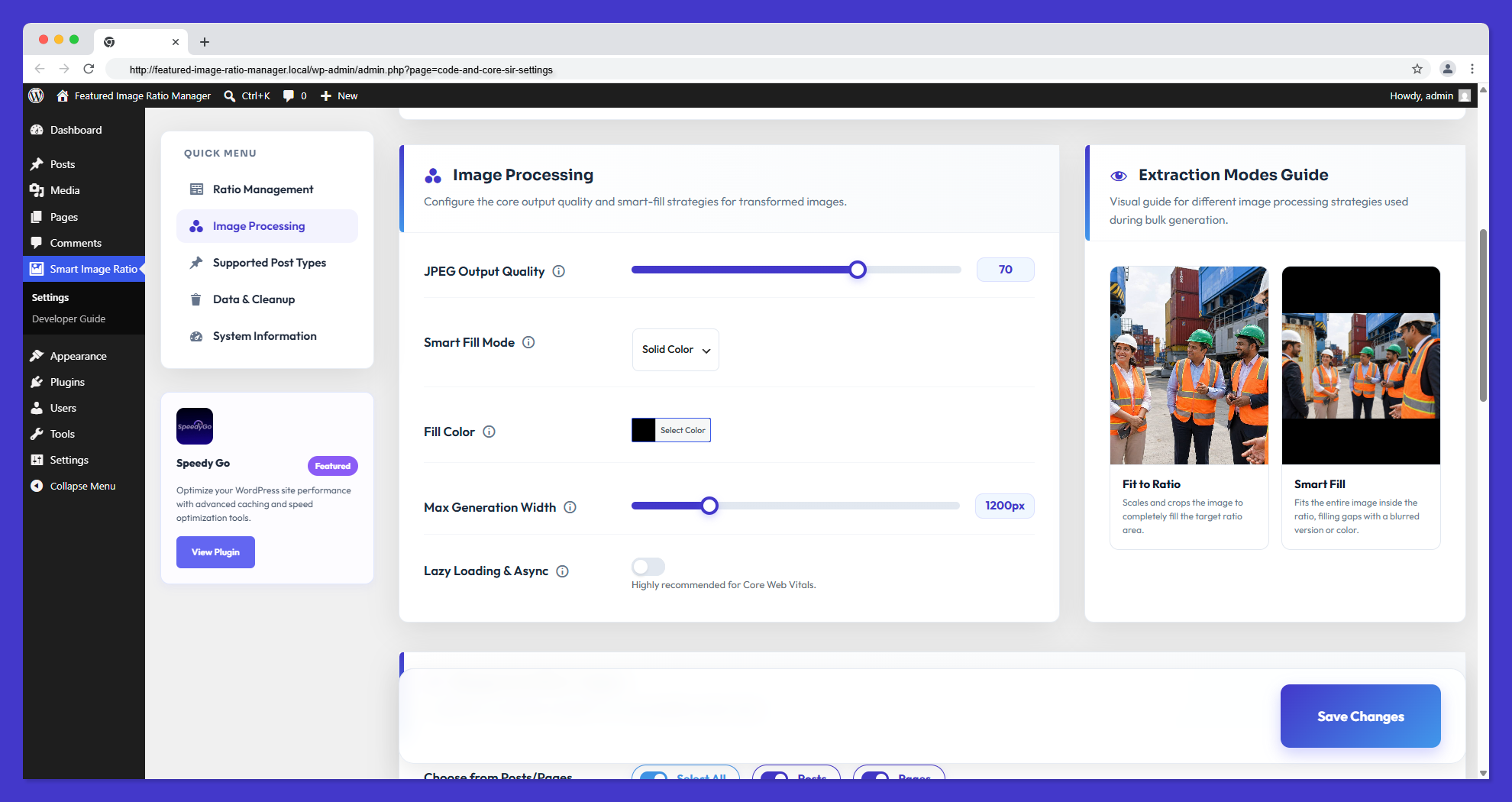
- Smart Fill & Blur Flow: Automatic color-sampled blurred backgrounds for non-standard image compositions—never see awkward white bars again.
- Atomic Metadata Management: Robust optimistic locking system that prevents data corruption during simultaneous image generations.
- Security Hardening: Strict capability enforcement (
edit_posts) for all internal AJAX operations and automatic directory protection for generated assets. - Automatic Storage Cleanup: Intelligent logic that automatically purges image variations and metadata when a Post or Media item is deleted, keeping your server bloat-free.
- Conversion Coverage Dashboard: Real-time card-based statistics showing conversion progress across all registered post types.
- 100% Localized Assets: Zero remote CDN tracking. All dependencies (SweetAlert2, Google Fonts) are shipped locally for absolute privacy standard compliance.
- Developer-First Architecture: Built with modern PHP practices, 100% strict compliance with WordPress Coding Standards (WPCS) & PluginCheck, yielding a clean and deeply documented Public API.
- Gutenberg & Classic Editor Integration: Seamless UI panels (vCards) injected directly into the Block Editor and Classic Post screens to manage ratios dynamically while writing content.
- Frontend Shortcodes & APIs: Simple
[code_and_core_sir_image]shortcode and PHP helper functions for effortless frontend rendering and page-builder (Elementor, Divi) compatibility. - Advanced Debug Logging: Isolated system-level flat-file logging (
cnc-sir-debug.log) for robust server execution monitoring and troubleshooting without cluttering standard WordPress debug logs. - Real-time Quality Playground: Adjust JPEG output quality in settings and see instant canvas-simulated results on your sample images before saving.
- Maintenance & Wipe Tools: Single-click administrative actions to instantly clear background queues, completely wipe ratio configurations, and purge all plugin metadata—assuring a pristine environment when managing staging sites.
Developer & Integration Guide
Retrieving your custom ratios is simple and developer-friendly. Whether you are coding a theme from scratch or using a page builder, we have you covered.
1. Public PHP Helpers (Primary Functions)
Get Ratio URL
code_and_core_sir_get_ratio_image_url( $id, $ratio_id, $fallback = '' )
Retrieve the URL of a specific ratio variation.
* $id: Post ID or Attachment ID.
* $ratio_id: The slug of the ratio (e.g., ratio_16_9).
* $fallback: (Optional) Fallback URL if no image exists.
Get Complete Image Tag
code_and_core_sir_get_image_tag( $id, $ratio_id, $class = '', $fallback = '' )
Retrieve a fully formed tag. Note: If the ratio image is not found, this function automatically falls back to the original featured image for normal users, and displays a red warning placeholder box for administrators to easily spot missing ratios.
* $class: (Optional) CSS class for the img tag.
* $fallback: (Optional) Fallback image URL or HTML if the ratio doesn’t exist.
Check for Ratio Existence
code_and_core_sir_has_ratio( $id, $ratio_id )
Returns true if a specific ratio variation exists for the image.
Bulk Data Retrieval
$ratios = code_and_core_sir_get_all_ratios(get_the_ID());
Returns a complete array of all generated image variations for a post.
Active Ratio State
$active_ratio_id = code_and_core_sir_get_active_ratio( $post_id );
Returns the ID of the ratio currently set as “Active” for the featured image (if the ‘Set as Featured’ feature was used).
2. Implementation Examples
Simple Hero Image (Recommended)
<?php if ( code_and_core_sir_has_ratio( get_the_ID(), 'ratio_16_9' ) ) : ?>
    <div class="hero-image">
        <?php echo code_and_core_sir_get_image_tag( get_the_ID(), 'ratio_16_9', 'hero-img-class' ); ?>
    </div>
<?php endif; ?>
Custom Grid or Card
<?php
$ratio_url = code_and_core_sir_get_ratio_image_url( $post->ID, 'ratio_4_3', get_template_directory_uri() . '/assets/placeholder.jpg' );
?>
<div class="card" style="background-image: url('<?php echo esc_url( $ratio_url ); ?>');">
    <!-- Card Content -->
</div>
Advanced Loop (Display All Ratios)
$ratios = code_and_core_sir_get_all_ratios(get_the_ID());

foreach ($ratios as $ratio_id => $data) {
    if (!empty($data['url'])) {
        echo '<div class="ratio-item">';
        echo '<h4>' . esc_html($ratio_id) . '</h4>';
        echo '<img src="' . esc_url($data['url']) . '" alt="">';
        echo '</div>';
    }
}
Conditional Output (Recommended PHP Fallback)
Use this logic to safely fallback to the full featured image if a specific ratio isn’t generated.
$thumb_id = get_post_thumbnail_id();
$meta = get_post_meta($thumb_id, '_code_and_core_sir_ratios', true);
$url = !empty($meta['ratio_1_1']['url']) ? $meta['ratio_1_1']['url'] : get_the_post_thumbnail_url(get_the_ID(), 'full');

if ($url) {
    echo '<img src="' . esc_url($url) . '" alt="' . esc_attr(get_the_title()) . '">';
}
3. Shortcodes & Page Builders
Basic Usage
[code_and_core_sir_image ratio="ratio_16_9" id="123" class="hero-img"]
- ratio: (Required) The Ratio ID (e.g. ratio_16_9)
- id: (Optional) Attachment ID (defaults to featured image)
- class: (Optional) Custom CSS class
- alt: (Optional) Custom alt text (defaults to attachment alt)
- default: (Optional) Ultimate fallback image URL
Page Builders
Working with Elementor, Divi, Beaver Builder, or Gutenberg? Simply drop the shortcode into a “Shortcode” or “Text” widget.
[code_and_core_sir_image ratio="ratio_4_5"]
4. Technical Details
Metadata Structure
The plugin stores generated ratio information in a single post meta key _code_and_core_sir_ratios for each attachment.
{
  "ratio_16_9": {
    "url": "https://example.com/wp-content/uploads/cnc-sir/2026/04/image-16x9.jpg",
    "path": "/absolute/path/to/image-16x9.jpg",
    "width": 1600,
    "height": 900,
    "mode": "crop",
    "timestamp": 1713170000
  }
}
Advanced Hooks & Filters
The settings are stored in the code_and_core_sir_settings option. Use standard WordPress filters like option_code_and_core_sir_settings to manipulate ratios or capabilities dynamically via code.
External services
This plugin connects to a third-party service at https://wordpress-plugins.pro/ for the following purposes:
- Deactivation Feedback: When you deactivate the plugin, an optional feedback form allows you to share why you are deactivating. If you fill this out, it sends the reason, site URL, plugin/WordPress/PHP versions, and active theme information. This helps us improve the plugin.
- Usage Tracking (Telemetry): If you explicitly opt-in via our settings or the activation modal, the plugin will occasionally send anonymous site diagnostics (site URL, plugin/WP/PHP versions, and active theme info) to help us prioritize compatibility updates and features.
This service is provided by “WordPress Plugins Pro”: General Conditions, Privacy Policy.
Credits
This plugin utilizes the following open-source third-party libraries:
- SweetAlert2 – Beautiful, responsive, customizable, accessible replacement for JavaScript’s popup boxes (MIT License).
- Cropper.js – Robust JavaScript image cropper used for the interactive Media Editor (MIT License).
- Outfit Font – Google Fonts typeface used throughout the plugin’s administration user interface (SIL Open Font License).
Details
Related plugins
Plugins that also contain the tag aspect-ratio
WP SmartCrop

Responsive oEmbed

Image Dimensions Display


About
Plugin for that tries to help you find the WordPress plugin you are looking for.
| Please enjoy an image of Crush (this awesome turtle) and have a lovely day! |  |
We do not own any plugin listed on this site and do not work for or work with WordPress.com or it's associated companies. We simply provide a searchable list of the available WordPress plugins.