



CodingBunny Mail SMTP
CodingBunny Mail SMTP allows you to easily configure an SMTP server to send all outgoing emails from your WordPress website.
By default, WordPress uses the wp_mail() function which relies on the server’s PHP mail configuration. This often leads to delivery issues or emails ending up in spam. This plugin solves that problem by routing emails through a reliable SMTP server.
Key Features
- Enable or disable SMTP with a single toggle
- Supports SSL, TLS, or no encryption
- Optional SMTP authentication (username & password)
- Secure password storage using encryption
- Custom “From Email” and “From Name”
- Built-in test email tool
- Lightweight, no third-party dependencies
- Fully compatible with WordPress PHPMailer
- Clean and accessible admin interface
Security
The SMTP password is encrypted before being stored in the database** and is never displayed in plain text in the WordPress admin area.
Configuration
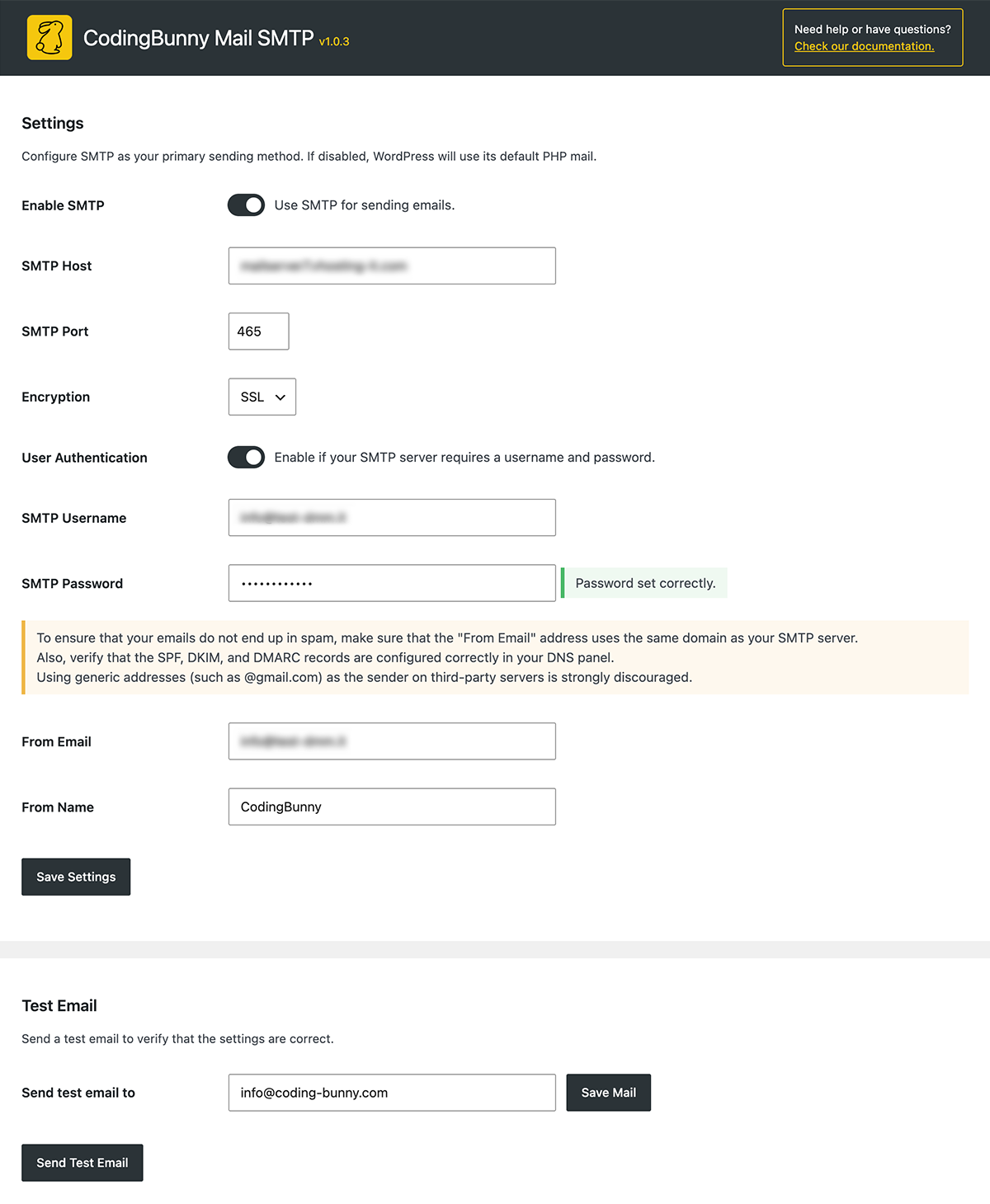
You can configure the following options:
- SMTP Host (e.g.
smtp.example.com) - SMTP Port (e.g.
587) - Encryption: None, TLS, or SSL
- Enable/Disable SMTP authentication
- SMTP Username & Password
- Sender Email Address
- Sender Name
After saving, use the Test Email section to verify your configuration.
Uninstall
When the plugin is uninstalled, all plugin options (including encrypted credentials) are removed from the database.
Details
Related plugins
Plugins that also contain the tag email
MC4WP: Mailchimp for WordPress

Post SMTP – Complete Email Deliverability and SMTP Solution with Email Logs, Alerts, Backup SMTP & Mobile App

WP Mail Logging

Creative Mail – Easier WordPress & WooCommerce Email Marketing

Mailchimp for WooCommerce

SureMail – SMTP and Email Logs Plugin with Amazon SES, Postmark, and Other Providers


About
Plugin for that tries to help you find the WordPress plugin you are looking for.
| Please enjoy an image of Crush (this awesome turtle) and have a lovely day! |  |
We do not own any plugin listed on this site and do not work for or work with WordPress.com or it's associated companies. We simply provide a searchable list of the available WordPress plugins.