



CompleteStores – Store Locator Map
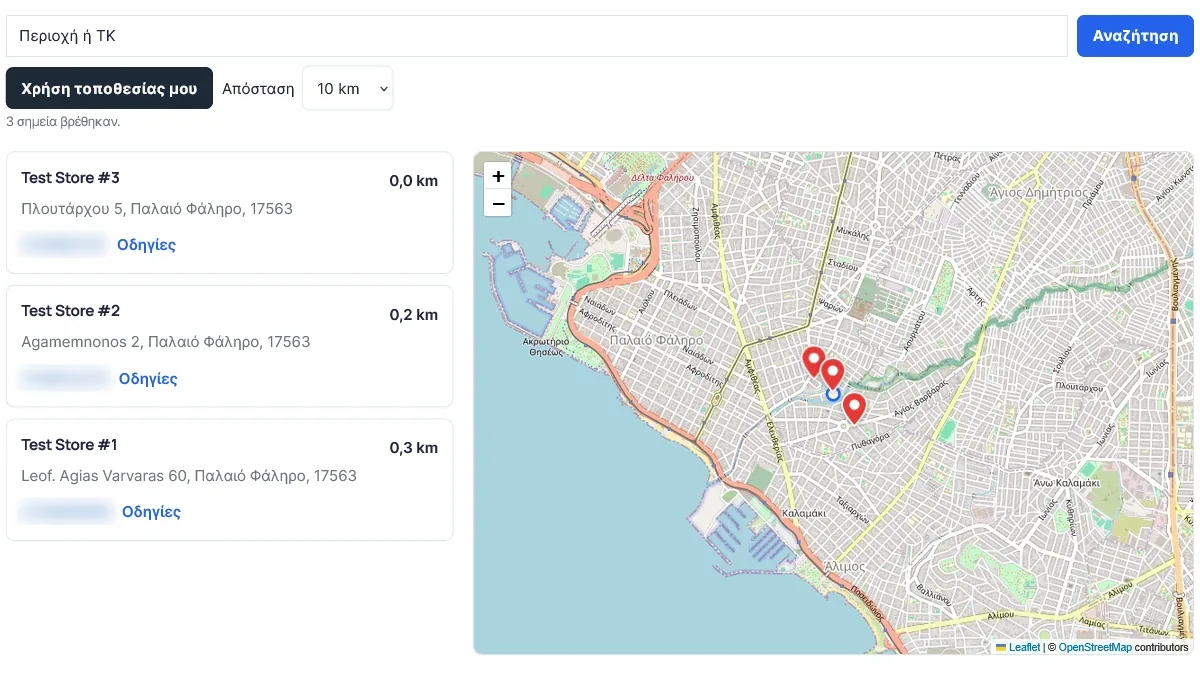
CompleteStores adds a clean, fast store locator to any page with one shortcode. Visitors can search by area or postal code, filter by distance, use their own location, see the closest stores sorted by distance and open directions in one click.
It uses Leaflet (bundled with the plugin) and OpenStreetMap-compatible tiles, so there is no Google Maps API key, no billing account and no per-map fees.
Features
- Interactive map with clickable pins and popups.
- Search by area or postal code, with a configurable country filter.
- Distance filter with your own options (for example 5, 10, 25, 50) in kilometres or miles.
- “Use my location” button – the visitor’s position stays in the browser and is never stored.
- If no store is inside the chosen distance, the nearest store is shown instead of an empty result.
- Store cards with address, phone and directions, sorted by distance.
- Layout options (list left, list right or stacked) and map height.
- Developer hooks (PHP filters and a small JavaScript API) so add-ons can extend the map.
- Every label can be rewritten. English by default and fully translated into Greek; other languages can be added with standard translation files.
- Choose your own map tile provider and geocoding service, or use a “local only” mode that makes no external search requests.
- Accessible: keyboard-friendly store cards, visible focus, labelled controls.
- Lightweight and secure: no public write endpoints, all settings validated, all output escaped.
Shortcode
[completestores]
Optional attributes: layout (list-left, list-right, stacked), height (280–1000), pin_color (for example #e53935).
Managing stores
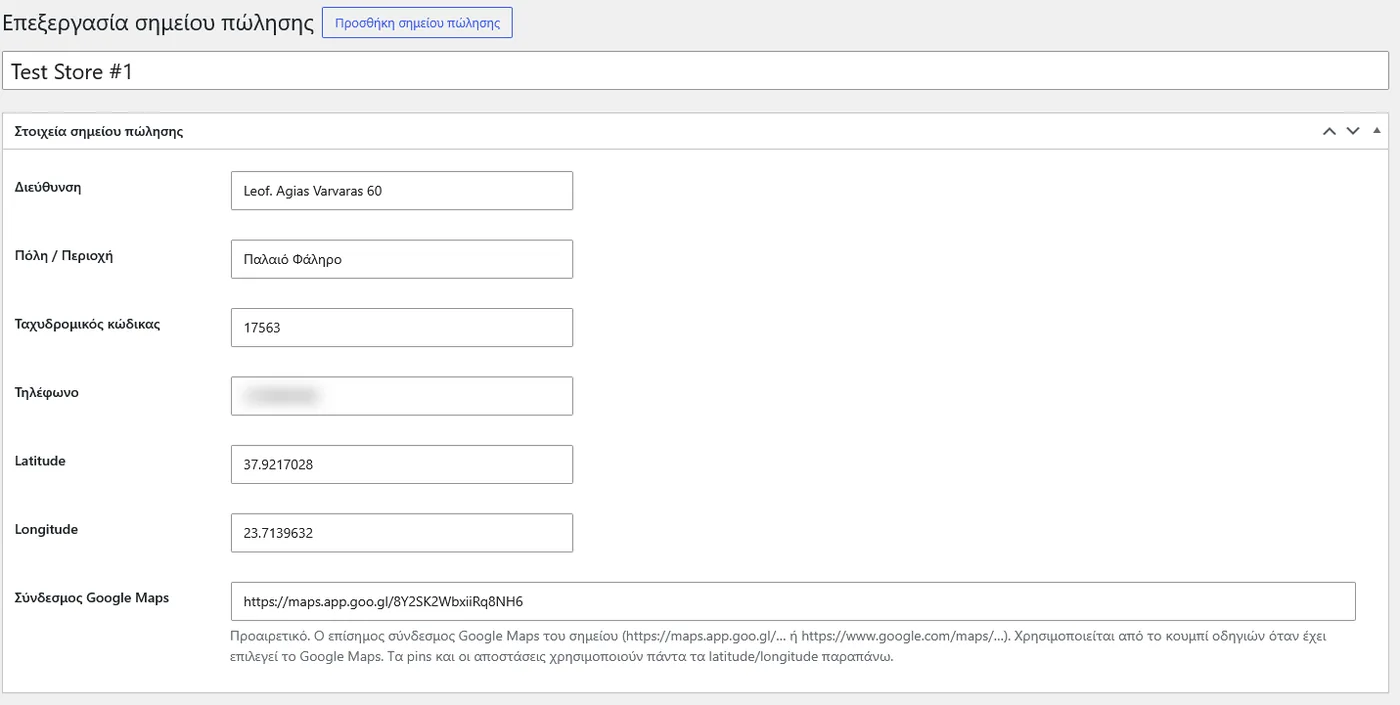
Add stores under CompleteStores > Add new: name, address, city, postal code, phone, latitude and longitude, and an optional Google Maps link.
CompleteStores Pro
A separate add-on, sold on developdigital.gr (the free plugin has no locked features), adds: your own branding (colours, pin shapes, custom pin images), store categories and filters with a pin colour per category, opening hours with an “Open now” status and holiday exceptions, extra fields (email, website, description, image), marker clustering, Google Sheet synchronisation and CSV import / export.
External services
This plugin can contact the following third-party services from the visitor’s browser. Which ones are used depends on your settings.
Map tiles – OpenStreetMap (default) or a provider you choose
Used to draw the map. Sent: the visitor’s IP address and the map area requested, whenever the map is displayed.
Default provider: OpenStreetMap tile servers (tile.openstreetmap.org). Tile usage policy: https://operations.osmfoundation.org/policies/tiles/ · Privacy policy: https://osmfoundation.org/wiki/Privacy_Policy
The public OpenStreetMap servers are intended for light use. For busy sites, set a tile provider of your own in the plugin settings.
Area / postal-code search – OpenStreetMap Nominatim (default), a Nominatim-compatible service you choose, or none
Used when a visitor presses the search button. Sent: the text typed by the visitor (an area or postal code), the optional country code and the visitor’s IP address. Nothing is sent until the visitor presses Search. Successful results are cached in the visitor’s browser (localStorage) for up to 30 days.
Default service: https://nominatim.openstreetmap.org · Usage policy: https://operations.osmfoundation.org/policies/nominatim/ · Privacy policy: https://osmfoundation.org/wiki/Privacy_Policy
Choose “Local only” in the settings to disable all external search requests.
Coordinate check (administrators only)
On the store edit screen an optional “Check against the address” button sends the store address to the configured geocoding service when an administrator clicks it.
Directions links – Google Maps or OpenStreetMap
Directions links open the chosen map website in a new tab only when the visitor clicks them. No data is sent by the plugin itself.
Details
Related plugins
Plugins that also contain the tag leaflet
Leaflet Map

MapPress Maps for WordPress

Ultimate Maps by Supsystic

Open User Map
Map Block Leaflet

Advanced Custom Fields: Leaflet Map Field


About
Plugin for that tries to help you find the WordPress plugin you are looking for.
| Please enjoy an image of Crush (this awesome turtle) and have a lovely day! |  |
We do not own any plugin listed on this site and do not work for or work with WordPress.com or it's associated companies. We simply provide a searchable list of the available WordPress plugins.