


Coyomi – Archive Calendar
Many archive calendar widgets query the database for every month on every page view.
On a site with years of posts that means around a hundred queries per page.
This widget aggregates the days that have posts once, when content changes, and writes them
to a static JSON file under wp-content/uploads/lwac/. Page views only read that file.
Coyomi (暦) means “calendar” in Japanese.
- One query per rebuild (
SELECT DISTINCT DATE(post_date)), none per page view - Rebuilt when a post is published, unpublished, trashed, deleted, re-dated or re-categorized, plus once a day
- The first month is rendered in HTML (works without JavaScript); other months are drawn in the browser
- Works with full-page caches: the browser always fetches the current data file
- Filter by post types and categories
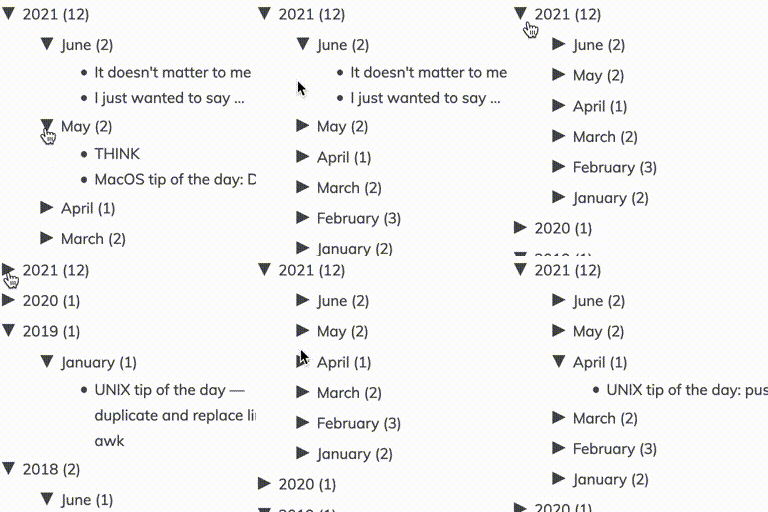
- Five layouts: month calendar, week strip, year (12 month tiles), dropdowns only, and a year / month / day tree
- A settings page (Settings Coyomi) with a live preview. Widgets follow it unless they choose their own layout and colors
- Five color schemes (Calendrier, Pastel, Classic, Dark, Simple). Every color can be changed per widget; only the changed colors are saved
- Other plugins can add events (e.g. sales) to days with the
coyomi_eventsfilter. An event held on several days in a row is listed on one line, marked “On now” or “Ended” - No external requests: the calendar talks to no service outside your site and collects no data
Developers
Add events with the coyomi_events filter. It is called only when the data is rebuilt (never on page views),
so it may do slow work. Add one entry per day:
add_filter( 'coyomi_events', function ( $events, $dataset ) {
    try {
        foreach ( my_plugin_sale_days() as $day ) {
            $events[] = array(
                'date'   => $day,                    // 'YYYY-MM-DD' in the site's time zone
                'label'  => 'Autumn sale',           // plain text, up to 60 characters
                'url'    => get_permalink( 123 ),    // a post on this site, or ''
                'color'  => '#bf0000',               // '#rrggbb' or '#rgb', or '' for the scheme's color
                'source' => 'my-plugin',             // a-z, 0-9, _ and -, up to 32 characters
            );
        }
    } catch ( \Throwable $e ) {
        // Rebuilds also run on a reader's first page view and in cron. On failure, add nothing.
    }
    return $events;
}, 10, 2 );
How events are shown:
- Days in a row with the same
label,urlandsourceare listed as one line (e.g. “12/4–12/11”).
Keep these three the same on every day of one event. - Entries with the same
date,labelandurlare shown once, even when two plugins add them. - The list marks events held today as “On now” and past events as “Ended”, using the reader’s date in the browser
(so a cached page still shows the right state). - Events do not change the month the calendar opens on. Readers reach them with the previous / next buttons.
- Entries with a date that does not exist or an empty label are dropped.
Rules for plugins that add events:
- Add only the events your plugin owns. Do not pass on events your plugin received from another plugin;
that plugin can add them itself. urlmust be a post or page on this site. Event links have norelattribute, so never use affiliate
or other paid links there.dateis a date in the site’s time zone (Settings General). The data is rebuilt when the time zone,
the permalink structure or the site address changes.
When your events change, ask for a rebuild. It runs once at the end of the request:
do_action( 'coyomi_request_rebuild' );
When your plugin is deactivated, remove your filter before asking for the rebuild, so that the rebuild at
the end of the same request does not add your events back.
The data file URL is built from the site URL (not the uploads URL), so it keeps working when media is
served from another domain or a CDN. If your setup still needs a different URL:
add_filter( 'coyomi_data_url', function ( $url, $key, $path ) {
    return $url; // must be readable from the page (same origin, or CORS allowed)
}, 10, 3 );<h3>WP-CLI</h3>
* wp coyomi status – data files and last rebuild
* wp coyomi rebuild – rebuild all data files
* wp coyomi compare lwac_calendar-2 – run the legacy per-month queries once and compare the days
Details
Related plugins
Plugins that also contain the tag archives
Disable Author Archives

Simple Yearly Archive

Advanced Posts/Page

Sitekit

Collapsing Archives
Ultimate Noindex Nofollow Tool II


About
Plugin for that tries to help you find the WordPress plugin you are looking for.
| Please enjoy an image of Crush (this awesome turtle) and have a lovely day! |  |
We do not own any plugin listed on this site and do not work for or work with WordPress.com or it's associated companies. We simply provide a searchable list of the available WordPress plugins.