


CronWatch
WordPress runs its scheduled events (WP-Cron) only when someone visits the site. On a quiet site they run late or not at all, and when an event’s code fails nobody hears about it. CronWatch records every WP-Cron event as it runs, in your own database, and alerts you when:
- an event is missed: it did not run within its recurrence plus a grace (10 minutes by default),
- a run fails: its code threw an exception, hit a fatal error or exited,
- a run gets stuck: it started and never finished,
- a run is much slower than usual,
and again when the event recovers. Every condition alerts once, when it starts, and once more when it ends; nothing repeats while it lasts.
It needs no change to your code or your other plugins. Every scheduled event becomes a job:
- A recurring event (hourly, twice daily, daily, weekly, or any schedule a plugin adds) is a job named
wp:<hook>, expected every interval of its recurrence. One scheduled with arguments iswp:<hook>:<key>, the key being the start of WordPress’s own key for those arguments, so the same hook with two sets of arguments is two jobs. - Single events (
wp_schedule_single_event, such as a scheduled post’s publishing) are one job per hook, with no schedule: they are one-offs, so a failure is reported but there is no cadence to miss. If WP-Cron stops running altogether, the recurring events WordPress itself schedules (update checks, twice daily and hourly) are reported missed, which is how you find out. - An event that is no longer scheduled (its plugin was deactivated, say) keeps its history and is never reported missed.
What a run prints is kept as its output. Your own code can add lines with do_action( 'cronwatch_log', 'sent 40 emails' );.
Alerts go by email (through wp_mail(), the way the site sends its other mail), to Slack, or to any URL as a signed JSON webhook. If you use them, they can also go to Discord, by email through Resend, Postmark, SendGrid, Mailgun or Amazon SES, by text message through Twilio, or to Sentry, Honeybadger, Datadog, Rollbar, Bugsnag or New Relic. Set them under CronWatch, Settings, where you can also send a test alert and see each event’s health.
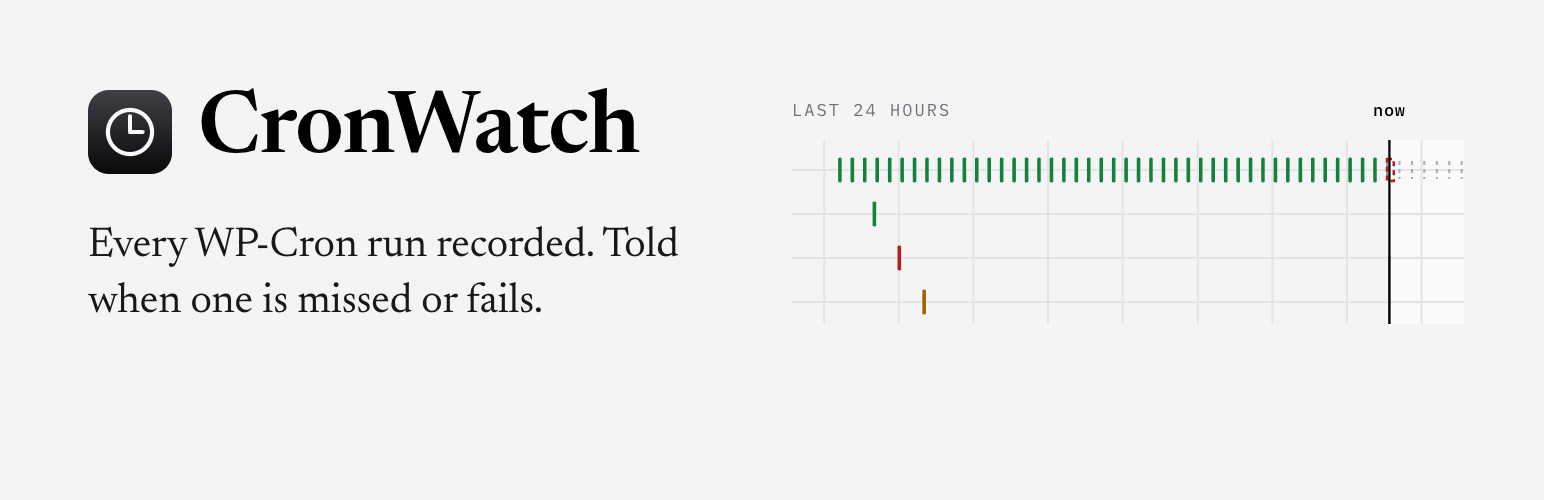
The CronWatch menu in wp-admin opens the dashboard, for administrators: every event’s health at a glance, the last 24 hours as a timeline (when each event was due, when it ran and for how long, and the slots nothing ran in), and for each event its last seven days, its runs with their output and errors, and buttons to silence it, forget it or run the check now.
Ask Claude about your cron
CronWatch speaks the same small JSON API in every language it runs in, and @cronwatch/mcp lets Claude and other AI assistants read it: which events are failing, what a run printed, silencing one for the night. The API is off until you turn it on under CronWatch, Settings, with a token; the page then shows the address and the line that adds it to Claude Code. Only requests that carry the token are answered, and only the API is exposed: the dashboard stays in wp-admin.
CronWatch is the WordPress plugin of the CronWatch library, which also watches jobs in TypeScript, Ruby, Python, PHP, Go, Rust, Elixir, Java and .NET apps and keeps the same tables in every language.
Why a check that runs on page visits misses a quiet site
CronWatch finds missed runs with a check every five minutes, which it schedules as a WP-Cron event of its own. WP-Cron runs only when someone (or something) loads a page, so on a site with no visits the check does not run either: the same silence that stops your events stops the check that would report them. A site that gets regular traffic is covered as it is; for every other site, and for events that must run on time, run WP-Cron and the check from the server’s own cron instead:
-
Turn off WP-Cron’s page-load trigger in
wp-config.php:define( ‘DISABLE_WP_CRON’, true );
-
Add a crontab line that runs due events every five minutes, either through WP-CLI:
*/5 * * * * cd /path/to/site && wp cron event run –due-now –quiet
or by requesting wp-cron.php:
*/5 * * * * curl -s https://example.com/wp-cron.php > /dev/null
-
And run CronWatch’s check from the crontab too, so it happens whether or not WP-Cron does:
*/5 * * * * cd /path/to/site && wp cronwatch check –quiet
wp cronwatch check prints one line, such as
cronwatch: checked 12 jobs, sent 1 alert. Many hosts offer a “real cron” setting that does the same as these lines.
For developers
cronwatch_alerts(filter): the list of alert channels (the ones the settings made). Add any object implementingCronwatch\Alerts\AlertChannel, or a callable taking theCronwatch\Alert.cronwatch_watch_event(filter): return false to leave an event unwatched. Giventrue, the hook, its arguments and its recurrence name (null for a single event).cronwatch_job_options(filter): a job’s options (grace,timeout,maxDuration,failuresBeforeAlert,description,tags), given the options, the hook, its arguments and its recurrence. Options CronWatch refuses are written to the error log, and the job keeps its own.cronwatch_client_args(filter): the arguments the library’s client is made with (its store, alert channels, default grace and error handler).cronwatch_reject_unsafe_urls(filter): whether an alert URL may not reach a private address or an unusual port (WordPress’sreject_unsafe_urls). True on a multisite network, where a site’s administrators may not be the network’s, and false otherwise; given the URL’s origin.cronwatch_log(action):do_action( 'cronwatch_log', ...$parts )adds a line for the output of the event running now, the parts joined with spaces and anything not a string written as JSON. With the plugin inactive it does nothing, so the code needs no check for it.
The plugin carries only the alert channels its settings offer. Developers who need other channels or AI triage of alerts can install the cronwatch/cronwatch Composer package, which has them, and add them with these filters.
Privacy
CronWatch sends nothing anywhere until you set an alert channel, and it has no tracking, statistics or calls home of any kind. Runs, output and state stay in three tables in your own database (wp_cronwatch_jobs, wp_cronwatch_runs and wp_cronwatch_state, with your table prefix). Values that look like secrets (API keys, tokens, passwords) are blanked from run output and errors before they are stored. The services an alert can go to are listed under “External services” below.
The JSON API is off unless you turn it on. When it is on, anyone who has the token can read the events, their runs and their output, silence or forget them, and run the check, so keep the token as you would a password, and make a new one under CronWatch, Settings, if it leaks. The plugin itself sends nothing to anyone through it: it only answers requests that carry the token.
Licence
The plugin is GPLv2 or later. It includes the cronwatch/cronwatch PHP library (in lib/), which is MIT licensed; the MIT licence is compatible with the GPL, and the library’s licence text is in lib/LICENSE.
External services
CronWatch contacts an outside service only to deliver an alert, and only one the site’s owner has set up under CronWatch, Settings: nothing is sent while no alert channel is set. An alert is sent when a watched event is missed, fails, gets stuck or runs slow, when it recovers, and when you press “Send a test alert”. It holds the job’s name and description, what went wrong and when, and the run that raised it with the end of its output and its error (with values that look like secrets blanked).
- Email: sent with
wp_mail(), the way your site sends its other mail (your host, or an SMTP or mail service plugin you chose), to the addresses you enter, with a link to the event’s page in your wp-admin. The plugin itself contacts no mail service. - Slack: when you enter a Slack incoming webhook URL, each alert is posted to it as a message, with the alert described above and a link to the event’s page in your wp-admin. Slack is a service of Slack Technologies: terms of service, privacy policy.
- Webhook: when you enter a webhook URL, each alert is posted to it as JSON (the alert described above, and the job’s definition), signed with the secret you give, if any. The URL is your own endpoint, or a service you chose, whose terms then apply; the plugin sends nothing to it until you enter it.
Under More channels, each of these services is contacted only once you have filled in its fields (your own account’s key or token, and where to send), and is then sent each alert described above, with a link to the event’s page in your wp-admin. The plugin sends nothing to any of them until then.
- Discord, at the channel webhook URL you enter, as a message: terms of service, privacy policy.
- Resend, Postmark, SendGrid, Mailgun and Amazon SES, through their APIs, as an email from the address and to the addresses you enter: Resend (terms, privacy), Postmark (terms, privacy), SendGrid, a Twilio service (terms, privacy), Mailgun (terms, privacy) and Amazon SES, an Amazon Web Services service (terms, privacy).
- Twilio, through its API, as a text message from the number you enter to the numbers you enter (not for recoveries): terms, privacy.
- Sentry, Honeybadger, Datadog, Rollbar, Bugsnag and New Relic, through their APIs, as an event or error in the project your key belongs to: Sentry (terms, privacy), Honeybadger (terms, privacy), Datadog (terms, privacy), Rollbar (terms, privacy), Bugsnag, a SmartBear service (terms, privacy) and New Relic (terms, privacy).
The plugin contacts no other service.
Details


Related plugins
Plugins that also contain the tag alerts
Scheduled Announcements Widget

Super Monitoring
Alerts DLX – Alert Box, Callout Box, and Notifications
WooCommerce Sales Notifications – Recent Sales Popup
Callout Boxes

MaxBoxy: Make WordPress Floating Content, Popup, Alert Bar


About
Plugin for that tries to help you find the WordPress plugin you are looking for.
| Please enjoy an image of Crush (this awesome turtle) and have a lovely day! |  |
We do not own any plugin listed on this site and do not work for or work with WordPress.com or it's associated companies. We simply provide a searchable list of the available WordPress plugins.