


Custom Canonical URL and Meta Keywords Modifier
Modify or set the canonical URL and meta keywords in the Quick Edit interface of posts and pages.
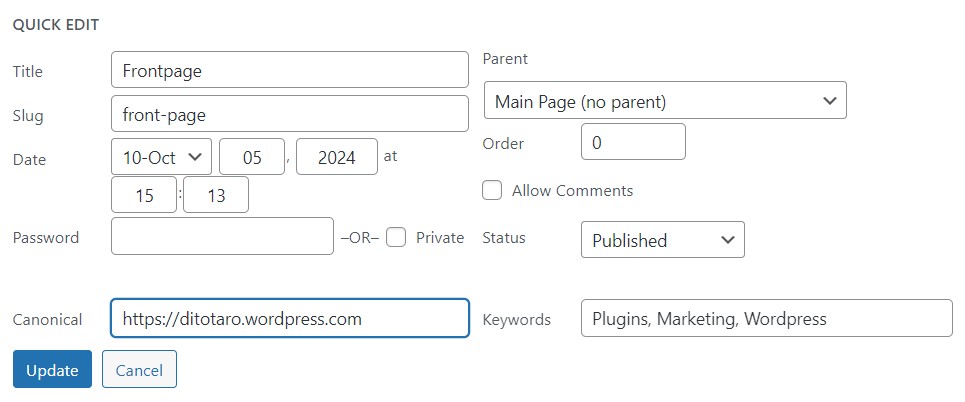
This plugin lets you modify or set the meta tags of the canonical URL and meta keywords in the Quick Edit interface of each post or page.
Why do I need to set the canonical URL?
If you use a subdomain and point it to specific pages / posts then WordPress automatically sets the canonical URL to the main domain (usually www.), but for SEO and indexing reasons you may want to set the canonical URL to the subdomain instead.
Why do I need to set Meta Keywords?
It helps Search Engines to index your content better, especially when you have important content which is generated automatically on the page and is not part of the HTML.
Basic Features
- Insert Go to Posts or Pages, click on Quick Edit and maintain Canonical URL or Keywords (multiple comma separated)
Support
To get your queries resolved related to ‘Custom Canonical URL and Keywords Modifier’, you can always take help from WordPress Support.
Details

Related plugins
Plugins that also contain the tag canonical
Canonical Link

Advance Canonical URL

Disable URL Autocorrect Guessing

Canonical SEO

Nice Search

Canonical SEO Content Syndication WordPress Plugin


About
Plugin for that tries to help you find the WordPress plugin you are looking for.
| Please enjoy an image of Crush (this awesome turtle) and have a lovely day! |  |
We do not own any plugin listed on this site and do not work for or work with WordPress.com or it's associated companies. We simply provide a searchable list of the available WordPress plugins.