

CWS API Table Sync
CWS API Table Sync turns structured REST/JSON API data into a synchronized local WordPress database table.
Instead of requesting an external API whenever a visitor loads a page, the plugin fetches data during synchronization, maps selected JSON fields to typed local database columns, and renders frontend tables from the local WordPress database.
This is useful for structured datasets such as directories, inventory, financial data, public datasets, listings, events, jobs, catalogs, and other API-fed information.
Features
- Connect to multiple REST/JSON endpoints.
- Test API connectivity and inspect JSON response structure.
- Detect record collections inside nested JSON responses.
- Map API fields to typed custom database columns.
- Select a stable external ID for record updates.
- Synchronize manually or through the scheduled WordPress cron event.
- Support page-number pagination.
- Support no authentication, Bearer tokens, Basic Authentication, and custom authentication headers/API keys.
- Snapshot mode for showing only the latest successful synchronization.
- Historical mode for retaining unique synchronized records across runs.
- Store the original record JSON alongside mapped columns.
- Configure frontend column labels, visibility, order, value formatting, prefix/suffix, and alignment.
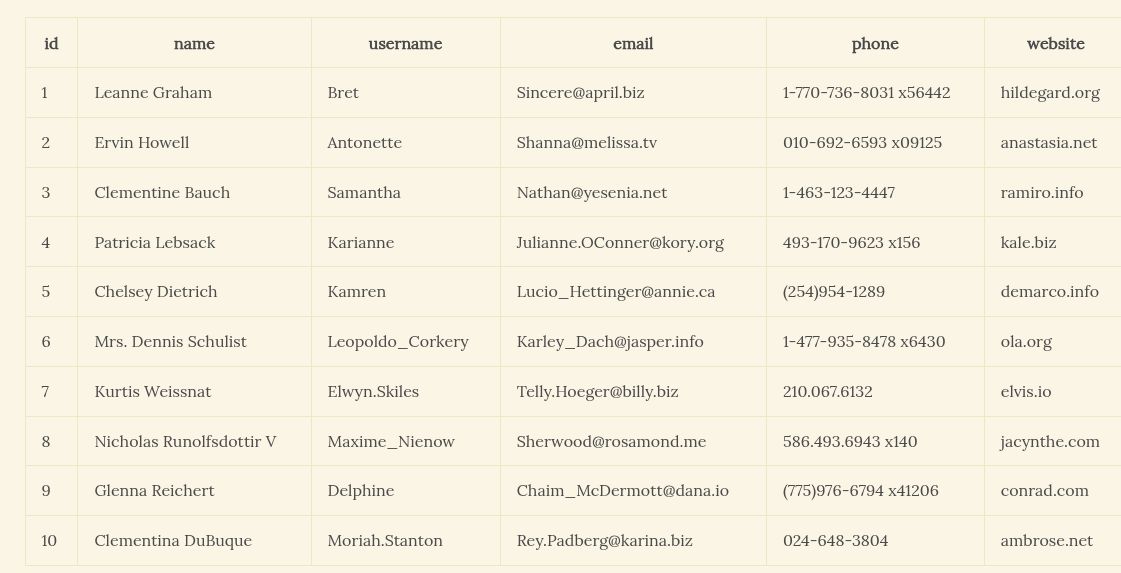
- Render synchronized data with a shortcode.
- Keep frontend rendering local: the shortcode does not call the external API during page loads.
- Optionally remove plugin data when the plugin is deleted. Deactivation does not delete persistent data.
Basic Workflow
- Open CWS API Table Sync > Sources.
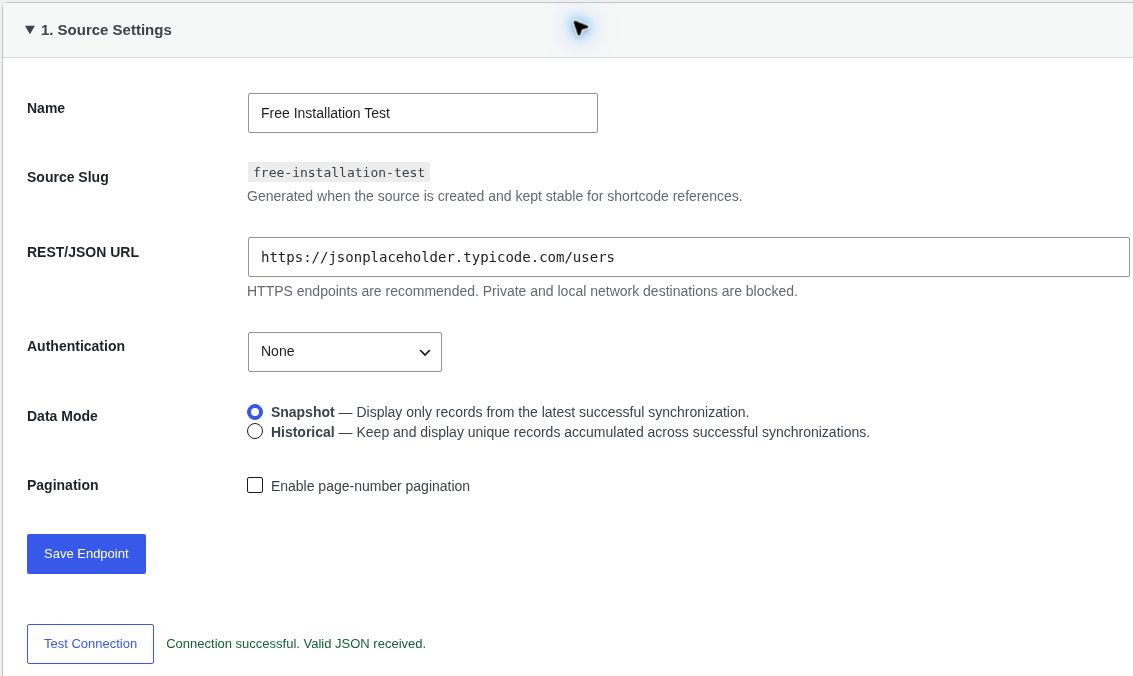
- In Source Settings, enter a name and REST/JSON endpoint. Choose authentication and pagination only when your API requires them, then click Save Endpoint.
- Use Test Connection to check the saved endpoint. Results appear beside the button.
- In Inspect Sample Data, inspect the API response and select the collection of records when the response contains nested data.
- In Map Fields, choose the fields to store and a stable external ID, then create the local table.
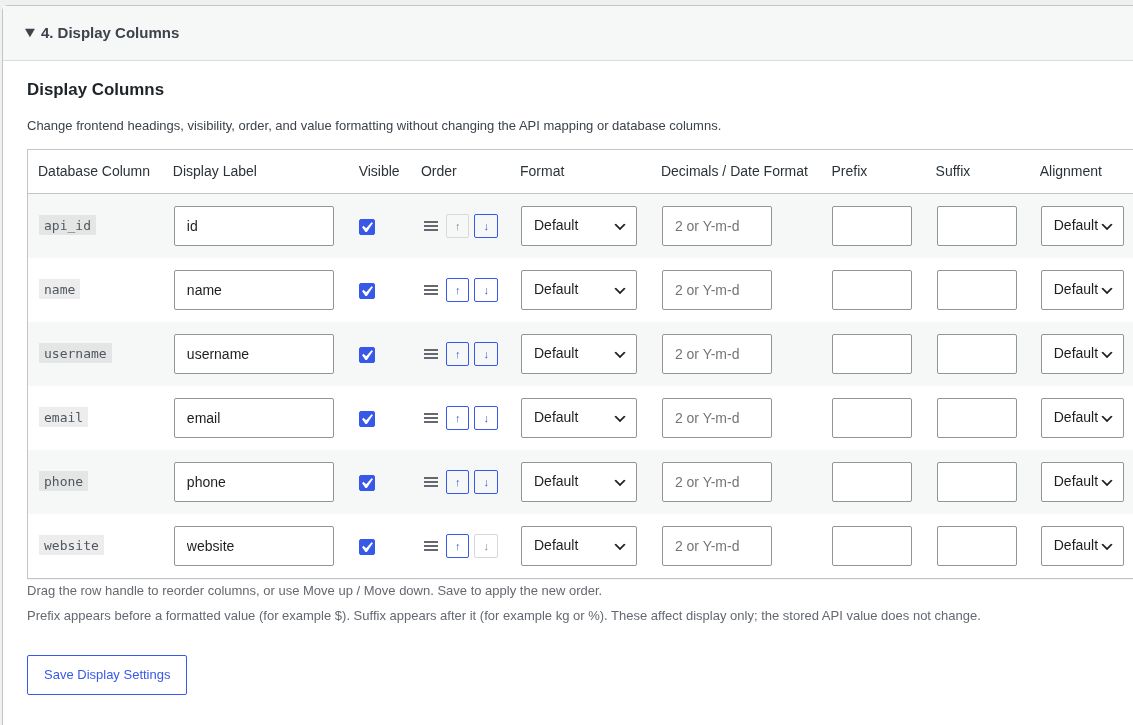
- In Display Columns, set headings, visibility, formatting, and optional text prefixes/suffixes. Drag the handles or use Move up / Move down to reorder columns, then click Save Display Settings.
- In Synchronize Data, click Sync Now and check the result beside the button.
- Add [cws_api_table_sync] to a Shortcode block in a post or page.
Successful setup actions open the next accordion section. You can reopen a completed section to change its settings. You can configure multiple sources. Select Add New Source to create another connection; each source has independent mapping, synchronization, and display settings.
Shortcode
Render the configured source:
[cws_api_table_sync]
Render a source by its stable source slug:
[cws_api_table_sync source=”source-slug”]
Set rows per page, from 1 through 100 (default 25). Navigation appears above and below tables with more than one page:
[cws_api_table_sync limit=”50″]
Choose navigation placement with pagination=”top”, “bottom”, or “both”:
[cws_api_table_sync limit=”10″ pagination=”both”]
Use pagination=”none” to display only the first limited set of rows:
[cws_api_table_sync limit=”10″ pagination=”none”]
Frontend pagination works independently of API fetching pagination, respects shortcode filters and sorting, and gives each table its own page parameter.
Frontend rendering reads synchronized records from the local WordPress database. It does not contact the configured API during the page request.
Upgrading existing installations
Existing source records and synchronized database tables are preserved. Existing wp_api_table_sync shortcodes in page content and text widgets are translated during rendering. For PHP templates or direct do_shortcode calls, use cws_api_table_sync.
External Services and Privacy
CWS API Table Sync connects to API endpoint URLs explicitly configured by a site administrator.
When a connection is tested, inspected, or synchronized, WordPress sends an HTTP request to the configured external API. Depending on the API and the administrator’s configuration, that request can include authentication credentials such as a Bearer token, Basic Authentication credentials, or a custom API-key header.
The plugin does not send plugin usage telemetry to Cameron Web Services and does not contact a Cameron Web Services service as part of normal operation.
The configured external API is a third-party service chosen by the site administrator. Its privacy policy, terms, data handling, availability, and usage limits are controlled by that API provider. Site administrators are responsible for ensuring that their use of an API and synchronized data complies with the provider’s terms and applicable privacy requirements.
API credentials are stored in the site’s WordPress database as part of the source configuration. They are not copied into synchronized record data or rendered on the frontend.
Data Removal
Deactivating CWS API Table Sync preserves its configuration and synchronized data.
By default, deleting the plugin also preserves its data. Administrators can explicitly enable “Delete all plugin data when the plugin is deleted” under CWS API Table Sync > Settings. When enabled, uninstall cleanup removes plugin-owned source metadata, synchronized data tables, plugin settings, transients, and the scheduled synchronization event.
Details
Related plugins
Plugins that also contain the tag api
WP Consent API
InfiniteWP Client

Disable REST API
Disable WP REST API

WordPress REST API (Version 2)

WP REST Cache


About
Plugin for that tries to help you find the WordPress plugin you are looking for.
| Please enjoy an image of Crush (this awesome turtle) and have a lovely day! |  |
We do not own any plugin listed on this site and do not work for or work with WordPress.com or it's associated companies. We simply provide a searchable list of the available WordPress plugins.