



DadsFam Email Marketing
DadsFam Email Marketing lets you send newsletters and email campaigns from your own WordPress site, in plain English, without a monthly bill per subscriber. Your list stays in your own database.
It is made for small businesses and the people who run them: the bakery, the hardware shop, the church, the club. If you can write an email, you can use it.
What you get
- A Home screen that tells you where you stand. One sentence answers the question that matters: are you ready to send, is something sending, or does something need you? A short setup checklist walks you through the few things worth doing once.
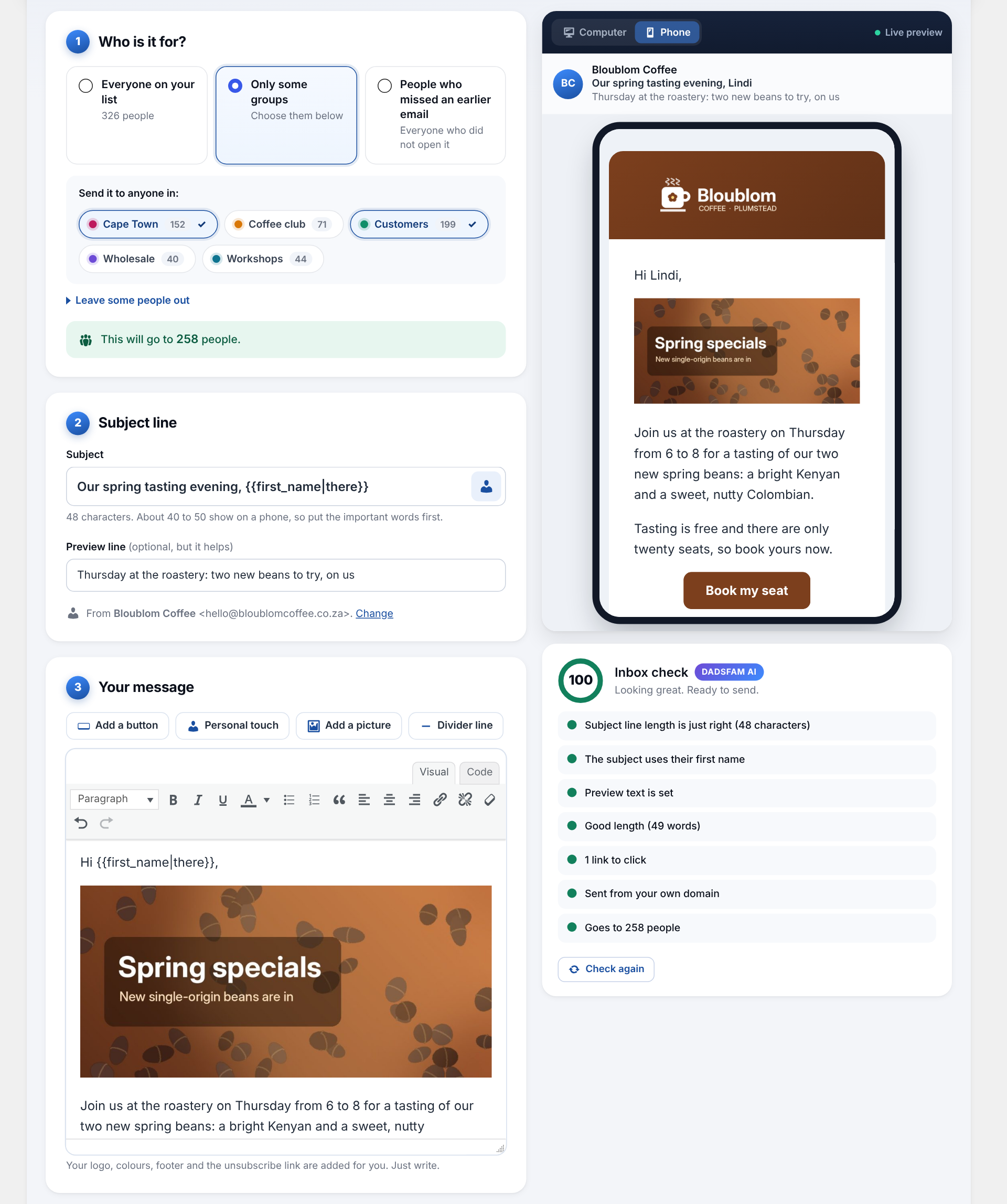
- An editor with a live preview. Write your email and see exactly how it will look, on a computer or on a phone, as you type. Add a button, a picture, a divider or a personal greeting such as “Hi Jane” in one tap. Your work saves itself as you go.
- An inbox check before you send. The built-in check (we call it DadsFam AI) looks for the things that send emails to spam: no subject, a fake “Re:”, shouting capitals, spam-trigger words, link shorteners, a missing preview line, broken personal greetings, pictures without a description and more. It gives the email a score out of 100 and tells you what to fix, in plain words. It runs entirely on your site.
- Safe sending. Campaigns go out in small batches in the background, at a speed your hosting can cope with, and keep going after you close the page. Pause, carry on or stop at any time. If the mail server starts refusing emails, sending pauses itself instead of working through your whole list.
- Send to exactly the right people. Everyone, one or more groups, everyone except some groups, or only the people who did not open an earlier email. Schedule a campaign for later, with a suggested best time learned from when your own readers open their email.
- Your look on every email. Your logo, colour, footer, business address and social links, on a clean design that works in every common inbox and on phones.
- A sign-up form that just works. An “Email sign-up form” block and a
[dadsfam_email_signup]shortcode, with optional confirmation by email (double opt-in), spam protection without puzzles, a welcome email and a note to you when someone joins. It even spots typos such as “gmial.com” and offers the fix. - Easy unsubscribing. Every email has a one-click unsubscribe (the kind Gmail and Yahoo expect from bulk senders) and a link to a preferences page where people can choose which groups they hear about, or leave and tell you why.
- Importing in three steps. Drop in a spreadsheet (CSV from Excel, Google Sheets or another email service) or paste addresses, check the columns it has guessed, done. Mistyped addresses are found and fixed in one tap.
- WooCommerce. Bring in your customers, add a newsletter tick box to the checkout (the classic checkout and the block checkout), or add customers automatically when an order is completed.
- Reports. Every campaign shows who opened it, who clicked, the most popular links and why people left. A Reports screen shows how your list is growing, how your campaigns compare and when your readers open their email, with a list health check that finds people who never open and sign-ups that were never confirmed.
- Remote control, if you want it. Let an AI assistant such as Claude, or another app you trust, write campaigns, look after your list and send for you, from your phone. It uses the WordPress Abilities API and Application Passwords, only administrators can use it, it stays off until you switch it on, deleting and changing settings stay off unless you allow them, sending and deleting ask for a second confirmation by default, and every call is written to a log.
Built to be kind to your inbox reputation
The plugin sends through WordPress’s own mail function, so whatever handles mail on your site handles these emails too. For the best delivery, use an address on your own domain and an SMTP plugin connected to a proper mail service. The Settings screen checks both and tells you in plain words if something needs attention.
Privacy
Everything is stored in your own WordPress database and nothing is sent to us or to anyone else. Open and click counting can be switched off, and IP addresses are not stored unless you choose to keep them. The plugin works with the WordPress privacy tools (Tools, Export and Erase Personal Data) and adds suggested wording to the privacy policy guide.
Coming from version 3?
Version 4 moves your subscribers, groups, campaigns, opens and clicks, settings and remote control switches across by itself the first time it runs. The old data is left untouched as a safety net until you remove it in Settings, Your data. Unsubscribe and tracking links in emails sent with version 3 keep working.
External services
This plugin does not connect to any external service. Everything it does, including the inbox check and the other DadsFam AI helpers, runs on your own site.
- Campaign emails are handed to WordPress’s own wp_mail() function. Where they go next is decided by your site’s mail setup (for example your host’s mail server or an SMTP plugin you have installed), not by this plugin.
- Open and click counting uses addresses on your own site, and the data is stored only in your own database.
- Remote control can add a picture to your media library from a web address. Only when it is asked to (by you, or by an assistant you allowed), it downloads that one file from the address it was given, with WordPress’s own download function, and sends nothing else.
- The Support and “More from DadsFam” screens contain plain links to dadsfam.co.za sites and WordPress.org. Nothing is loaded from or sent to them unless you click a link.
Details



Related plugins
Plugins that also contain the tag email-campaigns
Carrot quest

Email Marketing for WordPress and WooCommerce – Retainful

Convead

Flirty Leads

Bens Email Marketing & Automation

Emerge Campaigns


About
Plugin for that tries to help you find the WordPress plugin you are looking for.
| Please enjoy an image of Crush (this awesome turtle) and have a lovely day! |  |
We do not own any plugin listed on this site and do not work for or work with WordPress.com or it's associated companies. We simply provide a searchable list of the available WordPress plugins.