


Dash Notifier
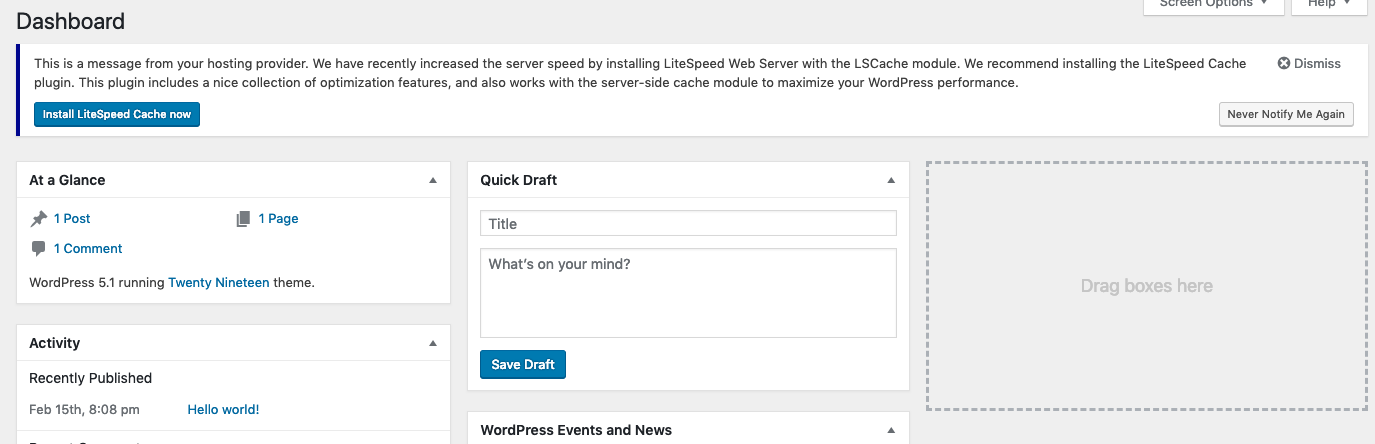
This plugin can be used by developers and system administrators to add a notification banner to their clients’ WordPress Dashboard. It’s useful for broadcasting important messages as well as suggesting plugins that clients’ might find useful, and is handled through an API.
To add a new banner, predefine a PHP constant called DASH_NOTIFIER_MSG before the setup_theme hook, like so:
define( 'DASH_NOTIFIER_MSG', json_encode( array( 'msg' => 'Your message to display in banner', 'plugin' => 'your_plugin_slug', 'plugin_name' => 'Your Plugin Name' ) ) ) ;
You can define ‘DASH_NOTIFIER_MSG’ in your own plugin or in functions.php, as long as it is before setup_theme.
The plugin parameter is optional. If set, an install button will be included with the message, allowing the client to install the plugin in one click.
The plugin_name parameter is also optional. If plugin is provided but plugin_name is not, the name will default to the official name found in the WordPress Plugin Directory.
Example: If the plugin you’d like to recommend is https://wordpress.org/plugins/hello-dolly/, replace your_plugin_slug with hello-dolly and Your Plugin Name with Hello Dolly.
NOTE: Your clients must have this plugin installed in order for the notification banner to be displayed.
Details

About
Plugin for that tries to help you find the WordPress plugin you are looking for.
| Please enjoy an image of Crush (this awesome turtle) and have a lovely day! |  |
We do not own any plugin listed on this site and do not work for or work with WordPress.com or it's associated companies. We simply provide a searchable list of the available WordPress plugins.