


Debug Bar List Script & Style Dependencies
We all know that when we’re add a script or style to WordPress, we should use wp_enqueue_script( $handle, $src, $deps, $ver, $in_footer ) and wp_enqueue_style( $handle, $src, $deps, $ver, $media ) as in:
function themeslug_enqueue_style() {
    wp_enqueue_style( 'core', 'style.css', array('twentytwelve-style') );
}

function themeslug_enqueue_script() {
    wp_enqueue_script( 'my-js', 'filename.js', array('jquery') );
}

add_action( 'wp_enqueue_scripts', 'themeslug_enqueue_style' );
add_action( 'wp_enqueue_scripts', 'themeslug_enqueue_script' )
$deps (dependencies), the handle name and an optional parameter, lets you control when/where your script or style should be added. If $deps is array('jquery'), your script will be loaded after jquery is loaded.
The problem is, which one exists and in which order are they loaded ?
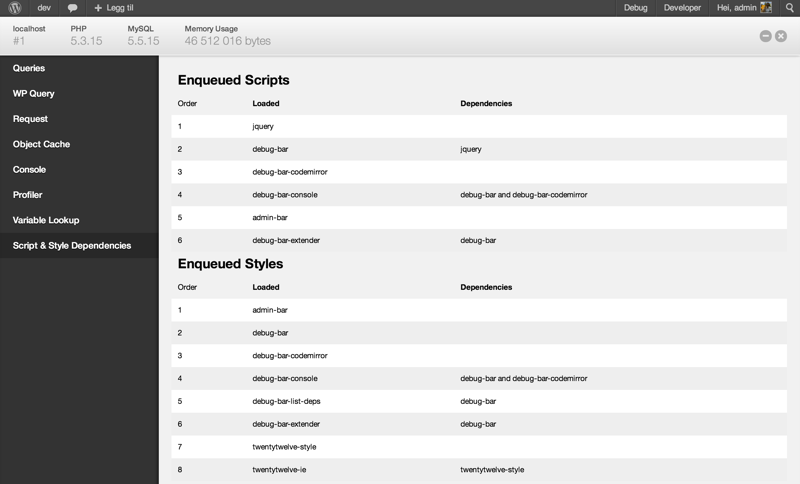
Debug Bar List Script & Style Dependencies, an add-on to Debug Bar, will list the dependencies.
Use
To view the loaded scripts and styles
- Front-end: Go to the front-end, and on the admin bar choose Debug and view Script & Style Dependencies
- Back-end: Go to the back-end, on the admin bar choose Debug and view Script & Style Dependencies
Note, the front-end and back-end loads different scripts and styles. Also, different pages on the front-end and back-end can load different scripts and styles.
Details

Related plugins
Plugins that also contain the tag debug
WP Crontrol

Query Monitor – The developer tools panel for WordPress

Debug Bar

Debug Log Manager – Conveniently Monitor and Inspect Errors

WP Debugging
Code Profiler – WordPress Performance Profiling and Debugging Made Easy

About
Plugin for that tries to help you find the WordPress plugin you are looking for.
| Please enjoy an image of Crush (this awesome turtle) and have a lovely day! |  |
We do not own any plugin listed on this site and do not work for or work with WordPress.com or it's associated companies. We simply provide a searchable list of the available WordPress plugins.