


Debug Log
If the log is long, the latest lines are show at the top to avoid scrolling. Line numbers are shown for reference.
Logs over 5MB do not load until you confirm you are sure, or you can opt to delete the log and start afresh.
Only admins can view (or anyone you give the capability “manage_options”).
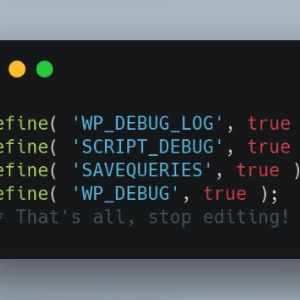
Debug Log only works if it’s enabled in wp-config.php. See https://codex.wordpress.org/Debugging_in_WordPress#WP_DEBUG_LOG
Recommended configuration:
define( 'WP_DEBUG', true );// just toggle this line to false to turn off
if ( WP_DEBUG ) {
    define( 'WP_DEBUG_LOG', true );
    define( 'WP_DEBUG_DISPLAY', false );
    @ini_set( 'display_errors', 0 );
}
Details


Related plugins
Plugins that also contain the tag debug
WP Crontrol

Query Monitor – The developer tools panel for WordPress

Debug Bar

Debug Log Manager – Conveniently Monitor and Inspect Errors

WP Debugging
Code Profiler – WordPress Performance Profiling and Debugging Made Easy

About
Plugin for that tries to help you find the WordPress plugin you are looking for.
| Please enjoy an image of Crush (this awesome turtle) and have a lovely day! |  |
We do not own any plugin listed on this site and do not work for or work with WordPress.com or it's associated companies. We simply provide a searchable list of the available WordPress plugins.