



DeltaBreen Helpdesk – Customer Support Ticket System
DeltaBreen Helpdesk adds a help desk and support ticket system to your WordPress site, with WooCommerce built in. Your visitors write to you from a support form on your pages, logged-in customers see their own tickets and your replies there, and your team answers every ticket from one shared board. It connects your site to Help by DeltaBreen, our helpdesk service at help.deltabreen.eu, and your customers never have to visit us.
One flat price per workspace, never per agent. The free plan has one site, two people and 100 tickets a month, with no card needed. You’re never charged for going over your plan.
Why sites choose DeltaBreen Helpdesk
- Your customers stay on your site. The form, their own tickets and your help articles are on your pages, in your theme. Your replies arrive by email too, and customers can reply to that email.
- Set up in one click. Press Connect, sign in or create a free account, and the site is ready, logged-in users too. Nothing to copy, no DNS record to add.
- Know who’s writing. Beside a logged-in customer’s ticket, your team sees their profile, orders and memberships from your site (on Lite and higher), read at that moment and never stored.
- Light on your site. Tickets are kept on Help’s servers in the EU, not in your database. The script loads only on pages that show Help, works with page caches, and never asks your visitors to solve a CAPTCHA.
- No surprise bills. Every plan includes a team, and its price covers all of them.
On your site
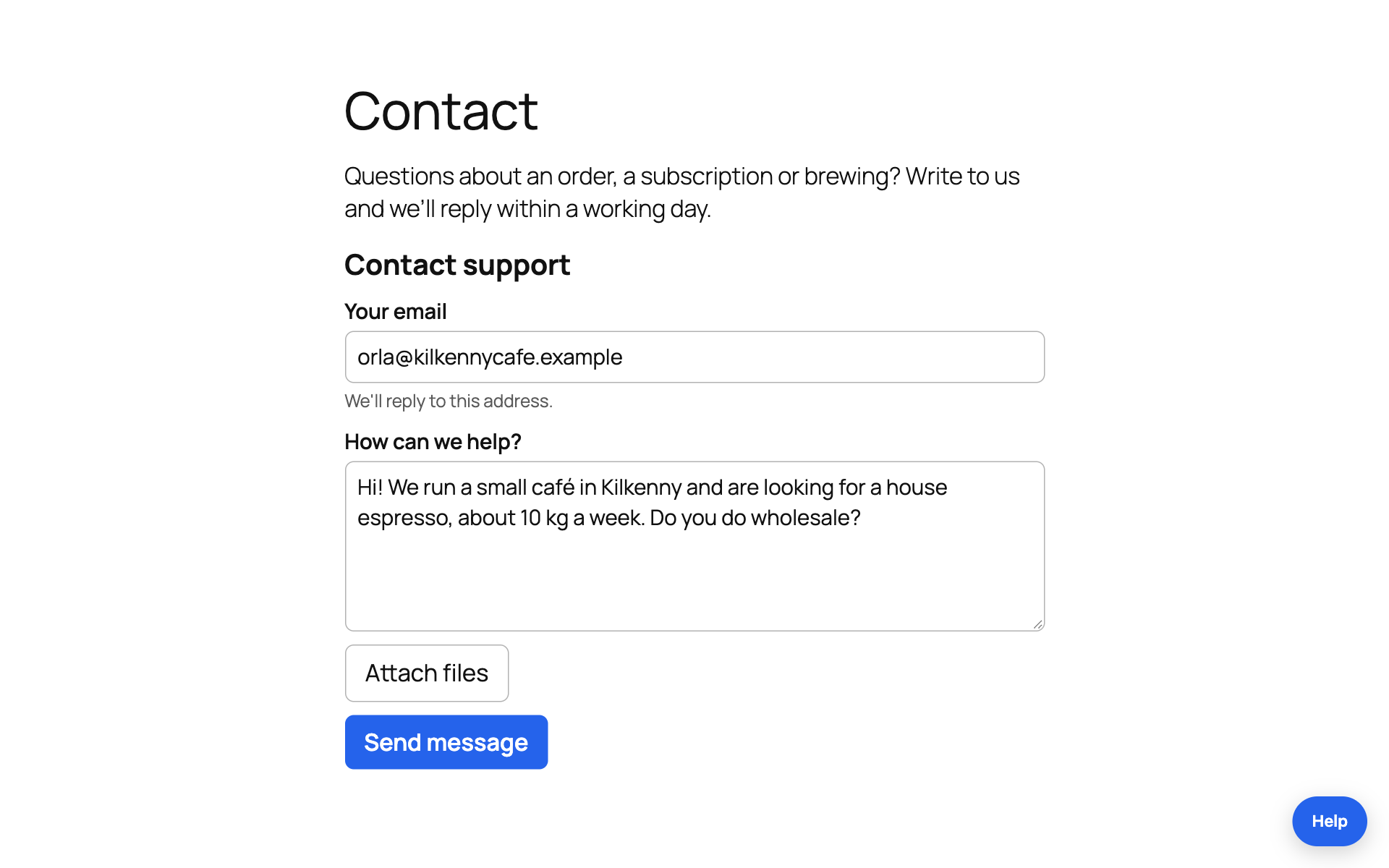
- Support form block. A contact form whose messages become tickets. Guests give their email and get your replies by email. Logged-in users are recognised, with nothing to set up. Severity and category are ready on every plan, and you can add fields of your own (on Lite and higher).
- Email, phone number or both. Ask guests for an email address, a phone number, or either one, each required or optional. On the Business plan, someone who left only a phone number is texted a link to your reply.
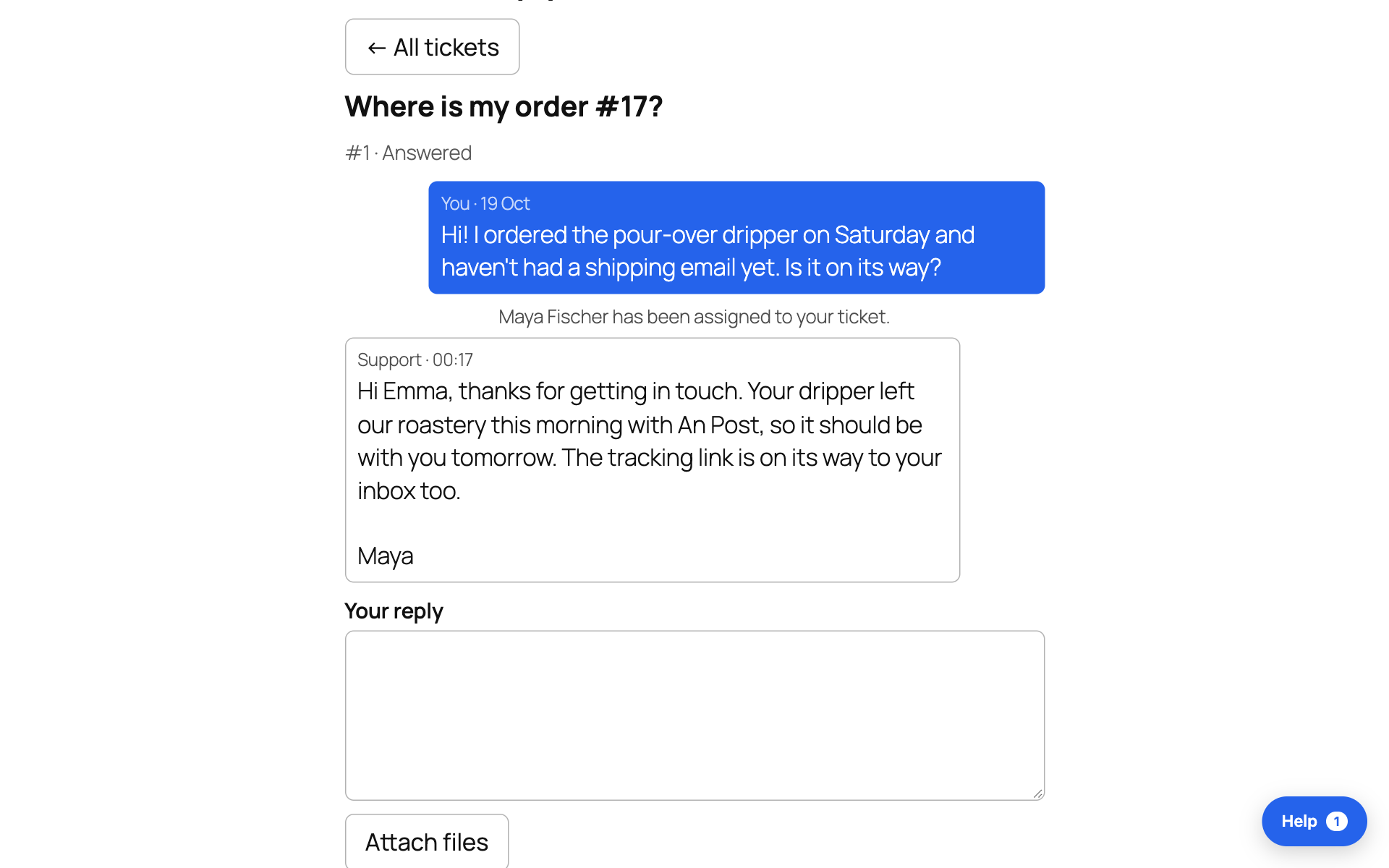
- My support tickets block. Each logged-in user sees their own tickets and your replies on your page, and replies there.
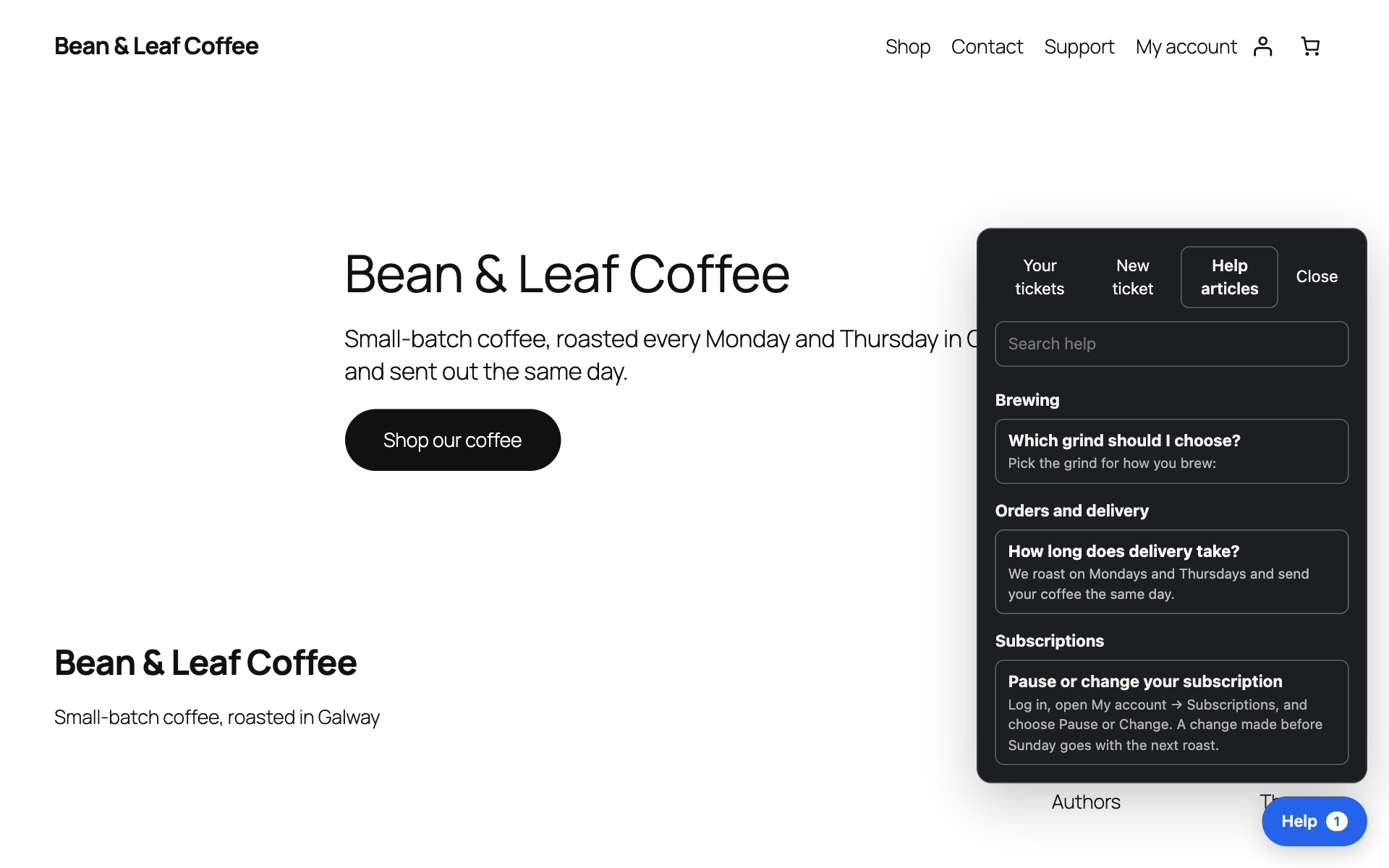
- Help button in the corner of one page or every page. It opens the form, the customer’s tickets and your help articles.
- Help articles block (on Pro and higher). Your articles and a search box on your own help page, and the form suggests them while a visitor writes.
- Files on Lite and higher: pictures, PDFs, text files and ZIPs, each checked by what it holds.
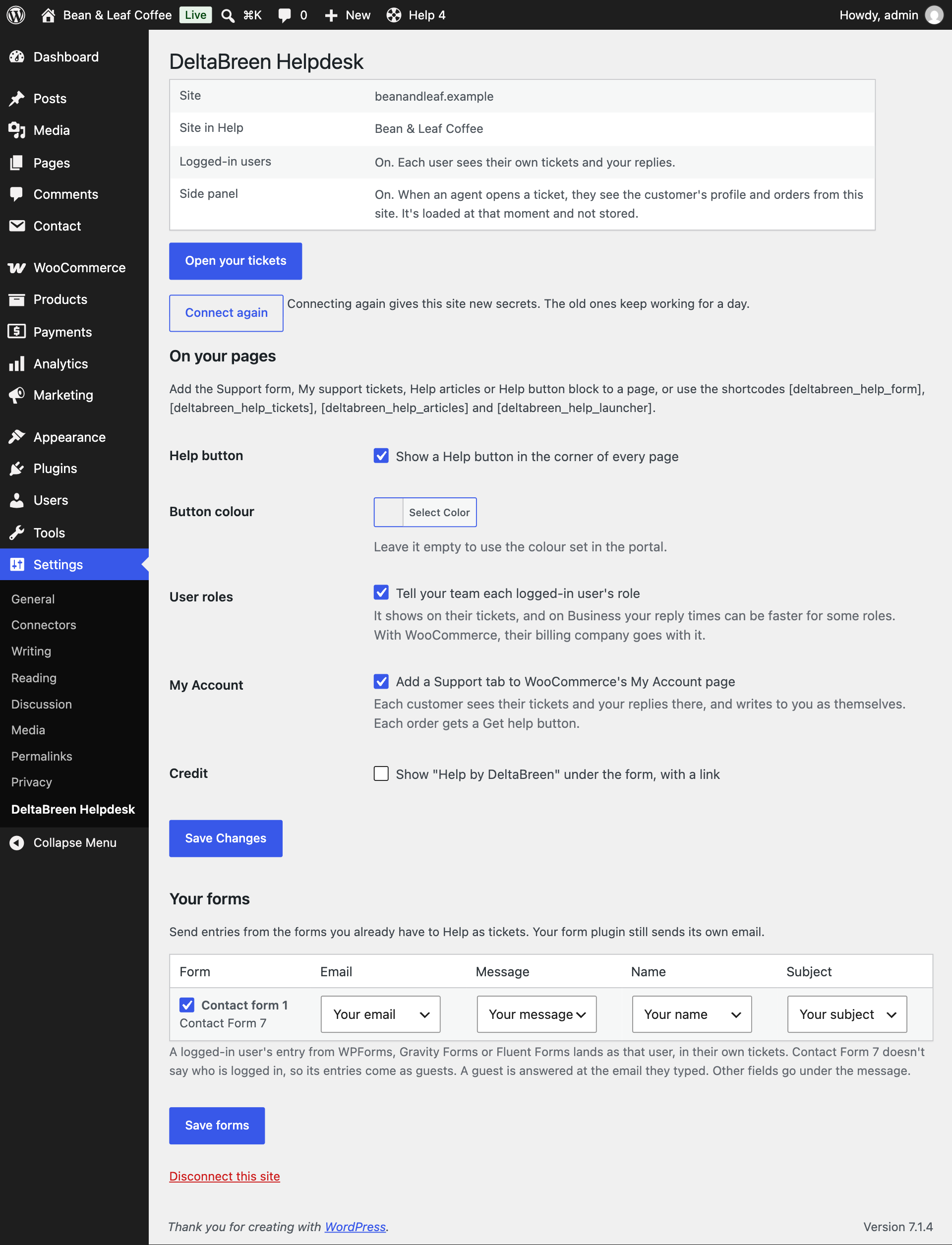
- Your existing forms become tickets. Switch on a Contact Form 7, WPForms, Gravity Forms or Fluent Forms form under Settings DeltaBreen Helpdesk. Your form plugin still sends its own email.
- Shortcodes and Elementor widgets for classic pages and page builders:
[deltabreen_help_form],[deltabreen_help_tickets],[deltabreen_help_articles]and[deltabreen_help_launcher]. - Your visitors’ language. The form and the tickets follow your page’s language in English, German, French, Spanish, Italian and Dutch, and you can change or translate every word.
- Your own design. The form takes your site’s colour, and on Lite and higher you can lay out the form and the ticket pages with your own HTML and CSS.
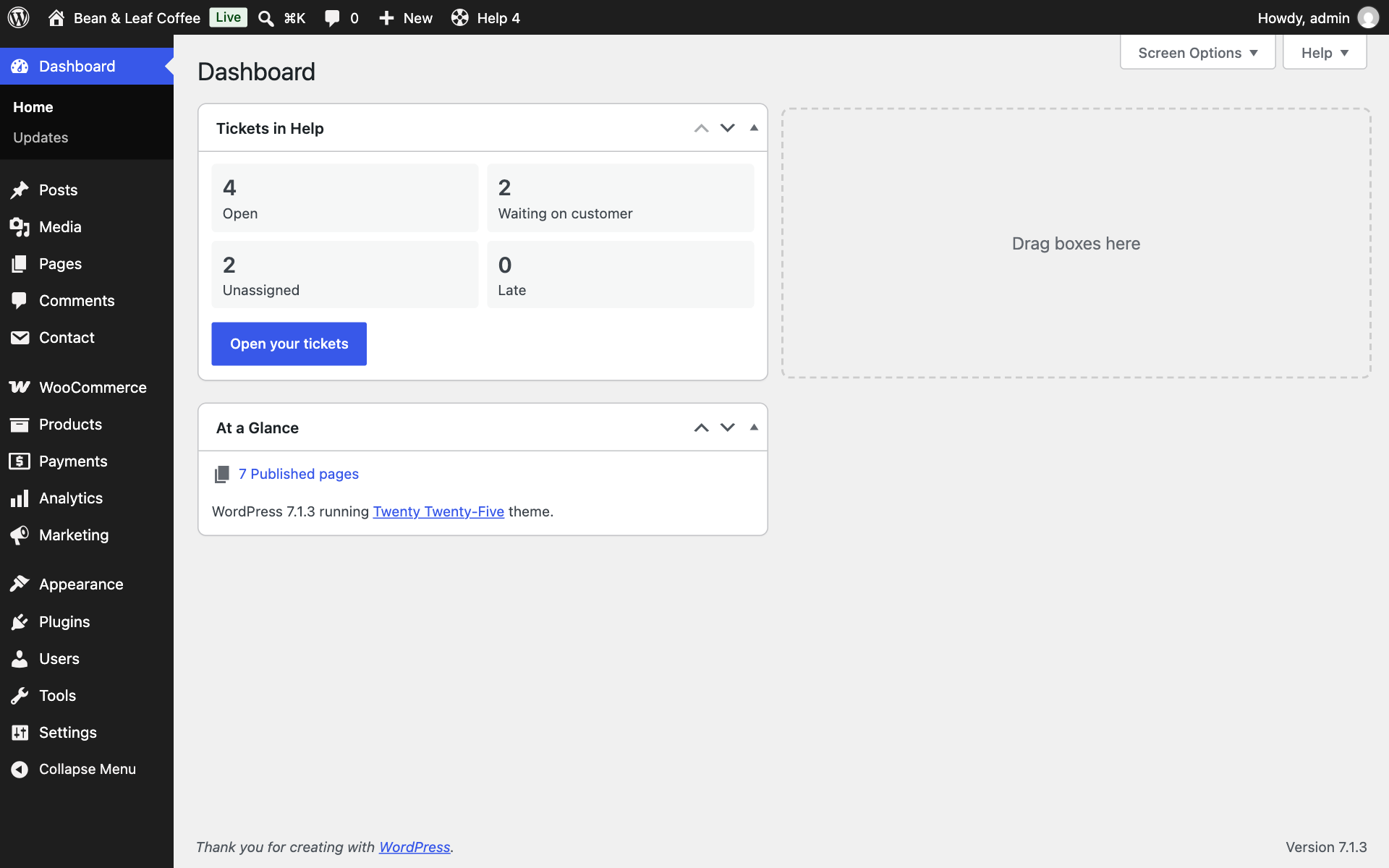
- Your tickets on the dashboard. Open, waiting, unassigned and late tickets in a dashboard box, and the open count in the admin bar.
For your team
Your team works at help.deltabreen.eu, from any browser.
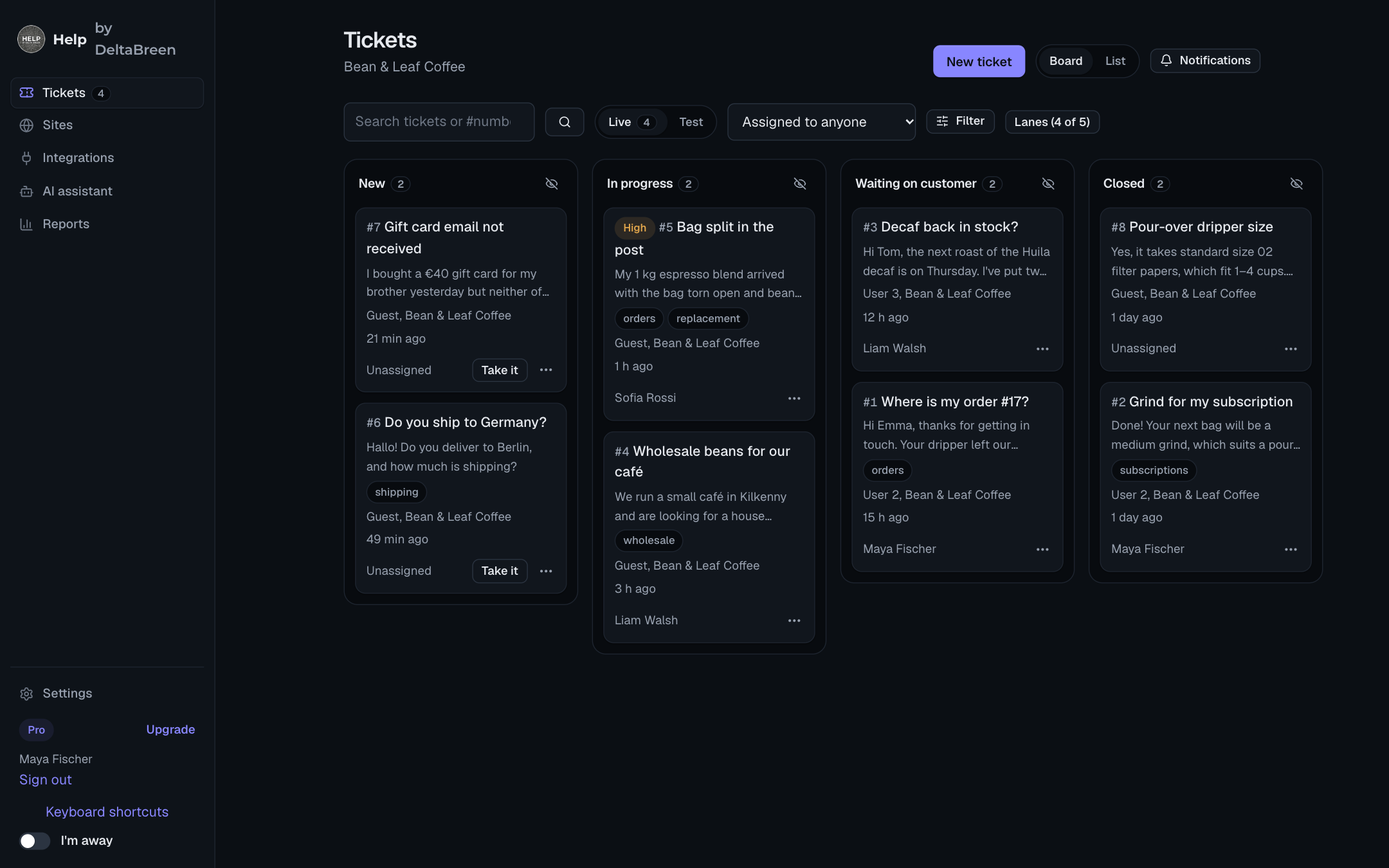
- A ticket board on every plan: New, In progress, Waiting and Closed, with drag and drop, or a list with search and filters. Priorities, tags, On hold, snooze, bookmarks and related tickets are on every plan too.
- Saved replies (five on Free, as many as you like on Lite and higher). A saved reply can also set the status, who has the ticket and its tags when it’s sent.
- Private notes for your team on every plan, and on Lite and higher: @mentions, following a ticket, seeing who else has it open, changing many tickets at once, merging two tickets and replies sent later.
- Rules on Pro and higher: hand tickets out in turn, send a site’s or a tag’s tickets to a team, close quiet tickets, and send an away message outside your hours.
- Reply time targets with your working hours and holidays, reports, ratings (“How did we do?”) and time tracking, on Pro and higher.
- Alerts your way: browser notifications on every plan, even with no tab open; Slack, Microsoft Teams, Discord or Telegram on Pro and higher; and on the Business plan, a text and then a call when a ticket is urgent.
- As your team grows: statuses of your own and fields only your team sees (on Lite and higher); teams, companies, and issues in GitHub, Linear or Jira from a ticket (on Pro and higher).
- Secure sign-in: two-step sign-in for everyone, and on the Business plan single sign-on, two-step sign-in required for the whole team, and roles of your own.
Works with WooCommerce and your other plugins
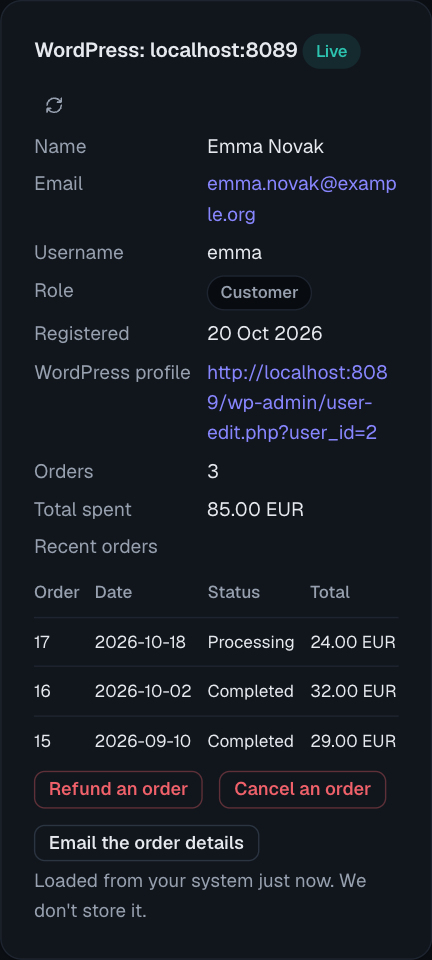
- The customer beside the ticket (on Lite and higher): their WordPress profile and, with WooCommerce, their number of orders, total spent and recent orders. It also reads Easy Digital Downloads and its Software Licensing, LearnDash, LifterLMS, Tutor LMS, Paid Memberships Pro, Restrict Content Pro, MemberPress, Wishlist Member and BuddyPress or BuddyBoss, whichever your site runs. Stripe and Shopify customers can be shown too, on Pro and higher.
- WooCommerce buttons (on Pro and higher): refund an order through its payment method, cancel it, or email its details again, from the ticket, after typing a word to confirm.
- A Support tab in My Account. Each customer’s tickets, your replies and the form in WooCommerce’s My Account, and a Get help button on every order that fills in its number. One switch turns it off.
- WordPress’s privacy tools take a person’s tickets too: Tools Export Personal Data includes them, and Tools Erase Personal Data removes them from Help.
Your own AI assistant
Help has no built-in AI and sells no AI credits. Connect the assistant you already use, such as Claude, ChatGPT or Cursor, to set up your sites on every plan, and on Pro and higher to read and reply to tickets and write help articles, with the permissions you choose.
Bring your tickets over
Move from another helpdesk plugin on this site, or from a hosted helpdesk, with replies, private notes and files, from Settings Import in the portal. Nothing on your site is changed.
Plans
- Free: one site, two people, 100 tickets a month.
- Lite, €10 a month: three people, 1,000 tickets a month, files, fields of your own and the customer beside the ticket.
- Pro, €49 a month: ten people, 3,000 tickets a month, help articles, rules, reports, ratings, chat alerts, WooCommerce buttons, webhooks, the API and your own AI assistant on tickets.
- Business, €129 a month: fifteen people, 10,000 tickets a month, single sign-on, roles of your own, texts and calls, and your own mail server and file storage.
- Enterprise, from €399 a month: room for your whole team.
Prices include VAT, and a yearly plan costs ten months. You’re never charged extra: on a paid plan the form keeps working if you go over, and on Free it stops taking guests’ messages until the month ends. Compare the plans at https://help.deltabreen.eu/pricing.
For developers
- The
deltabreen_help_customerfilter adds your own fields to what your team sees beside a ticket. - The
deltabreen_help_actionaction lets a button on a ticket do something on your site, such as cancel a subscription or resend an invoice, after the agent types a word to confirm. - A block or shortcode fills in the form’s own fields with
fields="order_id=123", and starts its subject withsubject="Book a call". - On Pro and higher: a REST API, and webhooks to your own URL, Zapier, Make or n8n.
External services
This plugin connects your site to Help by DeltaBreen (https://help.deltabreen.eu), a helpdesk service run by DeltaBreen Limited, Ireland. It is needed for the forms to work at all: the tickets are stored by the service and answered there.
The service’s servers are in the EU. Requests to help.deltabreen.eu pass through Cloudflare (https://www.cloudflare.com), which handles the secure connection and filters attacks. Cloudflare’s privacy policy: https://www.cloudflare.com/privacypolicy/
When an administrator presses Connect, the site sends the service its address, its name, the plugin’s version, whether WooCommerce is active, the three addresses the service may call it at, and a secret the site has just made. The service calls the site back once, signed with that secret, to check it is the site at that address.
When a visitor opens a page that shows a form, the tickets list or the Help button, their browser loads the embed script from help.deltabreen.eu and sends the site’s publishable key and the address of the page. For a logged-in user, the browser first asks your own site for a short-lived token, and sends that token to the service. It carries the user’s ID on your site, their email address, so replies can be emailed to them, and their role on your site, which is kept on their tickets (switch that off under Settings DeltaBreen Helpdesk).
While a visitor writes a message, on a plan with help articles and once you have published one, their browser sends the service what they have typed so far, after each pause, and the service answers with the titles of matching articles. The service keeps and logs none of it. You can switch this off for a site on its Articles tab in the portal. Opening an article, and pressing “That answered it”, each send the service the article’s name so it can count them; nothing about the visitor is kept with the count.
When a visitor sends a message, their browser sends the service the message, its subject, the page’s address, the values of any fields the page fills in (on a WooCommerce order’s page, that order’s number) and, for a visitor who isn’t logged in, the email address they typed.
When an agent opens a ticket (Lite plan and higher), the service calls your site, signed with the site’s secret, with the user’s ID. Your site answers with that user’s name, email address, username, role and registration date and, if WooCommerce is active, their number of orders, total spent and five most recent orders (number, date, status, total). From the other plugins it reads, when they are active: from Easy Digital Downloads, the same for their orders there, and with its Software Licensing each licence’s product, status and expiry date (never the licence key); from LearnDash, LifterLMS or Tutor LMS, each course they’re enrolled in and how far through it they are; from Paid Memberships Pro, Restrict Content Pro, MemberPress or Wishlist Member, each membership plan they hold, its status and when it ends (never a payment’s reference); from BuddyPress or BuddyBoss, the address of their profile, the names of the groups they’re in that aren’t hidden, and when they were last active. The service shows this to the agent and does not store it.
When an administrator opens the WordPress dashboard, at most once every five minutes, your site asks the service how its tickets stand, naming the site’s publishable key and signed with the site’s secret. The service answers with four numbers (open, waiting on the customer, unassigned, late) and nothing else.
When a visitor sends one of your own forms that you switched on (Contact Form 7, WPForms, Gravity Forms or Fluent Forms, under Settings DeltaBreen Helpdesk), and only once that form plugin has taken it as no spam, your site sends the service what the form held: the address and the message, the subject, every other answer as a line under the message (never a file, a hidden field or a consent box), the form’s name, the page’s address and your site’s language, and for a logged-in user (with WPForms, Gravity Forms or Fluent Forms) their ID on your site and their account’s email address, signed with the site’s secret. The service makes it a ticket. If the service can’t be reached, the entry waits in your site’s own database and is tried again each hour for a day.
When an administrator uses Tools Export or Erase Personal Data for an email address, your site asks the service, signed with the site’s secret, for that address and the ID of the account here that has it. To an export the service answers with that person’s tickets with this site: each one’s subject, status and dates, the messages they could read and the names of their files. An erase removes them from the service, unless the team set one to be kept, which the eraser then says.
When WordPress marks the site as a staging or development copy of a site connected to Help (a host’s staging button copies the plugin’s connection with the rest of the site), the copy asks the service once for test mode, sending its own address and the site’s publishable key, signed with the site’s secret. The service answers with the site’s test key and a test-mode secret for that copy alone, so the copy’s tickets are test tickets and nobody is emailed. Until it has them, the copy shows no form.
Twice a day at most, the plugin downloaded from help.deltabreen.eu asks it for the newest version’s number (/downloads/deltabreen-helpdesk.json), so WordPress can offer the update. It sends nothing about your site. The copy from the WordPress.org plugin directory does not; WordPress tells it of updates itself.
When someone on your team brings tickets over from another helpdesk plugin on this site (Settings Import in the portal), the service calls your site, signed with the site’s secret, and your site answers with which of the helpdesk plugins it reads are active and how many tickets each holds, then with that plugin’s tickets: each one’s subject, status, priority, tags and dates, the customer’s email address and their user ID on your site, the email address of the team member it was given to, its messages and private notes with their authors’ email addresses, and its attached files with their names. The service keeps them as tickets of your workspace. Your site reads the other plugin’s tables and files and changes nothing.
Terms of service: https://help.deltabreen.eu/legal/terms
Privacy policy: https://help.deltabreen.eu/legal/privacy
Details

Related plugins
Plugins that also contain the tag customer-support
Chatway Live Chat – AI Chatbot, Customer Support, FAQ & Helpdesk Customer Service & Chat Buttons

SupportCandy – Helpdesk & Customer Support Ticket System

Zendesk Chat

Live Chat with Messenger Customer Chat

Majestic Support – The Leading-Edge Help Desk & Customer Support Plugin

Zendesk Support for WordPress


About
Plugin for that tries to help you find the WordPress plugin you are looking for.
| Please enjoy an image of Crush (this awesome turtle) and have a lovely day! |  |
We do not own any plugin listed on this site and do not work for or work with WordPress.com or it's associated companies. We simply provide a searchable list of the available WordPress plugins.