



Details King Pro
—
Stay up-to-date with the latest by following @kingproplugins on Twitter, KingProPlugins on Facebook or King Pro Plugins on Google+
—
Built as a continuation of the blog posts on King Pro Plugins – Building a simple WordPress Plugin
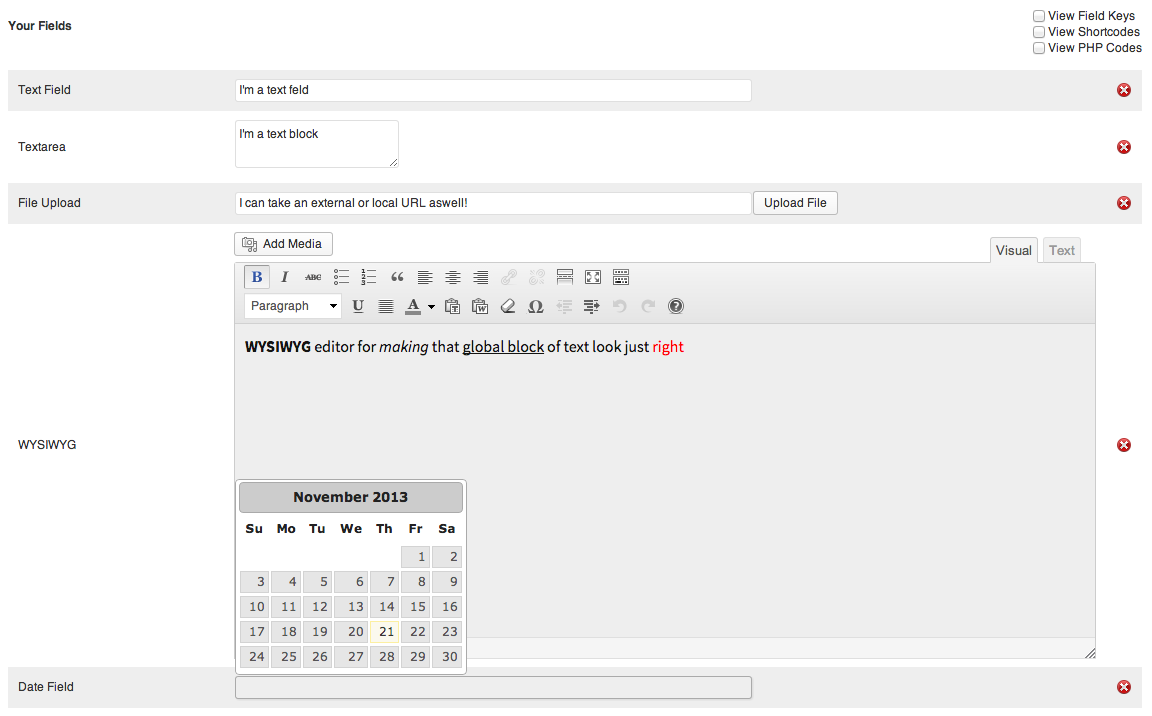
Details King Pro creates an easy way to have global values that can be used site with either via the provided shortcode or
via the PHP functions. Fields dynamically created by you can have a variety of values such as single textbox plain text value, block textarea plain text value, WYSIWYG content
value, file upload (such as a logo), or a date picker field.
—
If you have any suggestions or would like to see a feature in the plugin, please let me know in the support forum.
Any issues you are having, I’d also love to know, so again, please let me know using the support forum.
—
Check out the King Pro Plugins range
How To Use
Use Shortcodes
Shortcodes can be used in any page or post on your site. By default:
[dkp k=”your-field-key”]
If you would like to display an error if the key is not found:
[dkp k=”your-field-key” e=true]
To add this into a template, just use the “do_shortcode” function:
<?php if (function_exists(‘dkp_func’)) echo do_shortcode(“[dkp k=’your-field-key’]”); ?>
Of course, why do that when you have functions you can use:
<?php the_dkp_field($field_key, $error); ?>
This will print the value right there, or if you need to use the variable prior to printing it, use:
<?php $value = get_dkp_field($field_key, $error); ?>
—
Having Trouble? Get support either on the support forums here or at @kingproplugins on Twitter, KingProPlugins on Facebook or King Pro Plugins on Google+
—
Details

Related plugins
Plugins that also contain the tag dynamic
Dynamic Conditions

Login or Logout Menu Item

Dynamic Widgets

JC Submenu

Dynamic Year Block – display a copyright notice in your footer with the current year

Category Posts in Custom Menu


About
Plugin for that tries to help you find the WordPress plugin you are looking for.
| Please enjoy an image of Crush (this awesome turtle) and have a lovely day! |  |
We do not own any plugin listed on this site and do not work for or work with WordPress.com or it's associated companies. We simply provide a searchable list of the available WordPress plugins.