


Disable Toolbar
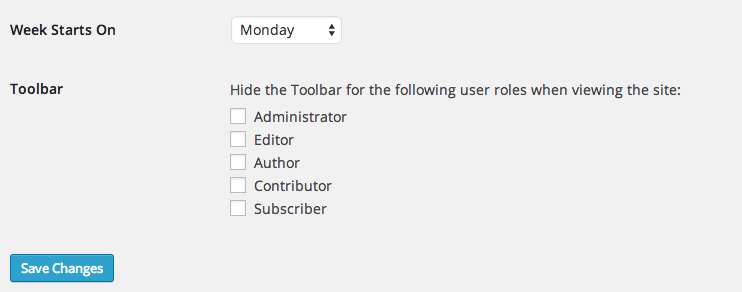
This humble plugin adds an option in Settings > General that controls who sees the WP Toolbar when viewing your site.
You can turn the Toolbar on or off per user role.
Note that this controls the public, front-end version of your site. When viewing the dashboard, the toolbar always appears.
How is this different from other plugins that do similar things? It’s smaller, cleaner, and doesn’t add any unnecesary settings pages. It’s also smart enough to hide the Toolbar option on user profiles if that user is already restricted from seeing the toolbar.
Details
Related plugins
Plugins that also contain the tag admin-bar
Hide Admin Bar Based on User Roles

Hide Admin Bar from Non-Admins
Bricks Navigator

Better Admin Bar

Auto Hide Admin Bar
Admin Bar & Dashboard Access Control


About
Plugin for that tries to help you find the WordPress plugin you are looking for.
| Please enjoy an image of Crush (this awesome turtle) and have a lovely day! |  |
We do not own any plugin listed on this site and do not work for or work with WordPress.com or it's associated companies. We simply provide a searchable list of the available WordPress plugins.