

This plugin is outdated and might not be supported anymore
Back
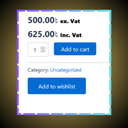
Display Inc. & Ex. VAT
Details
View on WordPress
Back
The Flexible VAT and Tax Display plugin empowers you to manage how product pricing is displayed across your WooCommerce store. Tailored for businesses that operate in regions with varying tax regulations, this plugin allows you to present prices with or without VAT (Value Added Tax) based on specific conditions.
Plugin Documentiation:
* WordPress Description
* Need help
* About Author
Installation:
- Upload Plugin Files: Upload the woocommerce-order-restriction folder to the /wp-content/plugins/ directory.
- Activate the Plugin: Activate the plugin through the ‘Plugins’ menu in WordPress.
- Configure Settings: Go to Display Inc. & Ex. VAT from menu to configure the all nessesary details.
- Click “Save Changes”
Features:
* View Type: Display inline or block
* Excluded Tax Label : like ex. vat or exclude vat etc
* Included Tax Label : like Inx. vat or Include vat etc
* Font size: Set custom font size
* Font weight: "Normal", "Bold", "Bolder"
* Font Color: Set custom font Color
* Where you want to display your tax: "Shop page", "Archive Page", "Single Page", "All Pages"
Details
Plugin code:
display-inc-ex-vat
Plugin version:
1.0.3
Author:
Outdated:
Yes
WP version:
5.0 or higher
PHP version:
7.0 or higher
Test up to WP version:
6.8.1
Total installations:
20
Last updated:
2025-05-20
Rating:
Times rated:
0
display-exclude-and-include-vat
display-woocommerce-price-with-inc-and-ex-vat


About
Plugin for that tries to help you find the WordPress plugin you are looking for.
| Please enjoy an image of Crush (this awesome turtle) and have a lovely day! |  |
We do not own any plugin listed on this site and do not work for or work with WordPress.com or it's associated companies. We simply provide a searchable list of the available WordPress plugins.