


Easy Cart
A simple shopping cart using shortcodes.
Be sure your permalinks in WordPress settings supports slug urls e.g. your-domain.tld/slug. Once you have proper permalink setting, Create a page with slug /cart. Then edit the cart page and add [easy_cart /] and [empty_cart /] shortcodes.
Create add to cart buttons using [add_to_cart /] shortcodes on other posts or pages of your WordPress site.
To display cart:
`
[easy_cart /]
`
To display empty cart link on cart page:
`
[empty_cart /]
`
Use the following attributes to define your add_to_cart products:
- itemid
- product_name
- product_desc
- product_qty
- price
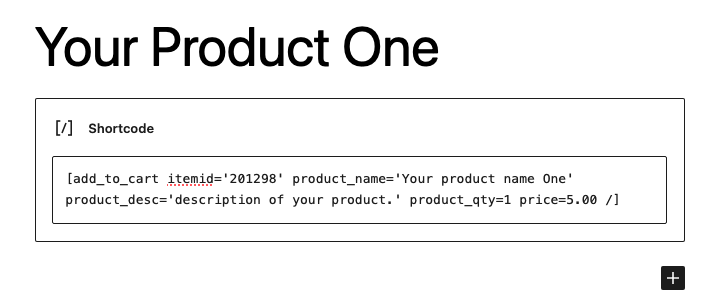
Here is a example usage of add_to_cart shortcode using all the attributes. Use quotes around text but not numbers:
[add_to_cart itemid=your-item-id product_name=”Your product name” product_desc=”description of your product.” product_qty=1 price=1.00 /]
`
[add_to_cart itemid=1111 product_name=”Your product name” product_desc=”description of your product.” product_qty=1 price=1.25 /]
`
You can have as many add_to_cart shortcodes as you like, in posts and pages.
Shopping cart allows you to store items and calculate total but doesn’t allow you to checkout. At least not yet as of version 1.2.
Details


Related plugins
Plugins that also contain the tag sessions
Native PHP Sessions

Loggedin – Limit Concurrent Sessions

Persistent Login

User Session Control

Nelio Session Recordings

Sympose


About
Plugin for that tries to help you find the WordPress plugin you are looking for.
| Please enjoy an image of Crush (this awesome turtle) and have a lovely day! |  |
We do not own any plugin listed on this site and do not work for or work with WordPress.com or it's associated companies. We simply provide a searchable list of the available WordPress plugins.