

Back
Editor Block Outline
Details
View on WordPress
Back
This a Gutenberg plugin that adds an outline around each block. Outline settings are based on user meta. Each user can
change the settings according to their needs and it will applied only to their account.
Users can change:
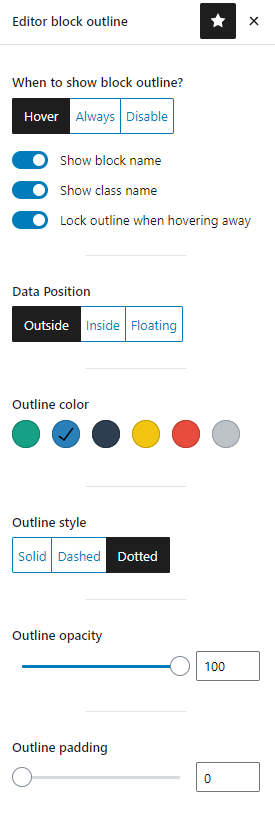
- When to show outline. On hover or always displayed.
- Lock outline for a single block.
- Disable outline completely.
- Show data (name and class) outside block, inside or floating when hovering over block
- Change outline color.
- Change outline style to solid, dashed or dotted line
- Change padding size
- Show/hide block name
Filters
- editor_outline_default_user_meta
You can override the default user meta by using this filter. The filter will receive the default user meta as an array and
you can return a modified array.
Check github repo for more information. https://github.com/kalimahapps/Editor-Block-Outline#filters
Details
Plugin code:
editor-block-outline
Plugin version:
1.4.3
Author:
Outdated:
No
WP version:
5.0 or higher
PHP version:
7.0 or higher
Test up to WP version:
6.9
Total installations:
1,000
Last updated:
2026-02-02
Rating:
Times rated:
21
blocks
editor
gutenberg
layout
outline

Related plugins
Plugins that also contain the tag blocks
Spectra Gutenberg Blocks – Website Builder for the Block Editor

Kadence Blocks — Page Builder Toolkit for Gutenberg Editor
Extendify

Otter Blocks – Gutenberg Blocks, Page Builder for Gutenberg Editor & FSE

Page Builder Gutenberg Blocks – CoBlocks

GenerateBlocks


About
Plugin for that tries to help you find the WordPress plugin you are looking for.
| Please enjoy an image of Crush (this awesome turtle) and have a lovely day! |  |
We do not own any plugin listed on this site and do not work for or work with WordPress.com or it's associated companies. We simply provide a searchable list of the available WordPress plugins.