


Editor Insights for Elementor
Editor Insights for Elementor helps you understand how an Elementor page is configured without digging through every element and control.
See useful metadata directly in Navigator, spot configured controls more easily, and make everyday Elementor editing faster to inspect and navigate.
Whether you’re returning to a site you built months ago, taking over somebody else’s project, or trying to find the setting behind unexpected layout behavior, Editor Insights gives you more context while you work.
The plugin is focused on the editor experience. Its insights and interface enhancements do not change the Elementor values they display or alter your website’s frontend output.
Preferences are saved per WordPress user, so every editor on a site can configure Editor Insights around their own workflow.
Elementor Free 3.0.0 or newer is required. Elementor Pro is not required.
See what matters before you start digging
Editor Insights is especially useful when you need to understand how an Elementor page is configured without opening every element and control one by one.
Come back to an old or inherited website
Open a project you built months ago — or one built by somebody else — and quickly get your bearings.
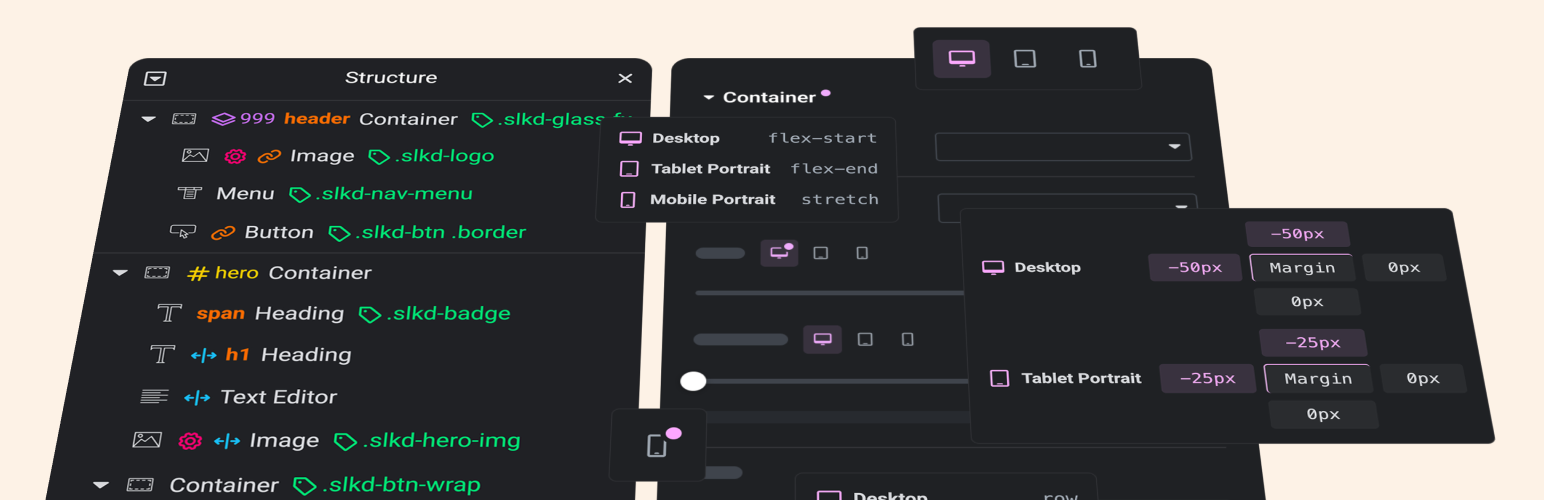
See IDs, classes, HTML tags, z-index values, positioning, links, attributes, responsive widths, and other useful details directly in Navigator instead of rediscovering the page one setting at a time.
Find the setting behind unexpected behavior
When something is overlapping, clipping, positioned strangely, or otherwise not behaving as expected, important clues can be easy to miss inside Elementor.
Editor Insights makes settings such as custom positioning, z-index, overflow, Custom CSS, classes, attributes, and other configured values easier to spot before you start changing things.
Understand responsive overrides
Responsive issues often come down to figuring out where a value was actually configured and which values are simply inherited.
Editor Insights makes responsive configuration easier to locate, while Pro can highlight breakpoint-specific values and show available breakpoint values in tooltips without repeatedly switching device modes.
Navigator insights
Make Elementor Navigator more informative without opening every element individually.
Editor Insights can show:
- CSS IDs — see when an element has a CSS ID and optionally display the actual ID.
- CSS classes — see custom CSS classes and optionally display their names directly in Navigator.
- Container HTML tags — see the HTML tag assigned to a Container.
- Heading HTML tags — see heading tags such as H1, H2, and H3 directly in Navigator.
- Z-index values — identify elements with a custom z-index and optionally display the configured value.
- Custom positioning — spot elements using custom positioning.
- Custom CSS — identify Custom CSS when Elementor Pro provides it.
- Links — see which supported elements contain links.
- Custom attributes — identify elements with configured custom attributes.
- Container overflow — see when a Container uses a non-default overflow setting.
- Custom responsive widths — identify widgets with custom responsive width values.
For supported position and Custom CSS indicators, Editor Insights replaces Elementor’s matching native Navigator indicator when enabled so duplicate indicators are not shown.
Navigator workflow improvements
Editor Insights also includes practical Navigator improvements:
- Disable animated click-to-element scrolling — stops Elementor from animating the canvas scroll when you click an item in Navigator.
- Increase Navigator maximum width — raises Navigator’s resize limit so it can be made much wider when working with deeply nested structures or long element names.
Panel improvements
Small changes to the Elementor Panel can make a noticeable difference during everyday editing.
Inline responsive switches
Keeps Elementor’s responsive device switch inline beside the control title for quicker access while editing.
Highlight sections
Adds an indicator to section headings that contain configured controls, making values easier to find even while sections are collapsed.
Decimal-friendly numeric inputs
Makes supported Elementor numeric inputs friendlier to decimal and negative values, including values such as 2.5 and -2.5.
Granular, per-user preferences
Editor Insights is designed to adapt to different workflows rather than forcing one setup on everyone.
Features can be enabled or disabled individually, and preferences are stored separately for each WordPress user.
One editor can keep Navigator highly detailed while another can enable only the indicators they find useful.
A global on/off control also lets you temporarily disable Editor Insights without losing your saved preferences.
Editor-only by design
Editor Insights is built for the Elementor editing experience.
Its metadata, indicators, highlights, and interface improvements inspect and display information without changing the Elementor values they represent.
The Free plugin does not add frontend scripts, styles, or other assets just to display Editor Insights information.
Editor Insights Pro
An optional, separately installed Pro add-on is available from Editor Insights with additional Panel insights and workflow improvements.
Tooltips
Hover a supported control or repeater title to see its configured values without manually switching through device modes.
For responsive controls, the tooltip shows every available breakpoint value regardless of the currently selected device mode.
Supported controls inside popovers are included, and Dynamic or Global values are identified.
Tooltip text can also be made selectable so values are easier to copy.
The tooltip color can be customized.
Highlight responsive switches
Adds a dot to a device switch when that breakpoint has its own local value, Dynamic tag, or Global value.
An inherited value alone does not trigger the dot, making actual breakpoint-specific overrides easier to distinguish.
The highlight color can be customized.
Highlight non-responsive controls
Adds a dot beside non-responsive controls with a meaningful current or default value.
Configured subfields inside supported compound controls can also be identified.
The highlight color can be customized.
Highlight control titles
Colors the title of a responsive control when it has a configured value at a non-desktop breakpoint, such as tablet or mobile.
This makes responsive overrides easier to spot without opening and checking every control individually.
The highlight color can be customized.
Wrap in Container
Adds a Wrap in Container action to Elementor’s context menu for classic Elementor V3 elements when Containers are enabled.
Use it with a single element or multiple selected elements to wrap them in a new Container.
Nothing is changed automatically. The action only runs when you explicitly choose it and invokes Elementor’s native editor behavior.
Free and Pro work together
The Free plugin contains the shared settings hub and shows the available Pro settings alongside the Free features.
Pro settings remain locked until the separately installed Pro add-on is active and licensed.
This lets you manage Editor Insights from one place while keeping the Free plugin fully functional on its own.
Privacy by design
The Free plugin:
- Sends no telemetry.
- Sets no cookies.
- Makes no external service requests.
- Performs no license checks.
- Loads no remote fonts or scripts.
- Stores its preferences locally in WordPress.
- Does not add Editor Insights preferences to Elementor documents.
Editor Insights is an independent plugin and is not affiliated with or endorsed by Elementor Ltd.
Privacy
Editor Insights stores per-user preferences locally in WordPress.
The Free plugin does not transmit data to external services, set cookies, include telemetry, perform license checks, or load remote fonts or scripts.
Free settings are stored in the editor_insights_preferences user-specific metadata record and are not added to Elementor documents.
Details


Related plugins
Plugins that also contain the tag editor
Elementor Website Builder – More Than Just a Page Builder

Classic Editor

Classic Widgets

Advanced Editor Tools

Spectra Gutenberg Blocks – Website Builder for the Block Editor

User Role Editor


About
Plugin for that tries to help you find the WordPress plugin you are looking for.
| Please enjoy an image of Crush (this awesome turtle) and have a lovely day! |  |
We do not own any plugin listed on this site and do not work for or work with WordPress.com or it's associated companies. We simply provide a searchable list of the available WordPress plugins.