



eFakturuj for WooCommerce
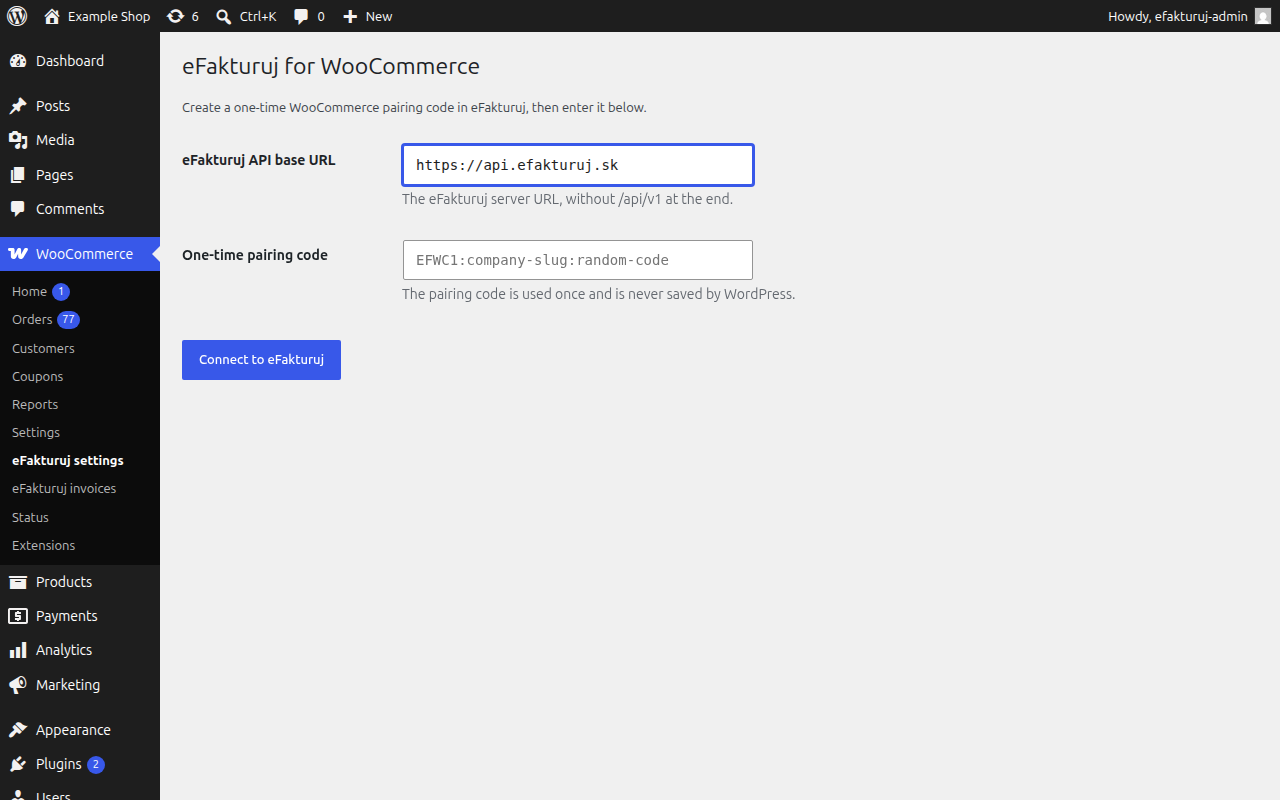
eFakturuj for WooCommerce connects one WooCommerce store to one eFakturuj company using a short-lived, one-time pairing code. Pairing records and protects the normalized store URL so the same store cannot silently be attached to another company.
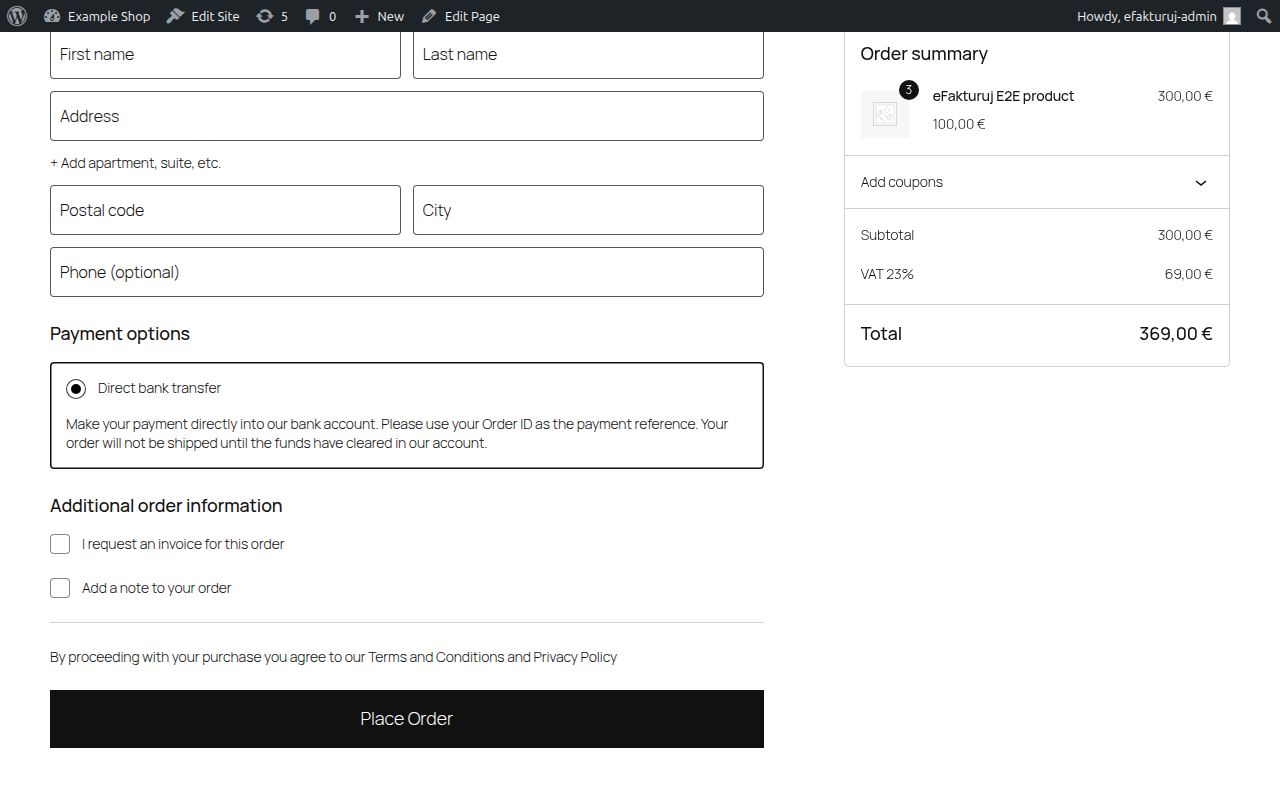
Normal synchronization is automatic and does not make checkout or an order edit wait for eFakturuj. The plugin captures an immutable canonical order snapshot in a durable local outbox, encrypts its payload with AES-256-GCM, and sends it in the background. The safe default creates invoices only when the customer requested one; the merchant can add the built-in checkout checkbox, use an existing checkout extension’s order-meta key, or deliberately enable every eligible order.
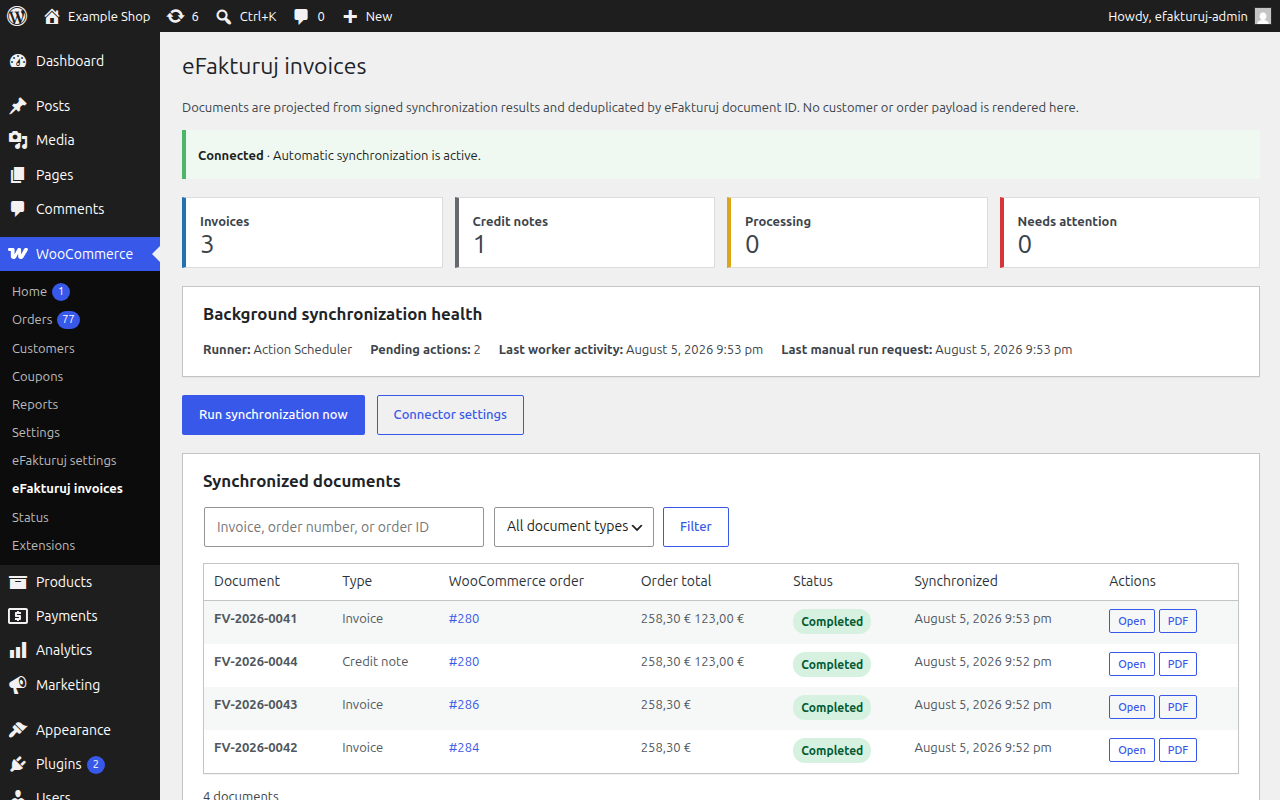
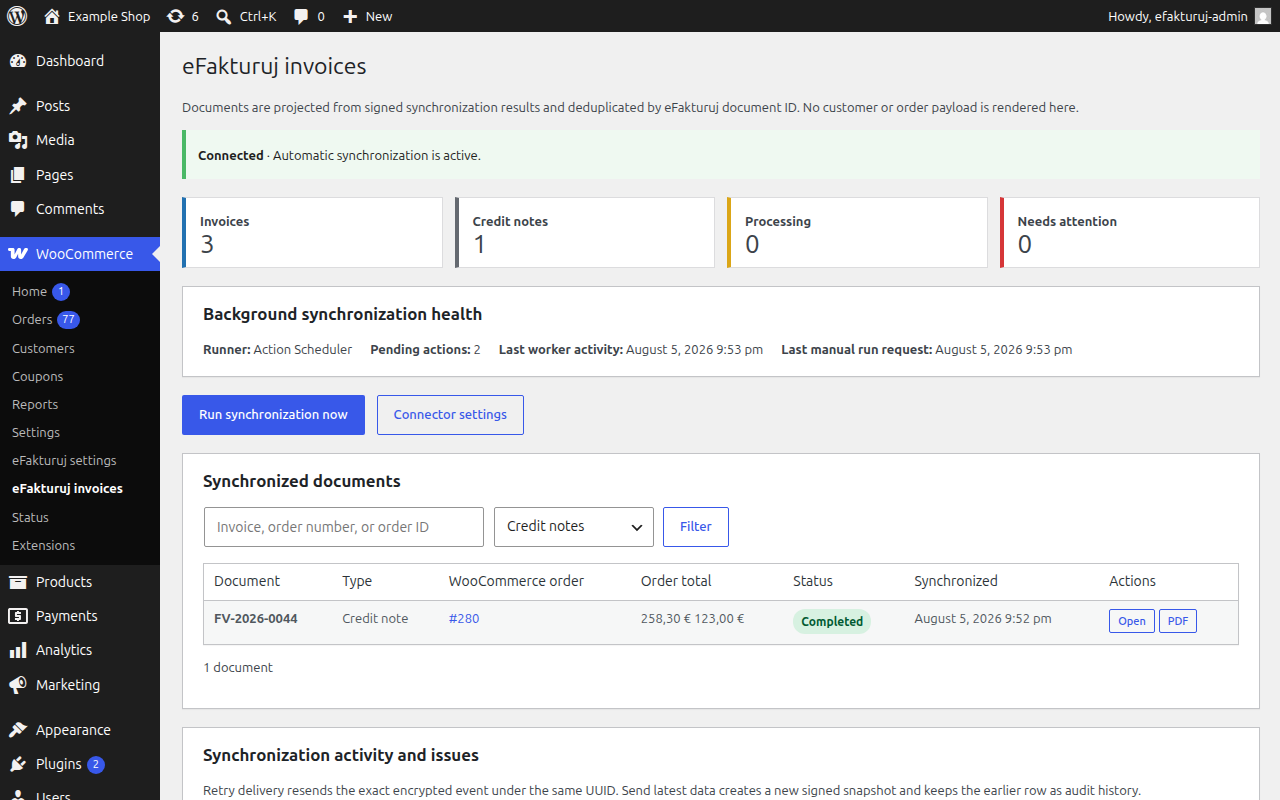
WooCommerce > eFakturuj invoices is the dedicated operational workspace. It provides:
- invoice and credit-note totals, issue counts, search, type filters, and pagination;
- deduplicated documents linked to their WooCommerce orders;
- authenticated eFakturuj invoice and PDF actions returned by the signed status API;
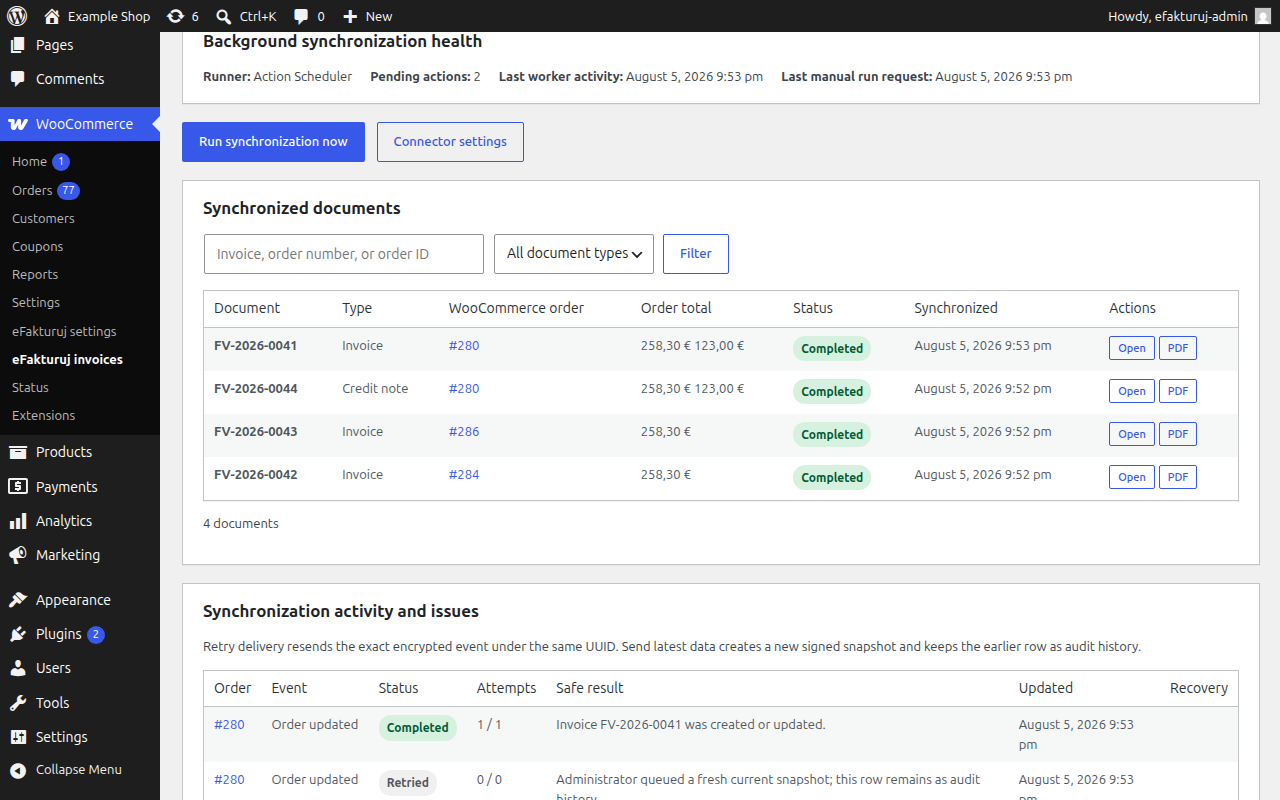
- durable synchronization history with delivery and status-poll attempt counts;
- separate exact-delivery and fresh-data recovery controls; and
- Action Scheduler or WP-Cron mode, pending-action count, last-worker activity, and a protected Run now control.
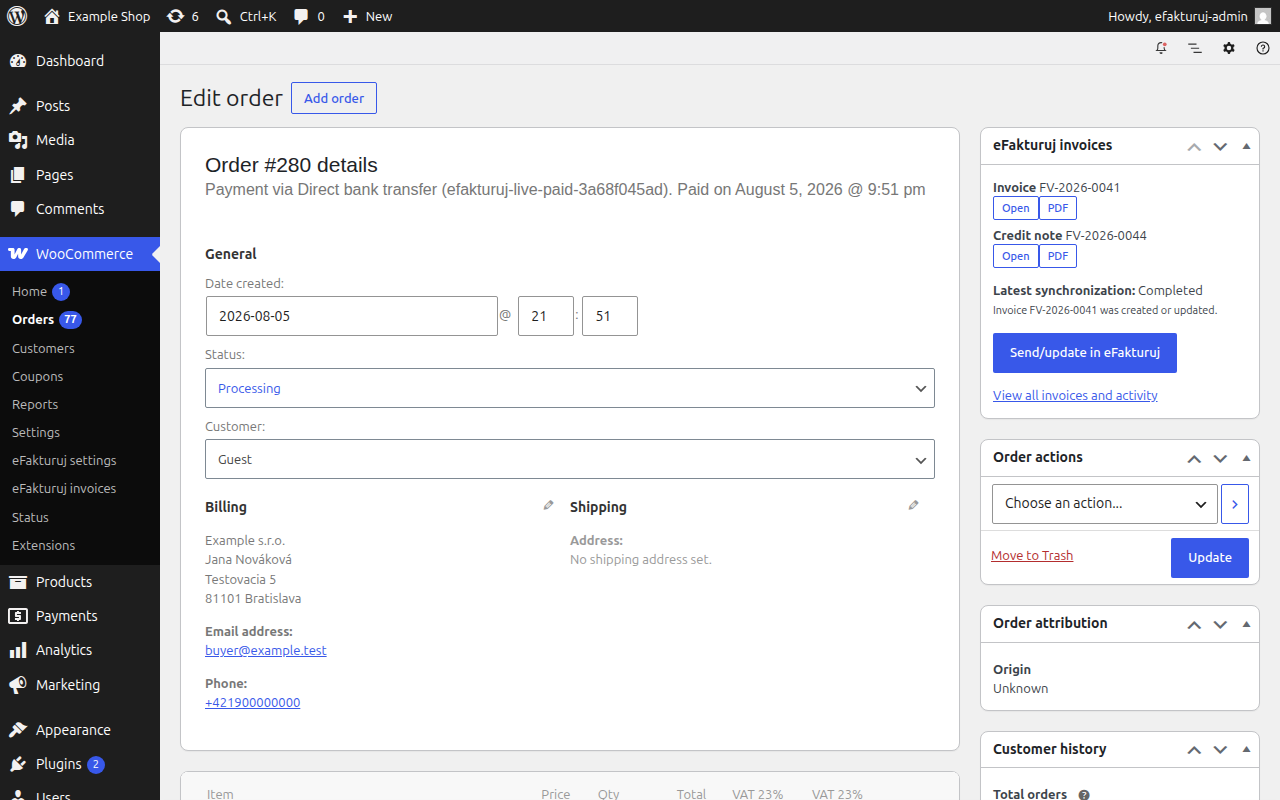
The WooCommerce order editor also contains an HPOS- and legacy-compatible eFakturuj invoices card. It shows documents and recent synchronization status for that order, provides authenticated Open/PDF actions when available, and allows an authorized administrator to send the current order again.
The plugin captures new orders, persisted order edits, status changes, saved order items, completed payments, created refunds, completed order refunds, and later refund edits. Duplicate hooks are coalesced before one immutable snapshot is stored. Itemized partial refunds include product, shipping, fee, and per-tax-rate allocations so eFakturuj can create linked type 381 credit notes. An amount-only or unreconciled refund remains visible for review instead of inventing an accounting allocation.
Security details:
- Pairing codes are never stored and cannot be reused.
- The connection is bound to the normalized WooCommerce store URL.
- The signing secret and immutable outbox payloads are encrypted at rest with AES-256-GCM using key material derived from the WordPress AUTH_KEY.
- Connection options are not autoloaded.
- Version 1.0.0 requests signature version 2 during pairing and uses the version returned by eFakturuj. Version 2 authenticates the canonical event UUID together with the exact JSON bytes; version 1 remains supported for an existing connection upgraded from an older plugin.
- Every status request is signed separately and scoped to its connection, event, company, and store.
- Remote POST requests do not follow redirects, so signed credentials and payloads are not forwarded to another host.
- Every mutating administrator action requires the manage_woocommerce capability and a purpose-specific WordPress nonce.
- Customer/order payloads and secrets are not written to activity rows or plugin logs.
- The workspace stores only bounded safe summaries and document/correlation identifiers outside the encrypted payload.
Requirements
- WordPress 6.5 or newer
- PHP 7.4 or newer with OpenSSL and AES-256-GCM support
- WooCommerce installed and active
- WordPress loopback/background processing enabled (Action Scheduler is preferred; WP-Cron is the fallback)
- The WordPress server must be able to make outbound HTTP requests to the eFakturuj API
The isolated 1.0.0 acceptance run passed all 27 checks on WordPress 7.0.1 and WooCommerce 10.9.4.
Testing the connection
- Pair the store at WooCommerce > eFakturuj settings and confirm that a Connection ID is shown.
- Open WooCommerce > eFakturuj invoices and confirm that Background synchronization health identifies Action Scheduler or the WP-Cron fallback.
- Create a test order with a product, customer billing details, shipping, tax, and a payment method. Mark the invoice-request field when using the default policy.
- Move the order to a status enabled in the eFakturuj WooCommerce application, for example Processing or Completed.
- Allow Action Scheduler to run. For an immediate test, use Run now in the invoices workspace or run
wp action-scheduler runwhen the Action Scheduler WP-CLI command is available. - Confirm that the activity moves from queued/sending through accepted/processing to completed, and that one deduplicated invoice appears.
- Open the order editor and confirm that the eFakturuj invoices card shows the same document. Test Open and PDF while signed in to an authorized eFakturuj account.
- Compare customer, line, discount, shipping, tax, currency, payment, and total values with the WooCommerce order.
- Edit the order or complete its payment and confirm that the plugin captures the persisted change without creating a duplicate document.
- Create an itemized partial refund and confirm that a linked type 381 credit note appears once with matching product, shipping/fee, and tax allocations.
Recovery behavior
Automatic delivery makes no more than five attempts for one immutable event UUID. Accepted events receive up to 12 signed status checks with bounded backoff.
The invoices workspace deliberately separates two recovery operations:
- Retry delivery decrypts and resends the exact stored JSON bytes under the same event UUID. Use it for a transient transport or queue failure; backend idempotency returns the existing result when the event was already received.
- Send latest data reads the current WooCommerce order, creates a new encrypted snapshot and UUID, and includes the earlier UUID as
retries_event_id. Use it only after correcting source data or when a review/attention result requires a new event. Both rows remain correlated audit history.
Neither operation lets a submitted request choose another order: the server-side handler resolves the order and event type from the protected outbox row. Both require manage_woocommerce and a row-specific nonce.
Disconnecting and uninstalling
Use WooCommerce > eFakturuj settings > Disconnect to remove the local connection ID, event URL, encrypted signing secret, signature version, and scheduled connector actions. Existing eFakturuj invoices are not deleted. Local outbox history remains available until the plugin is deleted, but it cannot be delivered while disconnected.
Deactivation preserves connection data and outbox rows so normal operation can resume after reactivation. Deleting the plugin from the WordPress Plugins screen removes connection and invoice-policy options, worker-health timestamps, scheduled actions, and the complete encrypted outbox table. Backend accounting documents are never deleted by local cleanup.
Uninstall the WooCommerce application in eFakturuj when access must also be revoked at the backend; that clears the server-side signing secret and rejects later store events.
External services
This plugin connects your store to eFakturuj, an e-invoicing service operated by
eFakturuj (IČO 57546495, Slovakia). The connection is created by you, in the plugin
settings, using a one-time pairing code issued by your eFakturuj account. No data
leaves your site before you pair it.
What is sent, and when:
- On pairing: your normalized store URL, the WordPress site name, the plugin version,
your WordPress version, your WooCommerce version, and the event signature version
the plugin requests, so eFakturuj can bind the connection to this store and agree
on how later events are signed. - When an eligible order or refund is captured: buyer billing and shipping details,
company and tax identifiers, email and phone, ordered items, discounts, shipping,
fees, per-rate taxes, totals, currency, payment state, refund allocations, the
reason recorded for each refund, and the customer’s order note. The order note and
the refund reason are free text: whatever the shopper or your staff typed there is
sent exactly as written, so it can contain personal data. - When synchronization status is checked: only the event identifier, signed with the
connection secret.
Nothing is sent for orders that are not eligible under your invoice policy.
Service terms: https://efakturuj.sk/p/terms
Privacy policy: https://efakturuj.sk/p/privacy
Service documentation: https://docs.efakturuj.sk
eFakturuj is a paid service. You can evaluate the connector without a paid account
using the free sandbox at https://sandbox.efakturuj.sk/get-started
Privacy
When connected, this plugin sends eligible invoice data to the configured eFakturuj API, including customer billing/shipping details, company and tax identifiers, email/phone, purchased items, discounts, totals, taxes, payment state, and refund information. Two of those values are free text rather than structured fields: the customer’s order note, written by the shopper at checkout, and the reason recorded for each refund. Both are transmitted exactly as entered, so treat them as potentially containing personal data and tell shoppers not to put anything sensitive in the order note.
Canonical payloads waiting for delivery are retained locally only in AES-256-GCM encrypted form. The invoices workspace and logs expose bounded non-content summaries: event/document identifiers, WooCommerce order identifiers/numbers, status, attempts, timestamps, correlation, document links, and sanitized public errors. They do not store or display the canonical customer/order JSON. Deleting the plugin drops the encrypted outbox and local options; normal database backups may retain deleted data according to the site’s backup policy.
Review the eFakturuj privacy policy (https://efakturuj.sk/p/privacy), document this processor/data transfer in the store privacy notice, limit administrator access to trusted users, and set an appropriate WordPress backup-retention policy.
Details
Related plugins
Plugins that also contain the tag accounting
ERP: Complete HR, Accounting & CRM Suite with WooCommerce CRM Support

Finpose – Accounting for WooCommerce

Accounting for WooCommerce

Money Manager

yengec.co

Contasimple


About
Plugin for that tries to help you find the WordPress plugin you are looking for.
| Please enjoy an image of Crush (this awesome turtle) and have a lovely day! |  |
We do not own any plugin listed on this site and do not work for or work with WordPress.com or it's associated companies. We simply provide a searchable list of the available WordPress plugins.