


EngageBay for Gravity Forms
Connecting EngageBay account
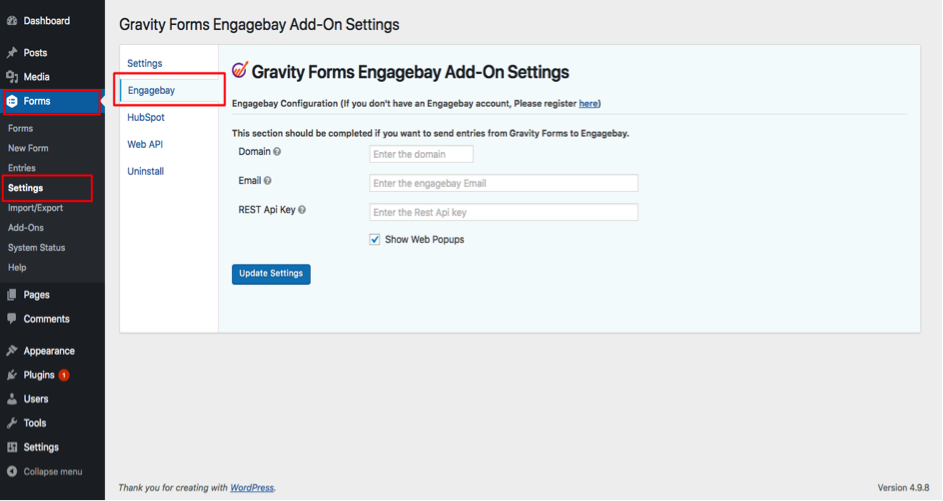
Enter the Engagebay Domain, Email and REST API Key (Admin Settings->API and then copy REST API Key). If you want to enable Web Popups for your site, Check/Uncheck Show Web Popups.
Map EngageBay fields with Gravity Form fields
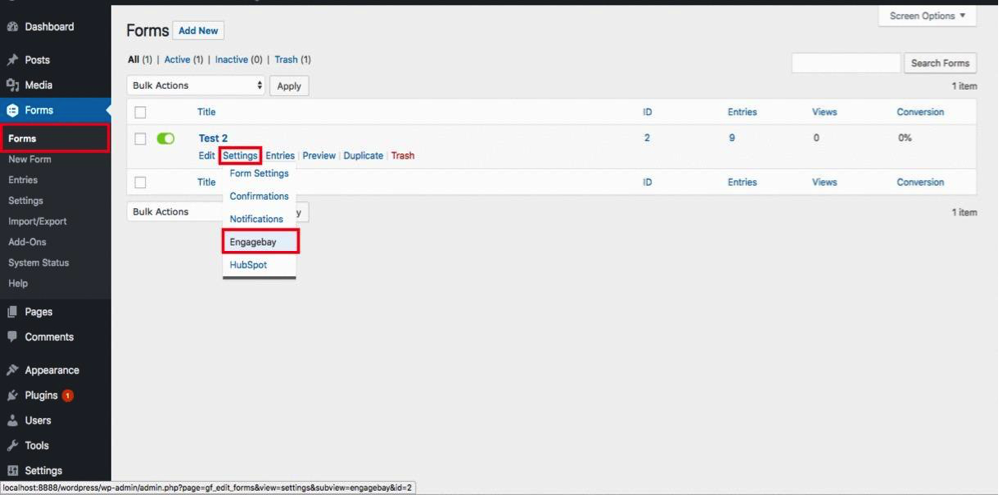
In the Form Settings tab, choose the Gravity Form that you’d like to integrate with EngageBay. Map the Gravity Form fields to the EngageBay fields (email, contacts, company etc). After mapping all the fields, save the details.
EngageBay system is simple and refreshing.
Melinda – WordPress Consultant
Here’s why smart business owners, designers, and developers love EngageBay, and you will too!
How EngageBay Can Help Your Business Grow
- All-in-one CRM, Marketing, Sales and Support software
- Increase web visitor engagement
- Capture more leads
- Grow email lists
- Convert more subscribers and sales
- Increase trust and brand value of your business
Support
Check out our support page for help documentation and access other support channels or simply send us an email to support@engagebay.com.
Details

Related plugins
Plugins that also contain the tag forms
WPForms – Easy Form Builder for WordPress – Contact Forms, Payment Forms, Surveys, & More

Fluent Forms – Customizable Contact Forms, Survey, Quiz, & Conversational Form Builder

Forminator Forms – Contact Form, Payment Form & Custom Form Builder

Ninja Forms – The Contact Form Builder That Grows With You

SureForms – Contact Form, Payment Form & Other Custom Form Builder

Formidable Forms – Contact Form Plugin, Survey, Quiz, Payment, Calculator Form & Custom Form Builder


About
Plugin for that tries to help you find the WordPress plugin you are looking for.
| Please enjoy an image of Crush (this awesome turtle) and have a lovely day! |  |
We do not own any plugin listed on this site and do not work for or work with WordPress.com or it's associated companies. We simply provide a searchable list of the available WordPress plugins.