



Extnify Offer Rules for WooCommerce
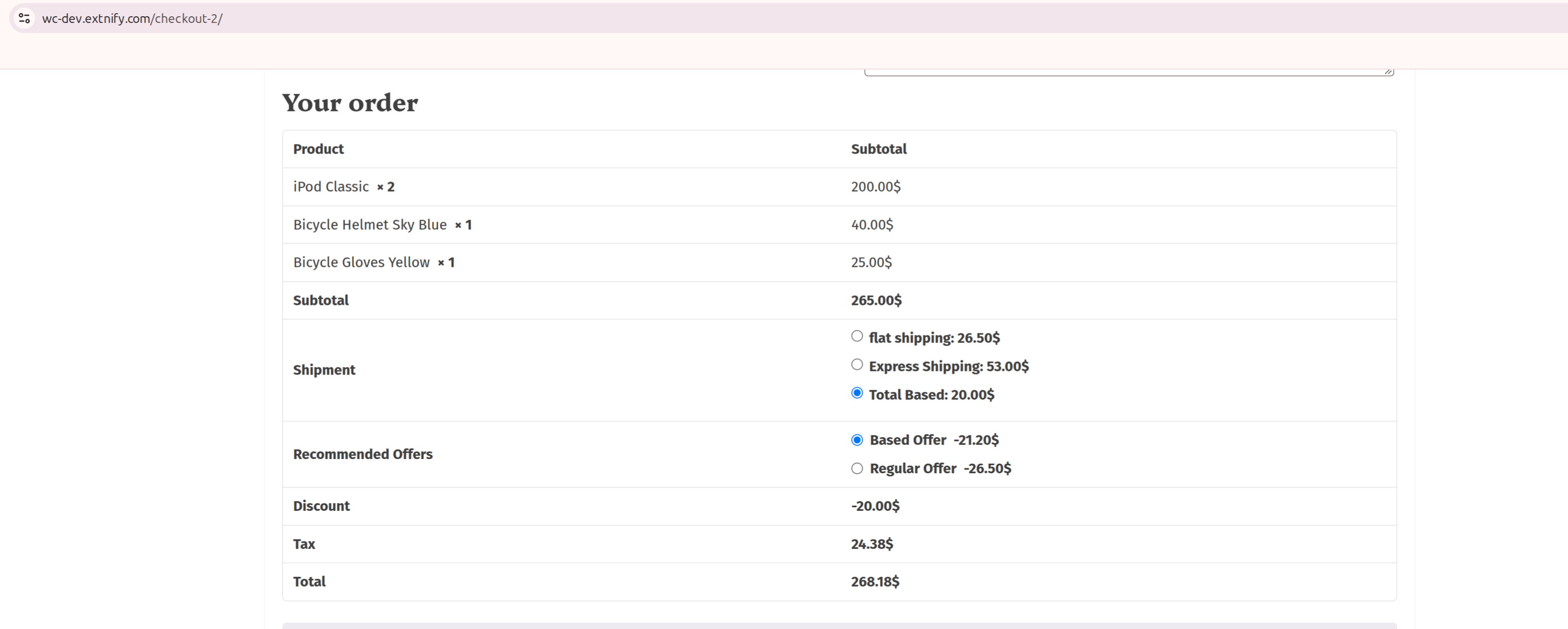
Extnify Offer Rules lets you present selectable offers on the cart and checkout — discounts the customer can claim, or optional paid add-ons they can choose. Unlike an automatic fee, each offer is shown in a “Recommended Offers” box and only applies when the customer selects it (or when you mark it selected by default).
Create as many offers as you need, decide exactly when each one is eligible, and let shoppers pick one or several. The totals update instantly as they choose.
Read the documentation » | Try the live demo »
What you can do with Extnify Offer Rules
- Offer a claimable discount the customer ticks to apply.
- Offer an optional paid add-on (gift wrap, priority handling, insurance).
- Let customers pick one offer or several.
- Pre-select an offer so it applies unless the customer removes it.
- Show offers only for a certain shipping zone, payment method or shipping method.
- Set the amount as a flat value or a percentage of the subtotal.
How it works
- Create an offer with an amount — a negative amount is a discount the customer can claim; a positive amount is an optional add-on charge.
- Choose when it’s eligible (shipping zone, payment method, shipping method).
- The eligible offers appear in a Recommended Offers box on the cart and checkout; the customer ticks the ones they want and the totals update instantly.
Selectable offers
Offers aren’t forced on the customer. Each eligible one is listed in the Recommended Offers box, and the customer decides. Choose whether they can pick one offer or several, and optionally pre-select an offer so it applies by default unless they opt out.
Discounts or add-ons
One form creates both. A negative amount (for example -10 or -10%) is a discount shown as a reduction when selected. A positive amount is an optional add-on charge. Enter a plain number for a fixed value, or add a trailing % for a percentage of the cart subtotal.
Conditional eligibility
Each offer only appears when the cart matches the rules you set. The free version gates offers by:
- Shipping zone — the WooCommerce zone the destination falls in.
- Payment method — the gateway chosen at checkout.
- Shipping method — the shipping option chosen (Extnify Shipping Rules methods are listed here individually if you run it too).
Placement and heading
Choose where the offers row sits in the totals — after the subtotal, before tax, or before the total — and set your own heading above it (default: “Recommended Offers”).
Tax handling
Pick a tax class per offer, or set it to None for a non-taxable offer. Offer tax follows your WooCommerce tax settings.
Easy management
Create, enable, disable, copy, delete and bulk-save all your offers from one screen, and set the order they’re listed in. New offers appear in the sidebar instantly and are written to the database when you save.
Live debugging
When an offer doesn’t appear and you’re not sure why, turn on the built-in debug log. For each offer it reports whether its rules passed or failed, the resolved amount, and whether it was shown or skipped — so you can see exactly which rule filtered it out. The log is stored in your own database (never a file, never sent anywhere) and can be cleared with one click.
Works everywhere WooCommerce does
The Recommended Offers box renders on both the classic checkout and the block (Store API) cart and checkout, and the totals stay correct on both.
Built for speed and privacy
- No external requests and no tracking — every rule and calculation runs on your own store.
- Lightweight — no bloat, no third-party libraries pulled in on your storefront.
- Translation-ready — ships with a
.potfile and a cleanextnify-offertext domain. - Clean uninstall — deleting the plugin removes its table, option and log; nothing is left behind.
Need more? Extnify Offer Rules Pro
Extnify Offer Rules Pro adds:
- Product, category and brand targeting, plus date/time, location and coupon conditions.
- Tiered (range-based) amounts with min/max caps.
- Offer grouping.
- CSV import/export.
Your free offers carry over automatically — Pro shares the same data.
More plugins by Extnify
- Extnify Fee Rules — add conditional fees or discounts to the WooCommerce cart and checkout. Free · Pro
- Extnify Shipping Rules — build your own conditional WooCommerce shipping methods and rates. Free · Pro
Extnify Offer Rules is built by Extnify, the team behind the X-Offer extension for OpenCart.
Details



Related plugins
Plugins that also contain the tag checkout
Brazilian Market on WooCommerce

reCAPTCHA for WooCommerce

Fluid Checkout for WooCommerce – Lite

Amazon Pay for WooCommerce

PayTR Sanal POS WooCommerce – iFrame API

Kustom Checkout for WooCommerce


About
Plugin for that tries to help you find the WordPress plugin you are looking for.
| Please enjoy an image of Crush (this awesome turtle) and have a lovely day! |  |
We do not own any plugin listed on this site and do not work for or work with WordPress.com or it's associated companies. We simply provide a searchable list of the available WordPress plugins.