



FactDesk – Read-Only MCP Server for AI Assistants
More people now ask an AI assistant instead of opening a search engine. When the assistant wants to know what you sell, what it costs or what your returns policy says, it has to read your website. Most of the time it scrapes the page, gets lost in menus and scripts, and guesses.
FactDesk gives them a proper front door. It adds a public, read-only server to your site that speaks the Model Context Protocol (MCP), the open standard AI assistants and agents use to connect to tools and data. An agent connects, asks a question, and gets a clean answer straight from your content.
There are no API keys to set up and nothing to pay for. The plugin makes no calls to outside services.
What agents can do
- Find out who you are. Site name, description, language, main menu pages and the contact details you choose to share.
- Search your content. Pages, posts and any public custom post type you switch on, with a short summary of each match.
- Read a page as Markdown. The full text of any shared page or post, cleaned of menus and scripts, with headings, lists, tables and links kept.
- List everything. Every shared page and post, 50 at a time.
- Search your shop (WooCommerce). Find products by words, category, price range or stock.
- Get product details (WooCommerce). Price, sale price, availability, options and variations, description, rating and images, exactly as your shop shows them.
Agents can look, but they cannot change anything, place orders or send messages. Every tool is marked read-only.
What is never shared
The server only shares what a logged-out visitor can already see on your site.
- Drafts, private, scheduled and password-protected content
- Anything marked noindex in Yoast SEO, Rank Math, SEOPress or The SEO Framework
- Products hidden from your shop catalogue
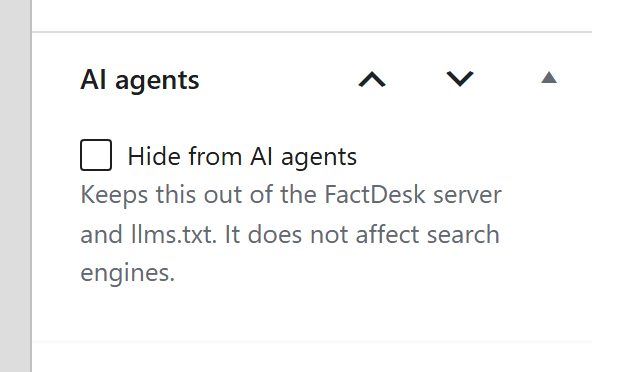
- Any page, post or product you hide with the “Hide from AI agents” box in the editor, or by ID in the settings
Helping agents find you
- A server card at
/.well-known/mcp/server-card.json, the file MCP directories and clients read to learn what your server offers. - An
llms.txtfile listing your main pages, recent posts and product categories, with a pointer to the server. If your site already has an llms.txt file, yours is left alone.
See what agents do
The settings page shows how many AI clients connected and which tools they used over the last 30 days. Only counts are kept, never IP addresses. You can also choose to keep the last 100 things agents searched for, which shows you what people ask their assistants about your business. That option is off by default.
Built to be safe
- Read-only by design: no tool writes, deletes or sends anything.
- A per-address rate limit (60 requests a minute by default).
- Requests over 64 KB and large batches are refused.
- Nothing leaves your site: no tracking, no remote calls, no account.
For developers
Filters: factdesk_post_available, factdesk_post_markdown, factdesk_tools, factdesk_call_tool, factdesk_site_info, factdesk_server_card, factdesk_llms_txt, factdesk_rate_limit and factdesk_client_ip.
The server follows the MCP Streamable HTTP transport with plain JSON responses and no sessions, and supports protocol versions 2025-11-25, 2025-06-18, 2025-03-26 and 2024-11-05.
Documentation
Every setting and tool is explained at 313automations.com/blog/factdesk-wordpress-plugin.
Privacy
FactDesk does not send any data to outside services.
It stores, in your own database: daily counts of connections and tool calls, and the first word of each AI client’s user agent, for 30 days. If you turn on “Search terms”, it also keeps the last 100 search terms agents sent. You can clear all of it from the settings page, and deleting the plugin removes it.
Details


Related plugins
Plugins that also contain the tag ai-agents
StoreAgent – WooCommerce AI Chatbot & AI Content Tools

Spyglasses – AI Traffic Analytics

GPTrends Agent Analytics

Share with My Agent – AI Visibility & llms.txt

byfaro – AI Search & AI Agent Optimization

PW Feed Readiness Audit for WebMCP


About
Plugin for that tries to help you find the WordPress plugin you are looking for.
| Please enjoy an image of Crush (this awesome turtle) and have a lovely day! |  |
We do not own any plugin listed on this site and do not work for or work with WordPress.com or it's associated companies. We simply provide a searchable list of the available WordPress plugins.