



Cache Watch – Clear Cache Everywhere
Cache Watch clears every cache on your WordPress site from one place, at the right time, then warms it back up.
Most WordPress sites have three or four caches stacked on top of each other: a cache plugin, the host’s server cache, a CDN like Cloudflare and the object cache. You update a page, menu or theme file, and visitors still see the old version, because one of those layers didn’t get cleared.
Cache Watch fixes that. It notices when something on your site changes, tells you (or just deals with it), purges every cache layer it finds, then preloads the cache so visitors never hit a slow page.
It works alongside the cache plugin you already have. It doesn’t replace it.
Why people use Cache Watch
- One button clears everything: cache plugin, host cache, Cloudflare, Bunny CDN, Varnish, Redis / Memcached object cache and page builder CSS
- Catches changes other plugins miss: menus, widgets, Customizer, block theme templates, global styles, and even theme files uploaded by FTP or deployed with git
- Smart purging: edit one post and only the affected pages are cleared, so the rest of your site stays fast
- Cache warming: purged pages are revisited in the background so the next visitor gets a cached page
- Auto-detects your setup: 12 cache plugins, 9 managed hosts and the major CDNs, with no configuration needed for most sites
- Built for developers: WP-CLI commands, a deploy webhook, an activity log and hooks
- Private by design: no analytics, no telemetry, no account needed
Knows when your site has changed
- Posts, pages, WooCommerce products and custom post types published, updated, unpublished or deleted
- Slug changes (the old URL is purged too)
- Block theme templates, template parts, global styles, patterns and navigation
- Menus, widgets, Customizer, site title, tagline, homepage and permalink settings
- Categories, tags and other public taxonomies
- Theme switches, plugin activations, and core, plugin and theme updates
- Approved comments, WooCommerce stock changes and ACF options pages
- Changes WordPress never sees: an hourly scan of theme and plugin files catches FTP uploads, git deploys and file editor changes
You choose what happens
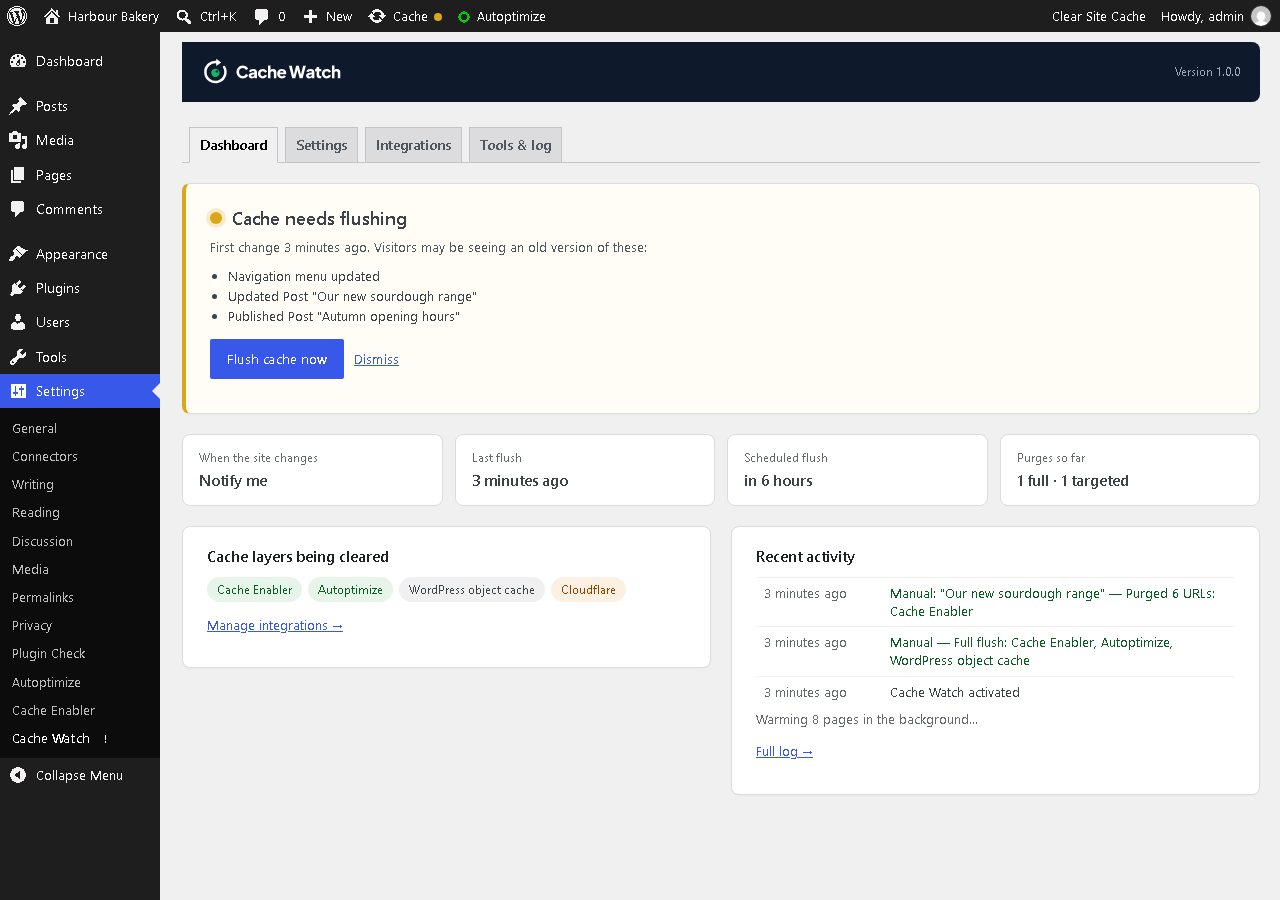
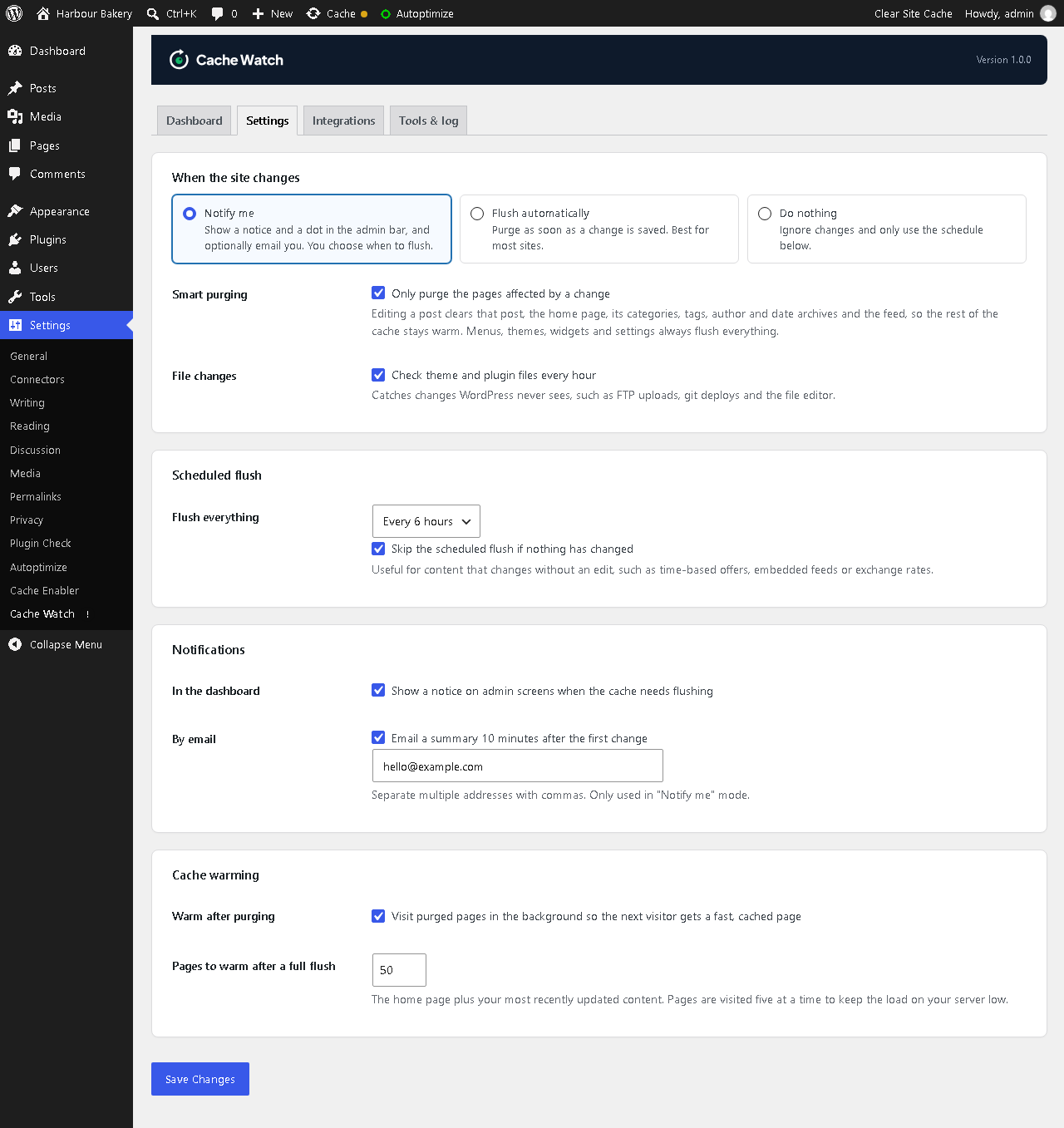
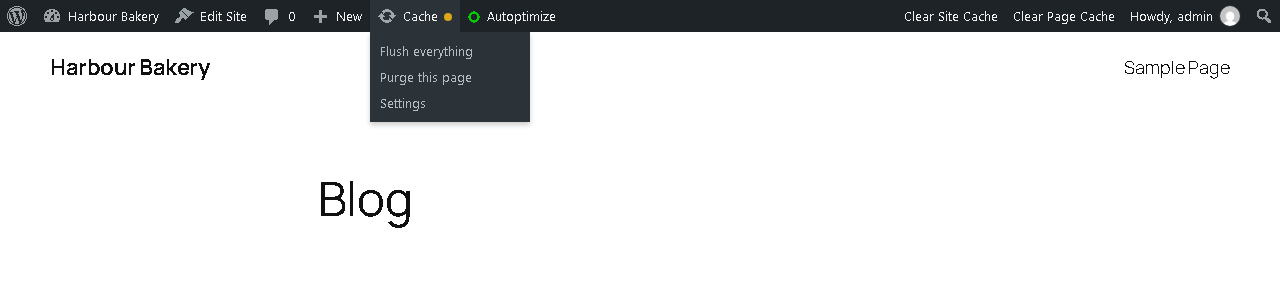
- Notify me: an admin notice, a status dot in the admin bar, a dashboard widget and an optional email summary with a link to flush
- Flush automatically: purge the cache the moment a change is saved
- Scheduled flush: clear the cache every 1, 3, 6 or 12 hours, daily or weekly. It can skip the flush when nothing has changed.
Smart purging
Editing one post doesn’t need to wipe your whole cache. Cache Watch purges only that post, the home page, its categories and tags, the author, date archives and the feed, so the rest of the site stays fast. Menus, themes and settings changes still flush everything.
Clears every cache layer
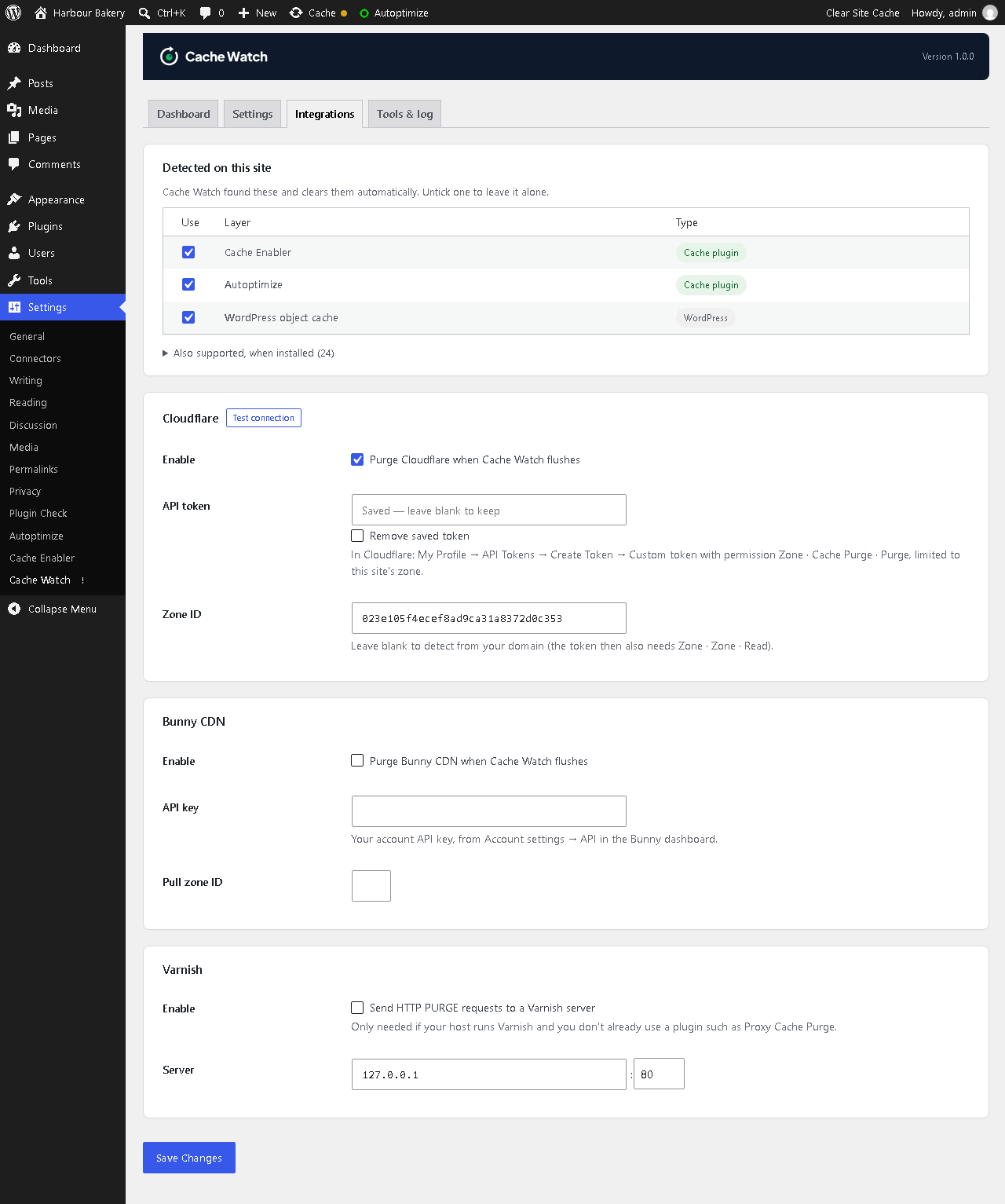
Cache plugins: WP Rocket, W3 Total Cache, WP Super Cache, LiteSpeed Cache, WP Fastest Cache, WP-Optimize, FlyingPress, Cache Enabler, Hummingbird, Swift Performance, Comet Cache, Autoptimize
Managed hosting: Kinsta, WP Engine, SiteGround, Cloudways (Breeze), Pantheon, GoDaddy Managed WordPress, Pagely, SpinupWP, Pressable / WordPress VIP (Batcache)
CDN and server cache: Cloudflare, Bunny CDN, Varnish (direct HTTP PURGE or Proxy Cache Purge), Nginx Helper
Page builders: Elementor, Divi and Beaver Builder generated CSS
WordPress: the object cache, including Redis and Memcached
Cache warming and preload
After a purge, Cache Watch visits the affected pages in the background, five at a time, so the next real visitor gets a fast, cached page instead of a slow one.
For developers and agencies
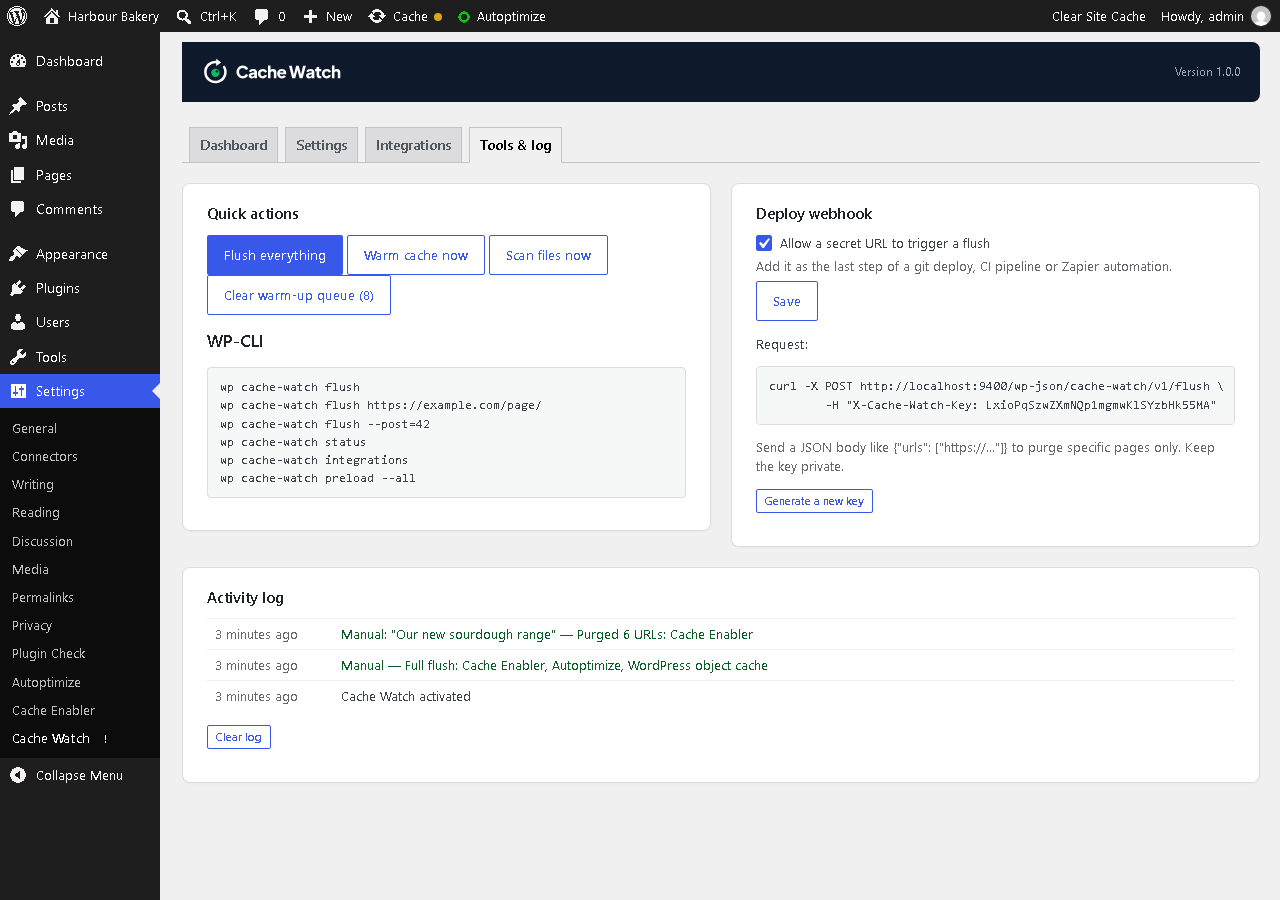
- WP-CLI:
wp fcb-cache-watch flush,flush <url>,flush --post=<id>,status,integrations,scan,preload - Deploy webhook: one secret URL to clear the cache from GitHub Actions, a deploy script or Zapier, with optional per-URL purging
- Purge buttons in the admin bar (“Purge this page”) and in post lists
- Activity log of every change, purge, email and error
- Hooks to add your own cache layer, change which URLs are purged, or run code after a flush
External services
Cache Watch does not send analytics or telemetry. Cloudflare and Bunny CDN are contacted only when you enable the integration and provide its credentials on the Integrations tab. Varnish requests are sent only when you enable it and configure a server.
Cache Watch stores its settings, change status, activity log and cache-warming queue in this WordPress site’s database. API credentials are stored in the plugin settings. These options are removed when the plugin is deleted. Optional email summaries are sent to the addresses you configure using this site’s WordPress mail service. Cache warming makes requests to this site’s own pages.
Cloudflare
Used to purge your Cloudflare cache. When Cache Watch flushes, it sends your API token and either a “purge everything” request or the list of page URLs to purge to the Cloudflare API (api.cloudflare.com). When you test the connection, or haven’t entered a Zone ID, it also sends your domain name to look up the zone.
Bunny CDN
Used to purge your Bunny CDN pull zone. When Cache Watch flushes, it sends your API key and either your pull zone ID or the page URLs to purge to the Bunny API (api.bunny.net).
Varnish purges and cache warming only send requests to your own server.
Details
Related plugins
Plugins that also contain the tag cache
WP Super Cache

WP-Optimize – Cache, Compress images, Minify & Clean database to boost page speed & performance

SpeedyCache – Cache, Optimization, Performance

Breeze Cache

OMGF | GDPR/DSGVO Compliant, Faster Google Fonts. Easy.

Jetpack Boost – Website Speed, Performance and Critical CSS


About
Plugin for that tries to help you find the WordPress plugin you are looking for.
| Please enjoy an image of Crush (this awesome turtle) and have a lovely day! |  |
We do not own any plugin listed on this site and do not work for or work with WordPress.com or it's associated companies. We simply provide a searchable list of the available WordPress plugins.