

Feedelity Product Feeds for WooCommerce
This plugin turns your WooCommerce catalogue into a product feed that Google Merchant Center can fetch, and keeps it up to date. It runs entirely on your own site. There is no account to create, nothing to register, and no usage data is sent anywhere.
How it works
- Install and activate the plugin.
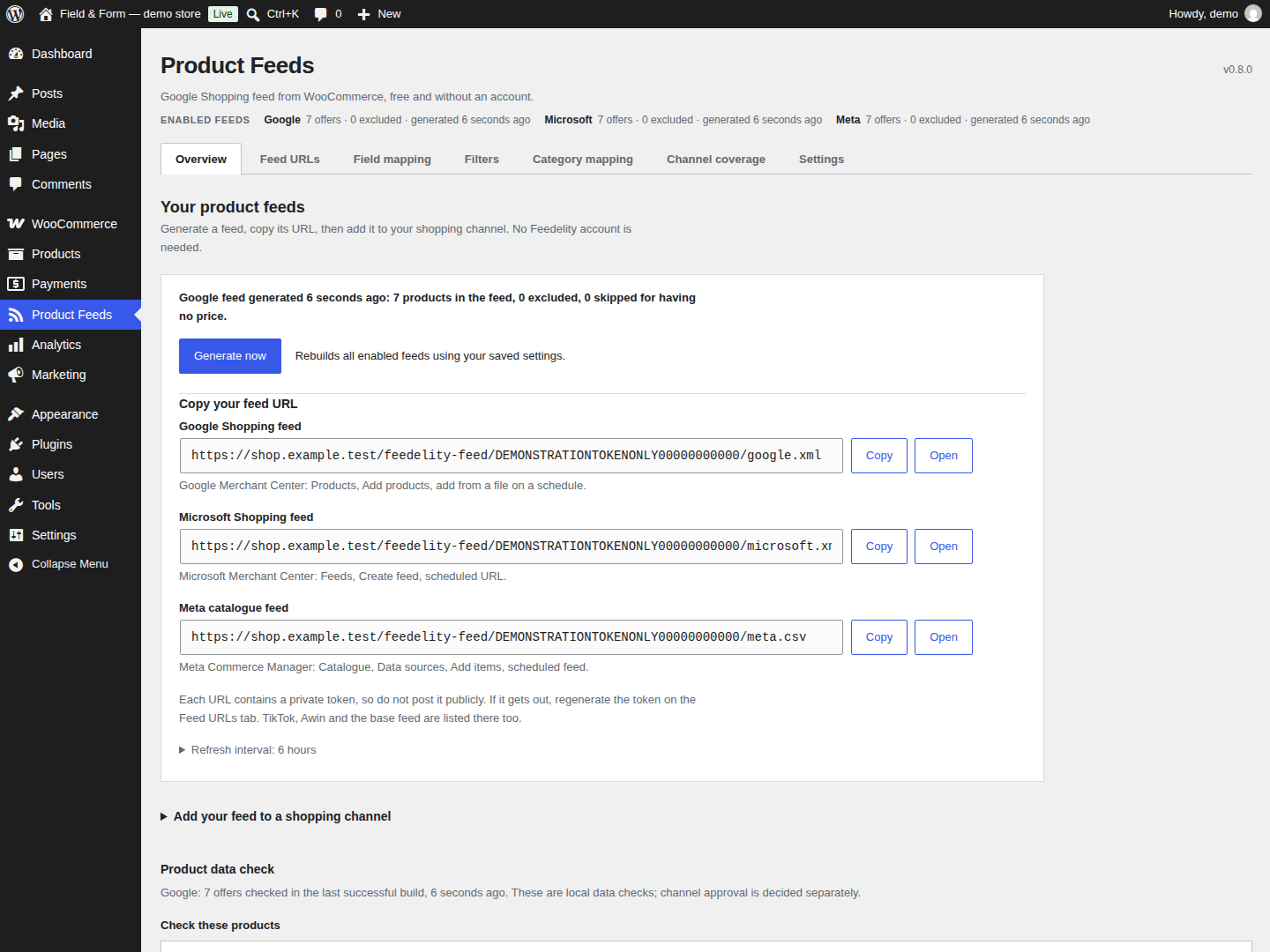
- Open Product Feeds in the WordPress admin and press Generate now.
- Copy the Google Shopping feed URL.
- Paste it into Google Merchant Center as a scheduled fetch.
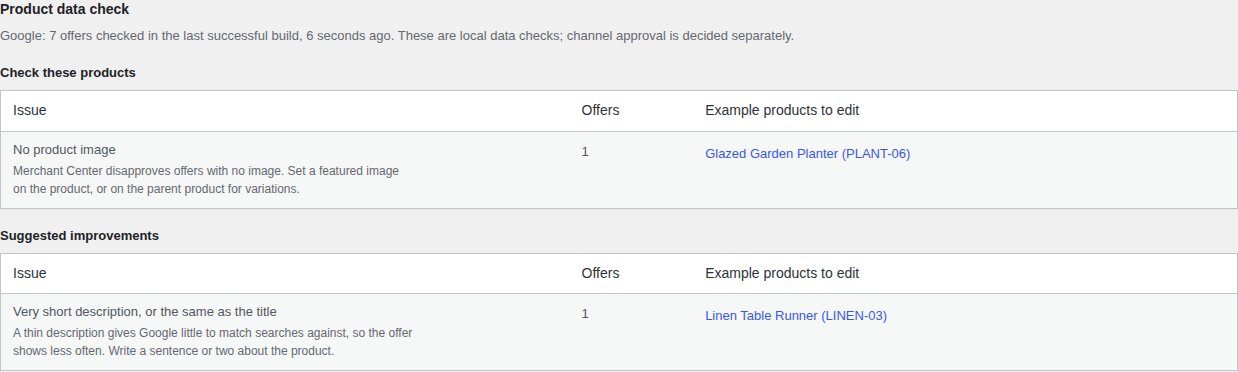
- Read the Product data check and fix the products it lists.
What you get, free
- A Google Shopping feed in RSS 2.0 with Google’s
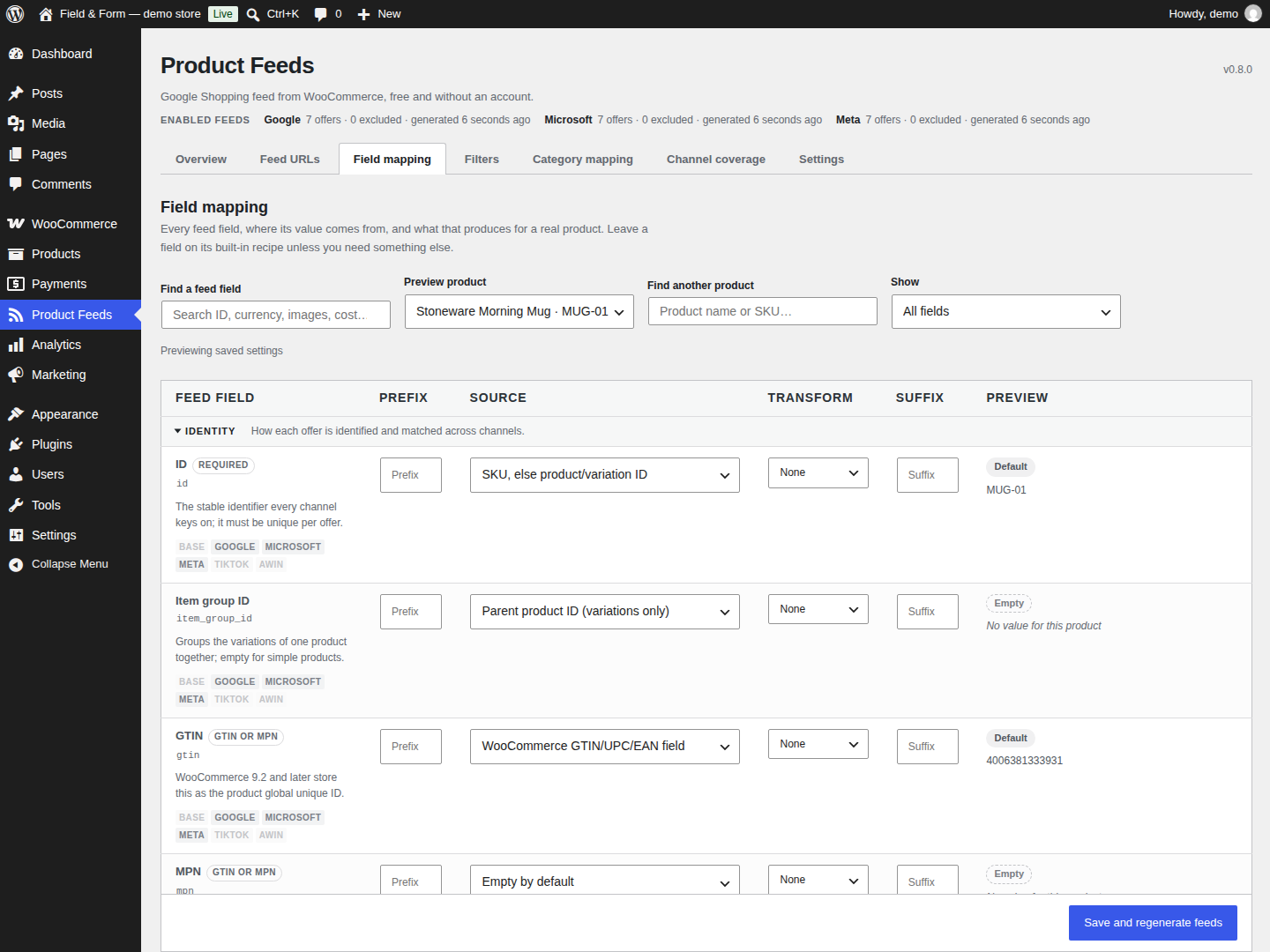
g:namespace, served from your own domain. - Field mapping, so any WooCommerce attribute or custom field can fill any feed field.
- Filters, to keep products out of one feed or all of them.
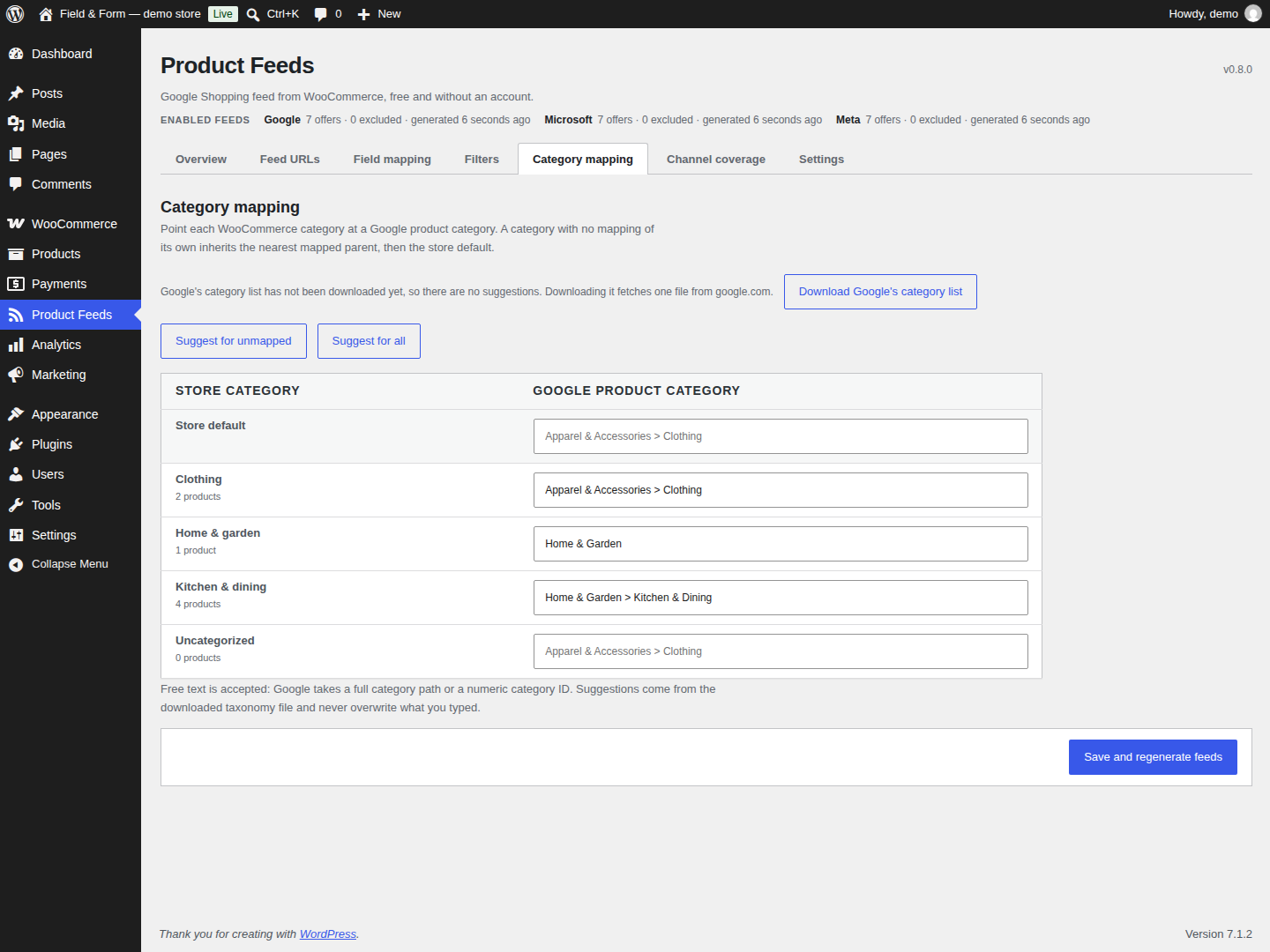
- Category mapping from your WooCommerce categories to Google’s product taxonomy.
- A product data check with actionable findings, suggested improvements and links to edit example products.
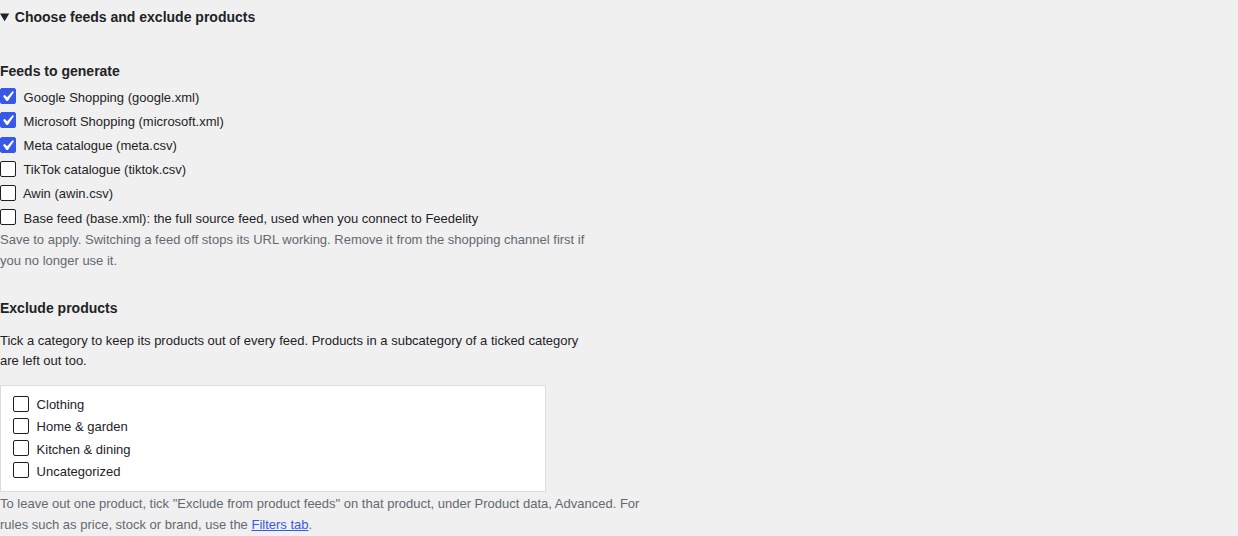
- A per-product Exclude from product feeds checkbox, and a store-wide list of categories to leave out.
- A feed URL for each enabled channel on the Overview tab, with a copy button and a line saying where to paste it.
- Background refresh, so the feed is rebuilt before Google fetches a stale one.
Feeds this plugin can serve
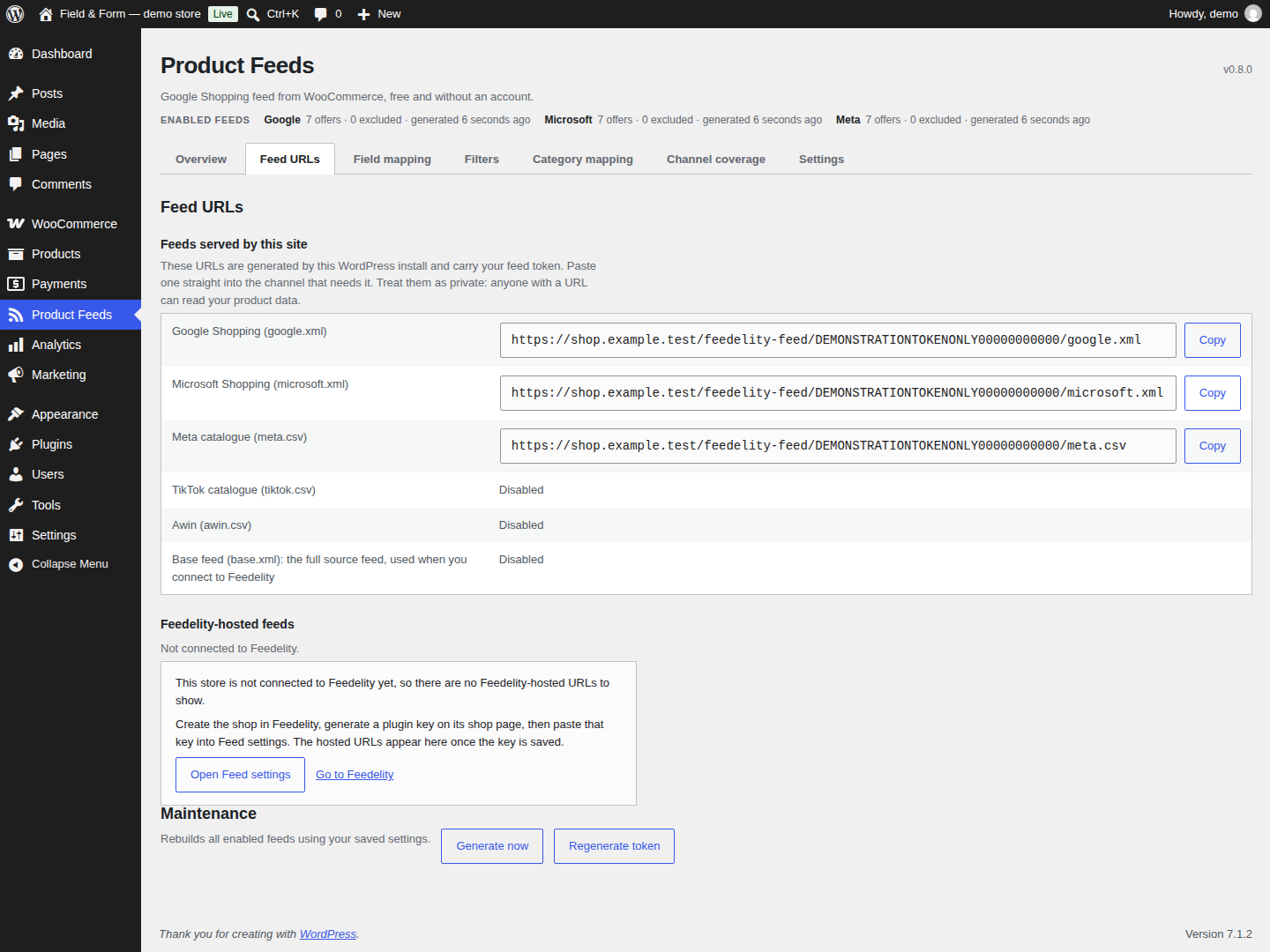
Every feed is served from your own site at a URL containing a private token:
- google.xml – Google Merchant Center (RSS 2.0 with the
g:namespace). - microsoft.xml – Microsoft Merchant Center, in the same format.
- meta.csv – Meta Commerce Manager catalogue CSV.
- tiktok.csv – TikTok catalogue CSV.
- awin.csv – Awin product feed CSV.
- base.xml – the full source feed, used only when connecting to Feedelity.
A fresh install switches on Google, Meta and Microsoft. Open Choose feeds and exclude products on Overview to select your channels. Sites upgrading from an earlier version keep every feed they already had switched on, and Microsoft stays off until you turn it on, because an upgrade should not open a new public URL on its own.
Product data check
After each build, the Overview tab names the feed and how many offers were checked, separates issues to investigate from suggested improvements, and links to example products. Checks include: offers with no GTIN, MPN or brand, the same GTIN or the same feed ID on more than one offer, feed IDs taken from the WooCommerce product ID, missing images, descriptions that are very short or identical to the title, titles and descriptions that had to be shortened, sale prices with no end date, backorders with no availability date, and offers with no brand. Each one is explained in plain English with up to five example products. Empty feeds are shown as having no products checked. These local checks do not establish channel approval.
Nothing is invented to make a check pass. The plugin never writes a GTIN, MPN or brand that your products do not have, and it cannot promise that Google will approve anything: approval is Google’s decision.
Keeping products out
- Tick Exclude from product feeds in the product data Advanced tab to drop one product.
- Choose categories to exclude on the Overview tab to drop a whole section of the catalogue.
- Use the Filters tab for rules such as “no products under GBP 5”, globally or per feed.
Products with no usable price are skipped automatically, because Merchant Center rejects them.
Refresh
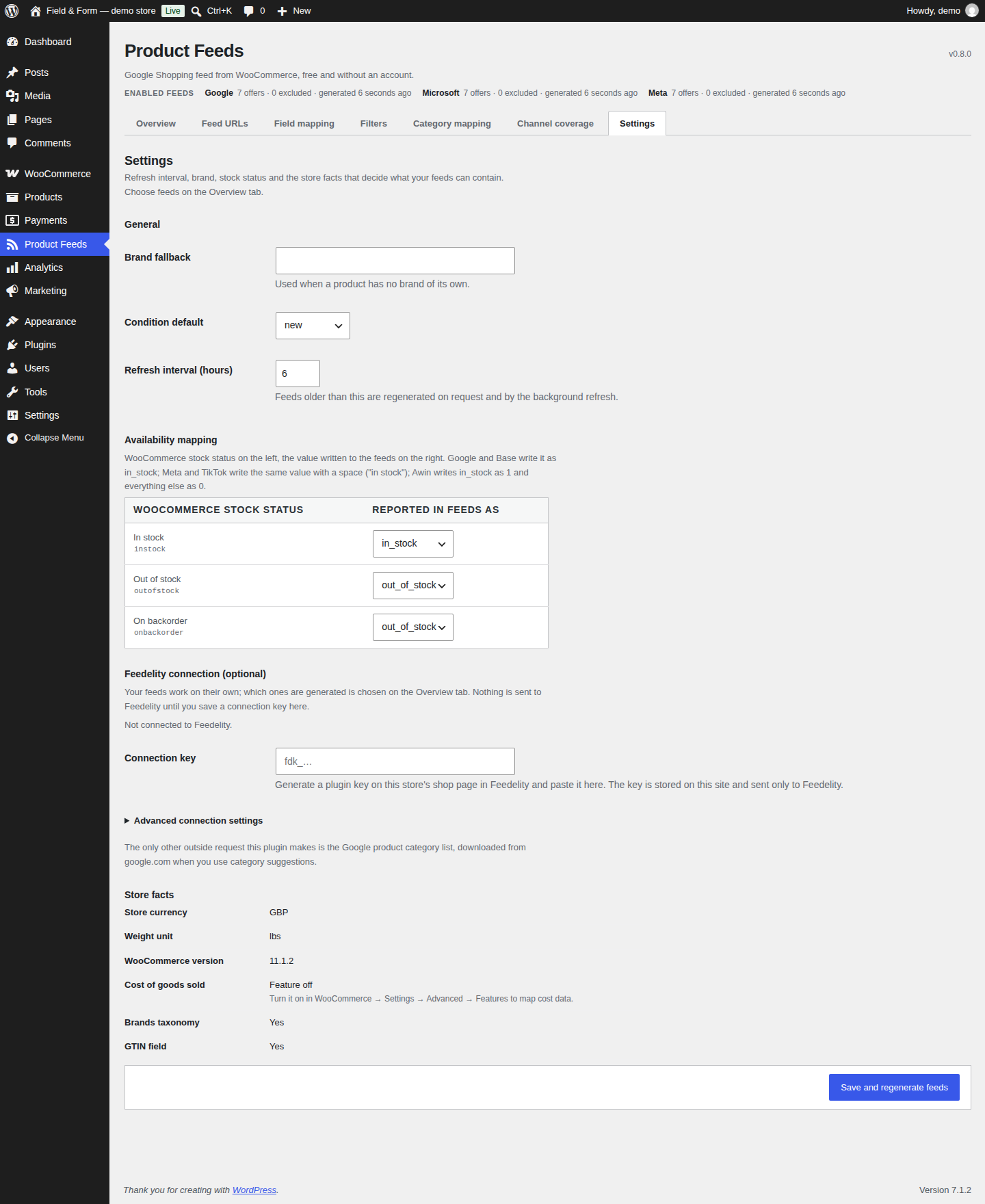
WP-Cron checks hourly and rebuilds any feed older than the refresh interval, which is six hours by default. If Google fetches a feed that has gone stale, the last good file is served straight away and a rebuild is queued, so nobody waits for a build. Generate now on Overview rebuilds the enabled feeds. If you have edited any settings, the button changes to Save changes and generate feeds and saves those changes first. The refresh details distinguish the next background check from the configured rebuild interval.
When a rebuild fails, or comes back empty, the last good feed is kept and served, and the failure is shown on the Overview tab.
Optional: connect to Feedelity
The feeds above work on their own and always will. Feedelity (https://feedelity.app) is a separate hosted service that adds conditional rules with find-and-replace and title templates, a view of which products a rule changes before you save it, hosted feed URLs that keep serving when your site is slow or down, and one workspace for several stores with roles and an activity log.
Saving a Feedelity connection key in Settings is the only thing that makes this plugin talk to Feedelity, and it changes nothing about the feeds your site serves. A Feedelity account is needed only if you choose to connect to that service.
External services
Feedelity
This plugin can connect to Feedelity, a hosted feed service at https://feedelity.app, but only after an administrator saves a connection key on the Settings tab. Until a key is saved, nothing is sent to Feedelity and no request is made.
Once a key is saved, the plugin sends a request to https://feedelity.app/api/plugin/exports when the Product Feeds admin page’s Feed URLs or Settings tab is viewed, and when you press Refresh on the Feed URLs tab. The request carries the connection key in an Authorization header and your site’s home URL, so that Feedelity can tell which shop is asking. The response contains your shop and workspace names and the URLs and status of your Feedelity-hosted feeds. No product data is sent in this request.
Disconnecting removes the stored key and the cached list from your site. Revoke the key in Feedelity to invalidate it there as well.
Feedelity terms of service: https://feedelity.app/terms
Feedelity privacy policy: https://feedelity.app/privacy
Google product taxonomy
When an administrator presses Download Google’s category list on the Category mapping tab, this site downloads one file from Google, https://www.google.com/basepages/producttype/taxonomy.en-US.txt, and saves it so that the category mapping screen can suggest and search Google categories. No data about your site or your products is sent to Google in that request. Once the file is present, it is refreshed automatically when it is more than 30 days old. If you never press the button, the file is never downloaded, and category mapping still accepts typed category paths and numeric IDs.
Google terms of service: https://policies.google.com/terms
Google privacy policy: https://policies.google.com/privacy
Feed fetches by Google, Meta and Microsoft
These are not requests made by the plugin. When you paste one of your feed URLs into Google Merchant Center, Meta Commerce Manager or Microsoft Merchant Center, that service then fetches the URL from your site on the schedule you set there. Your site answers the request; it does not initiate one. Stop it by removing the feed from that service, or by regenerating your feed token.
Details
Related plugins
Plugins that also contain the tag google-shopping
WebToffee WooCommerce Product Feeds – Google Shopping, Pinterest, TikTok Ads, & More
ELEX WooCommerce Google Shopping (Google Product Feed)
DataFeedWatch Connector for WooCommerce
ShoppingFeeder
WPSSO Google Merchant Feed XML
avecdo for WooCommerce


About
Plugin for that tries to help you find the WordPress plugin you are looking for.
| Please enjoy an image of Crush (this awesome turtle) and have a lovely day! |  |
We do not own any plugin listed on this site and do not work for or work with WordPress.com or it's associated companies. We simply provide a searchable list of the available WordPress plugins.