

This plugin is outdated and might not be supported anymore
Back

Feslider – Featured Slider
Details
View on WordPress
Back
FESlider is fast and responsive slider that act like featured image. You can just directly add the slides from your post editor page.
Features :
- Fast and responsive slider
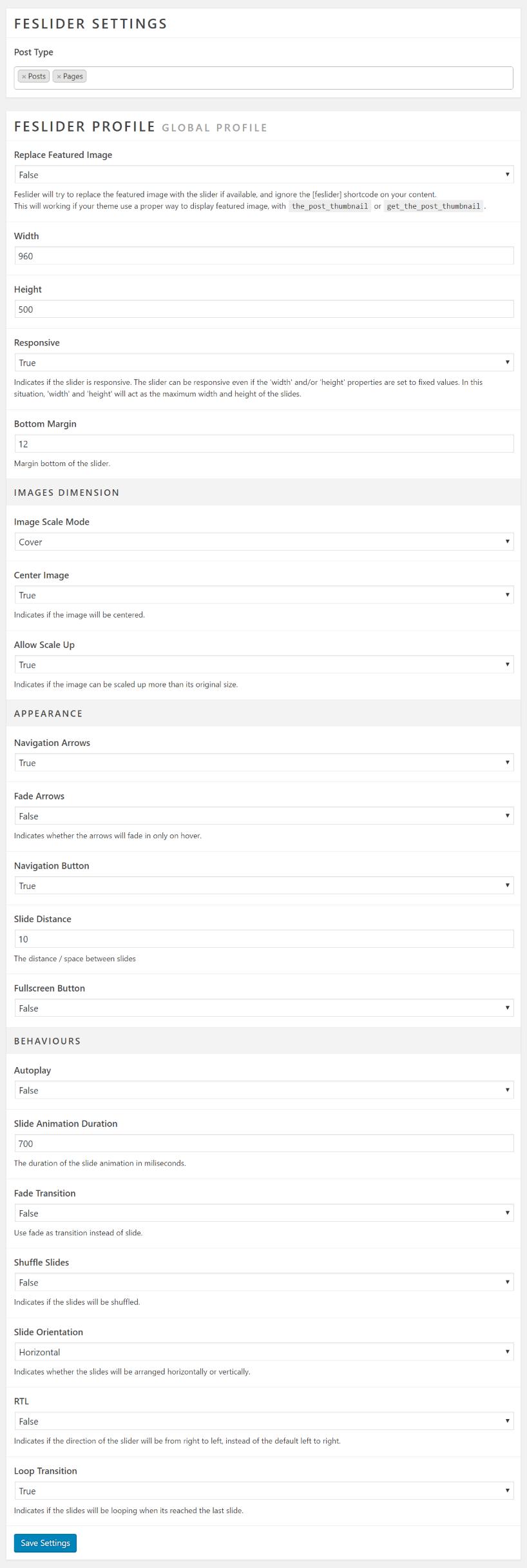
- Rich of setting options
- Slide caption
- As easy as featured image
- Ability to replace the featured image
- Enable for all post type
Usage Instruction
- After installation, go to your post editor, you will notice a new FESlider metabox
- Add your image(s) for use as slides. You can add multiple images by hold CTRL while select/click the images
- Add the slide text if you wish by edit the caption field on the wordpress media library editor
- The slideshow will automatically appears on the top of the post. You can also place the slideshow manually by put the shortcode
[feslider]on the current post content - Visit the slideshow settings page by click the settings button on post editor or click the FESlider menu on wordpress admin sidebar
- Slideshow settings values will working on all FESlider slideshow on the site.
Details
Plugin code:
feslider
Plugin version:
1.3
Author:
Outdated:
Yes
WP version:
4.0 or higher
PHP version:
or higher
Test up to WP version:
6.1.7
Total installations:
80
Last updated:
2023-02-15
Rating:
Times rated:
5
featured-image
featured-slider
featured-slideshow
responsive-slider
single-slider


Related plugins
Plugins that also contain the tag featured-image
Quick Featured Images

XO Featured Image Tools

Conditionally display featured image on singular posts and pages

Multiple Post Thumbnails

Ultimate Posts Widget

Manual Image Crop

About
Plugin for that tries to help you find the WordPress plugin you are looking for.
| Please enjoy an image of Crush (this awesome turtle) and have a lovely day! |  |
We do not own any plugin listed on this site and do not work for or work with WordPress.com or it's associated companies. We simply provide a searchable list of the available WordPress plugins.