

Back

File Upload For WPForms – Filenzo
Details
View on WordPress
Back
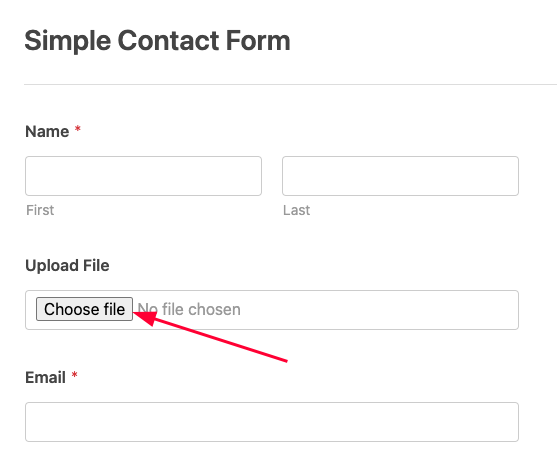
This plugin adds a custom File Upload Field to WPForms, enabling users to:
– Upload files (e.g., PDF, images, documents) via frontend forms.
– Restrict file types and sizes.
– Securely store uploaded files in the WordPress uploads directory.
– Attach files to email notifications (optional).
Usage
-
Add the File Upload Field to a Form:
- Edit or create a WPForm.
- Drag and drop the “File Upload” field into your form.
-
Configure Field Settings:
- Allowed File Types: Specify extensions (e.g.,
pdf, jpg, png). - Max File Size: Set a limit (e.g., 10MB).
- Storage Location: Files are saved to
/wp-content/uploads/wpxform-uploads/.
- Allowed File Types: Specify extensions (e.g.,
-
Attach Files to Email Notifications (Optional):
- Enable the “Attach Files to Email” option in the form’s Notifications settings.
Features
- Drag-and-drop file upload support.
- Server-side validation for file types and sizes.
- Unique filenames to prevent conflicts.
- Compatible with WPForms Lite/Pro.
Pro Addons
- Advanced Filedrop For WPForms
Add Drag and Drop File Uploads to WPForms
Details
Plugin code:
file-upload-for-wpforms
Plugin version:
1.1.0
Author:
Outdated:
No
WP version:
6.6 or higher
PHP version:
7.0 or higher
Test up to WP version:
6.9
Total installations:
1,000
Last updated:
2026-01-25
Rating:
Times rated:
17
attachments
file-upload
forms
wpforms


Related plugins
Plugins that also contain the tag attachments
Export media with selected content (by DKZR)

File Upload Types by WPForms

Lightbox with PhotoSwipe

Document Gallery

Download Attachments

Media Deduper


About
Plugin for that tries to help you find the WordPress plugin you are looking for.
| Please enjoy an image of Crush (this awesome turtle) and have a lovely day! |  |
We do not own any plugin listed on this site and do not work for or work with WordPress.com or it's associated companies. We simply provide a searchable list of the available WordPress plugins.