



Flexa Local Services
A plumber’s website usually ends up running three plugins: one for the contact form, one to lay out services and testimonials, one for local business schema. None of them knows about the others. So the alert that lands in the owner’s inbox says a form was submitted, and leaves out the thing they actually want to know, which job the caller is asking about.
Flexa Local Services is those three jobs in one plugin, wired together. The form knows which page it was sitting on, so every lead arrives labelled “Emergency Plumbing” or “Drain Cleaning” rather than “Contact form”. Hitting reply on the alert email goes to the customer, not to the website. Both of those are small things that decide whether the owner keeps the plugin after week one.
Everything lives under one Flexa Local menu: the content you publish, the leads that come in, the forms that collect them, and the settings they share.
What you get on day one
- A setup checklist on the dashboard that tracks five real steps and does not tick itself.
- A starter site for nine trades, so one click fills an empty plugin with example content you can edit.
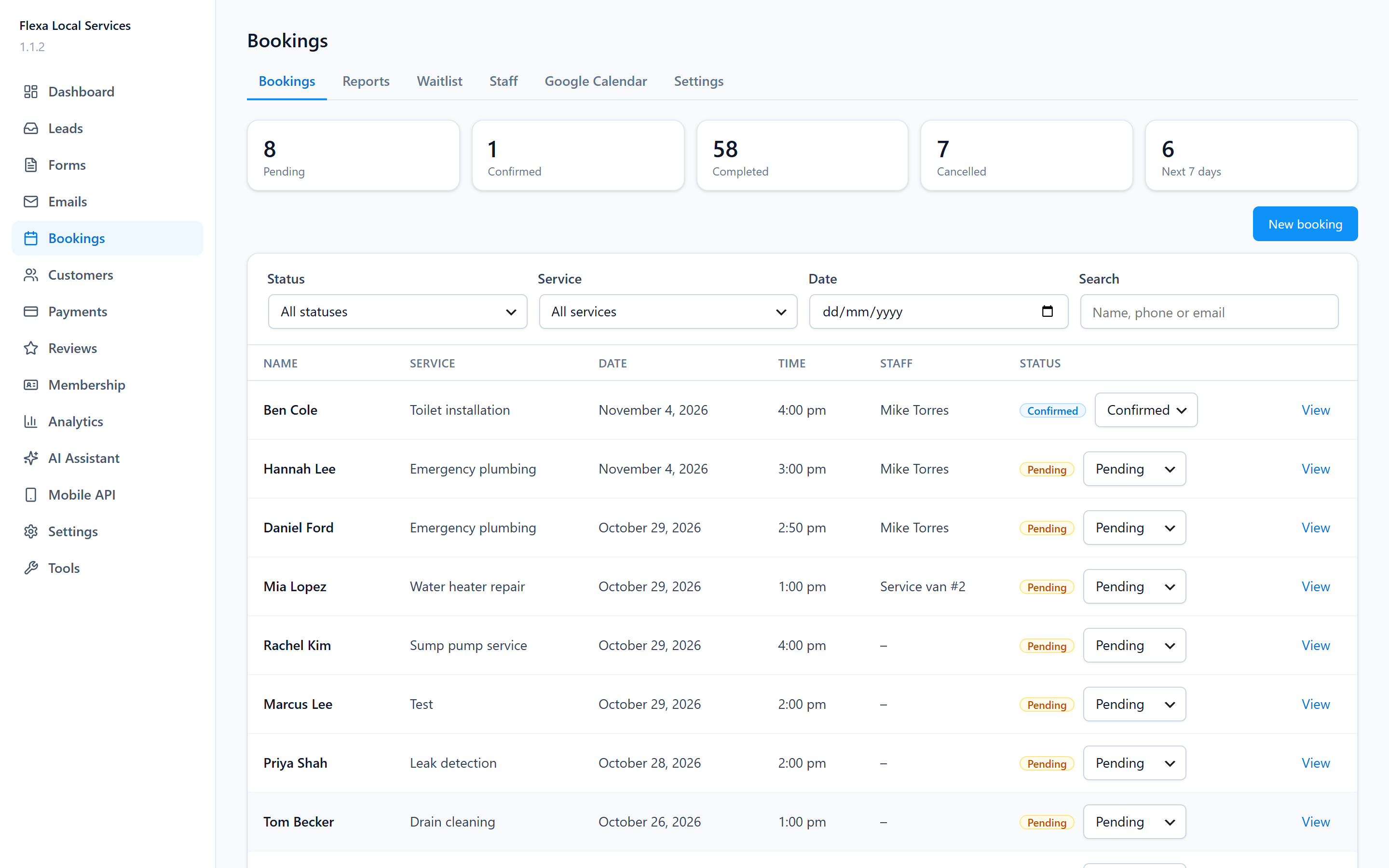
- Leads listed newest first, with the page, the phone number and the email on the same row.
- Reply and Call buttons on each lead, so the follow-up happens from a phone.
- Email alerts that quote the visitor’s own answers under the question they were asked.
- CSV export, with a UTF-8 marker so Excel reads accented names correctly, and spreadsheet formulas defused so an export cannot run anything on your machine.
A starter site, if you want one
An empty plugin is hard to judge. Pick a trade on the Tools screen, press Import, and you get a worked example of a whole site: home, services, pricing, service areas, recent work, reviews, about, FAQ, contact and a quote page, each one assembled from the blocks. Plumbing, electrical, HVAC, roofing and locksmith get an emergency call-out page as well, because those are the trades whose customers go looking for one at midnight.
Behind the pages sit six services with starting prices, six service areas, six testimonials, eight FAQs, three team members, three finished jobs, three offers and a quote form wired to the leads table.
Nine trades are there to pick from: plumbing, electrical, HVAC, roofing, locksmith, appliance repair, pest control, cleaning and landscaping. Everything is sample text about an invented company in Portland, written to be plausible rather than impressive, so edit the prices and the phone number before you launch. No images are bundled.
The pages arrive as drafts, so nothing shows up on your site until you publish them.
Publishing is one tick, and two more sit next to it: Home becomes the front page of the site, and a navigation menu is built from the page set and hung in the first free slot your theme offers. Both are on by default, and both need the pages published, so they sit out an import that comes in as drafts. The company name, phone, email and address are filled in from the sample data either way, but only where you have not set them yet. Nothing you already filled in is overwritten, and a menu your theme is already showing is left where it is. On a block theme the menu is still created, ready to drop into a Navigation block.
One button on the same screen takes the whole import back out again, by ID. The front page setting and the menu location go back the way they were, anything you edited in the meantime is kept, and no lead is ever touched.
Content types
Each one is a normal WordPress post type, so the editor, revisions, featured images and search all behave the way you expect.
- Services with a starting price, hero text, a call to action and optional JSON-LD schema
- Service areas with city, state, ZIP codes and coordinates, so visitors can tell whether you cover them
- Projects for finished work, with before and after images, cost, duration and the service and area they belong to
- Testimonials with a star rating, the customer’s name, a photo and an optional video
- Team members with a role, years of experience, phone, email and photo
- FAQs, grouped by category and attachable to a service
- Coupons with a code, a fixed or percentage discount and an expiry date
Blocks
Twelve blocks render your content on the front end. They are server rendered, so a published page always shows the current data, not a copy frozen at the time you saved it.
Services Grid, Areas Grid, Projects, Testimonials, Team, FAQ, Coupons, Pricing, Hero, CTA, Contact Card and Form.
Lead capture
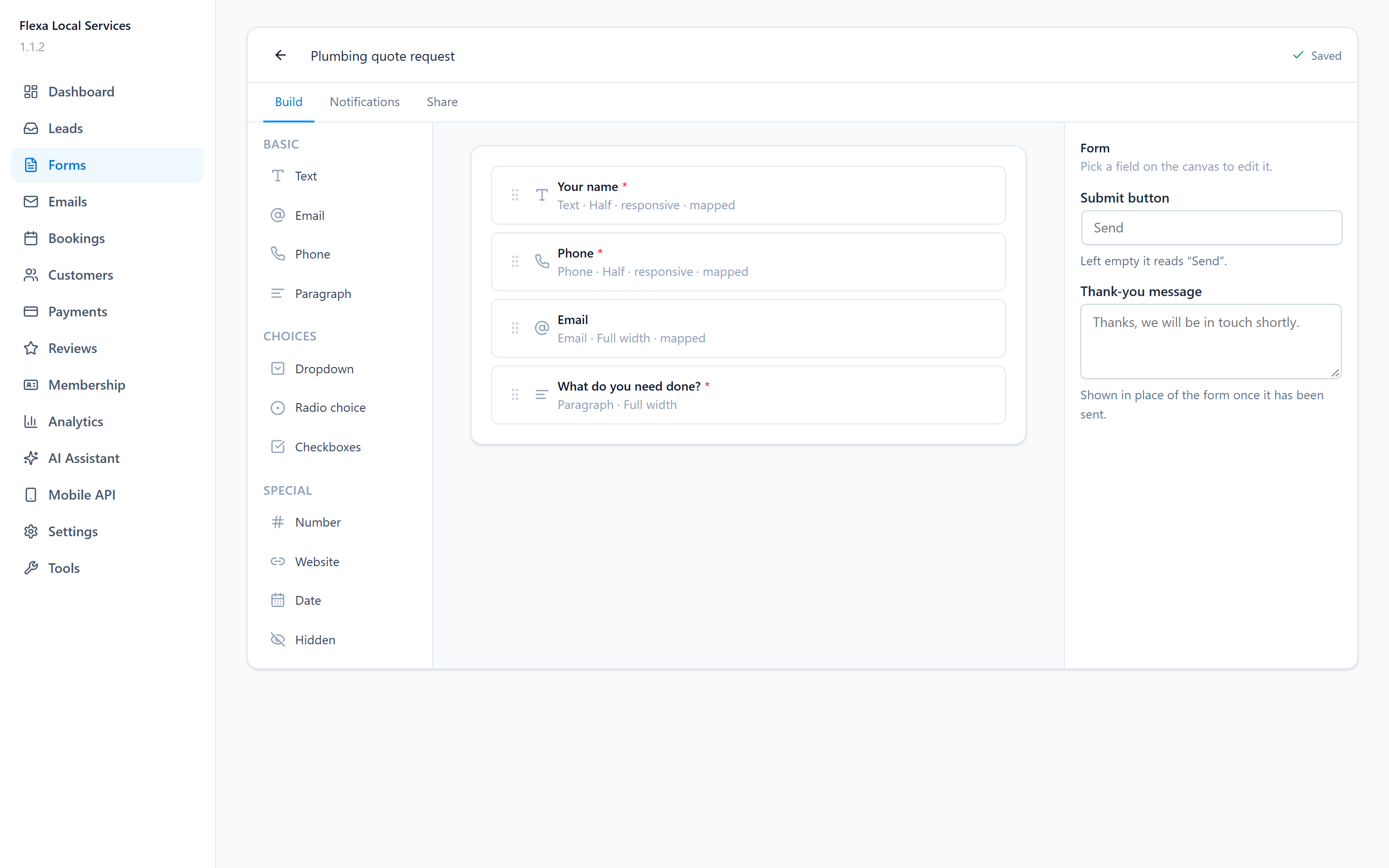
Build a form in the Forms screen, drop the Form block (or the [flexa_local_form id="1"] shortcode) on any page, and submissions land in the Leads screen.
- Each lead records the page it came from, which is the whole point of reusing one form across a site.
- Works with JavaScript switched off. With JavaScript on, it submits without reloading the page.
- A honeypot field and a timing check reject bots, so visitors never meet a CAPTCHA.
- Email alerts to one address or several, with Reply-To set to the customer.
- Mark a lead new, contacted, won or lost.
For developers
- REST API under
fxlc/v1for content, forms, entries, leads and settings. - Hooks for the pieces you are most likely to want to change:
fxlc_lead_notification,fxlc_form_spam_check,fxlc_form_public_submit,fxlc_settings_defaults,fxlc_admin_menu,fxlc_demo_packs,fxlc_demo_pagesand more. - Leads and form submissions live in their own tables, so a large volume of them never slows down your posts list.
- No external services. Nothing is sent anywhere except the lead emails you configure, through WordPress’s own mail function.
Source code
One file in this plugin is compiled: the admin app bundle under
assets/dist/, built from apps/admin/src/ (TypeScript and React). The
readable source ships inside the plugin, next to the build it produces, so
nothing has to be fetched to inspect or rebuild it.
Everything else is already readable as shipped. assets/js/*.js and
assets/css/*.css are hand-written, with no build step and no minified
variant, and all of the PHP is plain source under app/.
To rebuild the bundle from the shipped source, in the plugin folder:
- Install Node 20 or newer and pnpm 10 (
npm install -g pnpm). pnpm installpnpm build
That runs TypeScript against apps/admin/tsconfig.json and then Vite against
apps/admin/vite.config.ts, writing the bundle and its manifest back into
assets/dist/. The plugin reads assets/dist/.vite/manifest.json to find the
hashed filenames, so a rebuild needs no change in PHP. pnpm type-check and
pnpm test run the type checker and the unit tests on their own.
The build tools are pinned in the package.json and pnpm-lock.yaml that ship
with the plugin: Vite 6, TypeScript 5, React 18, Tailwind CSS 4.
Details





Related plugins
Plugins that also contain the tag contact-form
Contact Form 7

WPForms – Easy Form Builder for WordPress – Contact Forms, Payment Forms, Surveys, & More

Akismet Anti-spam: Spam Protection

Fluent Forms – Customizable Contact Forms, Survey, Quiz, & Conversational Form Builder

Forminator Forms – Contact Form, Payment Form & Custom Form Builder

Ninja Forms – The Contact Form Builder That Grows With You


About
Plugin for that tries to help you find the WordPress plugin you are looking for.
| Please enjoy an image of Crush (this awesome turtle) and have a lovely day! |  |
We do not own any plugin listed on this site and do not work for or work with WordPress.com or it's associated companies. We simply provide a searchable list of the available WordPress plugins.