


Flexa Site Migrator
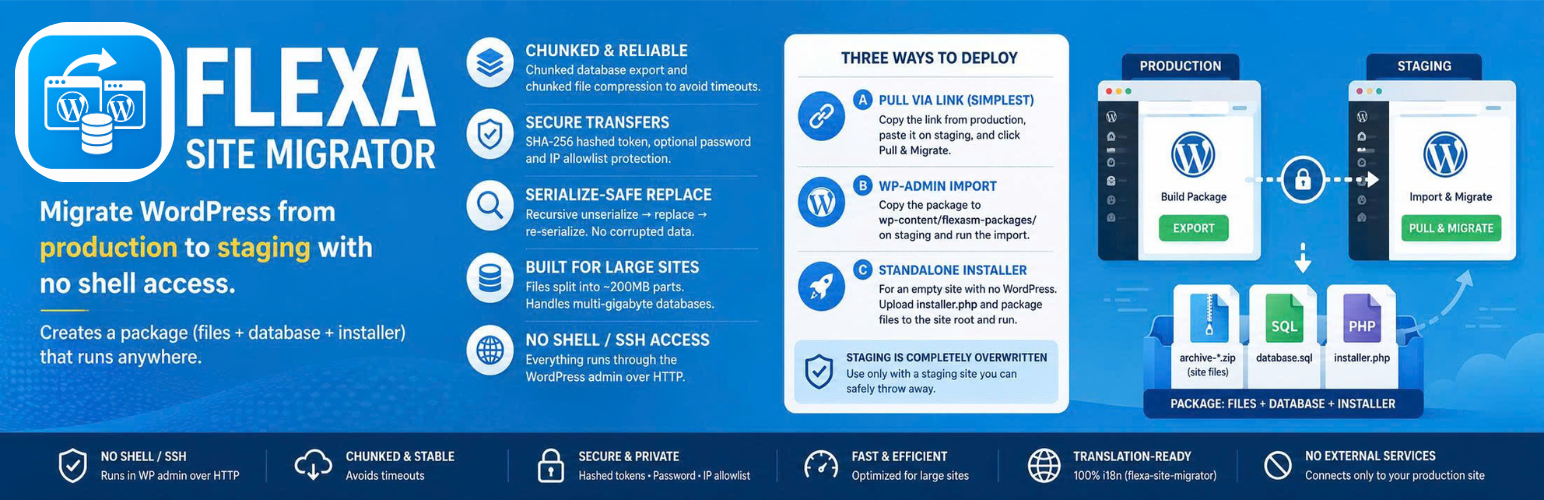
Flexa Site Migrator migrates a WordPress site from production to staging. It builds a package made of one or more archive-*.zip files (site files, split automatically), a database.sql dump, and a standalone installer.php. It works whether staging is on the same server or a different one, and requires no shell/SSH access — everything runs through the WordPress admin over regular HTTP.
Key features
- Chunked build — the database is exported in chunks (using
mysqldumpwhen available, otherwise pure PHP) and files are compressed in chunks to avoid timeouts. - Three ways to deploy to staging — pull-by-link, wp-admin import, or a standalone installer for empty sites.
- Serialize-safe search-replace — URLs are updated with a recursive unserialize replace re-serialize algorithm, so serialized options/widgets never get corrupted.
- Handles large sites — the build is fully chunked and files are split into ~200MB archive parts; the database deploy runs in a single request (check the System check panel for your PHP limits before importing very large databases).
- Token-protected transfers — pull links carry an SHA-256 hashed token (only the hash is stored on the server), with optional password and IP allowlist restrictions.
Deployment methods
Method A — Pull via link (simplest): Install the plugin on both production and staging. Build the package on production, copy the link, paste it on staging under Tools Flexa Site Migrator Import, and click Pull & Migrate. Staging downloads the files from production (byte-range supported) and runs extraction, DB import, and search-replace on its own.
Method B — wp-admin import: Copy the package folder to staging’s wp-content/flexasm-packages/, then run the migration from Tools Flexa Site Migrator Import.
Method C — Standalone installer: For an empty staging site with no WordPress. Upload installer.php and the package files to the site root, open installer.php in a browser, enter the database details, and start the migration.
External services
This plugin does not connect to any service operated by us or by a fixed third party, and it sends no data anywhere on its own.
The only outbound network request it makes is to the production site URL you paste on the staging side (Tools Flexa Site Migrator Import “Pull from production via link”). When you click Test connection or Pull & Migrate, staging contacts that URL to download the migration package (site files and the database dump) you created on production. The request carries the access token from the link, and, if the package is password-protected, the password you enter (sent in a request header). No third party is involved — both ends are your own sites — and nothing is transmitted until you paste a link and start a pull.
Details


Related plugins
Plugins that also contain the tag backup
All-in-One WP Migration and Backup

UpdraftPlus: WP Backup & Migration Plugin

Jetpack – WP Security, Backup, Speed, & Growth

ManageWP Worker

WPvivid — Backup, Migration & Staging

Backuply – Backup, Restore, Migrate and Clone


About
Plugin for that tries to help you find the WordPress plugin you are looking for.
| Please enjoy an image of Crush (this awesome turtle) and have a lovely day! |  |
We do not own any plugin listed on this site and do not work for or work with WordPress.com or it's associated companies. We simply provide a searchable list of the available WordPress plugins.