



FoodCamp – Food Ordering & Restaurant Menu for WooCommerce
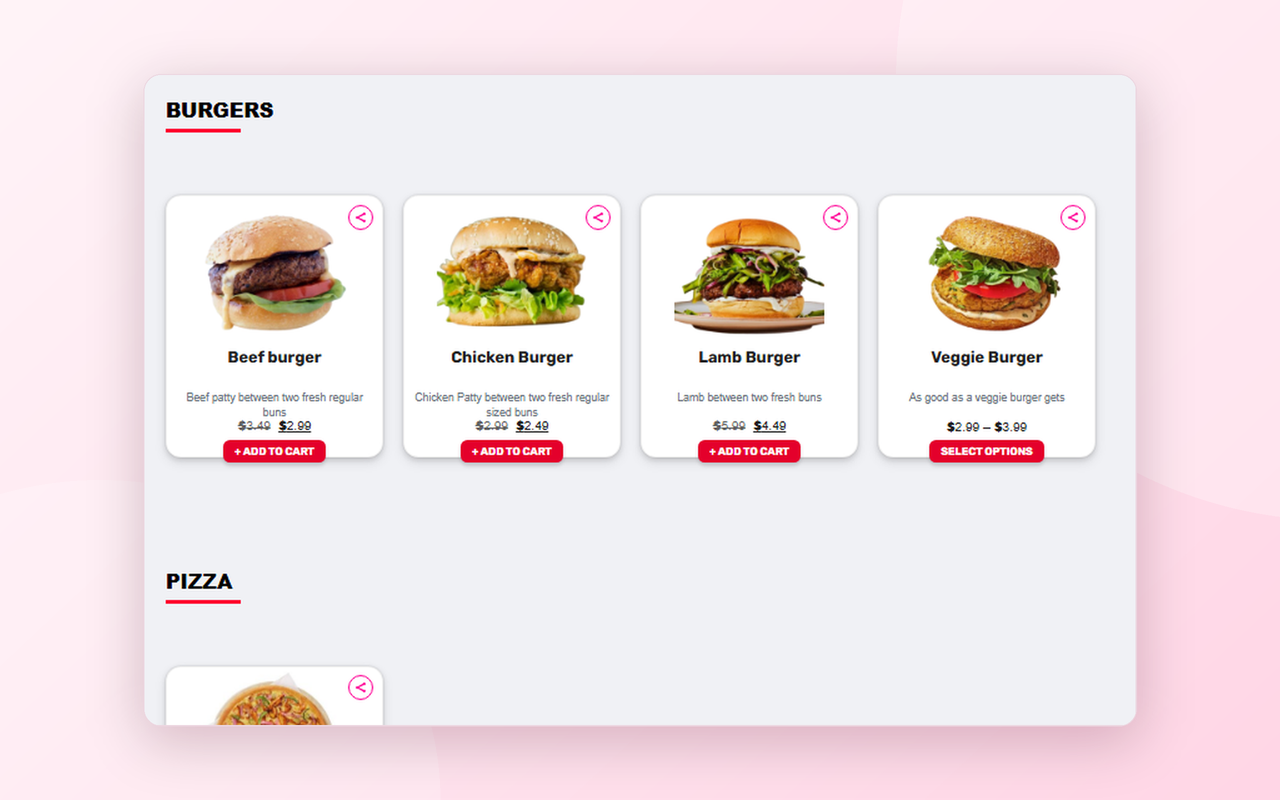
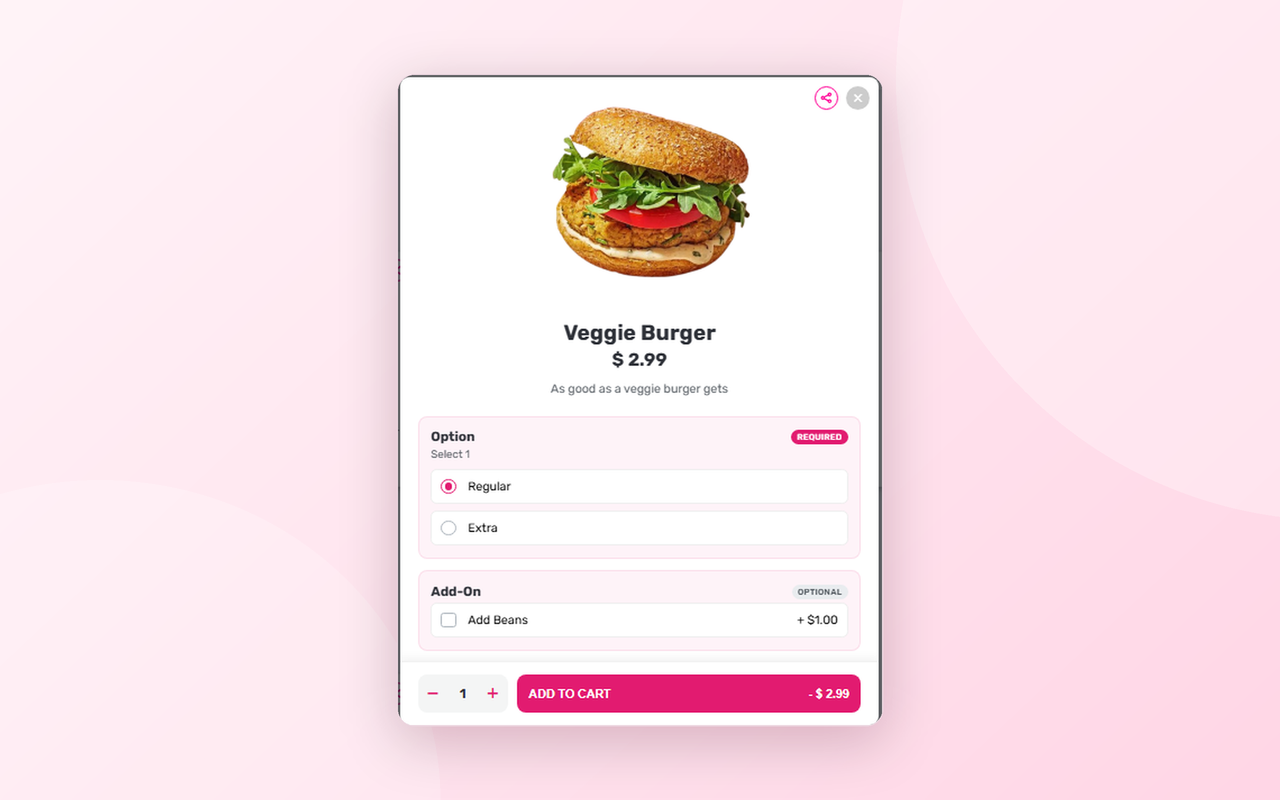
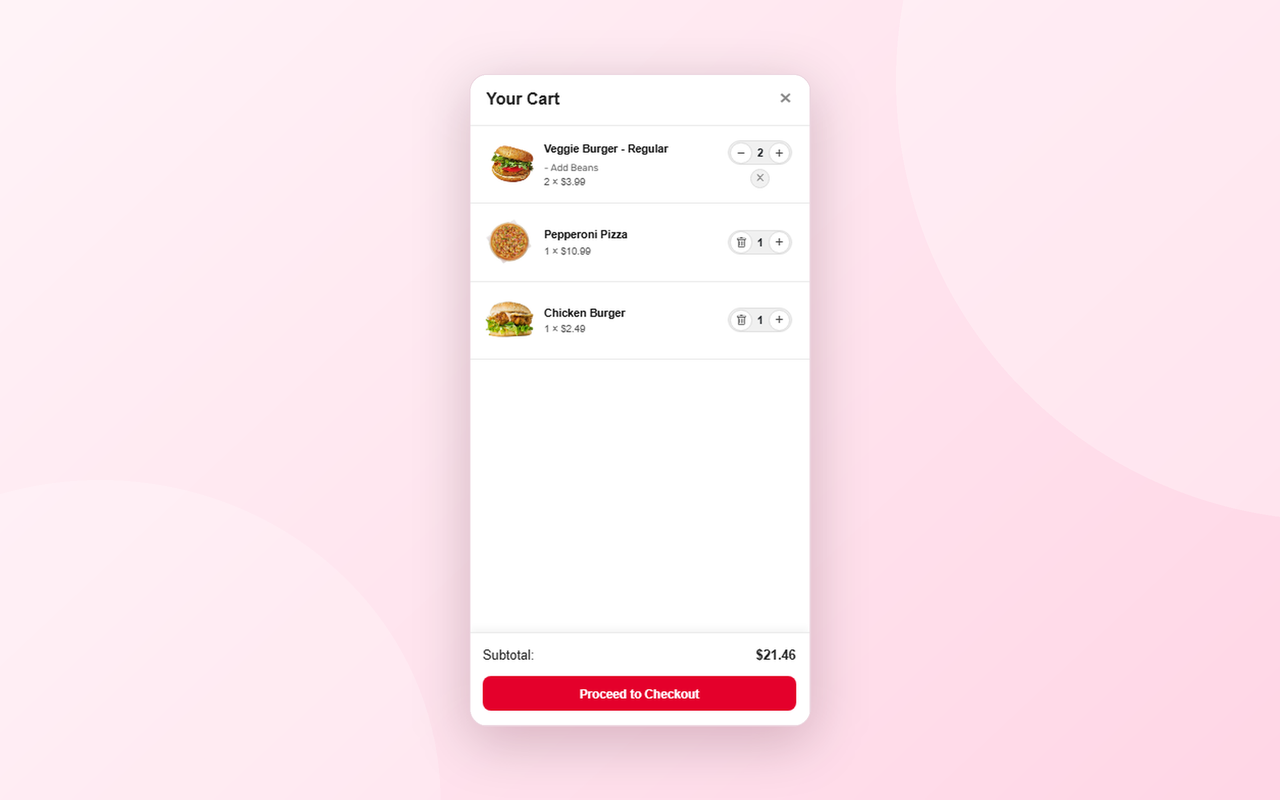
FoodCamp turns a standard WooCommerce store into a food ordering experience. Display your menu in a responsive product grid, let customers pick options in a slide-out modal, and manage everything through a lightweight side cart, all without leaving the page.
FoodCamp is built for restaurants, cafés, bakeries, cloud kitchens, food trucks and any business that sells food online. It works with your existing WooCommerce products and categories, so there is nothing to migrate.
FoodCamp requires WooCommerce to be installed and active.
Who is FoodCamp for?
- Restaurants and takeaways of every size
- Cafés, bakeries and dessert shops
- Pizzerias, burger joints and fast-food outlets
- Cloud and ghost kitchens
- Food trucks and pop-ups
- Caterers and meal-prep businesses
Problems FoodCamp solves
- Slow, cluttered menus. A clean card-based grid and an options popup replace long, confusing product pages.
- Too many clicks to order. The AJAX side cart lets customers add, change and remove items without leaving the page.
- Hard-to-build menu pages. The built-in shortcode generator creates your menu shortcode for you.
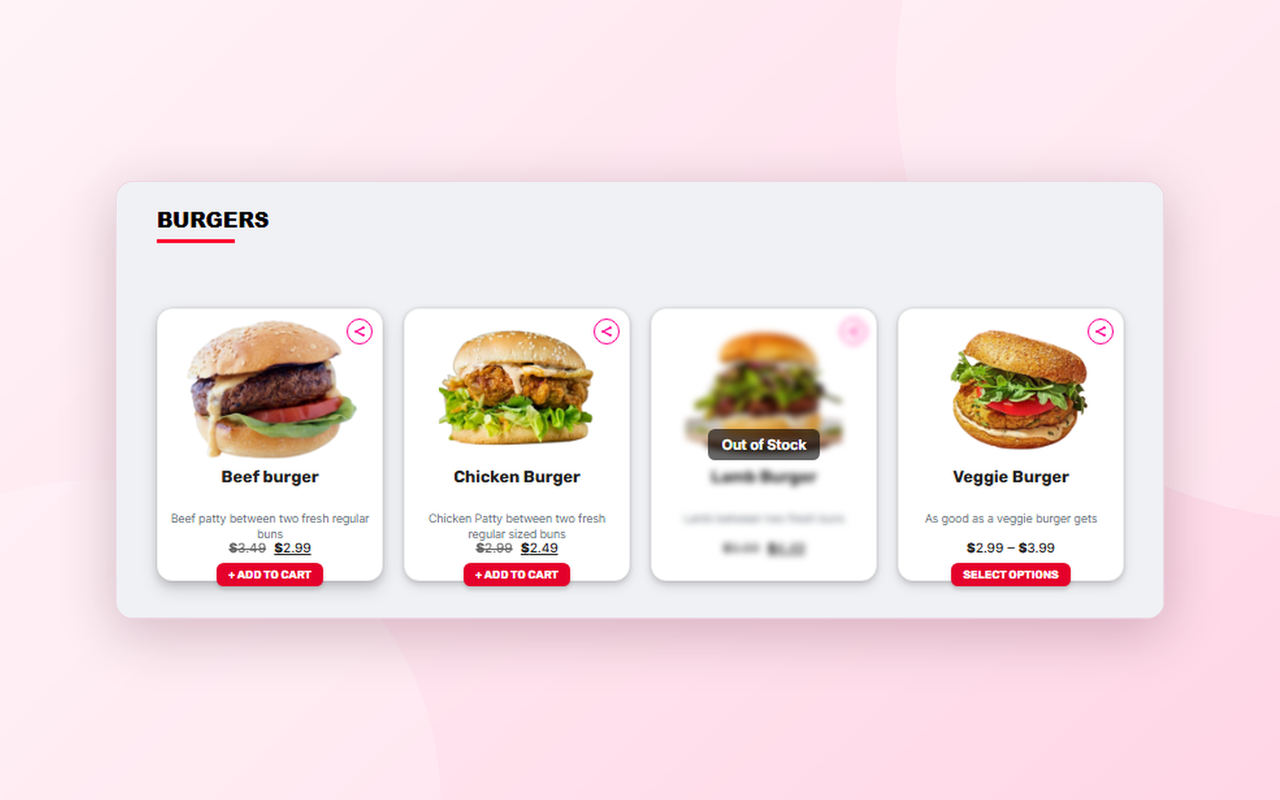
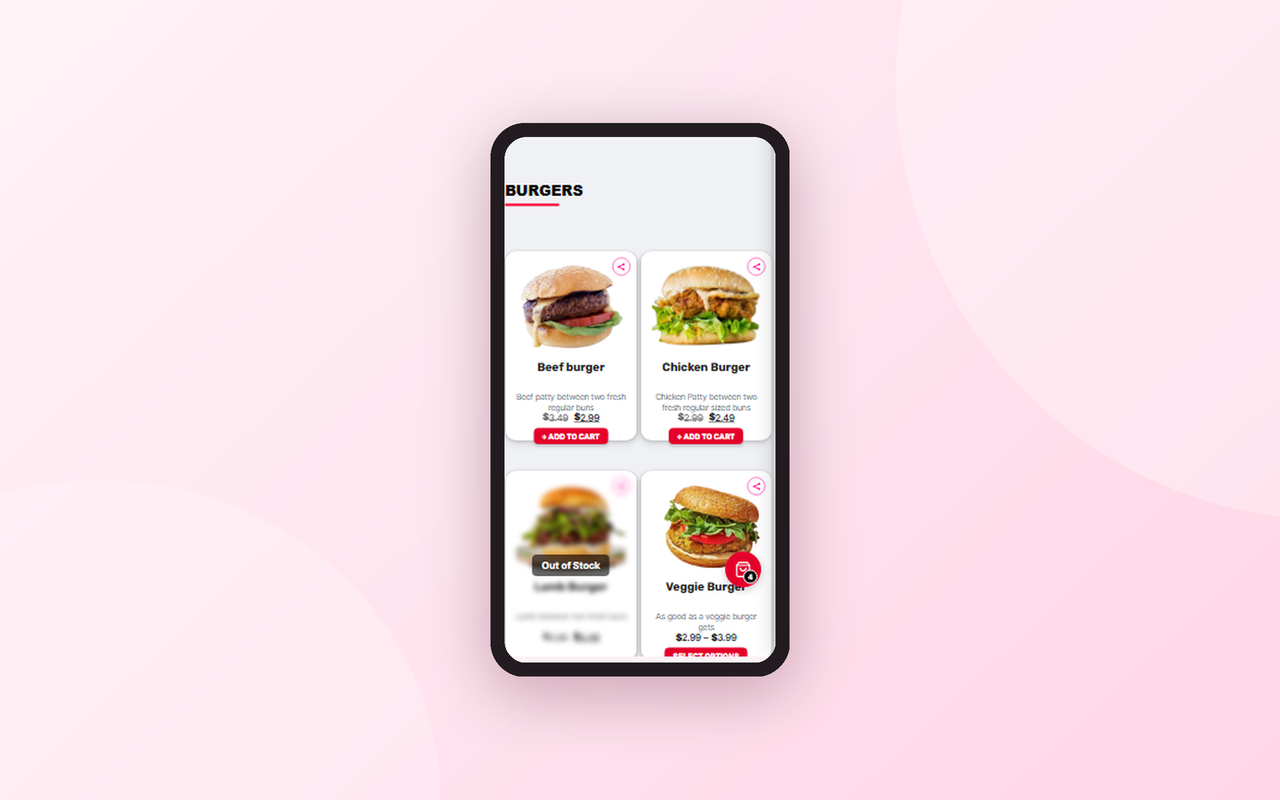
- Running out of dishes. Mark any item as out of stock and it shows as blurred on the front end.
- Managing a busy kitchen (Pro). A live order dashboard, customer order tracker, opening times, delivery sectors and printable receipts are all included in FoodCamp Pro.
FoodCamp Free – Core Features
[foodcamp_menu]and[foodcamp_category]shortcodes to display your product catalog- Built-in shortcode generator page. Point, click, and copy your shortcode. Options include:
- Display Type: Full Menu (all categories) or a Specific Category
- Category picker, when Specific Category is selected
- Show/hide the category heading
- Product Sorting: Title (A–Z), Title (Z–A), or Default WooCommerce Order
- Responsive product grid with card-based layout for menu items
- One-click share button on every product card
- Product options popup modal for variable products, also with sharing support
- AJAX-powered slide-out side cart with quantity controls: add, update and remove items with no page reloads
- Mark individual products as out of stock, shown blurred with an overlay on the front end
- Works with your existing WooCommerce products and categories
- Works with any theme
- Bundled Rubik font, served locally with no requests to Google Fonts
- Translation ready (.pot file included)
- Lightweight, with built-in caching for fast menu rendering
FoodCamp Pro – Everything in Free, Plus a Complete Restaurant Management System
FoodCamp Pro is an optional upgrade that adds a full menu editor, opening times, delivery and pickup management, a live order dashboard, a customer order tracker, receipt printing and smart recommendations. Everything below is a Pro feature and is not included in the free version.
Pro – Drag & Drop Menu Editor
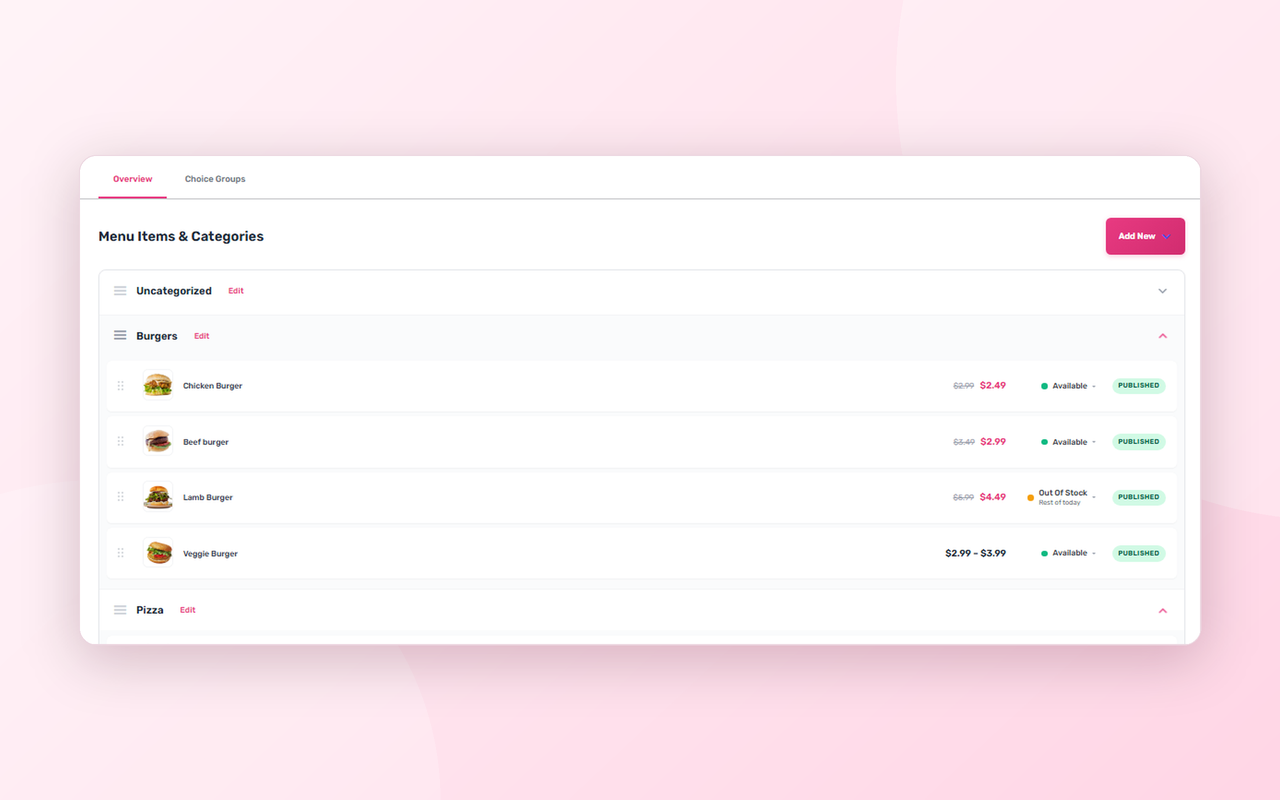
- Dedicated Menu Editor screen to manage your whole menu from one place
- Create and edit menu items and categories without leaving the editor
- Drag and drop to reorder categories
- Drag and drop to reorder items inside each category
- Move an item from one category to another in a single step
- Independent item order per category, so an item shown in several categories can sit in a different spot in each
- Category descriptions
- Draft and published status for each item
- Full support for variable products and their variations
- Custom drag-and-drop sort order used automatically by the menu shortcodes
Pro – Choice Groups (Add-ons and Extras)
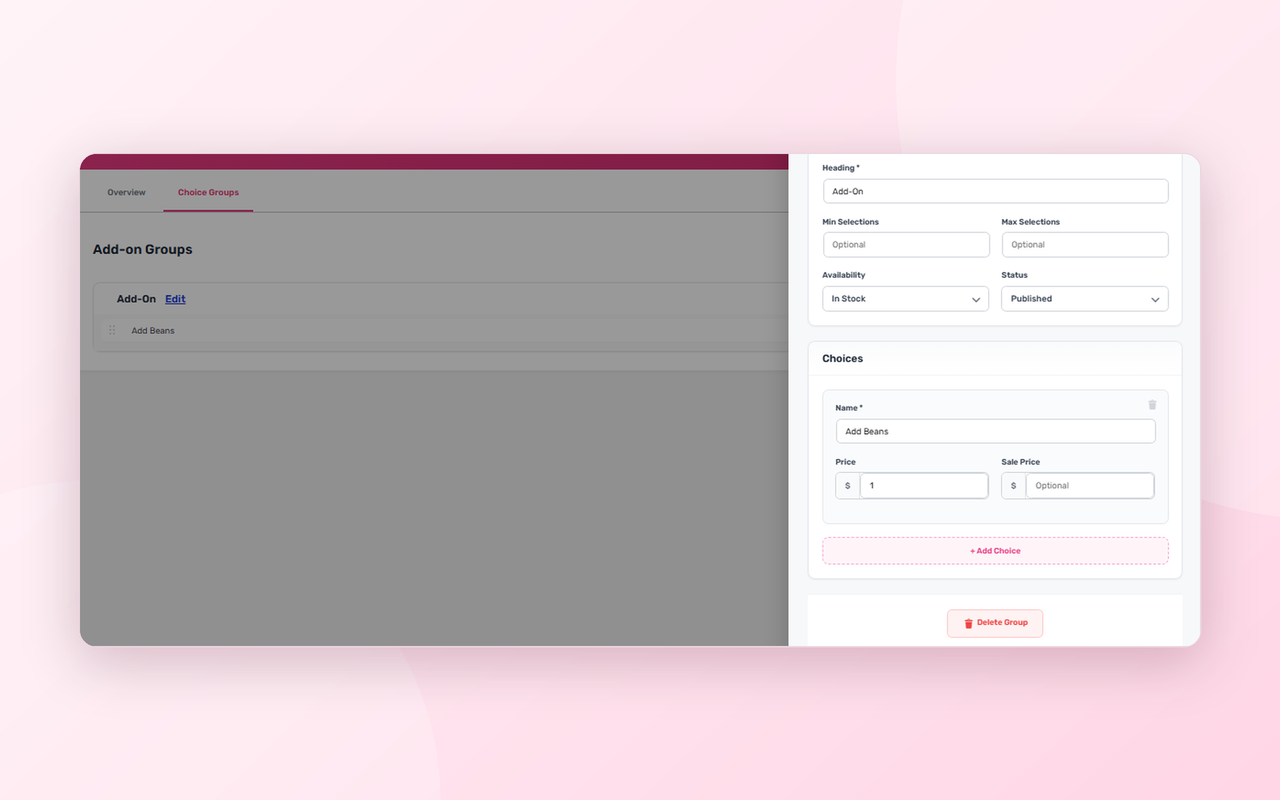
- Create reusable Choice Groups such as “Choose your size”, “Toppings”, “Sauces” or “Make it a meal”
- Add as many choices as you like to each group, each with its own name, price and optional sale price
- Set a minimum and maximum number of selections per group
- Required groups and pick-one groups are clearly labelled in the popup
- Mark a whole group as in stock or out of stock
- Attach any group to any item, and choose which choices apply to each item
- Drag and drop to reorder groups on an item, and choices inside a group
- Move choices between groups by dragging
- Prices and choice names are always verified on the server, so customers cannot tamper with them in the browser
- Selected add-ons appear in the cart, the order and the receipt
Pro – Menu Availability Control
- Set any item to Available, Unavailable, Hidden or Out of Stock in one click
- Show your own custom message on unavailable items, such as “Sold out for today”
- Timed availability: make an item unavailable for the rest of today, until a specific day within the next week, or until you turn it back on
- Items come back automatically when the time is up, with no manual work and no reliance on visitors or a server cron
- Unavailable and hidden items are kept out of the cart, the popup and the recommendations
Pro – Opening Times and Store Gate
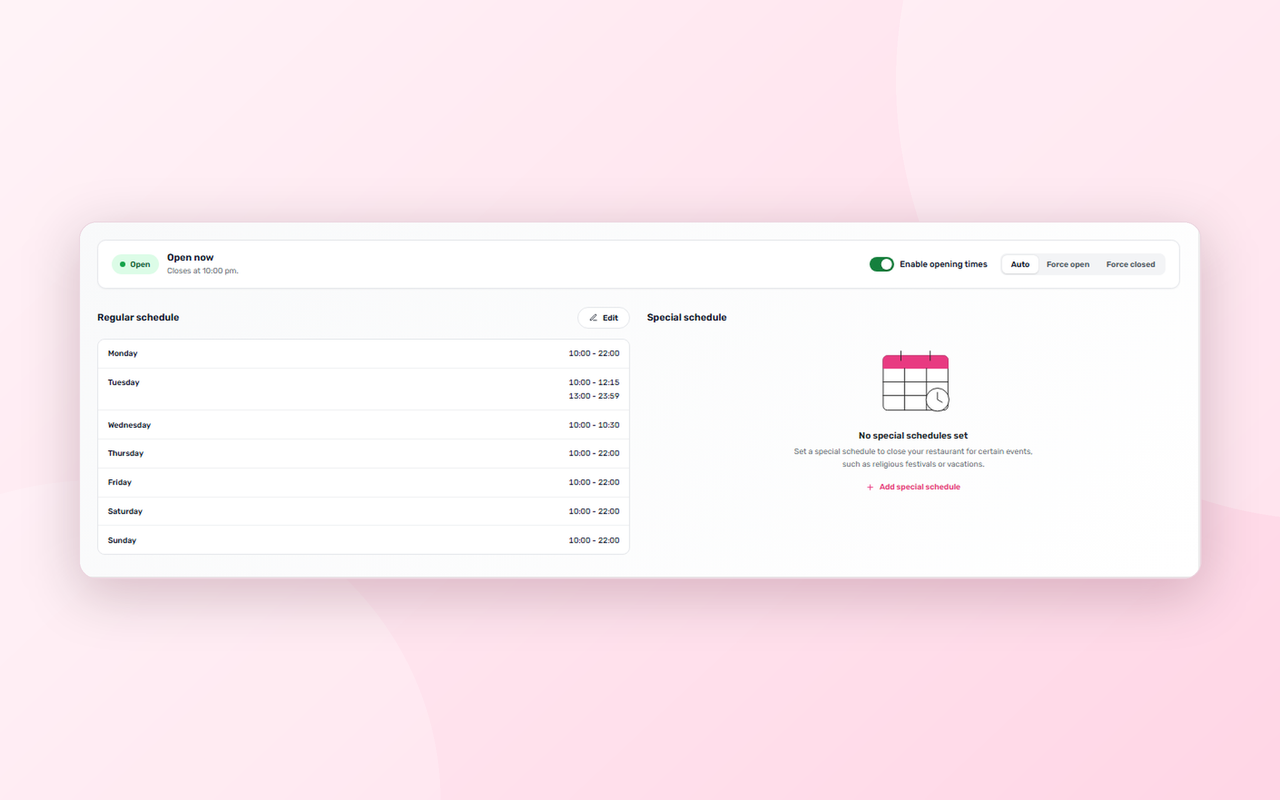
- Dedicated Opening Times screen with a clear status card showing whether you are open or closed right now
- Weekly schedule with up to 5 separate shifts per day, ideal for lunch and dinner services
- Special closures and holidays with a name, a start date and an end date
- One-click force open or force closed override, with schedule-based opening as the default
- Late-night shifts that run past midnight are handled correctly
- Everything uses your WordPress timezone
- Custom restaurant name used in closed messages shown to customers
- Live open/closed status on the storefront
- Next opening time shown to customers while you are closed
- Closed-store protection at every step: customers are stopped at the checkout page, at the classic checkout submit, at WooCommerce Blocks / Store API checkout, and the cart page shows a closed notice
- Customers can still browse the menu and fill their cart while you are closed
- Customers who already ordered can still view and pay for their existing orders
- Feature is off by default, so installing or updating never closes your shop by surprise
Pro – Delivery and Pickup
- Delivery / Pickup selector at checkout
- Enable or disable Delivery and Pickup independently
- Customizable checkout field labels
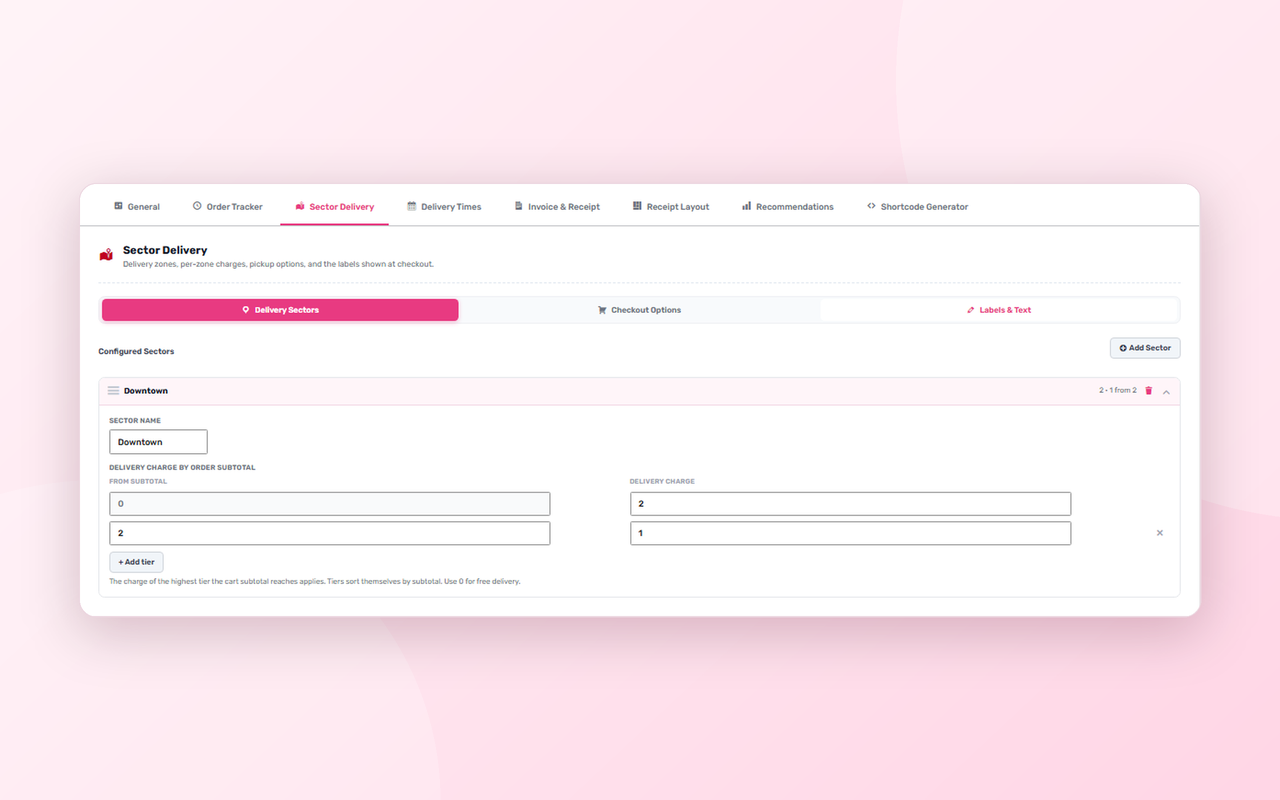
- Sector-based delivery: create your delivery areas (sectors) and set the delivery charge for each
- Tiered delivery charges based on the cart subtotal, such as 5.00 under 20, 2.00 from 20 and free from 40
- Free delivery above a minimum order amount, per sector
- Discounted delivery tiers for bigger baskets
- Tiers sort themselves by subtotal, and a tier of 0 means free delivery
- Pickup discount as either a percentage or a fixed amount
- Restaurant pickup address shown on the thank-you page and in the order tracker
- Fully customizable delivery charge labels, including the full-charge, free-delivery and discounted-charge messages
- Charge labels support placeholders for the amount, currency and sector name
- Delivery charge is calculated and applied automatically in the cart and at checkout
- Import and export your sector settings as a file, to back up or move between sites
Pro – Live Order Management Dashboard
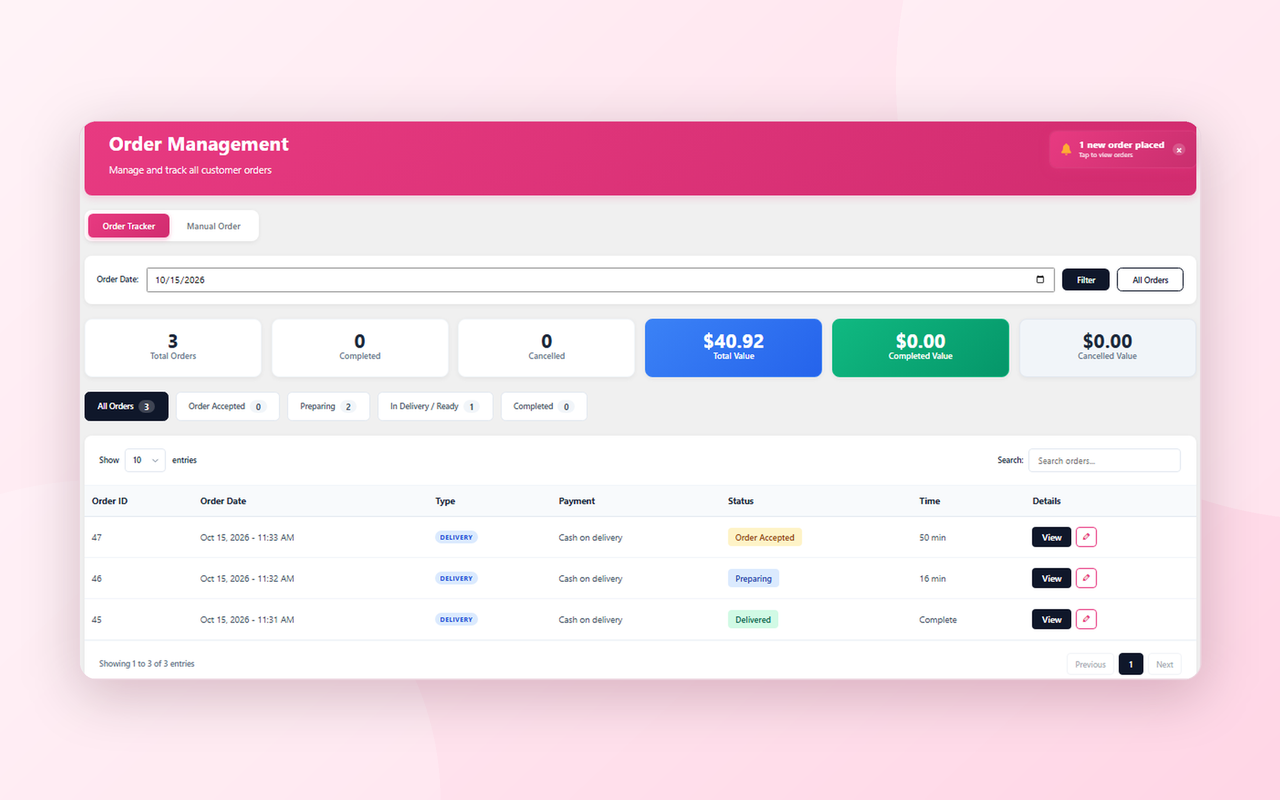
- Order Tracker dashboard built for the kitchen and front desk
- Browse orders by date, or view all orders at once
- Status filter tabs with live counts: All Orders, Order Accepted, Preparing, In Delivery / Ready and Completed
- Search orders instantly
- At-a-glance statistics: total orders, completed, cancelled, total value, completed value and cancelled value
- Order details modal with customer, address, order items, totals, delivery fee and pickup discount
- Change an order’s status in one click
- Accept orders that are waiting for payment
- Set or adjust the pickup or delivery time on any order
- Record a cancellation reason when cancelling an order
- Order types: Delivery, Pickup and Dine-in
- Real-time updates, with no need to refresh the page
Pro – New Order Alerts
- Instant new-order notification inside the admin
- Notification sound so a new order is never missed
- Browser push notifications for new orders and payment-change requests, sent to staff devices that have enabled notifications
- Duplicate protection, so one order never fires a burst of repeated alerts
Pro – Manual Orders and Edit Order
- Create orders for phone and walk-in customers directly from the dashboard
- Product search with the same options popup your customers see
- Choose the order type and see delivery settings while you build the order
- Edit an existing order: change items, order type and delivery charge
- Your field visibility rules apply to manual and edit forms too
Pro – Customer Order Tracker
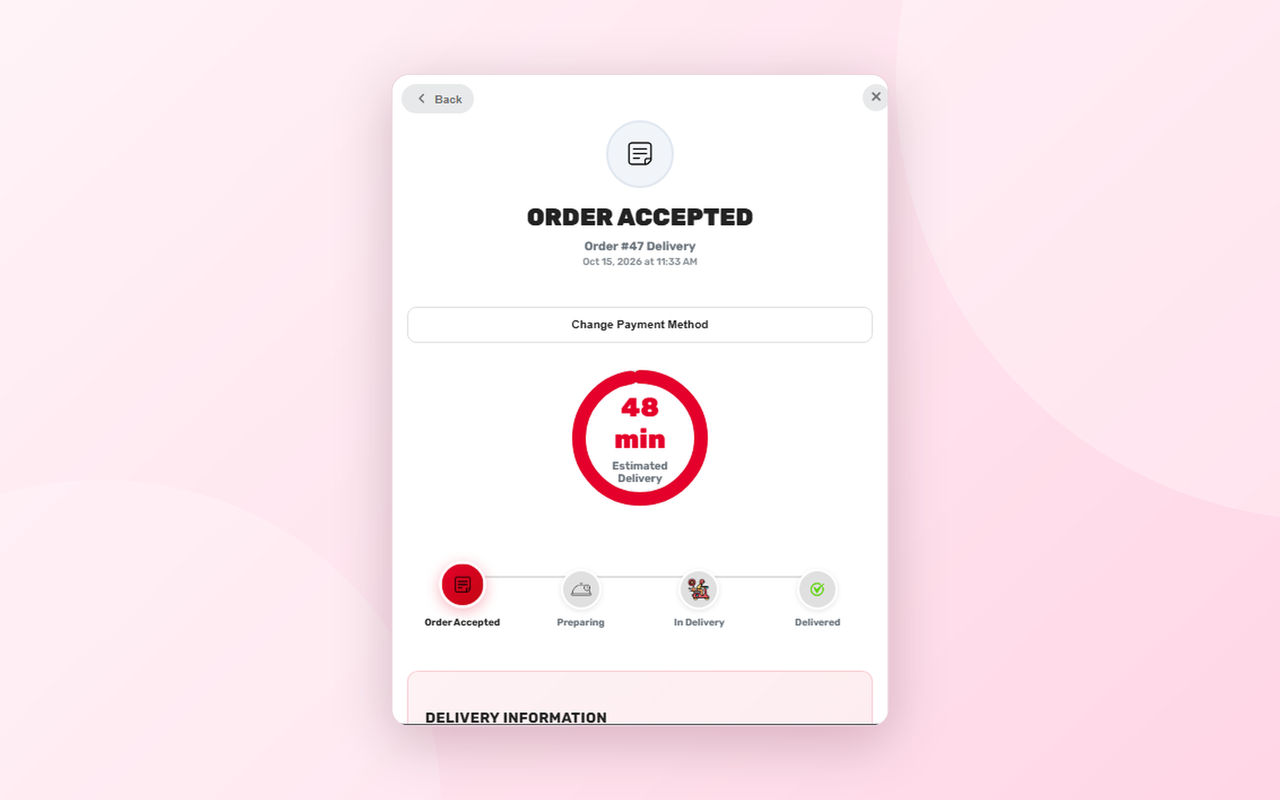
- Storefront order tracker so customers can follow their order without contacting the restaurant
- Order summary list and a detailed order view
- Live countdown to the estimated delivery or pickup time, or a simple static message if you prefer
- Default delivery time and default pickup time, with the timer starting automatically when an order is accepted
- Automatic status progression: the tracker moves through Order Accepted, Preparing and In Delivery / Ready on a schedule you control, set separately for delivery and pickup
- Auto-complete orders when the timer runs out, or hold at the last status until staff change it
- Optional static auto-complete after a set number of minutes
- Option to open the tracker automatically for the customer
- Choose whether customers see the order total and order notes
- Custom delivery and pickup messages
- Control how long completed and cancelled orders stay visible in the storefront tracker
- Updates in real time as staff change the order status
Pro – Customer Payment Method Change
- Customers can request a different payment method for their order straight from the tracker
- Staff get an alert with a sound and a review window
- Approve or reject each request in one click
- Choose which order statuses allow a payment change, or set a time window when the live countdown is on
Pro – Receipt and Invoice Printing
- Print order receipts and invoices from the dashboard in one click
- Two formats: Normal (A4) invoice and Thermal receipt
- Live invoice preview before you print
- Your restaurant name, tagline, logo, address, phone and website on every receipt
- Accent color and footer message
- Custom thermal paper width and A4 width
- Choose exactly which order details appear: customer name, phone, address, order type, sector, area, payment method, notes, pickup time and more
- Optional billing and shipping fields: email, company, address lines, city, state, postcode, country and shipping phone
- Show or hide subtotal, delivery fee, discount and tax
- Hide unwanted WooCommerce meta keys from invoice line items
- Visual Receipt Layout editor with real-time toggles for every border, divider and section
- Discount codes shown on the receipt
Pro – Frequently Bought Together Recommendations
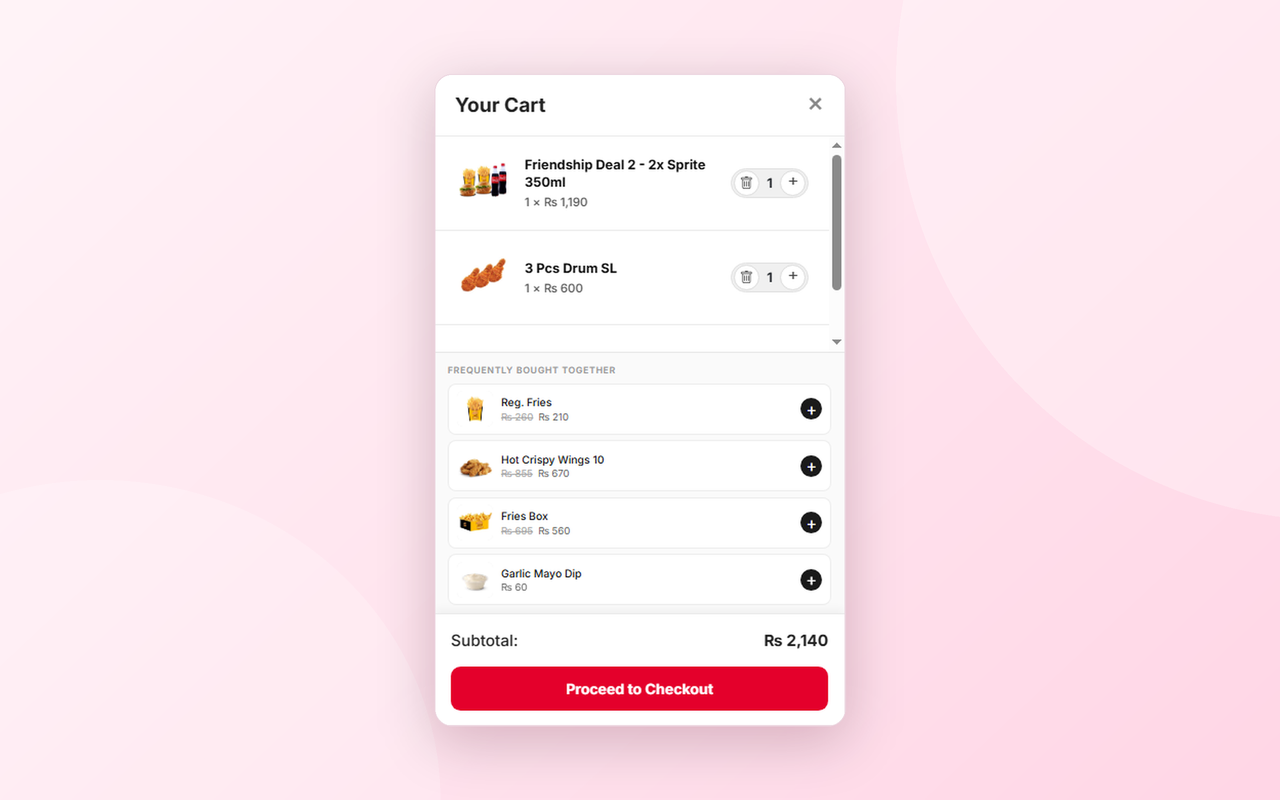
- “Frequently Bought Together” suggestions shown inside the side cart
- Suggestions are based on what customers really order together in your restaurant
- One tap to add a suggested item to the cart
- Suggested items with options open the options popup
- Out-of-stock, unavailable and hidden items are never suggested
- Order history backfill to build recommendations from your past orders
- Statistics screen showing your top 10 most co-purchased pairs
Pro – Checkout Field Control
- Automatically detects every field live at checkout, including fields added by a checkout field editor plugin
- Hide any field from the customer tracker, the admin order details and the manual order forms with one toggle
Pro – Settings, Shortcodes and Control
- Organized settings screen with tabs for General, Order Tracker, Sector Delivery, Delivery Times, Invoice & Receipt, Receipt Layout, Recommendations and Shortcode Generator
- Saves instantly with no page reloads
- Shortcode generator with the sorting options you want
- Option to delete all FoodCamp data when the plugin is uninstalled
- Single, consistent clock based on your site timezone across all time features
- Built-in caching for fast menus
Free vs Pro at a glance
- Free: menu grid, shortcodes, shortcode generator, options popup, AJAX side cart, share buttons, out-of-stock marking.
- Pro: everything in Free, plus the Menu Editor, Choice Groups, timed availability, opening times, delivery sectors with tiered charges, pickup discounts, order dashboard, order alerts, manual orders, customer order tracker, payment method change requests, receipt printing and Frequently Bought Together recommendations.
External services
This plugin does not send any data to external services, does not use cookies or tracking, and does not phone home.
The plugin’s admin includes a single “Upgrade to Pro” screen that lists optional Pro features. It contains a plain link that opens the FoodCamp Pro purchase page hosted by Freemius (https://checkout.freemius.com/). The link is only followed if you click it. No data is sent from your site by the plugin itself. Freemius terms and privacy policy: https://freemius.com/terms/ and https://freemius.com/privacy/
Credits
The Rubik font is bundled locally (no requests to Google Fonts) and is licensed under the SIL Open Font License 1.1. The full licence text is included in fonts/OFL.txt.
Details
Related plugins
Plugins that also contain the tag food-ordering
Restaurant Menu – Food Ordering System – Table Reservation

Orderable – WordPress Restaurant Online Ordering System and Food Ordering Plugin

Food Menu – Restaurant Menu & Online Ordering for WooCommerce

WPPizza – A Restaurant Plugin

Food Store – Online Food Delivery & Pickup
FoodBook Lite – Online Food Ordering System


About
Plugin for that tries to help you find the WordPress plugin you are looking for.
| Please enjoy an image of Crush (this awesome turtle) and have a lovely day! |  |
We do not own any plugin listed on this site and do not work for or work with WordPress.com or it's associated companies. We simply provide a searchable list of the available WordPress plugins.