


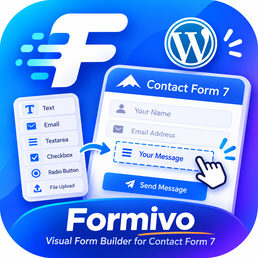
Formivo – Visual Form Builder for Contact Form 7
Formivo turns the plain HTML textarea of Contact Form 7 into a modern, visual drag & drop form builder.
Drag fields onto the canvas, arrange them in rows and columns, change labels and colors, and check how the form looks on desktop, tablet and mobile. You don’t need to write a single form-tag.
Everything you build is saved as standard Contact Form 7 markup. Mail, validation, messages, spam protection and add-ons keep working exactly as before. If you ever deactivate Formivo, your forms keep working too.
Why Formivo?
- No more form-tag syntax. Build
[text* your-name]and[email* your-email]with clicks instead of typing. - Real multi-column forms. Put name and email side by side, add a sidebar, or center a narrow form.
- What you see is what you get. The canvas loads your active theme, so the form in the editor looks like the form on your site.
- 100% Contact Form 7. No new form system to learn and no lock-in. Formivo only writes the form template.
Visual builder
- Fullscreen editor that opens right away when you add or edit a contact form.
- Drag & drop fields from the side panel into any column. Reorder fields and rows, duplicate and delete with one click.
- 10 ready-made structures: 1, 2, 3, 4 and 6 columns, left and right sidebar, wide + narrow, narrow + wide and centered.
- Click-to-add: click a field and it is added after the selected element.
- Rename the form directly from the builder.
- Undo / redo (Ctrl+Z / Ctrl+Shift+Z), keyboard shortcuts for save, duplicate and delete.
- Ready-made templates: Contact, Quote request and Newsletter.
Fields and elements
- Form fields: Text, Email, Textarea, Select (dropdown), Checkbox, Radio, Number, Date, Phone, URL, File upload, Acceptance (consent) and Submit button.
- Content elements: Heading, Paragraph, Image (from the Media Library), Divider and custom HTML.
- Field settings: label, field name (mail-tag), required, placeholder, default value, options, help text, min / max / step, length limits, autocomplete, file types and size, CSS ID and classes, and extra CF7 options.
Styling
- Built-in field styling: clean inputs, custom checkboxes and radio buttons, styled select and button. Turn it off to use your theme’s own form styles.
- Style tab for every element: colors, font size and weight, spacing, borders, border radius and padding for labels, inputs, options, help text and buttons, with normal, hover and focus states.
- Form settings: set default styles for every field of the form at once. Element styles override them.
- Responsive: each style value and each column width can be set separately for desktop, tablet and mobile.
Preview and output
- Live canvas in your active theme, with desktop, tablet and mobile views.
- Preview mode hides the editor outlines so you can type into the form and try it out.
- Shortcode tab shows the form’s shortcode and the generated Contact Form 7 template, each with a copy button.
- Front-end output is plain HTML plus CF7 form-tags and a lightweight grid stylesheet. Custom styles are added as a small inline stylesheet only on pages that show a Formivo form.
Works with your existing forms
Open any existing Contact Form 7 form and Formivo imports it into the builder. You can switch back to the classic HTML editor at any time from the builder’s menu. Formivo never touches your mail settings, messages or additional settings.
Source code
The editor is built with Vue 3. The full, unminified source code is included in the plugin in the admin/src folder, together with package.json and vite.config.js. To rebuild the compiled files in assets/build, run:
npm install && npm run build
Bundled third-party libraries, all MIT licensed:
- Vue – https://github.com/vuejs/core
- vuedraggable – https://github.com/SortableJS/vue.draggable.next
- SortableJS – https://github.com/SortableJS/Sortable
Details


Related plugins
Plugins that also contain the tag cf7
Contact Form 7 Multi-Step Forms

CF7 to Webhook

Date Time Picker for Contact Form 7
Void Contact Form 7 Widget For Elementor Page Builder

Contact Form 7 Shortcode Enabler

Multi Step for Contact Form 7

About
Plugin for that tries to help you find the WordPress plugin you are looking for.
| Please enjoy an image of Crush (this awesome turtle) and have a lovely day! |  |
We do not own any plugin listed on this site and do not work for or work with WordPress.com or it's associated companies. We simply provide a searchable list of the available WordPress plugins.