


Forms Converter Add-on For HTML Page Publisher
Independent add-on: Forms Converter Add-on For HTML Page Publisher is made and supported by Xavier Castaneda. It is not an official HTML Page Publisher add-on, and HTML Page Publisher’s author doesn’t provide support for it. Support: https://github.com/xcast3d/forms-for-html-page-publisher/issues
This add-on is built specifically for the original HTML Page Publisher plugin. HTML Page Publisher remains responsible for uploading, storing, versioning, and serving the static landing pages; this add-on supplies form detection, conversion, and rendering. It requires HTML Page Publisher 1.5.2 or later and does not replace it.
HTML Page Publisher publishes uploaded static landing pages as-is, outside the theme. Landing pages generated by AI tools or page builders usually include a <form> that doesn’t submit anywhere. This add-on converts those static forms into working Gravity Forms, Contact Form 7 or WPForms forms (see Detect Forms below), and lets you place any existing form in a page with an HTML comment placeholder:
<!-- form:gravity:12 --> – Gravity Forms
<!-- form:cf7:34 --> – Contact Form 7
<!-- form:wpforms:56 --> – WPForms (Lite or Pro)
Optional flags (both default to false, since landing pages usually have their own heading):
<!-- form:wpforms:56 title=true description=true -->
The older <!-- gravity-form:12 --> syntax keeps working.
Keeping the landing page’s design (styles=page)
<!-- form:cf7:34 styles=page button-class="btn btn-primary" -->
With styles=page, the form plugin’s visual theme is turned off and the landing page’s own CSS styles the form:
- Gravity Forms: theme CSS off (
gform_disable_css), plain markup without Orbital variables, no “* indicates required fields” note. - WPForms: its “No styles” level (a small functional stylesheet only).
- Contact Form 7: its functional stylesheet stays; auto-paragraphs are off and the submit
<input>becomes an equivalent<button>, so button rules written for the original page apply. button-classis added to the submit button;classandid(optional) go on the rendered form and a wrapper.- A small base stylesheet fills gaps (field spacing, choice lists, hidden honeypots, readable validation messages). Its layout rules use
:where(), so any rule in the page wins.
Without styles=page, forms use the form plugin’s own theme.
Converted forms use styles=page by default (filter ffhpp_default_styles). The original <form> becomes a <div> with the same class, id and other presentational attributes, and anything inside the form before the first field (a heading, intro text) or after the button stays in place around the placeholder:
<div id="signup" class="signup-form"><h2>Tell us about your project</h2><!-- form:cf7:34 styles=page button-class="btn btn-primary" --></div>
So rules like .signup-form, .signup-form input, .signup-form label, #signup … and .btn-primary keep working. Textarea rows and the submit button text carry over.
What it does:
- Replaces only these explicit placeholders. Shortcodes elsewhere in the uploaded HTML are left untouched.
- Prints only the styles, scripts and settings the form plugin needs, not the theme’s head or footer.
- Routes submissions that post to the page URL (no-JS fallbacks, Gravity Forms’ iframe AJAX) to the form plugin’s own handler, and only for forms whose placeholder is in that page. JavaScript submissions use each plugin’s own endpoint (Gravity Forms iframe, Contact Form 7 REST API, WPForms admin-ajax).
- The form plugin’s own validation, anti-spam, notifications, confirmations and entry storage apply.
- Missing, inactive or trashed forms, or an inactive form plugin: a visible warning in draft previews; an HTML comment (nothing visible) on published pages.
Requires HTML Page Publisher 1.5.2 or later and at least one of: Gravity Forms (2.9+; tested with 3.2.0), Contact Form 7 (tested with 6.2.3), WPForms Lite/Pro (tested with Lite 2.0.3).
Detect Forms: convert raw HTML forms
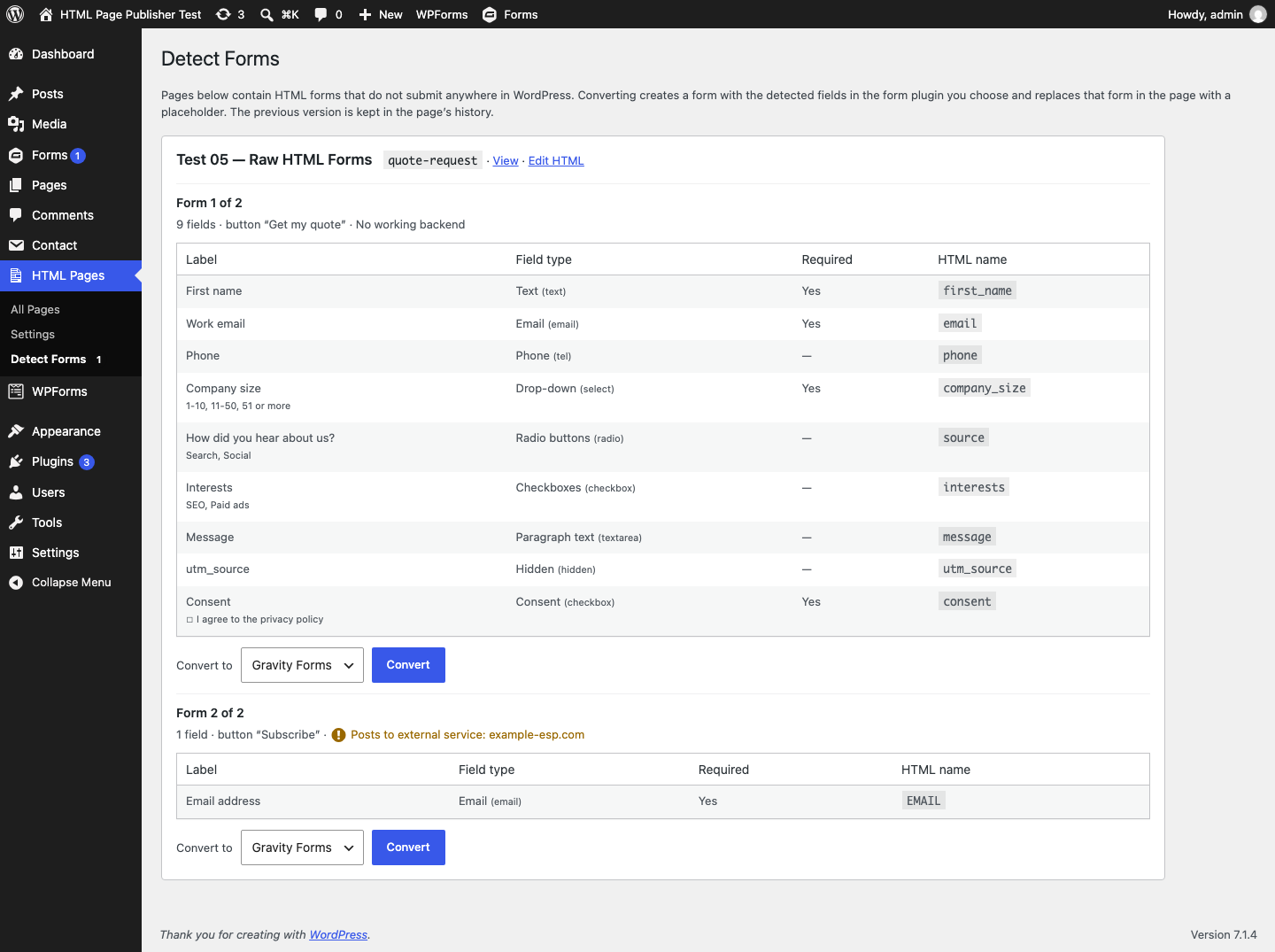
AI-generated pages often ship a <form> with no working backend. HTML Pages Detect Forms finds them:
- Pages are flagged whenever their HTML is written (upload, replace, editor save, restore); the submenu shows a count badge, and HTML Pages screens show a notice.
- Each detected form shows its fields (label, type, required flag, choices, HTML name), the submit button text and where the form currently posts. Forms that post to an external service are marked, and converting one asks for confirmation.
- Convert to lets you pick the form plugin when more than one is active. Differences for the chosen plugin are listed before converting (for example, fields WPForms Lite doesn’t have).
- Converting creates the form, then replaces exactly that
<form>…</form>in the page with its placeholder. The rest of the page is untouched. - The page is saved through HTML Page Publisher’s page service, which keeps the previous version in the page’s history, so a conversion can be undone there.
- If the page changed after it was reviewed, the conversion is refused. If saving the page fails, the new form is deleted again.
Field mapping:
Detected
Gravity Forms
Contact Form 7
WPForms Lite (Pro)
text, search, password
Single Line Text
[text]
Single Line Text
email
Email
[email]
Email
tel
Phone
[tel]
Single Line Text (Phone)
url
Website
[url]
Single Line Text (Website)
number, range
Number
[number]
Numbers
date
Date
[date]
Single Line Text (Date)
hidden
Hidden, filled from the query string
[hidden … default:get]
skipped (Hidden, {query_var})
textarea
Paragraph Text
[textarea]
Paragraph Text
select
Drop Down
[select … first_as_label]
Dropdown
radio group
Radio Buttons
[radio]
Multiple Choice
checkbox group
Checkboxes
[checkbox]
Checkboxes
lone “I agree…” checkbox
Consent
[acceptance]
Checkboxes, one choice, label hidden
A lone checkbox counts as consent when its text mentions agree, consent, accept, privacy, terms, policy or opt-in. Labels come from <label for>, a wrapping <label>, a group’s <legend>, then aria-label, placeholder, title or name. Choice values are kept (Contact Form 7 uses “Text|value” pipes).
Created forms get each plugin’s usual defaults: a confirmation message and an admin email notification. Contact Form 7’s mail body lists every field, with Reply-To set to the first email field.
Converting requires the publisher’s capability plus unfiltered_html (the same check as its HTML editor), and permission to create forms in the chosen plugin (gravityforms_create_form, wpcf7_edit_contact_forms, or WPForms’ create_forms).
WP-CLI
Commands live under the publisher’s own wp htmlpp namespace:
wp htmlpp forms plugins– supported form plugins, whether each is active, and its placeholder.wp htmlpp forms detect [<slug>]– raw HTML forms per page (fields, button, where it posts).--format,--fields.wp htmlpp forms convert <slug> --to=<gravity|cf7|wpforms> [--form=<n>|--all] [--styles=page|plugin] [--dry-run] [--porcelain]– convert forms;--dry-runshows the fields, notes and placeholder without changing anything. Run as an administrator (--user=<login>), since form plugins check the current user’s permissions.wp htmlpp forms placeholders [<slug>] [--problems]– every placeholder and whether its form can be shown (ok,form missing,plugin inactive,unknown plugin).
Examples:
wp htmlpp forms detect
wp htmlpp forms convert spring-promo --to=cf7 --dry-run
wp htmlpp forms convert spring-promo --to=gravity --all --user=admin
wp htmlpp forms placeholders --problems
Converted forms are titled after the page, with “— form N” (by position in the page) when it has more than one.
Support
Open an issue at https://github.com/xcast3d/forms-for-html-page-publisher/issues with your WordPress, HTML Page Publisher and form plugin versions. For problems with HTML Page Publisher itself (uploading or publishing pages), use its support forum: https://wordpress.org/support/plugin/html-page-publisher/
How it integrates with HTML Page Publisher
Uses only HTML Page Publisher’s public hooks and page service (version 1.5.2 or later):
htmlpp_page_html– replace placeholders and inject assets.htmlpp_before_serve– route a form submission before the page is served.htmlpp_page_created/htmlpp_page_updated– flag pages that contain HTML forms.htmlpp_page_meta_defaults– register the per-page form count (html_forms), read and written throughhtmlpp()->pages.htmlpp_serve_priority– serve pages after form plugins have initialised (see below).htmlpp()->pages– read pages and their HTML, and save a converted page with a version backup (update_html()).
Two adjustments, both needed because pages are served during init:
- HTML Page Publisher serves pages at
initpriority 0 by default, before form plugins initialise (init, 10). This add-on raises that to priority 20 throughhtmlpp_serve_priority(filterable withffhpp_serve_priority). Pages are still served before WordPress’s main query runs. - Contact Form 7 and WPForms register their scripts on
wp_enqueue_scripts, which never fires on these pages. When one of their forms is on a page, the add-on runs that action once, keeps the registrations, and discards whatever the theme or other plugins enqueued.
Adding another form plugin
Extend FFHPP_Adapter (form_exists, render, create_form, delete_form, edit_url, can_create, and optionally submission routing and conversion notes) and add an instance with the ffhpp_adapters filter. Its id() becomes the placeholder key: <!-- form:{id}:{form ID} -->.
Filters
ffhpp_adapters(FFHPP_Adapter[]) – form plugin adapters, in order of preference.ffhpp_serve_priority(int, default 20) – init priority pages are served at.ffhpp_form_markup(string $markup, string $adapter, int $form_id, bool $preview) – rendered form HTML before it replaces the placeholder.ffhpp_consent_pattern(string $pattern) – regex that marks a lone checkbox as a consent field.ffhpp_default_styles(string ‘page’|’plugin’, FFHPP_Adapter $adapter, array $form) – styling mode written into converted placeholders.
Filters and actions used the htmlpp_forms_ prefix before 0.7.0 (for example htmlpp_forms_adapters). The old names still work in 0.7.0 with a deprecation notice when WP_DEBUG is on, and will be removed in the next release.
Actions
ffhpp_form_converted(string $adapter, int $form_id, string $slug, array $form) – after an HTML form was converted.
Known limitations
- Contact Form 7 does not store submissions; it only sends email. Use working email delivery (or the Flamingo plugin) on the live site.
- Contact Form 7 radio buttons always require a choice.
- Form plugins’ scripts include WordPress’s jQuery where they need it. A page that bundles its own jQuery will load two copies.
- Every page request now runs after other plugins’
initcallbacks (priority < 20), slightly later than before. - Multi-page forms, file uploads, payment add-ons and redirect confirmations have not been tested yet.
- Converted forms use the form plugin’s markup. With styles=page, rules that target the form through its class/id and element types (
.signup-form input,#signup label) keep working; rules that depend on the original structure (.signup-form > label, sibling selectors, grid placement of direct children, classes on individual fields) do not, andform.signup-formno longer matches (it’s a<div>now). Page JavaScript bound to the old form stops working. - The page’s
labelrules also reach the labels of radio and checkbox choices, which may make them bolder than in the original. - File inputs, color pickers and custom widgets are not converted; forms are detected in the raw source, so a
<form>inside a<script>string or HTML comment would also be listed.
Details


Related plugins
Plugins that also contain the tag ai
SEOPress – On-site SEO & Analytics

AI Engine – The Chatbot, AI Framework & MCP for WordPress

GetGenie – AI Content Writer with Keyword Research & SEO Tracking Tools

SEO Plugin by Squirrly SEO

Website LLMs.txt

Smartsupp – live chat, AI shopping assistant and chatbots


About
Plugin for that tries to help you find the WordPress plugin you are looking for.
| Please enjoy an image of Crush (this awesome turtle) and have a lovely day! |  |
We do not own any plugin listed on this site and do not work for or work with WordPress.com or it's associated companies. We simply provide a searchable list of the available WordPress plugins.