



Fosia Collect – Mobile Money Payments & Donations
Fosia Collect adds a “Pay” or “Donate” form to any page of your WordPress site. People pay with Mobile Money (MTN MoMo, Airtel Money, Orange Money, M-Pesa, Moov Money and the other operators of your PawaPay account), and the money goes straight to your own PawaPay account. Fosia never holds it.
It is made for organisations that do not sell products: NGOs and charities, churches, schools, associations, events. You do not need WooCommerce, a shop or a cart.
You need your own PawaPay merchant account. A Sandbox account to test is free and opens in minutes; PawaPay opens the Live account after checking your organisation (see the FAQ).
How it works
- You add the Fosia Collect form block to a page (or the
[fosia_collect]shortcode) and choose the amounts. - The visitor picks an amount, types their Mobile Money number and presses “Donate” (or “Pay”).
- They are sent to PawaPay’s secure payment page and approve the payment on their phone with their PIN.
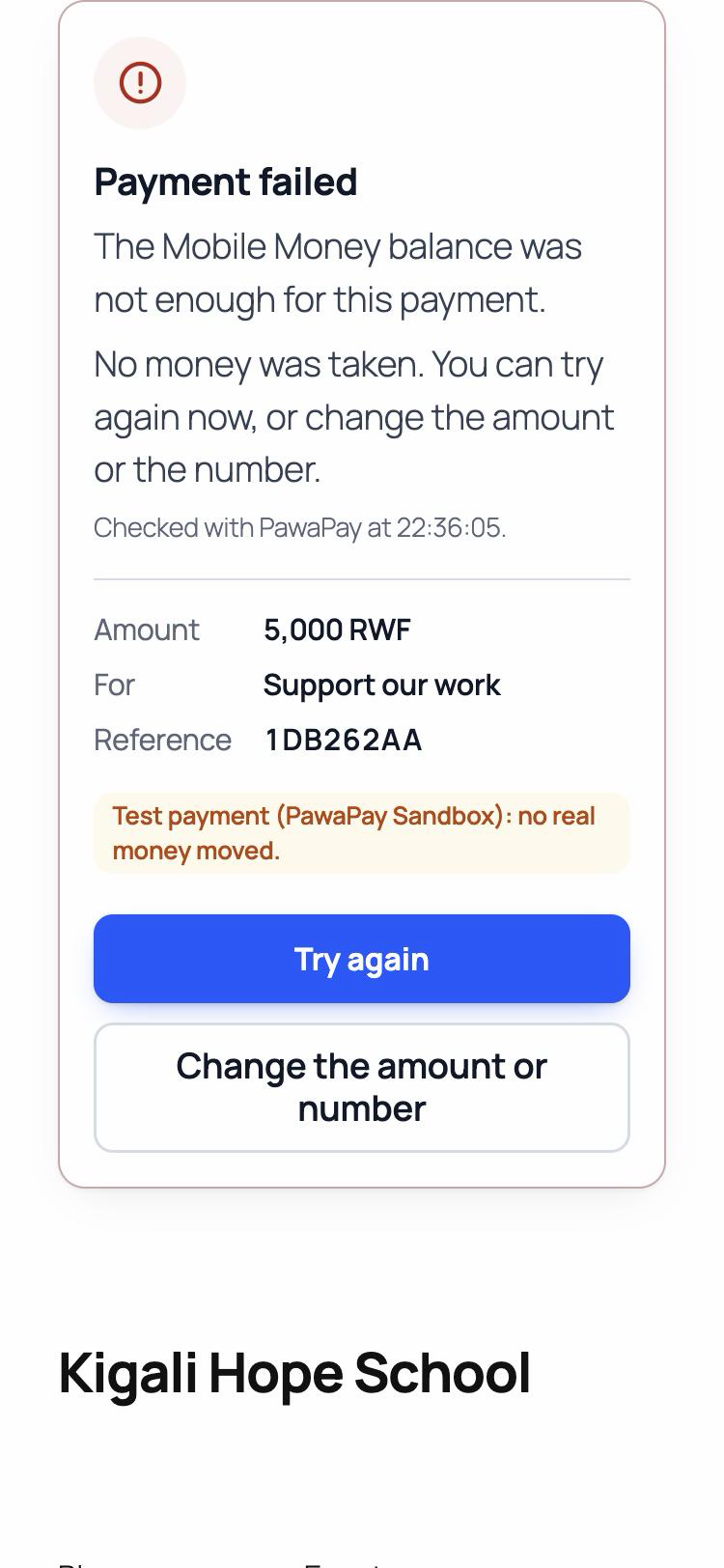
- They come back to your page and see the real status, read from PawaPay: “Thank you, your donation was received”, “Payment not received yet” (with “Pay again” and “Check again”), or “Payment failed” with the reason in plain words and “Try again”. Never “thank you” for a payment that did not arrive.
Features
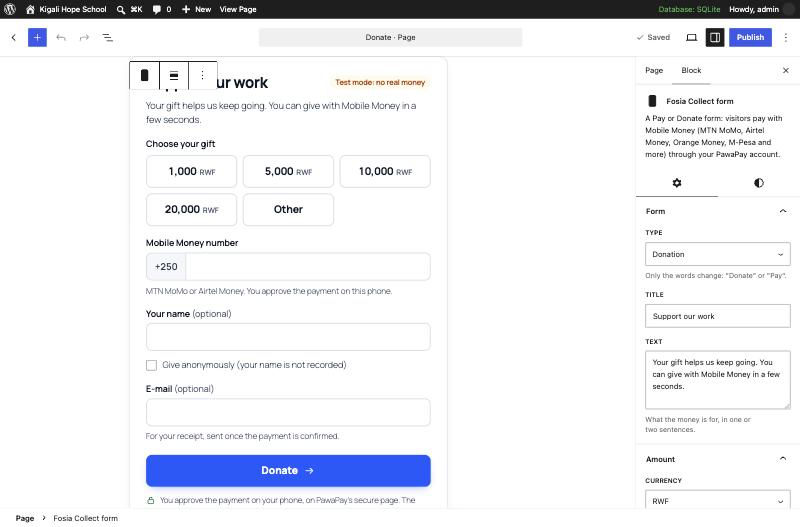
- A Gutenberg block with its settings in the sidebar, and a shortcode for other page builders.
- Donation or payment (only the words change: “Donate” or “Pay”).
- One fixed amount, or up to 6 quick amounts with an optional “Other amount” (with a minimum and a maximum).
- Currency: any Mobile Money currency (RWF, KES, UGX, TZS, XOF, XAF, GHS, NGN, CDF, ZMW…), or USD / EUR converted at the day’s rate into the payer’s Mobile Money currency, with the estimate shown before paying.
- Your title and text; optional fields: name, e-mail, message, and “Give anonymously” (the name is then not recorded).
- An extra field with your own label, required or optional: “Student name”, “Invoice number”, “Member ID”… It shows in Transactions, in the CSV export and on the receipt.
- After payment: your thank-you message, or a thank-you page of your site.
- E-mail receipt to payers who give their e-mail address, sent once PawaPay confirmed the payment (can be turned off).
- An e-mail to your organisation for each payment PawaPay confirms (can be turned off, or sent to another address).
- Refunds, full or partial, through PawaPay (or recorded when made elsewhere), never more than what was paid, with the status followed until final and a note of who refunded.
- Transactions screen: status, amount, amount received in Mobile Money, operator, payer, form, PawaPay reference; filters by status, form, date and mode; CSV export.
- Dashboard: amounts received this month and since the start, totals per form, latest payments, a setup checklist.
- Settings: Sandbox or Live, PawaPay API token (tested before it is saved, stored encrypted, never shown again), callback address with a Copy button, connection test.
- A guided setup opens after activation (it can be skipped at any time).
- English and French included.
Payments you can trust
- The amount never comes from the visitor’s browser: the form’s settings are signed by your site, and the visitor only picks one of your amounts (or an “other” amount within your limits).
- A payment is shown as paid only after the plugin asked PawaPay with your own token, and only if the amount and currency PawaPay confirms are exactly those asked. A different amount is put aside as “To check”, never counted as paid.
- PawaPay’s callbacks are never trusted as they are: they only tell the plugin which payment to check with PawaPay. Signed callbacks are verified too.
- A payer who paid and closed the page is still confirmed: the plugin checks with PawaPay in the background (2 minutes after, then at growing intervals for about 9 hours).
- Abuse limits made for shared Wi-Fi (churches, schools, mobile operators): only payments that really start are counted, per phone number, per browser and per connection (60 per 10 minutes by default, adjustable); wrong numbers and “Try again” are never counted. A hidden anti-robot field, nonces and capability checks on every admin action.
Privacy
- Payments are stored in the plugin’s own table on your site, never in public pages.
- Payers’ details (name, e-mail, phone number, message) are erased automatically after the period you choose (6 to 60 months, 24 by default); the amount and the PawaPay reference stay for your accounts. Payments that were never paid are deleted after 90 days.
- WordPress’s personal data export and erasure tools (Tools > Export / Erase Personal Data) include these payments.
- A suggested text for your privacy policy is added to Settings > Privacy.
- No tracking, no advertising, no analytics. One functional cookie (
fcol_session, random, one day) is set only when a form is sent, to protect it against abuse.
Countries
The plugin knows the Mobile Money countries of PawaPay’s API: Benin, Burkina Faso, Cameroon, Congo, DR Congo, Côte d’Ivoire, Ethiopia, Gabon, Ghana, Kenya, Lesotho, Liberia, Malawi, Mali, Mozambique, Nigeria, Rwanda, Senegal, Sierra Leone, Tanzania, Uganda, Zambia and Zimbabwe. You can take payments in the countries and with the operators enabled on your PawaPay account.
External services
PawaPay (payment processor)
The plugin cannot take payments without PawaPay. Requests go to api.pawapay.io (Live) or api.sandbox.pawapay.io (Sandbox), with your PawaPay API token.
- When a visitor sends a form: the plugin checks the Mobile Money number with PawaPay (phone number validation), reads your account’s amount rules (decimals, minimum and maximum, cached for 1 hour), then creates a PawaPay payment page with the amount and currency, the country, the payer’s phone number, a short text (letters and digits of your organisation’s name), a payment id, the address of your page to come back to, and the language. The payer’s name, e-mail address and message are not sent to PawaPay.
- When the payer comes back, when PawaPay sends a result to your callback address, and in the background after a payment was started: the plugin asks PawaPay for the payment’s status, and downloads PawaPay’s public signing keys (cached for 12 hours) to verify signed callbacks.
- When you refund a payment (Transactions > Details and refund): the plugin sends PawaPay a refund (
POST /v2/refunds) with a refund id, the original payment’s id, the amount and the currency, then reads its status (GET /v2/refunds/{id}) until it is final, also in the background (WP-Cron) and when PawaPay sends the refund’s result to your callback address. Nothing about the payer is sent: PawaPay refunds the number that paid. - When you test the connection (guided setup or settings): the plugin reads your PawaPay account configuration.
PawaPay Merchant Terms of Service and Privacy Policy.
ExchangeRate-API (open.er-api.com)
Used only for a form whose currency differs from the payer’s Mobile Money currency (for example a form in USD paid from Rwanda in RWF). When no rates are cached, the plugin requests https://open.er-api.com/v6/latest/{form currency}, when such a form is shown (in the background, with WP-Cron) or sent. Only the currency code is sent: no personal or payment data. Rates are cached for 12 hours.
ExchangeRate-API Terms of Use and privacy.
Fosia (pay.fosiarw.com) — “Quick feedback” when you deactivate, only if you submit it
When you click “Deactivate” on Fosia Collect in Plugins, a “Quick feedback” window asks why. It is optional: nothing is sent if you click “Skip & Deactivate”, the × or Escape (closing it keeps the plugin active).
- Only if you pick a reason and click “Submit & Deactivate”, your site (not your browser) sends once to
https://pay.fosiarw.com/wp-json/fosia/v1/feedback: the reason, the text you typed (optional, 500 characters at most), the product (Fosia Collect), the plugin, WordPress and PHP versions and the site language. - Your site address and your e-mail address are sent only if you tick “You may email me about this” (unticked by default). No payment or payer data and no PawaPay token are ever sent.
- Fosia keeps the answers 12 months, then deletes them.
Fosia Terms of Service and Privacy Policy.
No other external request is made. Links to PawaPay, pay.fosiarw.com and WhatsApp in the admin screens only open when you click them.
Details




Related plugins
Plugins that also contain the tag donate
GiveWP – Donation Plugin and Fundraising Platform

Charitable – Donation Plugin for WordPress – Fundraising with Recurring Donations & More

Doneren met Mollie

Potent Donations for WooCommerce

Donation Thermometer
پلاگین پرداخت دلخواه


About
Plugin for that tries to help you find the WordPress plugin you are looking for.
| Please enjoy an image of Crush (this awesome turtle) and have a lovely day! |  |
We do not own any plugin listed on this site and do not work for or work with WordPress.com or it's associated companies. We simply provide a searchable list of the available WordPress plugins.