


FounderPostAI – AI Suite SEO
Start with a free check of your site’s AI crawler and search-readiness signals, then map the customer questions your existing pages answer. These tools need no account, AI credits, or API key. An editable FAQ block and a local log for manually checking assistant answers are included too.
When you connect AI Suite Core for hosted AI processing, AI Suite SEO can suggest changes to a post and ask you to approve each one.
Run an analysis on a post and AI Suite SEO returns:
- A search title written for the page you actually published
- A meta description in your brand’s voice
- Internal links to real pages on your site, with the anchor text already chosen
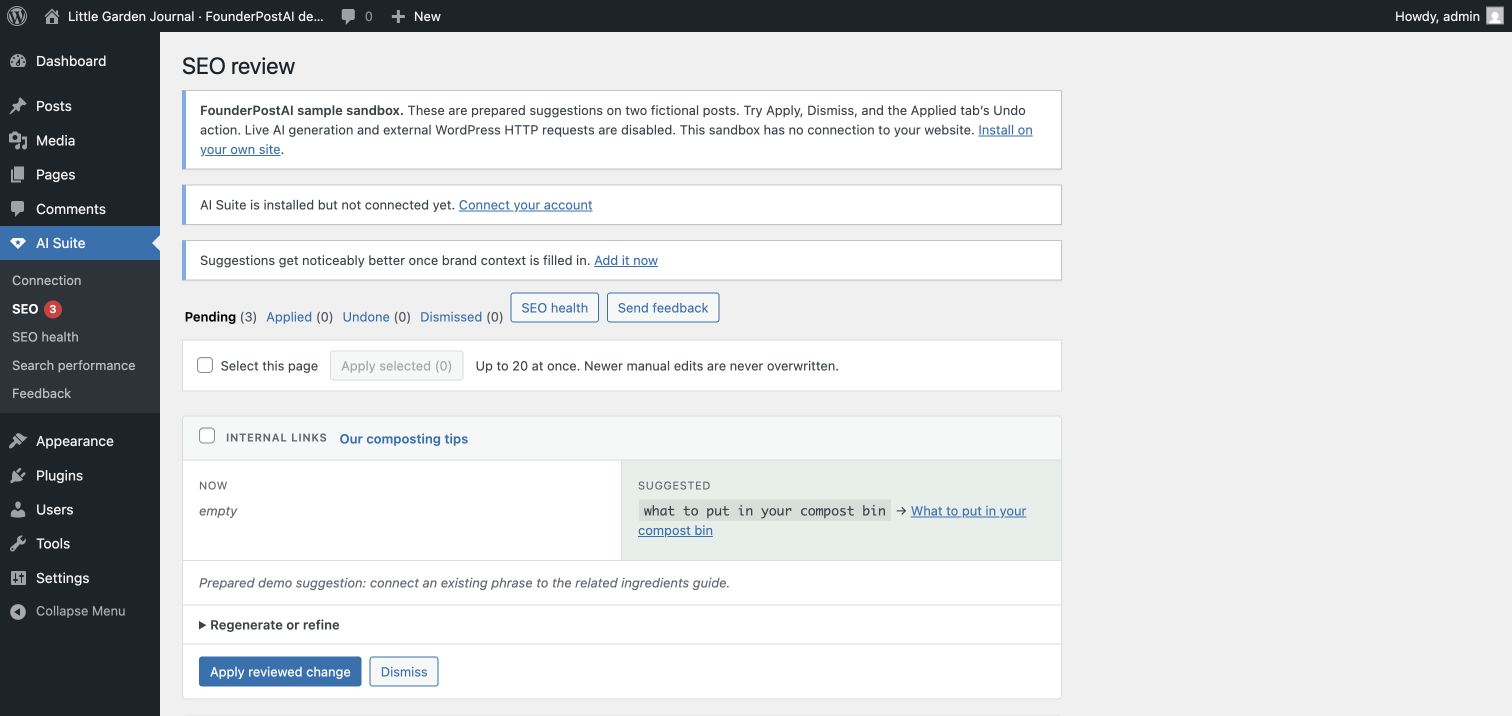
Every suggestion lands in a review queue showing the current value beside the proposed one and a one-line reason. Nothing touches your content until you click Apply, and applying an internal-link change saves a revision first, so it is always reversible.
If Yoast, Rank Math, All in One SEO, or SEOPress is active, AI Suite SEO leaves tag rendering to that plugin and saves approved titles and descriptions directly into its native metadata fields.
What makes it different:
- Internal-link targets come from a closed list of real published posts on your site.
- Whole-site candidate retrieval ranks topical relevance before the AI selects a link, rather than considering only the newest posts.
- Suggested anchor text must occur verbatim in the source content before it can be applied.
- Link insertion is block- and DOM-aware and avoids headings, code, existing links, and shortcodes.
- Suggestions that became stale after analysis are rejected instead of overwriting newer edits.
- Every content write creates a WordPress revision first.
- All suggestions remain reviewable; there is no arbitrary PHP or JavaScript generation or execution.
- A site-wide SEO health dashboard tracks coverage, missing metadata, stale or failed analyses, orphaned content, link counts, and pending suggestions.
- Gutenberg includes an AI Suite SEO sidebar for live previews, reviewed edits, refinement directions, apply, dismiss, and guarded undo.
- A compact local site index updates incrementally so relevant-link discovery remains bounded on sites with tens of thousands of posts.
- The review queue can safely apply up to 20 selected suggestions while checking every item for newer manual edits.
- A free AI Visibility screen checks public ChatGPT and Claude crawler policies, indexing and snippet directives, canonical URLs, headings, JSON-LD presence, and advertised same-site sitemaps. Findings include evidence and practical next steps.
- A free GEO Planner maps four customer conversation turns to existing pages and prioritizes missing answers about fit and buying decisions.
- A Gutenberg GEO FAQ block adds up to six editable question-and-answer pairs with optional matching FAQ structured data and readable saved HTML.
- A local manual AI answer log records exact prompts, engine, model, date, mentions, cited URLs, and evidence. Comparable summaries exclude unavailable tests and brand-supplied prompts.
- An optional read-only Google Search Console dashboard ranks query-and-page opportunities from finalized impressions, clicks, CTR, and average position.
All functionality included in this plugin is available without a plugin license, feature key, trial period, or time limit. Manual 10-post batches are repeatable reliability chunks, not a total usage cutoff. Hosted AI service usage is described below.
AI Visibility
Run a setup check on your homepage or a public post/page. Search and user-requested crawler access are shown separately from model-training preferences. The check reads your actual public robots.txt and page response, including headers, and gives guidance for your existing SEO plugin or hosting controls. It does not edit robots.txt, privacy settings, content, or schema.
Each administrator-triggered check makes bounded requests from your server to your own site, without authentication cookies or bot impersonation. The latest derived report is cached in your WordPress database for 24 hours. Response bodies are not persisted or sent to FounderPostAI, OpenAI, or Anthropic.
This is a readiness check, not a ranking or citation score. It cannot verify actual crawler IP access, indexing, AI recommendations, JavaScript rendering, schema validity, sitemap contents, or answer quality. Private and password-protected posts cannot be selected.
GEO Planner and FAQ block
Choose one topic, audience, and desired next step. Customize four starter questions covering orientation, comparison, qualification, and decision. Map each question to an existing public post or page, assess its coverage, and write a brief with the facts and evidence you need. The planner prioritizes gaps close to a buying decision. It does not generate pages or answers automatically.
In the block editor, insert FounderPostAI GEO FAQ. Write concise, accurate answers, including useful follow-ups about alternatives, fit, costs, or next steps. The 40–80-word suggestion is editorial guidance, not a ranking threshold. Only complete question-and-answer pairs appear publicly. Optional FAQPage markup matches the visible answers on public singular pages; turn it off if another plugin already supplies that FAQ markup. Schema does not guarantee AI citations or search features. Publish through the normal WordPress save action. Saved answer text remains readable after plugin deactivation; the plugin’s structured data is no longer emitted.
The manual AI answer log lets an administrator record tests they actually perform in an assistant. Start a fresh conversation and use the saved prompts in sequence. Record the engine, model, search mode, date, mentions, cited URLs, and evidence. Summaries separate engine/model/mode and conversation turn, use only the current prompt set, and exclude unavailable tests and brand-supplied prompts. Historical prompt sets remain in the log. This is a record of owner-entered observations, not automatic AI monitoring or a site-wide visibility score.
One editable plan and up to 100 observations are stored locally in WordPress without external requests or AI credits. Export them as Markdown before removing records or uninstalling the plugin. Planner data remains until you remove it or uninstall; uninstall deletes the plan and observation log, but does not delete published FAQ content. Review prompts monthly and the overall plan quarterly.
External services
This plugin uses FounderPostAI – AI Suite Core to send content to the FounderPostAI AI Suite gateway. Running an analysis is an explicit administrator action.
The SEO screen also links to Core’s feedback form with AI Suite SEO preselected. Feedback is sent only when an administrator explicitly submits that form. The form’s exact data disclosure is documented in AI Suite Core and shown immediately before submission.
When an administrator runs an analysis, the post title, plain-text content, excerpt, permalink, existing meta values, saved brand context, and a list of published post titles and URLs used as internal-link candidates are sent. The gateway sends this input to the Anthropic API and returns structured SEO suggestions. Nothing is sent until an administrator runs an analysis.
The local content index is stored only in this WordPress database and is not uploaded. If an administrator explicitly connects Google Search Console, the FounderPostAI gateway requests Google’s read-only Search Console scope, stores the returned refresh token encrypted, and retrieves the chosen property’s finalized queries, pages, clicks, impressions, click-through rates, and average positions. WordPress caches that reporting data for six hours. Search Console data is not sent to Anthropic or another AI model, and disconnecting removes the gateway-held Google token.
FounderPostAI AI Suite gateway:
- Service: https://founderpostai.com/ai-suite
- Terms: https://founderpostai.com/terms
- Privacy: https://founderpostai.com/privacy
Anthropic API:
- Service: https://www.anthropic.com/api
- Commercial terms: https://www.anthropic.com/legal/commercial-terms
- Privacy: https://www.anthropic.com/legal/privacy
Google Search Console API (optional):
- Service: https://search.google.com/search-console
- API terms: https://developers.google.com/terms/api-services-user-data-policy
- Privacy: https://policies.google.com/privacy
The plugin does not download or execute code from either service. The gateway returns structured data, and the plugin validates field types, lengths, link targets, and anchor text before storing a suggestion.
Details
Related plugins
Plugins that also contain the tag ai
SEOPress – On-site SEO & Analytics

AI Engine – The Chatbot, AI Framework & MCP for WordPress

GetGenie – AI Content Writer with Keyword Research & SEO Tracking Tools

SEO Plugin by Squirrly SEO

Website LLMs.txt

Smartsupp – live chat, AI shopping assistant and chatbots


About
Plugin for that tries to help you find the WordPress plugin you are looking for.
| Please enjoy an image of Crush (this awesome turtle) and have a lovely day! |  |
We do not own any plugin listed on this site and do not work for or work with WordPress.com or it's associated companies. We simply provide a searchable list of the available WordPress plugins.