


Fromwell – Lead Source for Contact Form 7
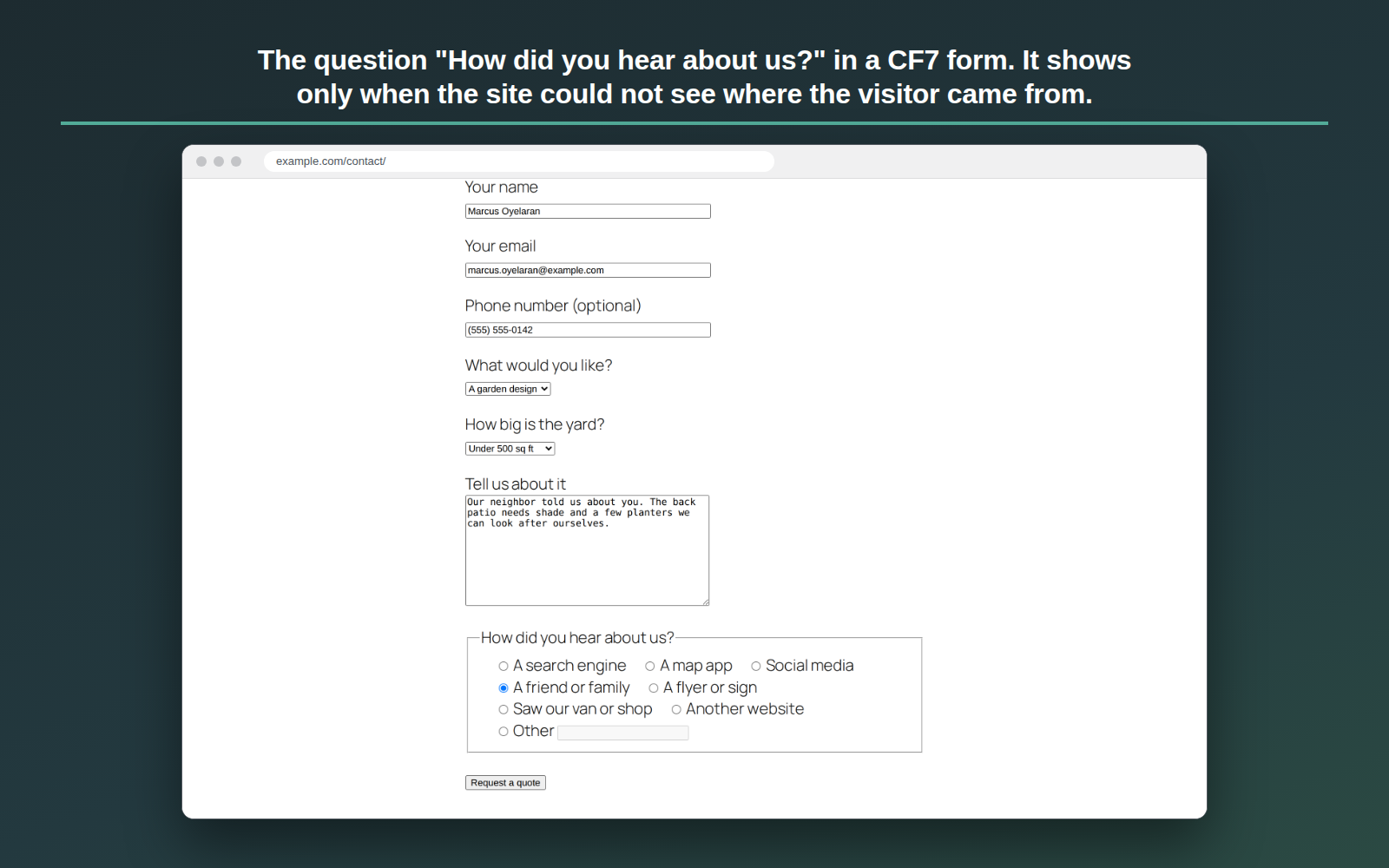
Fromwell asks “How did you hear about us?” in your Contact Form 7 form only when it could not see where the visitor came from. When the site can see it — a campaign tag in the link, an ad network’s click mark, another site that sent the visitor — nobody is asked, and the message you receive says so.
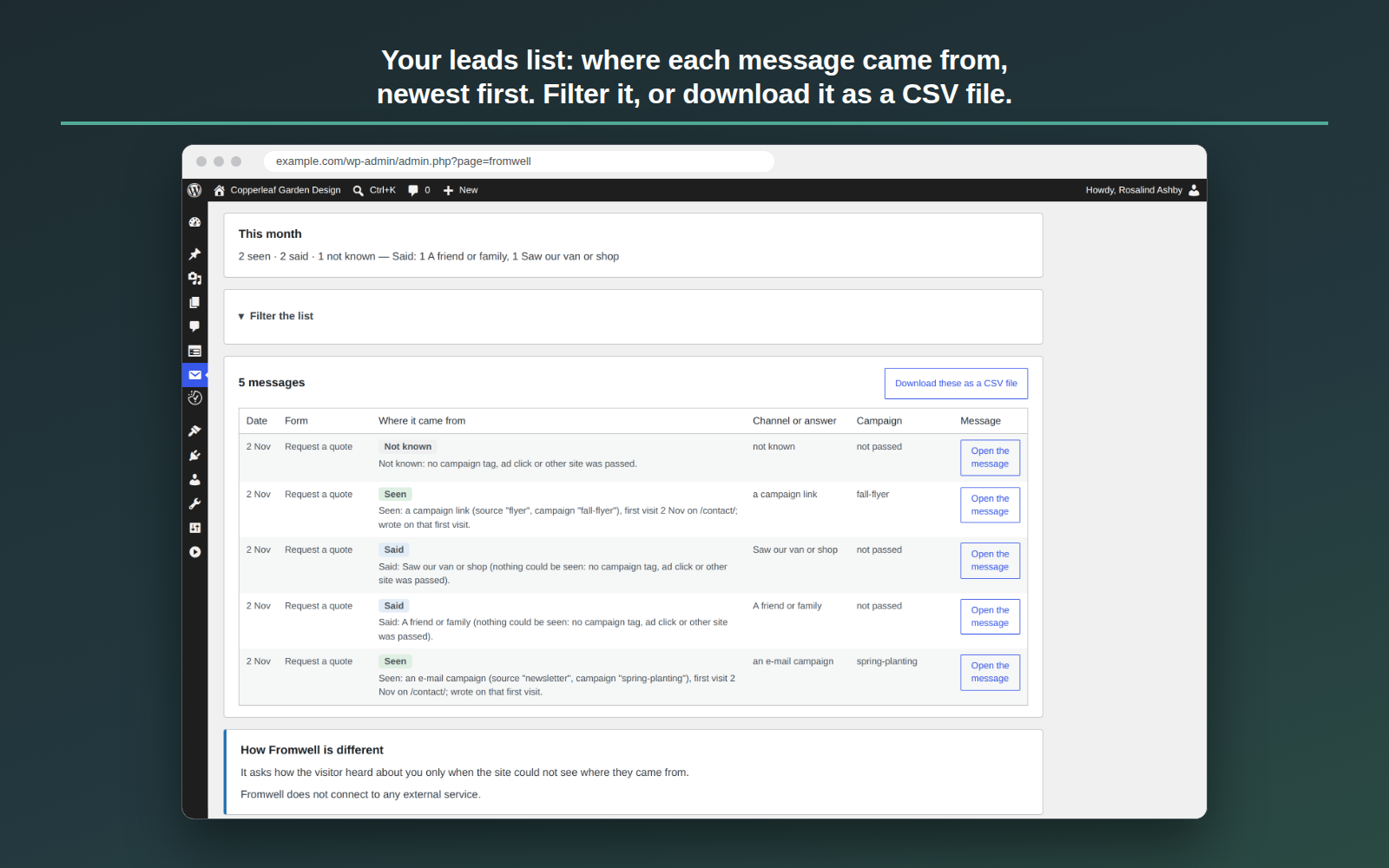
Each message you receive is labelled Seen, Said or Not known: Seen when the visitor’s browser showed where they came from, Said when the visitor answered the question, and Not known when they skipped it.
Fromwell does not connect to any external service: it reads the address and the referring site in the visitor’s own browser, and the source goes only with the form the visitor sends, to your own site’s database and mail.
How Fromwell is different
- It asks “How did you hear about us?” only when the site could not see where the visitor came from.
- A visitor who arrived from a tagged link or from another site is not asked.
- Each message says whether its source was seen or said.
“How did you hear about us?” in your Contact Form 7 form
On the Forms tab of Contact › Fromwell, press “Add the question before the Send button” for a form, or type the form-tag [fromwell_ask] where you want it. Undo puts the form back exactly as it was.
The words and the answers are yours to change on the Settings tab: some sites write “Where did you hear about us?”. A box for Other lets the visitor type their own answer.
The source line in your form’s e-mail
Press “Add the source line to this form’s mail” on the Forms tab, and the e-mail that form sends you ends with one line, the Contact Form 7 lead source of that message: Seen, with where the visitor came from; Said, with their answer; or Not known. The copy a visitor may get never carries it. The mail tag [_fromwell] puts the same line where you want it in a form’s mail.
UTM parameters, gclid and the referrer
Fromwell reads the campaign tags of a link (the UTM parameters utm_source, utm_medium, utm_campaign, utm_term, utm_content and utm_id), the click mark a network adds to a link (gclid, gbraid and wbraid from Google Ads, msclkid from Microsoft Advertising, ttclid from TikTok, li_fat_id from LinkedIn, fbclid from Facebook or Instagram, twclid from X and epik from Pinterest) and the name of the referring site (the referrer), in the visitor’s own browser. It keeps the first visit and the latest visit that showed a source, so a visitor who comes back later by typing your address still shows where they came from. A click mark names the network the visitor came through, never an ad. Every other part of the address is dropped.
Every message’s source, on your site
Contact › Fromwell lists each message’s source, newest first, for your CF7 forms: lead source tracking and form attribution that stay on your own site. Filter the list by date, form, label, channel, answer or campaign, and download what you see as a CSV file. A short guide on the same screen explains the labels, puts the question in a form and gives you links to try it, as an ad click and as a visit with no source.
With a page cache, a consent plugin and a phone
The page is the same for every visitor, so a page cache changes nothing: the visitor’s own browser hides the question when it saw a source. With a consent plugin on your site, nothing is kept until the visitor allows it, and until then the form simply asks. The question and the form are tested on phones and tablets.
Privacy
Fromwell does not connect to any external service: it reads the address and the referring site in the visitor’s own browser, and the source goes only with the form the visitor sends, to your own site’s database and mail.
In the visitor’s browser, Fromwell keeps one first-party note for your site alone, under the name “fromwell” in the browser’s local storage. It is not a cookie. For the visitor’s first visit, and for their latest visit that showed where they came from, the note holds:
- the campaign tags in the link they arrived by, if it had any (utm_source, utm_medium, utm_campaign, utm_term, utm_content, utm_id);
- a network’s click mark in that link, if it had one (such as gclid or fbclid);
- the name of the other site that sent them, if their browser passed it, never the address of its page;
- the first page they opened on your site, without anything after its address;
- the date and time of those visits.
The note also holds when they were last on your site, how many visits they made, and when the note ends. It holds no name, e-mail address, IP address, browser details or anything else that names the person. Every other part of the address is dropped.
The note ends 60 days after the latest visit that showed a source, or after the 30, 90 or 180 days you choose in “Remember a visitor’s source for” on the Settings tab. Safari may delete it sooner, after 7 days without a visit.
When a consent plugin on your site asks visitors first, the note is written only once the visitor allows the category you chose in “Wait for this consent category” (Marketing at first, or Statistics), and it is deleted if they withdraw it. Until then, nothing is kept and the form may ask the question. With no consent plugin, the note is written at once, unless you chose “Only store it when a consent plugin says yes”.
Nothing leaves the visitor’s browser until they send a form. Where they came from then goes with that form to your site’s own database and mail. A visitor who never sends a form leaves nothing on your site. The answer to the question is part of the message the visitor sends, and it is kept with it.
On your site, Fromwell keeps one row for each message sent through a form, unless you switched its list off or the form is set not to store messages: the form, the time, the label, where it came from and the answer, with a visit count. The row holds no name, e-mail address, message, files, IP address or browser details. Rows older than 365 days are deleted, or after the time you choose. With Flamingo active, the source line is also kept with Flamingo’s copy of the message.
Fromwell adds suggested wording for your privacy policy to Settings › Privacy, written from your settings. Its rows are part of WordPress’s personal data export and erase tools, found through Flamingo’s copy of the message; without Flamingo, no row of Fromwell holds an e-mail address, so none can be matched to a person.
Details



Related plugins
Plugins that also contain the tag attribution
Molongui Post Contributors: Multi-Role Contributor Attribution

ThoughtMetric for WooCommerce

TrueROAS AI Ad Attribution

PressForward

Simple Attribution
Async Image Credits – Lightweight automatic image credits


About
Plugin for that tries to help you find the WordPress plugin you are looking for.
| Please enjoy an image of Crush (this awesome turtle) and have a lovely day! |  |
We do not own any plugin listed on this site and do not work for or work with WordPress.com or it's associated companies. We simply provide a searchable list of the available WordPress plugins.