

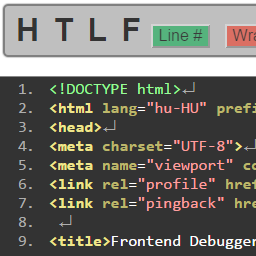
Frontend Debugger
Only for development!
Displays:
- Header
- Thumbnails
- The Loop (content)
- Footer
- Included template parts
- Highlight script, link and style elements
To remove all registered scripts and styles add ?remove-scripts to the URL. All these scripts and styles will be listed at the bottom of the footer as HTML comment. This way it is possible to detect non-WordPress script printing.
If you are not an administrators add ?view-source to the URL to activate Frontend Debugger.
Notice: This plugin uses regular expressions and eval() to get the current template apart.
TODO: sidebar, search-form.
The mini control panel contains:
- Header, Thumbnails, The Loop, Footer, Included files anchors
- Toogle button for line numbers
- Toggle button for line wrapping
- Toggle button for showing line ends
- Button for script and style highlighting
From the second click on the Highlight button loops through (scrolls to) all scripts and styles.
The control panel’s state is kept in your browser’s localStorage.
Development of this plugin goes on on GitHub. Please contribute by sending PR-s implementing my TODO-s.
Details


Related plugins
Plugins that also contain the tag debug
WP Crontrol

Query Monitor – The developer tools panel for WordPress

Debug Bar

Debug Log Manager – Conveniently Monitor and Inspect Errors

WP Debugging
Code Profiler – WordPress Performance Profiling and Debugging Made Easy

About
Plugin for that tries to help you find the WordPress plugin you are looking for.
| Please enjoy an image of Crush (this awesome turtle) and have a lovely day! |  |
We do not own any plugin listed on this site and do not work for or work with WordPress.com or it's associated companies. We simply provide a searchable list of the available WordPress plugins.